2b-logger
v0.0.3
Published
A simple JS logger


Readme
2b-logger
A simple to use JS logger.
Installation
npm install 2b-loggerIf you want to save the install in package.json:
npm install --save 2b-loggerOr
npm install --save-dev 2b-loggerBasic usage
The basic usage for this logger is the following:
	const loggerConstructor = require ( "2b-logger" );
	const logger = loggerConstructor ();
	logger.info("A nice info message");
Or, in a simplified version:
	const logger = require ( "2b-logger" ) ();
	logger.info("A nice info message");
The import require ( "2b-logger" ) will return a constructor function that takes, optionally, a configuration object.
The default options are:
	{
		"level": "info",
		"noColor": false,
		"timestampFormat": "YYYY-MM-DD @ HH:mm:ss:ms"
	}
Options
The options object can receive the following configurations:
level (string, default: info)
The level indicates which messages will be logged and which will be discarded.
The accepted values are trace, debug, info, warn and error.
The following table displays which messages will be logged, depending on the configured level:
Messages with the success level are considered to be of info level, but they have a different render style.
noColor (boolean, default: false)
This boolean option indicates the logger that no color should be added to rendered messages.
Even if logged messages are colored, they will have the color removed, if noColor was set as true.
Example:
	const logger = require ( "2b-logger" ) ({ noColor: true });
	const chalk = require ( "chalk" );
	logger.info ( chalk.cyan ( "A cyan message" ) );
In this case, the redered message will not have colors.
timestampFormat (string, default: YYYY-MM-DD @ HH:mm:ss:ms)
This is the timestamp format to be used when rendering messages. The accepted format can be seen here.
API
Once a logger has been created, the following methods are available in it:
logger.trace ( msg1, msg2, ... )
Logs the messsages using trace level.
logger.debug ( msg1, msg2, ... )
Logs the messsages using debug level.
logger.info ( msg1, msg2, ... )
Logs the messsages using info level.
logger.success ( msg1, msg2, ... )
Logs the messsages using success level.
logger.warn ( msg1, msg2, ... )
Logs the messsages using warn level.
logger.error ( msg1, msg2, ... )
Logs the messsages using error level.
ℹ️ - About log parameters
- The logger will ignore
nullparameters. - All other parameters will be converted to string, using
.toString ( ).- If, and only if, the result string is neither
nullnoremptyit will be appended to the message, using a space character as separator.
- If, and only if, the result string is neither
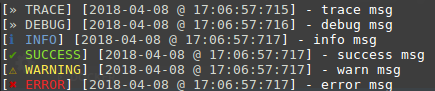
Example output
The following code:
const logger = require ( "../src/index.js" ) ({
	level: "trace"
});

logger.trace ( "trace", "msg" );
logger.debug ( "debug", "msg" );
logger.info ( "info", "msg" );
logger.success ( "success", "msg" );
logger.warn ( "warn", "msg" );
logger.error ( "error", "msg" );
Will produce the following output: