
3d-world-map
v1.4.1
Published
Create interactive 3D world maps, globe maps, and flat map projections in JavaScript with Canvas 2D and no WebGL.

Maintainers
 shri-hari
Readme
3D World Map



Important: a commercial license is required for production use
CanvasGlobe is proprietary commercial software. Public production use without a valid license key is restricted and displays a licensing notice. Purchase a license and review the license agreement. For help with purchasing or licensing, email [email protected].
3d-world-map is an official package entry for
CanvasGlobe, an interactive JavaScript 3D
world-map and globe library rendered with Canvas 2D. It provides the same API,
renderer, features, documentation, commercial license, and production behavior
as canvas-globe without duplicating the implementation.
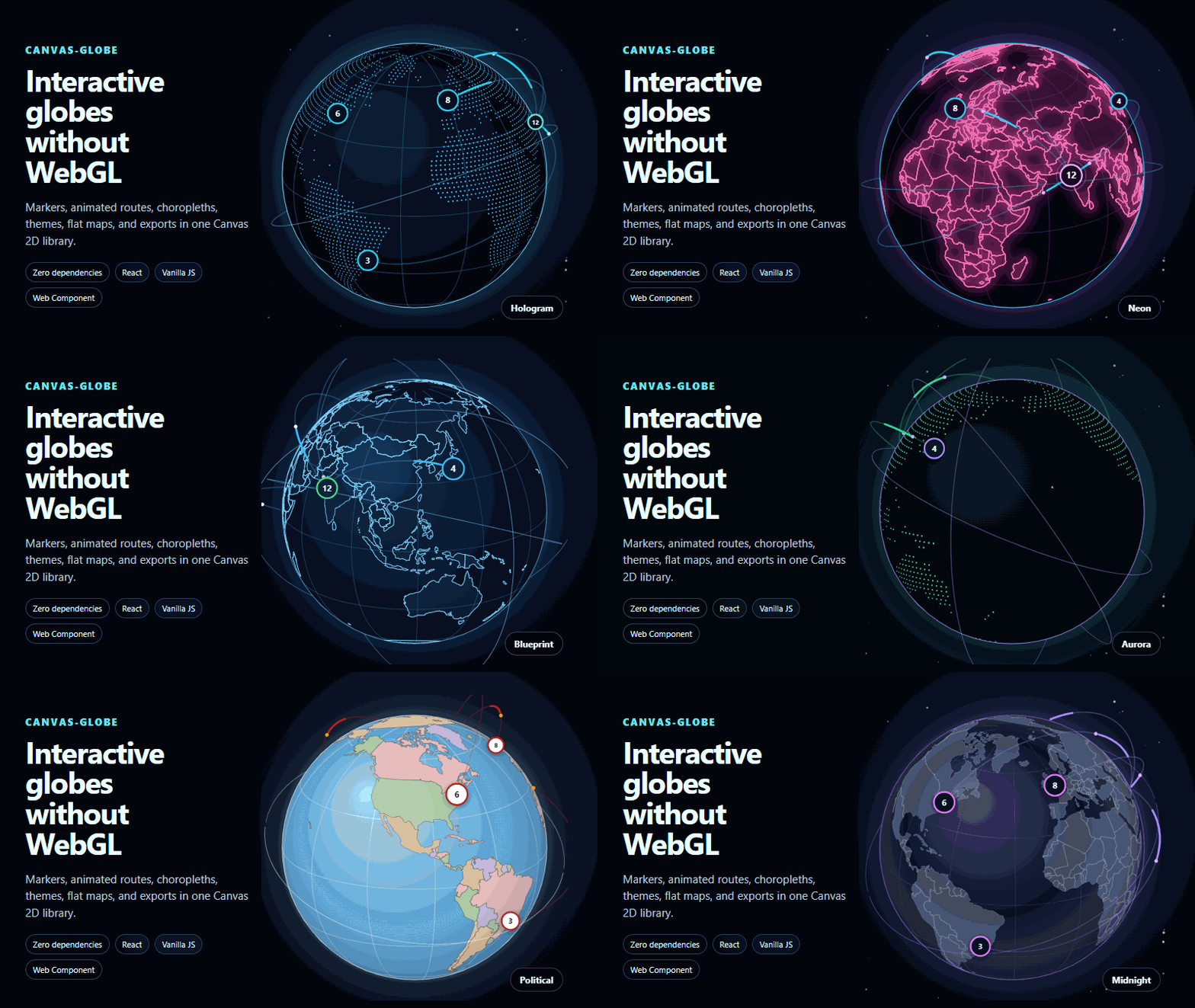
Use it for animated globe maps, flat map projections, location markers, routes, country data, live dashboards, landing pages, logistics visualizations, travel products, and geographic storytelling.
Why use 3D World Map?
- Interactive 3D globe and flat world-map projections
- Canvas 2D rendering with no WebGL requirement
- Zero runtime dependencies in the core renderer
- Markers, labels, routes, arcs, clusters, tooltips, and choropleths
- 54 optional visual, transition, camera, data, and interaction effects
- Nine animated geographic chart layers and six composed recipes
- Built-in themes including atlas, midnight, hologram, neon, and aurora
- Pointer, touch, keyboard, zoom, rotation, and reduced-motion behavior
- PNG image export and animation-friendly rendering
- JavaScript, React, Vue, Angular, Svelte, and Web Component support
- No map tiles or runtime network requests required for the bundled world map
Install
npm install 3d-world-mapThe package installs canvas-globe as its rendering engine. You only need one
CanvasGlobe license for the same permitted product, regardless of which official
package name you install.
Quick start
<canvas id="map" style="width: 100%; max-width: 720px; aspect-ratio: 1"></canvas>import { createGlobe } from "3d-world-map";
const map = createGlobe(document.querySelector("#map"), {
licenseKey: "your-license-key",
preset: "hologram",
mode: "globe",
autoRotate: true,
markers: [
{ lat: 19.076, lon: 72.878, label: "Mumbai" },
{ lat: 51.507, lon: -0.128, label: "London" },
{ lat: 40.713, lon: -74.006, label: "New York" },
],
arcs: [
{ from: { lat: 19.076, lon: 72.878 }, to: { lat: 51.507, lon: -0.128 } },
{ from: { lat: 51.507, lon: -0.128 }, to: { lat: 40.713, lon: -74.006 } },
],
});Globe and flat-map projections
Switch between an interactive globe and flat projections using the same data:
map.setMode("globe");

map.setOptions({
  mode: "map",
  projection: "naturalEarth",
});
Available map projections include equirectangular, Mercator, and Natural Earth.
Effects and chart layers
Optional entry points keep advanced features separate from the core import:
import { aurora, routeDashes } from "3d-world-map/fx";
import { tilegram } from "3d-world-map/charts";
import { applyRecipe, keynoteGlobe } from "3d-world-map/recipes";

map.use(aurora());
map.use(routeDashes({
  routes: [
    { from: { lat: 19.076, lon: 72.878 }, to: { lat: 51.507, lon: -0.128 } },
  ],
}));
map.use(tilegram({ values: { IN: 214, GB: 164, US: 196 } }));
const removeRecipe = applyRecipe(map, keynoteGlobe());
Explore and configure the effects visually in the Effect Studio.
React
import { Globe } from "3d-world-map/react";

export default function WorldMap() {
  return (
    <Globe
      licenseKey="your-license-key"
      preset="midnight"
      autoRotate
      markers={[{ lat: 28.614, lon: 77.209, label: "New Delhi" }]}
    />
  );
}
Dedicated framework packages are also available:
| Framework | Package |
| --- | --- |
| React | react-canvas-globe |
| Vue 3 | canvas-globe-vue |
| Angular | canvas-globe-angular |
| Svelte | canvas-globe-svelte |
| Web Components | canvas-globe-web-component |
Package entry points
| Import | Purpose |
| --- | --- |
| 3d-world-map | Core renderer, data helpers, projections, markers, routes, and exports |
| 3d-world-map/element | Framework-independent custom element |
| 3d-world-map/react | React component |
| 3d-world-map/fx | Visual, camera, transition, and data effects |
| 3d-world-map/fx/interaction | Advanced pointer and selection interactions |
| 3d-world-map/charts | Animated geographic chart layers |
| 3d-world-map/recipes | Complete composed visual treatments |
| 3d-world-map/controls | Search, timeline, threshold, and crossfilter bindings |
| 3d-world-map/places | Searchable bundled place data |
| 3d-world-map/data/world | Bundled world geometry |
Learn and experiment
- Interactive playground
- Effects and interactions
- Examples and templates
- Documentation
- API reference
- Pricing
- License agreement
- GitHub repository
- Report an issue
Support and licensing: [email protected]