
3dsvg
v0.2.1
Published
The easiest way to turn SVGs into interactive React 3D components

Maintainers
 renatoworks
Readme
3dsvg
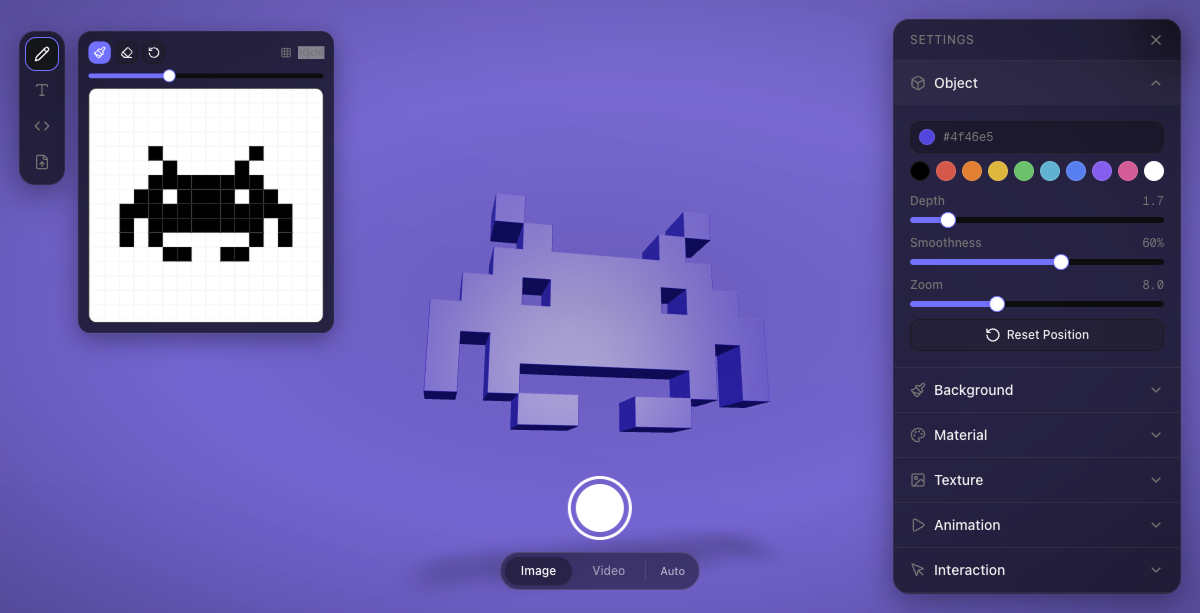
The easiest way to turn SVGs into interactive React 3D components.



Install
npm install 3dsvgPeer dependencies: react, react-dom, three, @react-three/fiber, @react-three/drei
Quick Start
import { SVG3D } from "3dsvg";

// 3D text
<SVG3D text="Hello" animate="spin" />

// SVG from your public folder
<SVG3D svg="/logo.svg" material="gold" animate="float" />

// Inline SVG markup
<SVG3D svg='<svg viewBox="0 0 24 24"><path d="M12 2L2 7l10 5 10-5z"/></svg>' />

// Remote URL
<SVG3D svg="https://cdn.example.com/icon.svg" material="metal" />
Next.js — wrap with next/dynamic for SSR safety:
const SVG3D = dynamic(
  () => import("3dsvg").then((m) => ({ default: m.SVG3D })),
  { ssr: false }
);
Demo & Editor
Design 3D objects visually and export embed code at 3dsvg.design.
Props
Content
Provide either text or svg. If both are given, svg takes priority.
| Prop | Type | Default | Description |
|------|------|---------|-------------|
| text | string | — | Text to render in 3D |
| font | string | "DM Sans" | Google Font name (see available fonts) |
| svg | string | — | SVG markup or URL (/logo.svg, https://..., ./path.svg) |
Shape
| Prop | Type | Default | Description |
|------|------|---------|-------------|
| depth | number | 1 | Extrusion depth (0.5 = flat, 10 = very deep) |
| smoothness | number | 0.2 | Curve and bevel quality, 0–1 |
| color | string | "#ffffff" | Base color (hex) |
Material
| Prop | Type | Default | Description |
|------|------|---------|-------------|
| material | MaterialPreset | "default" | Material preset (see below) |
| metalness | number | — | Override preset metalness (0–1) |
| roughness | number | — | Override preset roughness (0–1) |
| opacity | number | — | Override preset opacity (0–1) |
| wireframe | boolean | false | Wireframe rendering mode |
Material presets:
| Preset | Metalness | Roughness | Notes |
|--------|-----------|-----------|-------|
| default | 0.15 | 0.35 | Balanced starting point |
| plastic | 0.0 | 0.3 | Smooth, non-reflective |
| metal | 0.9 | 0.2 | Brushed metal |
| glass | 0.1 | 0.05 | Transparent with refraction |
| rubber | 0.0 | 0.9 | Matte, soft |
| chrome | 1.0 | 0.05 | Mirror-like reflections |
| gold | 1.0 | 0.25 | Gold tint applied automatically |
| clay | 0.0 | 1.0 | Fully matte |
| emissive | 0.0 | 0.5 | Self-illuminated glow |
| holographic | 0.8 | 0.1 | Transparent with clearcoat |
Texture
| Prop | Type | Default | Description |
|------|------|---------|-------------|
| texture | string | — | Image URL to map onto the 3D surface |
| textureRepeat | number | 1 | How many times the texture tiles |
| textureRotation | number | 0 | Texture rotation in radians |
| textureOffset | [number, number] | [0, 0] | UV offset [x, y] |
When a texture is set, the base color is overridden to white so the texture renders at full fidelity.
Lighting
| Prop | Type | Default | Description |
|------|------|---------|-------------|
| lightPosition | [number, number, number] | [5, 8, 5] | Key light position [x, y, z] |
| lightIntensity | number | 1.2 | Key light brightness |
| ambientIntensity | number | 0.3 | Ambient fill light |
| shadow | boolean | true | Show contact shadows |
Camera
| Prop | Type | Default | Description |
|------|------|---------|-------------|
| rotationX | number | 0 | Initial X rotation (radians) |
| rotationY | number | 0 | Initial Y rotation (radians) |
| zoom | number | 8 | Camera distance |
| fov | number | 50 | Field of view (degrees) |
The camera automatically adjusts on narrow/portrait viewports — it zooms out proportionally so the 3D object always fits within the visible area.
Interaction
| Prop | Type | Default | Description |
|------|------|---------|-------------|
| interactive | boolean | true | Master toggle — false disables drag, zoom, and orbit |
| cursorOrbit | boolean | true | Object subtly follows the cursor |
| orbitStrength | number | 0.15 | How strongly the object follows the cursor (radians) |
| draggable | boolean | true | Allow drag to rotate |
| scrollZoom | boolean | false | Allow scroll to zoom (off by default so embeds don't hijack page scroll) |
| resetOnIdle | boolean | false | Return to default position after inactivity |
| resetDelay | number | 2 | Seconds before reset triggers |
Animation
| Prop | Type | Default | Description |
|------|------|---------|-------------|
| animate | AnimationType | "none" | Loop animation type (see below) |
| animateSpeed | number | 1 | Speed multiplier |
| animateReverse | boolean | false | Reverse direction |
Animation types: none · spin · float · pulse · wobble · spinFloat · swing
Intro
| Prop | Type | Default | Description |
|------|------|---------|-------------|
| intro | string | "zoom" | Intro animation: zoom · fade · none |
| introDuration | number | 2.5 | Duration in seconds |
| introFrom | object | { zoom: 18, opacity: 0 } | Starting state |
| introTo | object | { zoom: 8, opacity: 1 } | Ending state |
Layout
| Prop | Type | Default | Description |
|------|------|---------|-------------|
| width | string \| number | "100%" | Container width |
| height | string \| number | "100%" | Container height |
| background | string | "transparent" | Canvas background color |
| className | string | — | CSS class on the wrapper div |
Events
| Prop | Type | Description |
|------|------|-------------|
| onReady | () => void | Fires when WebGL context is ready and first frame is rendered |
| onAnimationComplete | () => void | Fires when the intro animation finishes |
| onLoadingChange | (loading: boolean, progress: number) => void | Fires during geometry processing with loading state and progress (0-100). Use this to show custom loading UI. |
Geometry processing is asynchronous — complex SVGs are processed in batches to keep the browser responsive. The onLoadingChange callback lets you track progress and show a loading indicator:
<SVG3D
  svgString={complexSvg}
  onLoadingChange={(loading, progress) => {
    if (loading) console.log(`Processing: ${progress}%`);
    else console.log("Done");
  }}
/>
Available Fonts
DM Sans · Bebas Neue · Playfair Display · Righteous · Black Ops One · Permanent Marker · Rubik Mono One · Pacifico · Oswald · Archivo Black
License
MIT — Renato Costa
Made in Blueberry 🫐