
@5n7/clv
v0.4.0
Published


Readme
clv

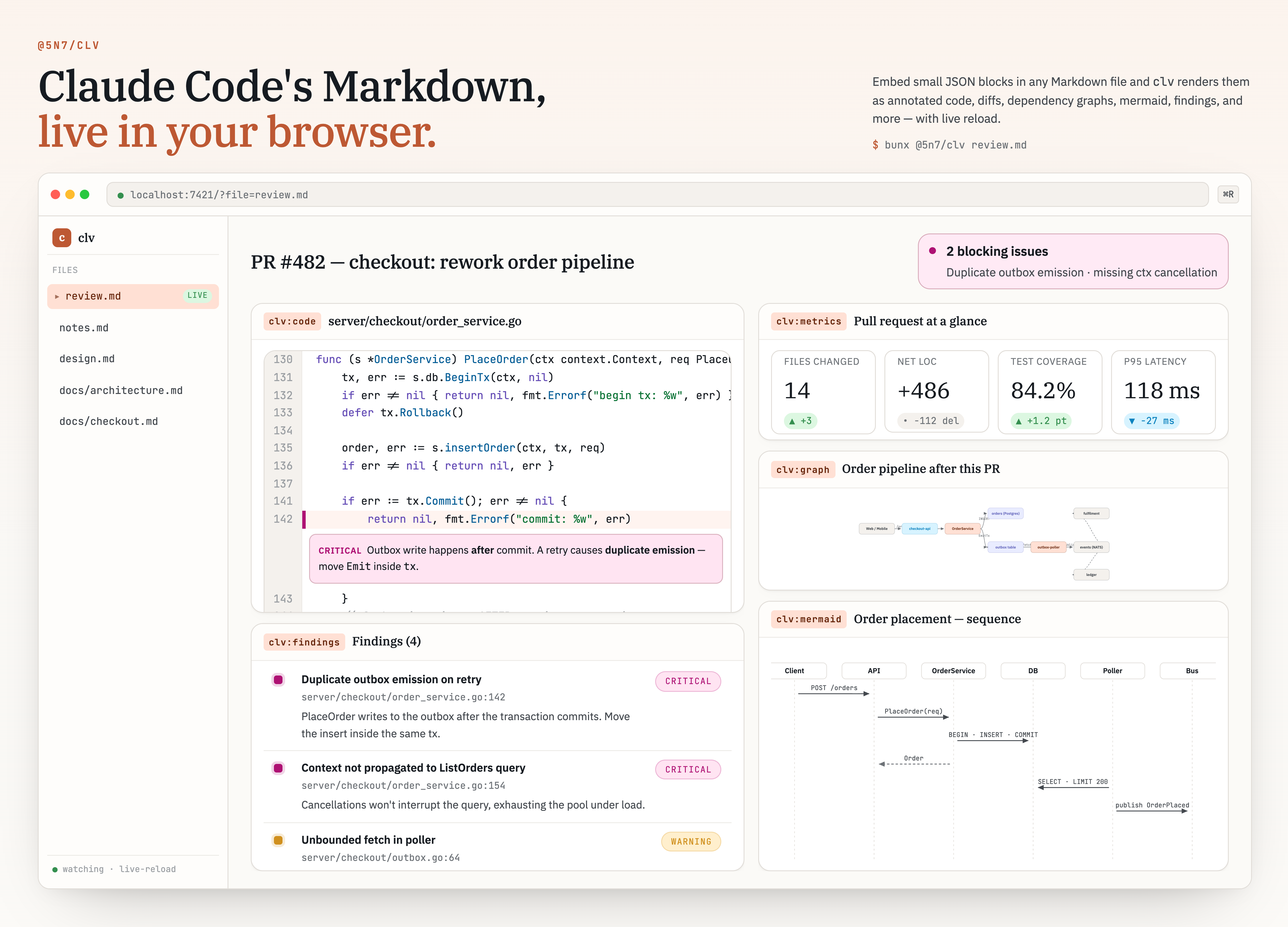
clv turns Markdown that Claude Code writes into a rich, live preview you can read in any browser. Claude embeds small JSON blocks (```clv:<type>) in its review or explanation output; clv parses them, validates each against a schema, and renders them as callouts, annotated code, diffs, charts, dependency graphs, step-by-step walkthroughs, and more.
- Live preview —
clv review.mdopens the document in your browser and live-reloads it on every save, preserving scroll position. - Multi-file — point
clvat several files or a directory and navigate them from a sidebar (flat/tree view, filename/heading-title toggle, search) at one localhost address. Files are grouped by their GitHubowner/repoautomatically, or under a name you pass with-g/--group. Hover a file row or group header for a×that closes it (dropping it from the session, never deleting it from disk). - Background daemon — re-running
clvadds files to the already-running session instead of starting a new server; the open files are persisted and restored on restart. - Static export —
clv --output out.htmlwrites a single self-contained HTML file (all JS, CSS, fonts, and images inlined; no network calls). Open it offline, email it, or commit it. - Graceful — unknown or malformed blocks render as a clearly marked fallback instead of failing the whole document.
Usage
The npm package is published as @5n7/clv, but the command it installs is clv. Run it ad hoc with bunx, or install it globally for repeated use:
# One-off, no install:
bunx @5n7/clv review.md

# Or install globally; the command is then `clv`:
bun add -g @5n7/clv
clv review.md
The examples below use bunx @5n7/clv; if you have installed globally, drop the bunx and call clv directly.
# Open a file in your browser with live reload
bunx @5n7/clv review.md

# Open every Markdown file in a directory (recurse with -R)
bunx @5n7/clv docs/
bunx @5n7/clv -R docs/

# Add more files to the already-running session
bunx @5n7/clv notes.md design.md

# Local development against this repo
bun run src/cli/index.ts review.md
clv <paths...> starts (or reuses) a background live preview server on localhost:7421 and opens your browser to it. The paths may be files or directories; clv watches them and live-reloads the browser whenever a file changes, preserving scroll position. When more than one file is open, a sidebar lets you navigate between them and the active file is reflected in the URL (?file=<id>). Files are organized into collapsible sidebar groups: by default each file is grouped by the GitHub owner/repo of the repository its own directory belongs to (files outside any repo fall under "default"), so opening files from several repos keeps them visually separated. Pass -g/--group <name> to put the files from that invocation under an explicit name instead. Hovering a file row or group header reveals a × that closes it — removing the file (or every file in the group) from the session. Nothing is deleted from disk, and the removal is persisted, so a closed file does not reappear when the daemon restarts.
The server runs as a detached daemon and outlives the command that launched it. Re-running clv with new paths registers them into the running session rather than spawning a second server, and the open files are persisted so they reappear if the daemon is restarted.
--theme and --watch/--no-watch are fixed when the daemon starts and apply for its whole lifetime. Re-running clv with different values only registers the new paths — it does not re-theme or toggle watching the running daemon (you'll get a notice when the value you pass is ignored). Run clv shutdown and start again to change them.
# Inspect the running daemon (port, pid, file count)
bunx @5n7/clv status

# Stop the daemon
bunx @5n7/clv shutdown
Run clv doc to print the full showcase document (all 14 block types) to stdout, or clv doc <block> (e.g. clv doc callout) to print a single block's schema and a worked example — handy for learning the block format or piping into a file. A file literally named doc is shadowed by the subcommand; use ./doc or clv doc.md to preview such a file.
Static export
To produce a single self-contained HTML file instead of starting a server, pass --output. This converts the Markdown and writes the file without opening a browser:
# Write one self-contained HTML file (no server, no browser)
bunx @5n7/clv review.md --output review.html

# Pipe Claude Code's output straight in
claude -p "review this PR" | bunx @5n7/clv --output review.html
A piped document with no --output is rendered to a temporary file and opened directly, so the bare pipe still works as a one-shot view:
# View a piped document once, without a server
claude -p "review this PR" | bunx @5n7/clv
CLI options
| Flag | Default | Description |
| ----------------------------- | ------- | ---------------------------------------------------------------------------------------------------------------------------------------------------------------------------------------- |
| <paths...> | stdin | Markdown files or directories to serve. Reads standard input when omitted. |
| doc [block] | — | Print clv format help to stdout and exit: no block = full showcase (all 14 types); doc <block> = one block's schema + example. Must be the first argument; shadows a file named doc. |
| status | — | Show the running clv daemon (port, pid, files) and exit. Must be the first argument; targets --port (default 7421); shadows a file named status. |
| shutdown | — | Stop the running clv daemon and exit. Must be the first argument; targets --port (default 7421); shadows a file named shutdown. |
| --output <path> | — | Static export: write HTML to <path> and exit (no server, no browser). |
| --port <number> | 7421 | Live preview server port. |
| -w, --watch | on | Watch files and live-reload. On by default; use --no-watch to disable. |
| --no-watch | — | Disable file watching / live-reload. |
| -R, --recursive | false | Recurse into subdirectories when a directory is given. |
| -g, --group <name> | auto | Group files under <name> in the sidebar. When omitted, each file is grouped by the GitHub owner/repo of its own repo, else "default". |
| --no-open | false | Do not auto-launch the browser. |
| --title <string> | "clv" | HTML <title>. |
| --theme <auto\|light\|dark> | auto | Color scheme. auto follows prefers-color-scheme. |
| --strict | false | With --output (static export): exit 1 if any block fails validation (default: render fallback and continue). Ignored in live preview mode. |
| -h, --help | — | Print usage and exit. |
| -v, --version | — | Print version and exit. |
Block catalog
Each block is a fenced code block whose info string is clv:<type> with an optional attribute list, and whose body is a single JSON object:
```clv:callout title="N+1 detected"
{ "kind": "warning", "body": "ListOrders issues one query per row." }
```
Header attributes (title="…" etc.) are merged into the payload; on conflict the JSON body wins. The body must be plain JSON — no comments, no trailing commas. Every block also accepts the optional fields title, collapsed, and id. For Mermaid you may use a bare ```mermaid fence instead of clv:mermaid; the whole body is the diagram source.
| Type | What it renders |
| --------------- | -------------------------------------------------------------------------------------------------------- |
| clv:callout | Colored alert (info / tip / warning / danger / critical) with a Markdown body. |
| clv:chart | Bar, line, area, pie, or scatter chart over tabular data. |
| clv:checklist | Quality-gate list with pass / fail / na / skip status and a tally bar. |
| clv:code | Syntax-highlighted code with per-line severity annotations and highlighted lines. |
| clv:diff | Before/after code diff (split or unified). |
| clv:findings | Review findings grouped by severity; each can link to a clv:code block. |
| clv:graph | Node/edge diagram (dependency graph, call graph) with dagre layout. |
| clv:metrics | Grid of KPI cards with deltas and up / down / neutral trends. |
| clv:mermaid | Mermaid diagram. |
| clv:steps | Step player with Prev/Next, keyboard nav, and dots; each step is Markdown plus an optional nested block. |
| clv:table | Sortable data table; columns can be syntax-highlighted. |
| clv:tabs | Tabbed panels; each tab is Markdown or a nested block. |
| clv:timeline | Numbered vertical rail of phases/events, each with a severity. |
| clv:tree | Changed-file tree with per-file status badges and optional anchors. |
See examples/review.clv.md for a document that exercises all 14 types plus a deliberate unknown-block fallback. Copy docs/output-style-clv.md into CLAUDE.md or ~/.claude/output-styles/ so Claude emits valid blocks; that file has the full schema for each type.
Self-contained output
--output produces a single HTML file that embeds bundled JS, CSS, WOFF2 fonts (IBM Plex Sans/Serif, JetBrains Mono), and the document JSON (window.__CLV_DATA__). It makes no network requests at runtime. The live preview server serves the same React viewer, but fetches documents over an HTTP API and pushes updates over a WebSocket so the page reloads as you edit.
Design tokens use CSS oklch() and color-mix(). You need a recent browser (Chrome/Edge 111+, Safari 16.4+, Firefox 113+). Older browsers render but colors may degrade.
Implementation notes
- Graph: uses
@xyflow/reactv12 with@dagrejs/dagrelayout.layout: "force"falls back to dagre;layout: "manual"uses per-nodex/yonly when every node provides them, otherwise dagre. - Markdown: prose fields are rendered with
react-markdownin the browser.
Known limitations
When a finding's context link targets a clv:code block nested inside clv:tabs or clv:steps, only the active tab or current step is mounted, so the hash jump may be a no-op until the user opens that tab or step. The inline snippet shown when a finding is expanded is unaffected.
Build from source
Requires Bun.
bun install
bun run build   # web SPA (dist/template.html), then CLI bundle (dist/cli.js)
build:web runs Vite with vite-plugin-singlefile; build:cli bundles src/cli/index.ts and text-imports the template so the CLI has no runtime file dependency. The published package ships dist/ only.
For UI work without the CLI:
bun run dev:web # Vite dev server; sample document in dev-data.tsOther scripts: bun run fmt, bun run fmt:check, bunx oxlint.