
@8thwall/coaching-overlay
v1.0.0
Published
Fallback page displayed when an 8th Wall experience cannot run on the current device
Downloads
80


Readme
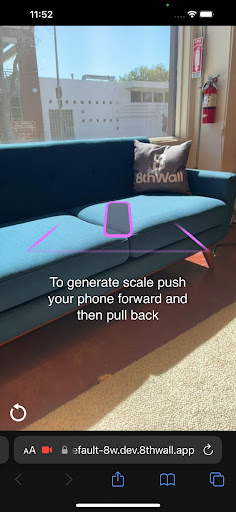
Coaching Overlay
Helpful user prompts for Absolute Scale and Sky Effects projects
Usage
See https://8thwall.org/docs/engine/guides/coaching-overlays for a complete guide to customizing the coaching overlay.
Option 1: Script tag
<script src="https://cdn.jsdelivr.net/npm/@8thwall/coaching-overlay@1/dist/coaching-overlay.js" crossorigin="anonymous"></script>Option 2: npm
npm install @8thwall/coaching-overlayYou will need to copy the included artifacts into your dist folder, for example in webpack:
new CopyWebpackPlugin({
  patterns: [
    {
      from: 'node_modules/@8thwall/coaching-overlay/dist',
      to: 'external/coaching-overlay',
    }
  ]
})
You can then load the library by adding the following to index.html:
<script src="./external/coaching-overlay/coaching-overlay.js"></script>When you import the package, a simple helper for accessing window.CoachingOverlay/window.SkyCoachingOverlay is provided. The expectation is still that the script tag is added to the HTML. Note that configuring the overlays in this way is not required for A-Frame projects as the configuration is passed through the component schema.
import * as CoachingOverlay from '@8thwall/coaching-overlay'
CoachingOverlay.AbsoluteScale.configure({
  promptColor: '#00ff00',
})
CoachingOverlay.Sky.configure({
  promptText: 'Look at the sky!',
})
Development
- Start a local server with
npm run watch - Try out the test at
https://localhost:9003/test/. - In order to use your local version in a project, replace the existing script tag with
<script crossorigin="anonymous" src="https://localhost:9003/coaching-overlay.js"></script>