
@99percentpeople/pi-background-tasks
v2.1.1
Published
Background commands and attachable PTY/TUI sessions for Pi, with SSH Remote integration

Maintainers
 99percentpeople
Readme
@99percentpeople/pi-background-tasks
Run long-lived commands and full-screen terminal applications alongside the
Pi coding agent without blocking the conversation. Use it
locally for builds, servers, tests, and TUIs—or combine it with
@99percentpeople/pi-ssh-remote
to run and interact with the same workloads on a remote Unix or Windows host.
Just ask Pi to "start the dev server in the background" and keep chatting.
bg_* tools start, wait on, inspect, interact with, and stop tasks;
/bg-attach opens a live terminal (Ctrl+] detaches without stopping it).
Demo
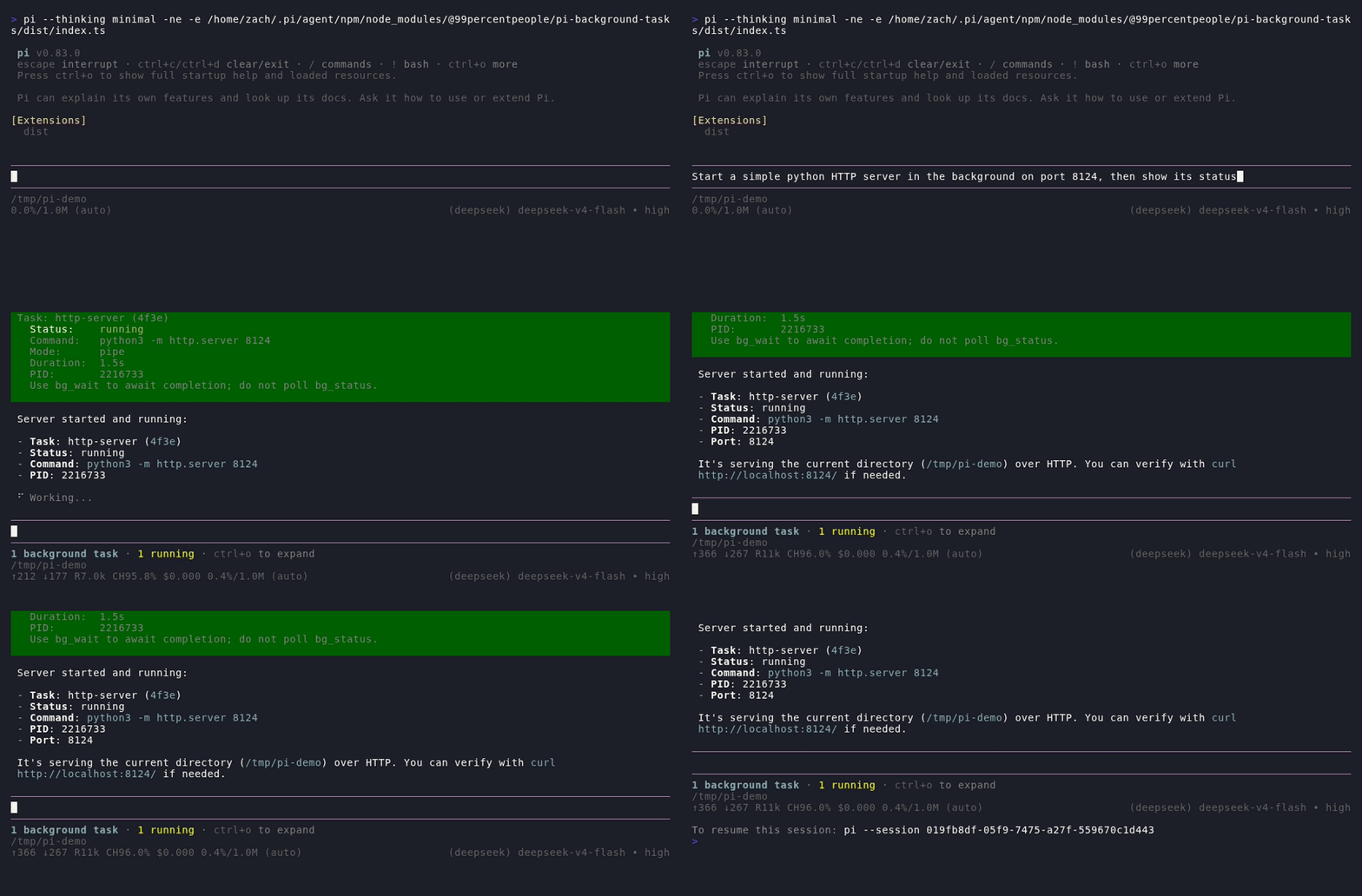
Ask Pi to start a server in the background—the task keeps running while you chat, and the status widget tracks it:
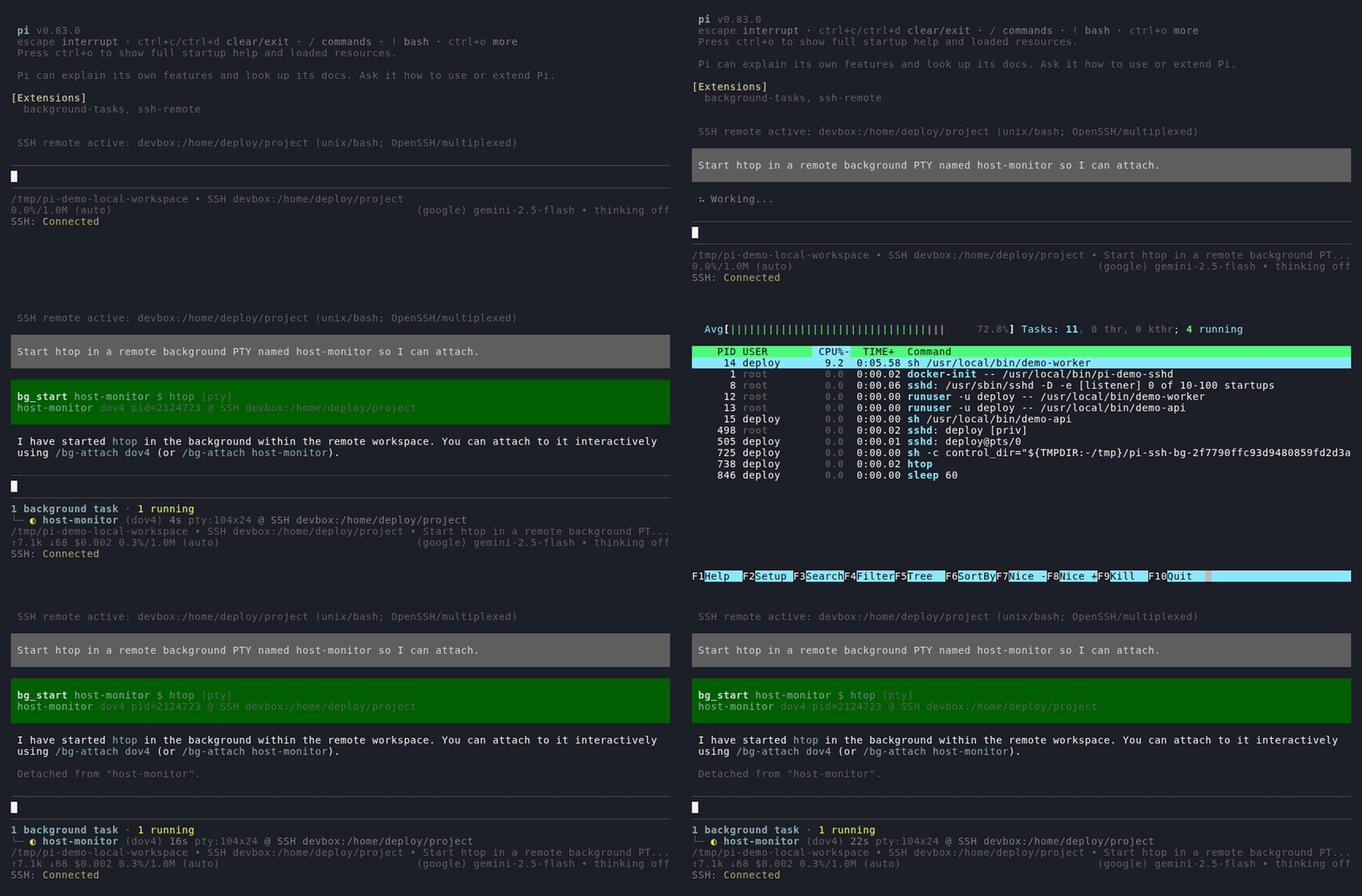
The same start → attach → detach workflow works for a remote TUI when SSH Remote
is active—here, htop runs in a remote PTY:
Highlights
- Keep Pi responsive while builds, servers, watchers, tests, REPLs, and TUIs run
- Choose lightweight pipe logging or a real PTY with a parsed terminal screen
- Attach and detach without pausing, restarting, or reconnecting the child
- Forward PTY keyboard, mouse, focus, and resize events
- Retain output while detached and replay it before seamlessly following live data
- Track status, duration, environment, and optional output in a compact widget
- Address tasks by stable, unique names as well as generated IDs
- Compose start, wait, logs, input, signals, and termination without polling
- Route tasks through named shell providers such as SSH Remote and Pwsh Adapter
- Keep remote tasks bound to their original host and cwd across workspace switches
- Reconcile SSH transport loss before reporting a remote task as finished
Contents
- Install
- Quick start
- Run a remote TUI over SSH
- Tool ordering and parallelism
- Pipe and PTY modes
- Live attach and final snapshots
- Output retention and cleanup
- Sending input and keys
- Shell and platform behavior
- Shell adapter protocol v2
Install
For local background commands and TUIs:
pi install npm:@99percentpeople/pi-background-tasksAdd SSH Remote when tasks should run in the active remote workspace:
pi install npm:@99percentpeople/pi-ssh-remoteNative
node-ptydependency:pnpmandbunmay reportIgnored build scripts: node-pty. On platforms covered by node-pty's shipped prebuilt binaries, the warning alone is not an installation failure and no approval is required. A source build on an unsupported platform still needs the package manager to allow node-pty's install script.
The packages are independent: Background Tasks works locally by itself, while SSH Remote automatically registers a higher-priority remote provider when both are installed. Background Tasks 2.x uses shell adapter protocol v2. Pair it with SSH Remote 0.5.0 or newer and, on Windows, Pwsh Adapter 1.1.0 or newer. Legacy unnamed providers are rejected so a remote launch cannot silently fall back to the local machine. Update installed adapters before updating Background Tasks. See the SSH Remote documentation for target, authentication, and transport setup.
During local extension development:
pi -e ./extensions/background-tasks/index.tsQuick start
Describe the desired outcome naturally:
Run the development server in the background and tell me when it is ready.
Start lazygit in a background PTY named local-git so I can attach to it.
Run the test suite in the background and inspect the failures when it exits.
Background execution is appropriate when the user asks for it, the process must
remain available for later interaction, or Pi can perform useful independent
work while it runs. Runtime alone is not a reason to use these tools. If Pi
needs a command's result before it can continue, it should use the foreground
bash tool with an appropriate timeout instead of emulating synchronous
execution with bg_start → bg_wait → bg_logs.
The model can start, wait for, inspect, signal, and stop tasks. Model-facing
tools have narrow responsibilities: bg_wait reports completion plus the latest
pipe log line, bg_status reports metadata plus the latest pipe log line,
bg_logs reads full retained output, and bg_kill reports termination.
Every model-facing id accepts either the generated task ID or its unique,
case-insensitive name. Users normally need only these interactive commands:
/bg-attach <task-id>
/bg-kill <task-id>
Omit the task ID to choose from an interactive list. Press Ctrl+] to leave
an attached console without stopping its task.
Run a remote TUI over SSH
With both packages installed, remote TUI execution uses the same Pi conversation and the same Background Tasks UI:
/ssh-connect devbox:/srv/projectThen ask Pi:
Start lazygit in a background PTY named remote-git so I can attach to it.Run /bg-attach and select remote-git from the task list, or pass the task
ID shown by bg_start:
/bg-attach <task-id>The PTY is created locally around the system OpenSSH client, while SSH allocates
the terminal on devbox and starts lazygit in /srv/project. The attached
screen forwards keyboard, mouse, focus, and resize events. Press Ctrl+] to
return to Pi; lazygit keeps running remotely and its terminal state continues
to be retained. You can keep chatting, change the SSH cwd, switch hosts, or
return to the local workspace—the existing task stays bound to
SSH devbox:/srv/project. The model can continue addressing it by the unique
name remote-git, and /bg-attach keeps it in the interactive task list.
Other useful remote PTY prompts include:
Start htop in a remote background PTY named host-monitor.
Run nvim README.md in a background PTY and let me attach.
Start k9s remotely in a background PTY named cluster-ui.
Important details:
- The task must use PTY mode; full-screen TUIs are not interactive in pipe mode.
- The program must be installed on the remote host.
- Remote jobs always use the local system OpenSSH client. They reuse SSH Remote's managed ControlMaster when available; otherwise configure key or agent authentication. Foreground passwords are never copied into background processes.
- Detaching with
Ctrl+]leaves the task running, but Pi session shutdown still terminates it. This extension is background task management, not a persistent remote service or terminal multiplexer.
Tool ordering and parallelism
Background tool calls that target the same task reference in one model response
execute strictly in source order. A reference can be the generated ID or the
unique task name. bg_start joins the same ordering chain by name, so the model
does not need to spend a separate round learning the generated ID before it can
compose the rest of a finite workflow:
bg_start(name=A) → bg_wait(id=A)                    # start, finish, latest pipe log line
bg_start(name=A) → bg_wait(id=A) → bg_logs(id=A)   # add full/multiline or PTY output
bg_status(A)                                        # status plus latest pipe log line
bg_send(A) → bg_wait(A) → bg_logs(A)               # interact, wait, then read full output
bg_kill(A) → bg_logs(A)                             # terminate, then read final output
The model should emit each complete chain in one response instead of waiting for
one tool result before emitting the next call. Calls for different tasks remain
independent and execute in parallel. Ordering is intentional:
bg_logs(A) → bg_wait(A) reads available output first and only then waits.
Multiple chains such as bg_wait(A) → bg_logs(A) and
bg_wait(B) → bg_logs(B) can run concurrently. A bg_status call without an
ID is a global snapshot and is not part of any single-task chain.
Pipe and PTY modes
| | Pipe mode | PTY mode | | --- | --- | --- | | Best for | Builds, servers, scripts, tests, and watchers | TUIs, REPLs, debuggers, and terminal-aware programs | | Output model | Separate stdout and stderr logs | One terminal screen with ANSI control sequences interpreted | | Attached view | Combined stdout/stderr in arrival order | Live virtual terminal | | Direct attached input | Read-only; send stdin through Pi | Keyboard and mouse input are forwarded | | Resize behavior | Local console reflow only | Debounced terminal and child-process resize |
Pipe mode is the simpler default for commands that only need reliable logs. PTY mode sets up a real pseudo-terminal, so programs can detect terminal capabilities, redraw their screen, request mouse tracking, and respond to window size changes as they would in a standalone terminal.
Live attach and final snapshots
Each task owns a virtual console from the moment it starts. Output is processed
continuously whether attached or not. When /bg-attach opens the console, it
first renders the retained terminal buffer and buffers only the small amount of
output arriving during that replay. The child process is never paused and its
stdout or stderr is never reconnected to the physical terminal.
For PTY applications, attach forwards keyboard input and terminal resize events. Extended mouse encodings, including SGR and SGR pixel mode, are restored when the application enables them. Mouse tracking, encodings, and focus modes are reset on detach so terminal state does not leak back into Pi.
If a task exits while attached, the console stays open until Ctrl+]:
- pipe mode appends a completion message;
- PTY mode overlays the message in the bottom-right corner without changing the application's final screen.
The completion message exists only on the user's physical terminal. It is not
written into retained logs, bg_logs, or the final virtual-terminal snapshot.
A finished task can be attached again in read-only mode while its snapshot is
still retained.
Status widget
Pi displays background tasks below the editor with their status, duration, and
optional latest pipe output. The collapsed widget shows only the task totals by
default, or it can show 1, 3, or 5 prioritized task rows. Running tasks are
selected before the most recently finished tasks while preserving task order.
Pi's standard tool expansion shortcut (Ctrl+O by default) reveals the complete
task list. Output previews can be disabled or limited to failures, finished
pipe tasks, or all pipe tasks. Finished PTY tasks stay compact because their
final screen remains available through attach or explicit logs.
The header uses separate colors for the total, running, and finished counts so
active work stands out without making the whole widget look like a warning.
When a shell adapter supplies an execution label, task rows show it inline—for
example SSH devbox:/srv/project. Running durations and recent output refresh
without repeatedly registering a new widget.
Output retention and cleanup
Within the current session, a running task continues across ordinary agent runs and remains available to the background tools. Reloading or shutting down the session terminates running tasks.
If a task finishes before the current agent run settles, its final status and retained output remain available only for the rest of that run and are normally removed before the next run starts. Only a task that is still running when the agent settles and then finishes while the agent is idle remains available throughout the next agent run. It can be inspected multiple times during that run and is normally removed before the following run.
Once removed, the old task ID is no longer available through attach, status, logs, or wait operations. Task names must be unique (case-insensitively) among all retained running and finished tasks; a name becomes available again when its old task is removed by this cleanup lifecycle. Completed snapshots are checkpointed as hidden Pi session entries, so reloading the extension or navigating the session tree does not clear them early. Cleanup writes a matching session event, so an expired snapshot cannot reappear after another reload.
Live pipe stdout and stderr remain in memory and are capped at 4 MiB each, with the oldest bytes discarded when that limit is reached. A persisted pipe snapshot keeps the latest 500 lines, capped at 256 KiB per stream. The attached console snapshot keeps 200 lines of scrollback and is capped at 512 KiB. No task output is written to a temporary disk directory. This is not persistent job management: reload restores only completed read-only snapshots, while session shutdown still terminates running processes and disposes live virtual terminals so it does not leave orphaned tasks.
Sending input and keys
Pi can send ordinary text, terminal keys, or signals without opening an attached
console. Text is exact and never implies Enter. Special keys use <...> tokens:
<C-o>filename.txt<Enter>
<Esc>iHello<Enter>
<Down*3><Enter>
The input syntax supports Ctrl+A-Z and Ctrl punctuation, Alt/Meta combinations,
arrows, navigation keys, Insert/Delete, F1-F12, Space, Enter, Escape, Tab, and
Backspace. Modifiers can be combined, such as <C-A-d> or <S-A-Left>, and
key repetition uses forms such as <Down*3>. Use \< for a literal < and
\\ for a literal backslash.
Pipe attachments do not forward keyboard input directly, but Pi can still send stdin through the background task interface. PTY attachments forward input interactively and the same key syntax remains available for model-driven input.
The signal input accepts a portable named-signal vocabulary and validates each
request against the task's actual execution environment. Local Unix tasks use
their process group; a shell adapter can instead declare a process, process
group, or process-tree target with its own supported signals. SSH Remote uses
this path so signals reach the remote process group or Windows process tree
instead of merely killing the local ssh transport. Signal behavior remains
platform-specific, and unsupported requests return an explicit error. Use the
dedicated kill operation when the goal is reliable process-tree termination.
Output inspection
For pipe tasks, bg_wait and bg_status include the latest non-empty log line
and identify whether it came from stdout or stderr. The same value is available
as latestLog in tool details; a status list includes it per task. They omit the
field when no pipe output is available and never expose a PTY terminal snapshot.
Use bg_logs when one latest line is insufficient or any PTY output is needed.
Pipe tasks retain stdout and stderr separately, while PTY tasks expose the parsed
terminal buffer rather than raw ANSI escape sequences. Omitting stream works
in both modes: pipe tasks return stdout and stderr, and PTY tasks return terminal
output. Use tail or from_line/max_lines to select the retained range. An
empty running task reports (no output yet); once it finishes, the same empty
log is reported as (no output) (or (no terminal output) for PTY mode).
bg_kill still returns no process output. Emit bg_logs after bg_wait,
bg_status, or bg_kill only when fuller pipe output or PTY terminal output is
needed.
Pi capabilities
The extension exposes a compact set of model-facing operations: start, wait,
status, logs, send, and kill. Each operation has one responsibility, while
same-reference source ordering—including bg_start by unique name—composes a
complete workflow in one model response without sacrificing parallel execution
across tasks. Users can usually describe the desired outcome in natural
language instead of calling these operations manually. While a tool call is
streaming, fields appear only after the model writes them; missing arguments are
omitted rather than rendered as placeholders.
Shell and platform behavior
Background commands follow Pi's configured Bash resolution and command prefix,
so they use the same syntax as the built-in bash tool. On Windows this means
Pi's configured shellPath, Git Bash, or a bash.exe found on PATH, rather
than cmd.exe.
Installing @99percentpeople/pi-pwsh-adapter explicitly switches both Pi's
built-in shell tool and background tasks to PowerShell syntax.
Installing
@99percentpeople/pi-ssh-remote
registers a higher-priority OpenSSH provider for pipe and PTY tasks whenever an
SSH workspace is active. Commands, including full-screen PTY applications, run
in the remote cwd; an explicit bg_start.cwd is mapped into the remote
workspace without requiring that absolute directory to exist locally. See
Run a remote TUI over SSH for a complete example.
SSH launches are tagged with an immutable environment such as
SSH devbox:/srv/project. bg_start, bg_wait, bg_status, bg_logs,
bg_send, and bg_kill return that location in their task information, and
finished snapshots retain it across extension reloads. A running task stays in
the environment where it started; later tasks follow SSH host, cwd, and
local/remote transitions.
SSH task signals use a short control connection associated with the immutable
launch host. A task lease keeps its launch-time ControlMaster available across
workspace switches and shutdown-handler ordering; when no managed master
exists, the adapter retries with key or agent authentication. Foreground
passwords are not copied into background or signal processes. On Unix the
control request targets the recorded remote process group; Windows termination
uses the recorded remote process tree. This keeps
bg_send signals, bg_kill, and normal Pi shutdown from treating termination
of the local SSH transport as proof that the remote command exited. If an
adapter cannot confirm cleanup after its local transport disappears, the task
enters disconnected: retained logs remain readable and adapter signals can be
retried, but stdin is unavailable until the task is terminated or confirmed
finished.
Shell adapter protocol v2
Shell adapters can register independently instead of competing through last-writer-wins state:
pi.events.emit("bg:register", {
  id: "my-adapter",
  priority: 50,
  resolveShell,
  spawn,       // optional, scoped to this provider
  ptySpawn,    // optional, scoped to this provider
  onRegistered: ({ protocolVersion, taskControl }) => {},
});
For each launch, an adapter may return control alongside file, args, and
env. A control must implement async sendSignal, probe, onTransportExit,
and dispose; it may also declare supportedSignals, terminatingSignals,
the signal target (process, process group, or process tree), and stdin
availability. Signals receive the tool's AbortSignal. The control remains bound
to the task after its local launcher exits, allowing remote cleanup without
mistaking transport termination for process termination.
Named providers are queried by descending priority and fall through when their
resolver returns undefined; throwing fails closed. Every registration requires
an id and resolveShell; unnamed v1 registrations are rejected. Providers
can unregister with
pi.events.emit("bg:unregister", { id }). SSH task-control safety requires
protocol v2, so SSH Remote blocks new remote bg_start calls when an older
Background Tasks build is detected. bg_send.signal exposes a portable
local/remote signal vocabulary and validates each request against the selected
task's capabilities rather than Pi's local operating system alone. Native
Windows ssh.exe -n pipe launches advertise stdin as unavailable and direct
interactive input to PTY mode instead of reporting a misleading successful
write.
Pipe-task completion follows the tracked process's exit event rather than the
stdio close event. Launch failures are finalized by the pre-spawn error
event, while close is used only to persist any output drained after process
exit. This matters on Windows, where a descendant can keep a pipe handle open
after the shell PID has already exited; the task status still transitions out
of running, so later status or kill operations do not target a nonexistent
process.
Source layout and build
The extension source is split by responsibility while keeping index.ts as the
small public entry point:
extension.tswires lifecycle events, settings, tools, and commandsruntime.tsowns task state, shell providers, process control, logs, and snapshotstools.tsandcommands.tsregister the model-facing and interactive APIsattachment.tshandles live/final terminal attachmentwidget.tsrenders and refreshes task statusinput.tsparses model-driven text and terminal key sequencestypes.tsandmemory-log-store.tscontain shared contracts and storage
The normal package build follows local imports and bundles these modules into one minified runtime entry, so the published extension still loads a single file:
bun run --cwd extensions/background-tasks build
# dist/background-tasks/index.min.js
The linked source map retains the original module paths for debugging; the individual TypeScript implementation files are not required at runtime.
Native dependency
PTY support uses node-pty. If a compatible prebuilt binary is unavailable,
installation may require Python and a native C/C++ build toolchain. On macOS
this generally means Xcode command-line tools; Windows builds may require Visual
Studio C++ and the Windows SDK. Pipe mode does not require a pseudo-terminal at
runtime, but node-pty is still installed as a package dependency.
Shared settings
Use the shared /99settings menu to configure the number of task rows shown in
the collapsed widget and which pipe tasks include their latest output. Defaults
preserve the compact summary-only widget and finished-task output previews.
Operational commands such as /bg-attach and /bg-kill remain separate.
License
MIT