@a11y-ngx/sr-only
v1.0.1
Published
A component and CSS rule that provides a way to insert visually hidden text that is still reached and announced by screen reader
Downloads
19

Maintainers
 ldv
ldvReadme
Screen Reader Only / Visually Hidden
A simple component & CSS rules that provides a way to insert visually hidden text that is still reached and announced by screen readers. It helps improve accessibility by conveying additional context, labels, or instructions to users relying on assistive technologies.
This library was generated with Angular CLI version 12.2.0.
Index
Installation
Install npm package:
npm install @a11y-ngx/sr-only --saveImport
A11ySROnlyModuleinto your module or standalone component:
import { A11ySROnlyModule } from '@a11y-ngx/sr-only';

@NgModule({
    declarations: [...],
    imports: [
        ...
        A11ySROnlyModule,
    ],
})
export class AppModule { }
Use / Example
You can make use on one of the available items:
<a11y-sr-only>(component)<a11y-visually-hidden>(component).a11y-sr-only(CSS class).a11y-visually-hidden(CSS class)
By using the components, you can insert any text you want to provide extra context, either by using:
- Input:
textof typestring, or - Content Projection
NOTE: To make use of the CSS classes, you have to import
A11ySROnlyModuleat least once at a root level in your app so the CSS is available.
Everything inside any of those elements will be visually hidden but reachable by the screen reader.
<a href="/settings">
    <span>Settings</span>
    <sup><i class="fa-solid fa-up-right-from-square ms-1" aria-hidden="true"></i></sup>
    <a11y-sr-only>(opens in a new tab)</a11y-sr-only>
</a>

<a href="/policies">
    <span>Policies</span>
    <sup><i class="fa-solid fa-up-right-from-square ms-1" aria-hidden="true"></i></sup>
    <a11y-visually-hidden text="(opens in a new tab)"></a11y-visually-hidden>
</a>

<a href="/cookies">
    <span>Cookies</span>
    <span class="a11y-sr-only">(opens in a dialog)</span>
</a>
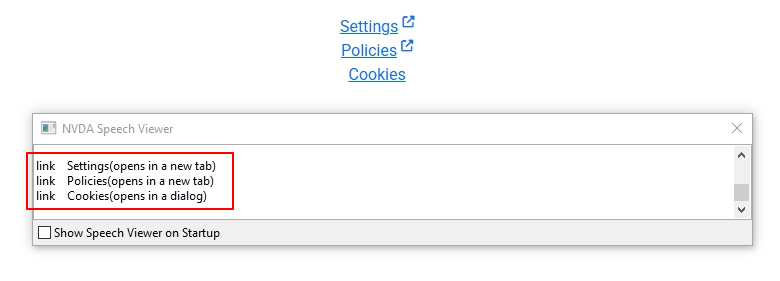
You can see how it is announced by the NVDA screen reader:
link👉 the elementSettings👉 the visible text(opens in a new tab)👉 the visually hidden text (💡 the use of parentheses is just for the screen reader to give a small pause)