
@absolumont/particles-designer
v0.1.6
Published
Luminous GPU particle fields for any web page: <particle-field> element and ParticleField API, with the Particles Designer (WebGL2, audio-reactive, AI-authored looks).

Maintainers
 rezakalfane
Readme
Particles Designer
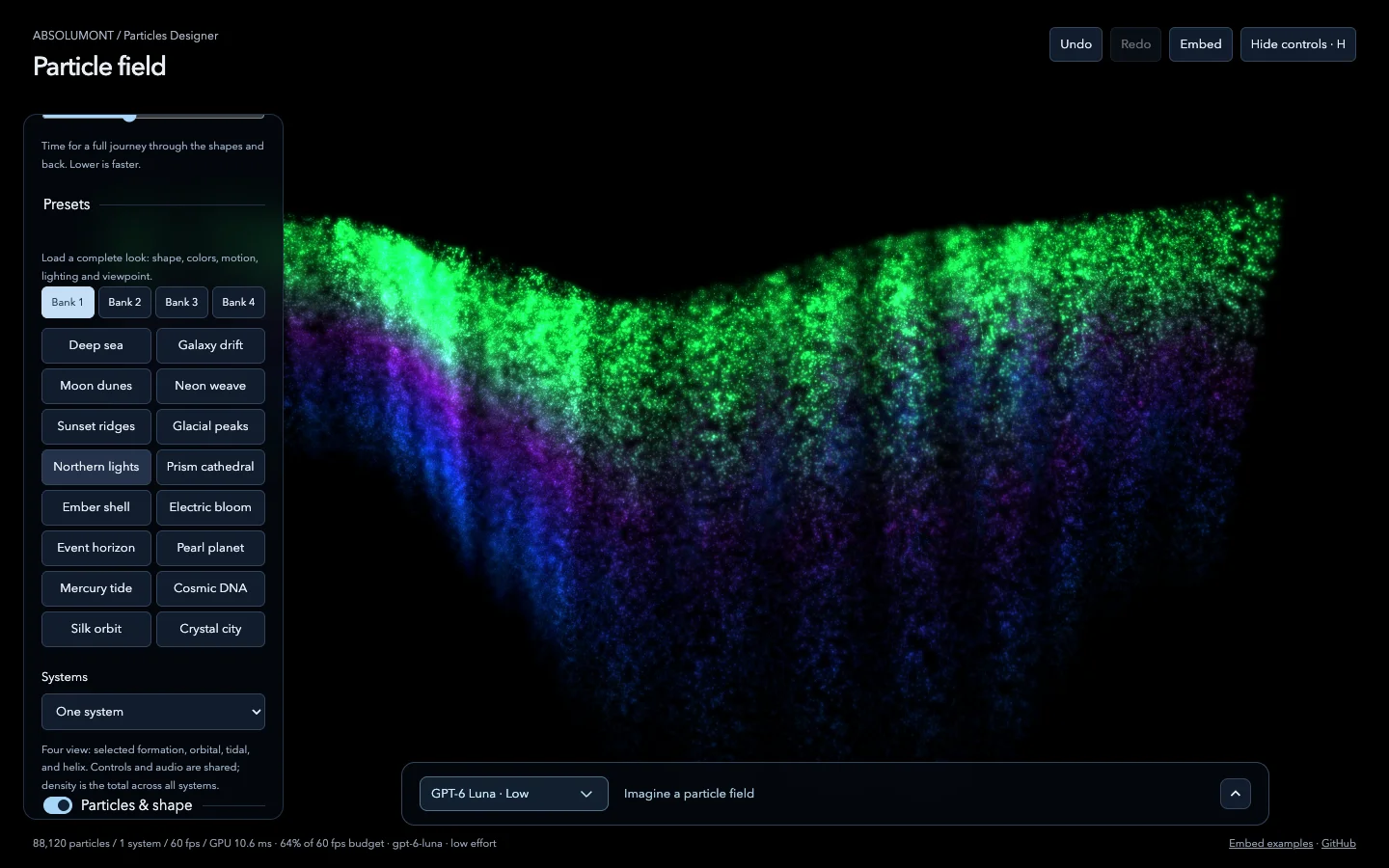
ABSOLUMONT / Particles Designer — author luminous GPU particle fields in the browser: 1k–200k procedural WebGL2 points forming built-in, baked or AI-invented shapes, with light, ribbons, attractors, motion, shockwaves, a collapse → explode → reform cycle and audio reactivity. Every factory look is ready to perform: audio, ripples and the cycle are all available. Browse eight banks of looks (P1–P8) and shapes (S1–S8), save your own, describe a field in words (optionally with an inspiration photo), and play it all from a ROTO-CONTROL. Then drop any look into a web page with the embed kit.
Originally built inside LUMEN; this repository is the standalone tool.
Live: Designer ·
embed examples ·
Mac app (the .dmg on
each release; see docs/ELECTRON.md for the first launch). The
hosted Designer runs fully in the browser: saved slots stay in that browser, and AI
generation needs the local host (below) or the Mac app.
Quick start
npm install
npm run dev          # http://localhost:5180/
Chrome or Edge is recommended (Web MIDI for ROTO-CONTROL; WebGL2 required).
AI design generation (optional)
The prompt bar calls the local dev host at /api/generate, which talks to OpenAI
server-side. Copy .env.example to .env.local, fill in OPENAI_API_KEY, and
restart npm run dev. The key is never sent to the browser, and generation only
accepts loopback requests.
Saved slots
Saved presets and shapes are written by the dev host to one JSON library
(~/Library/Application Support/Particles Designer/slots.json on macOS; override
with PARTICLES_DESIGNER_DATA_DIR), so every device that opens the dev server
shares them. Browser storage is the fallback when no host is available.
npm run bake turns saved work into factory code (see docs).
Slot badges tell them apart: a hollow ring is built-in, a filled dot is saved. Hover a saved slot for × (or press Delete) to remove it; a built-in it covered comes back. On touch screens the × is always shown, and a long-press on any slot offers Replace (the Shift+click equivalent) and Delete. Export library / Import… (above Presets) back up and move saved work between browsers, or into your local copy; Import also accepts a single look downloaded from Embed.
ROTO-CONTROL
Three setups (MIDI channels 9–11) play every page of the Designer:
download them (also
linked from the Designer), find them in roto/, or on the CDN. See the
map and guide.
Embed a look in any web page
<script
  type="module"
  src="https://cdn.jsdelivr.net/npm/@absolumont/[email protected]/dist-embed/particles-designer.js"
></script>
<particle-field look="deep-sea" style="width: 100%; height: 480px"></particle-field>
// npm install @absolumont/particles-designer
import { ParticleField } from "@absolumont/particles-designer";
const field = new ParticleField("#hero", {
look: "galaxy-drift",
audio: "microphone",
audioDepth: 1,
});In the Designer, Embed copies a ready-to-paste snippet of the current look or
downloads it as JSON. The kit is about 37 KB gzipped with no dependencies, and it
adapts its quality to each visitor's device so it stays smooth on phones. It is on npm
as @absolumont/particles-designer
and on jsDelivr. See docs/EMBED.md and the
live examples.
Scripts
| Command | What it does |
| -------------------------- | --------------------------------------------------------------------- |
| npm run dev | Vite dev server with the Designer host APIs (LAN-exposed) |
| npm run build | Typecheck + static build in dist/ |
| npm run preview | Serve the build with the host APIs |
| npm test | Unit tests (Vitest) |
| npm run build:embed | Build the embed kit into dist-embed/ (ESM, IIFE, types) |
| npm run build:site | App + kit + examples as one static site in dist/ (GitHub Pages) |
| npm run examples | Build the kit and open the embed examples |
| npm run verify | Format check, typecheck, tests, app and embed builds |
| npm run bake | Bake the saved slot library into factory shapes/looks |
| npm run roto:presets | Regenerate the ROTO-CONTROL setup files in roto/ |
| npm run rehearse:roto | Browser rehearsal with simulated Web MIDI (needs npm run dev) |
| npm run rehearse:embed | Browser rehearsal of every embed example (needs npm run dev) |
| npm run rehearse:boot | Reload check: no unstyled flash, splash removed (needs npm run dev) |
| npm run rehearse:quality | Adaptive quality on a deliberately slow device (needs npm run dev) |
| npm run electron:dev | Build the site and the Electron shell, then launch the desktop app |
| npm run dist:mac | Package the Mac app (universal, ad-hoc signed) into release/ |
| npm run icon | Regenerate the app icon (electron/icon.png, icon.icns) |
Releasing
npm version patch && git push --follow-tagsThe version tag runs .github/workflows/publish.yml: checks, npm publish via trusted
publishing (with provenance; jsDelivr follows), then a GitHub Release with the
commits since the previous tag and the kit builds + ROTO-SETUP files attached; a
macOS job then builds the desktop app and attaches its .dmg. Installed apps offer
the new version on their next launch (see docs/ELECTRON.md).
Preview the notes with DRY_RUN=1 scripts/github-release.sh v0.1.1.
Layout
index.html            Designer page
src/engine/           WebGL2 particle renderer, custom geometry compiler, baked shapes, cycle
src/looks/            Factory catalog: looks, studies, baked looks, 4×16 factory slots
src/designer/         Designer UI: main loop, design schema, banks, dialogs, history, ROTO layout
src/roto/             ROTO-CONTROL Web MIDI driver and setup parser
src/embed/            Embed kit: ParticleField runtime, audio, <particle-field>, snippets
examples/             Embed sample pages (+ a custom design JSON)
server/               Dev-host APIs: AI generation (/api/generate), saved slots (/api/slots)
electron/             Mac app: shell, loopback host serving dist/ + the APIs, update check
scripts/              Bake, ROTO presets, rehearsals, site/Electron builds, Vectrex wordmark
roto/                 ROTO-SETUP files (MIDI channels 9–11)
docs/                 DESIGNER.md (reference), EMBED.md (embed kit), ROTO-CONTROL.md (hardware),
                      ELECTRON.md (Mac app)
tests/                Vitest suites
Below the embed kit, ParticleRenderer (src/engine/renderer.ts) is the raw seam:
render(timeMs, drive) every frame and dispose() when done. It owns no loop,
clock, DOM or audio.
Roadmap
- Documentation site
- Signed and notarized Mac app (Apple Developer ID), with automatic updates
License
MIT © 2026 Reza Kalfane, Absolumont Collective