
@adarshsingh05/agent-guard
v0.1.4
Published
A drop-in spend cap and audit log for LLM API calls

Maintainers
 adarshsingh05
Readme
agent-guard
A drop-in spend cap and local audit log for LLM API calls.
In 2026, a misconfigured agent loop on Cloudflare Durable Objects generated a $34,000 bill in 8 days — because there was no real-time spending safeguard. agent-guard wraps your LLM calls, enforces a hard dollar ceiling, and keeps a receipt on disk.
- No account
- No hosted dashboard
- No telemetry leaving your machine
- Zero runtime dependencies
See it in action
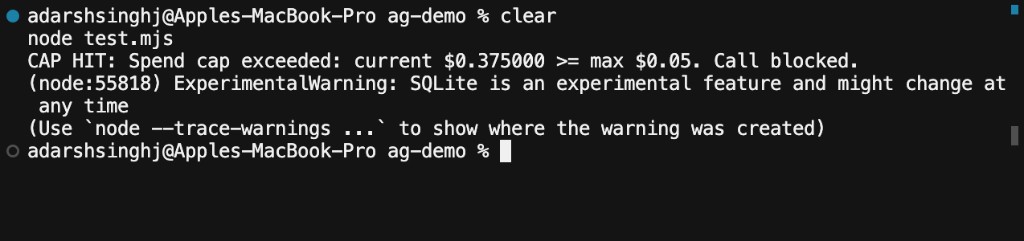
1. Cap blocks the next call
2. Local spend summary
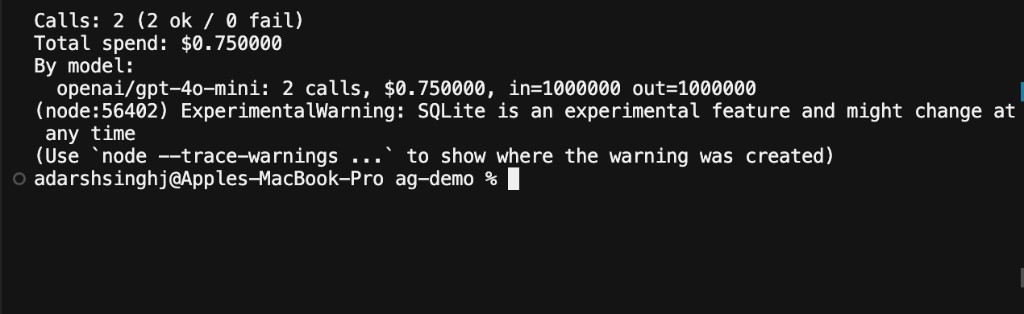
Table of contents
- See it in action
- What it does
- How to test locally
- Requirements
- Step 1 — Install from npm
- Step 2 — Initialize
- Step 3 — Wrap your LLM calls
- Step 4 — Handle the spend cap
- Step 5 — Monitor spend (CLI)
- Cap scopes
- Privacy
- Pricing updates
- API reference
- Known limitations
- FAQ
What it does
| Feature | Behavior |
|--------|----------|
| Spend cap | Before each wrapped call, if spend >= maxSpend, throws SpendCapExceededError and does not call the API |
| Audit log | Every call is recorded locally (model, tokens, cost, latency, success/fail, prompt hash) |
| Model pin warning | Warns once if you use a floating alias like gpt-4o or *-latest |
Flow
your agent  →  guard(wrapped SDK call)  →  check budget
                                         →  call LLM (if under cap)
                                         →  write local log + add $
                                         →  throw if next call would exceed cap
How to test locally
A) From this repo (no npm install needed)
cd agent-guard
npm install
npm test          # unit tests
npm run build

node --input-type=module -e '
import { guard, SpendCapExceededError } from "./dist/index.js";

const fake = async () => ({
  model: "gpt-4o-mini",
  usage: { prompt_tokens: 500000, completion_tokens: 500000 },
});

const g = guard(fake, { maxSpend: 0.05, provider: "openai", onWarn: () => {} });

try {
  await g({ model: "gpt-4o-mini", messages: [{ role: "user", content: "hi" }] });
  await g({ model: "gpt-4o-mini", messages: [{ role: "user", content: "hi" }] });
} catch (e) {
  console.log(e instanceof SpendCapExceededError ? "CAP HIT:" : "ERR:", e.message);
}
'

node dist/cli.js log --summary
Expected: CAP HIT: ... then a summary with Calls: 1 and Total spend: $0.375000.
B) As an end user (after the package is public on npm)
mkdir /tmp/ag-demo && cd /tmp/ag-demo
npm init -y
npm install @adarshsingh05/agent-guard
Then create test.mjs:
import { guard, SpendCapExceededError } from "@adarshsingh05/agent-guard";

const fake = async () => ({
  model: "gpt-4o-mini",
  usage: { prompt_tokens: 500000, completion_tokens: 500000 },
});

const g = guard(fake, { maxSpend: 0.05, provider: "openai", onWarn: () => {} });

try {
  await g({ model: "gpt-4o-mini", messages: [{ role: "user", content: "hi" }] });
  await g({ model: "gpt-4o-mini", messages: [{ role: "user", content: "hi" }] });
} catch (e) {
  console.log(e instanceof SpendCapExceededError ? "CAP HIT:" : "ERR:", e.message);
}
node test.mjs
npx agent-guard log --summary # if CLI bin is presentIf npm install says 404 Not Found, open npm → Staged Packages and approve / publish the staged release first.
Capture screenshots for the README (macOS)
- Run the local demo above so
CAP HITandlog --summaryare on screen. - Press
Cmd + Shift + 4, drag over the terminal. - Save / move files to:
docs/cap-hit.pngdocs/log-summary.png
- Commit and push — GitHub (and npm, if
docs/is in the package) will show them.
Requirements
- Node.js
>= 18 - Prefer Node ≥ 22.5 for SQLite logging (
node:sqlite). Older Node falls back to JSON-lines automatically. - An existing OpenAI, Anthropic, or similar SDK call you can wrap
Step 1 — Install from npm
In your project (Cursor terminal, VS Code terminal, or any shell):
npm install @adarshsingh05/agent-guardOr with pnpm / yarn:
pnpm add @adarshsingh05/agent-guard
yarn add @adarshsingh05/agent-guard
Verify the CLI is available:
npx agent-guard --helpImport from the scoped package name:
import { guard, SpendCapExceededError } from "@adarshsingh05/agent-guard";Step 2 — Initialize
Run once per project:
npx agent-guard initThis creates:
.agent-guard/
  config.json     # default maxSpend: $5
  log.db          # created when the first call is logged (or log.jsonl on older Node)
Add .agent-guard/ to .gitignore if you do not want logs in git (init tries to append this automatically when a .gitignore already exists).
Step 3 — Wrap your LLM calls
Keep your existing SDK. Wrap the method you call in a loop.
OpenAI
import { guard, SpendCapExceededError } from "@adarshsingh05/agent-guard";
import OpenAI from "openai";

const client = new OpenAI(); // uses OPENAI_API_KEY

const create = guard(
  client.chat.completions.create.bind(client.chat.completions),
  {
    maxSpend: 5.0,       // hard ceiling in USD
    provider: "openai",  // used for pricing lookup
    scope: "session",    // or "global" | "day"
  },
);

// Use `create` everywhere you used to call chat.completions.create
const completion = await create({
  model: "gpt-4o-2024-08-06", // prefer a pinned/dated model
  messages: [{ role: "user", content: "Hello" }],
});

console.log(completion.choices[0].message.content);
Anthropic
import { guard, SpendCapExceededError } from "@adarshsingh05/agent-guard";
import Anthropic from "@anthropic-ai/sdk";

const client = new Anthropic(); // uses ANTHROPIC_API_KEY

const create = guard(client.messages.create.bind(client.messages), {
  maxSpend: 5.0,
  provider: "anthropic",
});

const response = await create({
  model: "claude-sonnet-4-20250514",
  max_tokens: 1024,
  messages: [{ role: "user", content: "Hello" }],
});

console.log(response.content);
Tip for Cursor users
- Open your agent project in Cursor.
- Run Steps 1–2 in the integrated terminal.
- Change your agent code to call the wrapped function instead of the raw SDK method.
- Run the agent as usual — when the budget is hit, the loop stops with
SpendCapExceededError.
Step 4 — Handle the spend cap
When the running total reaches maxSpend, the next wrapped call is blocked:
try {
  const result = await create({ /* ... */ });
} catch (err) {
  if (err instanceof SpendCapExceededError) {
    console.error(
      "Budget reached — stopping agent.",
      `spent $${err.currentSpend.toFixed(4)} / max $${err.maxSpend}`,
    );
    process.exit(1); // or break your loop cleanly
  }
  throw err;
}
Example terminal output:
Spend cap exceeded: current $0.375000 >= max $0.05. Call blocked.Step 5 — Monitor spend (CLI)
All monitoring is local — open your project terminal and use the CLI.
See a summary (most common)
npx agent-guard log --summaryExample:
Calls: 12 (11 ok / 1 fail)
Total spend: $1.842100
By model:
  openai/gpt-4o-mini: 8 calls, $0.410000, in=12000 out=8000
  anthropic/claude-sonnet-4-20250514: 4 calls, $1.432100, in=9000 out=5000
Calls from today only (UTC)
npx agent-guard log --todayFull call list (today)
npx agent-guard log --today
# without --summary, prints one line per call
Per-line fields include timestamp, provider/model, cost, tokens, latency, ok/fail, and a short prompt hash.
Clear the log and day counters
npx agent-guard resetUse this when starting a fresh experiment or after testing.
Where is the data?
| File | Purpose |
|------|---------|
| .agent-guard/log.db | SQLite audit log (Node ≥ 22.5) |
| .agent-guard/log.jsonl | JSON-lines fallback |
| .agent-guard/config.json | Defaults from init |
| .agent-guard/pricing.json | Optional cached pricing from update-pricing |
Override the directory:
export AGENT_GUARD_DIR=/path/to/my-guard-data
npx agent-guard log --summary
Cap scopes
Pass scope when calling guard():
| Scope | Meaning |
|-------|---------|
| session / global | Counter lives for this process only (resets when the process exits) |
| day | Counter is persisted by UTC calendar day — restarts the same day share the same budget |
Example — daily budget of $2:
const create = guard(fn, {
  maxSpend: 2.0,
  provider: "openai",
  scope: "day",
});
Privacy
By default:
- Prompt and response text are not stored
- Only a SHA-256 hash of the prompt payload is logged
To store truncated previews (opt-in):
guard(fn, {
  maxSpend: 5,
  provider: "openai",
  logPayloads: true,
});
Pricing updates
Costs use a bundled pricing table. Runtime never calls the network.
Refresh the local cache (this CLI command may use the network):
npx agent-guard update-pricingUnknown models are recorded as $0 with a one-time warning. Prefer pinned model IDs that exist in the table.
API reference
import { guard, SpendCapExceededError } from "@adarshsingh05/agent-guard";

guard(fn, {
  maxSpend: number;           // required — USD ceiling
  provider: string;           // required — "openai" | "anthropic" | ...
  scope?: "global" | "session" | "day";  // default "global"
  logDir?: string;            // default: .agent-guard under cwd
  forceJsonl?: boolean;       // force JSON-lines even if SQLite works
  pricingPath?: string;       // custom pricing JSON path
  logPayloads?: boolean;      // store truncated prompt/response (default false)
  onWarn?: (message: string) => void;  // custom warning sink
});
CLI commands
npx agent-guard init                 # create .agent-guard/ + config
npx agent-guard log --summary        # totals + breakdown by model
npx agent-guard log --today          # filter to UTC today
npx agent-guard reset                # clear log + day counters
npx agent-guard update-pricing       # refresh pricing cache (network)
npx agent-guard --help
Environment variables
| Variable | Purpose |
|----------|---------|
| AGENT_GUARD_DIR | Override .agent-guard directory |
| AGENT_GUARD_PRICING_URL | Override URL used by update-pricing |
Known limitations
- Streaming: the cap is checked before each call, not mid-stream. One large call can slightly overshoot; the next call is blocked.
- No LangChain / framework adapters in v0.1 — wrap the raw SDK method.
- No hosted UI — monitoring is CLI + local files only (by design).
FAQ
Do I need an agent-guard account?
No.
Does it send my prompts anywhere?
No. Everything stays on disk under .agent-guard/ (hash only, by default).
Will this work inside Cursor?
Yes. Install and run it in your project terminal like any npm package. Cursor Cloud Agents / scripts that call LLM APIs the same way can wrap those calls too.
Why is the package scoped (@adarshsingh05/agent-guard)?
The unscoped name agent-guard is already taken on npm. Install and import the scoped name above.
How do I smoke-test without spending money?
Wrap a fake async function that returns OpenAI-shaped usage, set a tiny maxSpend, call it twice, then run npx agent-guard log --summary.
License
MIT