
@aeronautic/afterburner
v0.5.1
Published
Realistic jet afterburner and rocket exhaust plumes for three.js and React Three Fiber: raymarched in TSL for WebGPU, with shock diamonds, heat haze and one instanced draw

Maintainers
 romainlg29
Readme
@aeronautic/afterburner


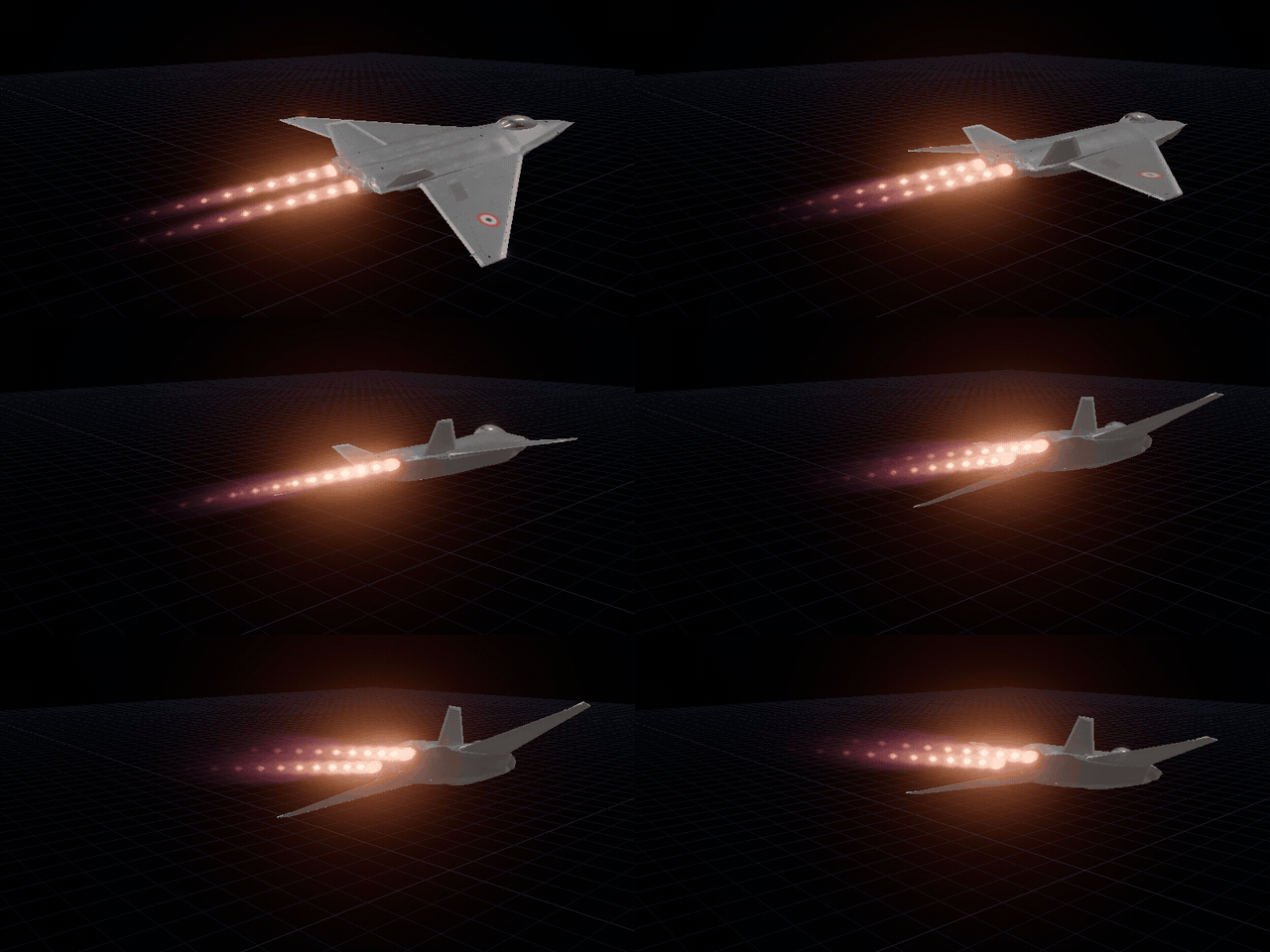
Raymarched jet and rocket plumes for React Three Fiber,
written in TSL for three's WebGPURenderer.
Each plume is a signed distance field, marched inside an instanced proxy hull: shock diamonds, a potential core, stretched eddies, a helical mode, soot and heat haze. Every plume sharing a batch is one instanced draw, with distance tiers so hundreds of nozzles stay cheap. Presets cover a clean afterburner, turbulent reheat, kerolox, hydrolox and methalox rockets, a solid booster and a plasma thruster, and the shader is exported piece by piece for building your own.
The docs have a tutorial, guides, live examples, the full reference and how
the shader works. This README is the short version. For the vapor a wing pulls
in humid air, see
@aeronautic/wing-vapor.
Install
pnpm add @aeronautic/afterburner @aeronautic/core three@~0.186Peer dependencies: @aeronautic/core, three 0.186.x, plus react 19 and
@react-three/fiber 9 (or 10) for the components in @aeronautic/afterburner/react.
The root, /physics and /tsl entries need no React.
Each release supports one three minor, because TSL changes between them.
It needs a WebGPURenderer (which falls back to WebGL 2 by itself); it does not
run on the classic WebGLRenderer. In R3F, gl={webgpu_gl()} from
@aeronautic/core/react makes one.
Quick start
<Afterburner> is a group where a nozzle sits. The plume streams out along the
group's local +Z, aft of a model that flies along -Z, and follows the group every frame. That is all a scene
needs: nozzles with no batch above them share one made for their scene and
preset.
import { Canvas } from "@react-three/fiber";
import { Afterburner } from "@aeronautic/afterburner/react";
import { webgpu_gl } from "@aeronautic/core/react";

const Jet = () => (
  <group>
    <JetModel />
    {/* On the nozzle's exit plane, 14 m aft of a model flying along -Z */}
    <Afterburner
      preset="afterburner"
      position={[0, 0, 14]}
      params={{ nozzleRadiusM: 0.55 }}
    />
  </group>
);

export const App = () => (
  <Canvas gl={webgpu_gl()}>
    <Jet />
  </Canvas>
);
The radiance is graded for exposure 1 with a filmic tone map (the docs use
AgXToneMapping) and reads best with a little bloom on top. Every distance is
in metres.
Presets
| name | what it is |
| ----------------------- | ---------------------------------------------------------------------------- |
| afterburner | A clean military reheat: blue core, crisp diamonds, almost no turbulence. |
| afterburner_turbulent | The same can, churning: the defaults. |
| rocket_kerolox | RP-1 and LOX: yellow-orange, sooty, opaque and very turbulent. |
| rocket_hydrolox | LH2 and LOX: nearly invisible violet with bright Mach disks and strong haze. |
| rocket_methalox | Methane and LOX: blue-violet root, pink-orange tail, clear diamonds. |
| solid_booster | An APCP booster: huge, white-yellow, dense and ragged. |
| plasma | A cyan, laminar, sci-fi drive. |
A preset sets both the per-nozzle params and the batch's shared profile.
The params are physical quantities in SI units: nozzle radius, exit Mach,
exit pressure ratio, exit temperature, gamma, molar mass, soot and particles.
The plume's length, width and shock spacing are not dials; they come out of the
jet those numbers make, so { nozzleRadiusM: 2 } on a rocket preset gives a
bigger rocket, not a stubby one. Colour comes from temperature through Planck's
law, except the gas's own band emission (bandColor).
Shaped nozzles
The exit needn't be round. Its outline is a superellipse, an ellipse at squareness 2 and a rounded rectangle above, and the jet mixes round downstream:
<Afterburner
  preset="afterburner"
  params={{
    nozzleRadiusM: 0.27, // the round exit of the same area
    nozzleAspect: 1.4, // width over height
    nozzleSquareness: 2, // 1 a diamond, 2 an ellipse, 4+ a rounded rectangle
    nozzleRoll: 0, // radians about the plume's axis
    nozzleOutlineLength: 1, // how long the shape lasts, in core lengths
  }}
/>
Any other outline is the outline hook, below.
Flight and propellant
The profile puts the engines in the air:
altitudeMandtemperatureOffsetKgive the International Standard Atmosphere's pressure, temperature and density. A rocket's plume balloons and thins as it climbs; leftover fuel and soot stop burning once there is too little oxygen.airspeedMPerSslows the mixing layer, lengthening the core and the shock train, and rams a jet engine's inlet.
A liquid rocket can be given its fuel and mixture ratio instead of raw soot and afterburning numbers; against a preset of the same fuel it also scales the exhaust temperatures:
<Afterburner
  preset="rocket_kerolox"
  params={{ propellant: { fuel: "kerosene", mixtureRatio: 2.0 } }}
/>atmosphere, propellant_effects, propellant_params and jet_state are
exported for working these out on the main thread.
Inside an @aeronautic/core <FlightProvider>, all of this comes from the
flight. The batch takes altitudeM, airspeedMPerS and
temperatureOffsetK from it, and a nozzle with no throttle prop follows
the flight's throttle. The flight is read only when it changes, inside the
batch's own frame update, so nothing renders:
<FlightProvider track={jet}>
  {/* throttle, altitude and airspeed from the flight */}
  <Afterburner position={[0, 0, 6]} />
</FlightProvider>
A number for throttle, or a write to the handle's throttle, takes over from
the flight. A function reads the flight its own way, and is called only when
the flight changes: throttle={(f) => f.throttle * 0.9} for an engine
spooling short of the other. source={null} ignores the flight altogether.
Inside an @aeronautic/controls <Engine>, a nozzle sits on that engine's
exhaust and runs at its throttle. It also turns with the nozzle when the
engine vectors:
<Engine side="left">
  <Afterburner />
</Engine>
A preset can also be an object of your own, { params, profile }, and
AFTERBURNER_PRESETS is there to spread from:
const sunset_booster = {
  params: {
    ...AFTERBURNER_PRESETS.solid_booster.params,
    bandColor: "#ff5a1f",
  },
  profile: AFTERBURNER_PRESETS.solid_booster.profile,
};
API
<Afterburner>
Takes every <group> prop (position, rotation, scale, children…), plus:
| prop | type | default | what it does |
| ----------- | -------------------------------------------- | ------------------------ | -------------------------------------------------------------------------------------------------------- |
| preset | AfterburnerPresetName \| AfterburnerPreset | the defaults | Which look to start from. Outside an <AfterburnerBatch> it also picks the batch, and so the profile. |
| params | AfterburnerParamsInput | — | How this plume looks, over the preset. Colours take any ColorRepresentation. |
| throttle | number \| (flight) => number | the flight's, else 1.1 | 0 to 1 is dry thrust, on to 1.1 at full reheat. A jet's burner lights past 1; a rocket's is always lit. |
| source | Flight \| null | nearest | The flight it follows. null follows none. |
| batch | AfterburnerBatchHandle | nearest | Draw it with this batch rather than the nearest one. |
| target | Object3D \| null | its <Engine>'s exhaust | Sit on this mesh, group or bone from anywhere in the scene. position/rotation are then in its frame. |
| direction | [x, y, z] | — | Which way the exhaust streams, in the frame it sits in. Wins over rotation. |
| ref | AfterburnerHandle | — | Imperative handle, see below. |
params is compared field by field, so an inline object is fine. A change
rewrites only this nozzle's instance. The group's scale scales the plume, look
and all.
AfterburnerHandle (ref)
Stable for the component's life, and safe to write before the nozzle is in a batch.
type AfterburnerHandle = {
  throttle: number; // cheap to write every frame; the plume eases toward it
  setParams: (params: AfterburnerParamsInput) => void; // replaces them all
  updateParams: (params: AfterburnerParamsInput) => void; // merges
  setOffset: (offset: AfterburnerOffset) => void; // move or turn it
  setDirection: (direction: [number, number, number]) => void;
  readonly params: Readonly<AfterburnerParams> | null;
  readonly object: Group | null;
  readonly nozzle: AfterburnerNozzle | null;
  readonly batch: AfterburnerBatchHandle | null;
};
To drive the throttle every frame without a render:
const engine = useRef<AfterburnerHandle>(null);

useFrame(({ clock }) => {
  if (engine.current) {
    engine.current.throttle = 0.95 + 0.15 * Math.sin(clock.elapsedTime * 3);
  }
});

<Afterburner ref={engine} />;
Placing it on a model
The plume leaves the group's origin along its local +Z. Nested in JSX, it
follows its parent like any child. For a node of a loaded model, or anything
else not in your JSX, pass it as target. The nozzle then sits on it, and
position and rotation (or direction) are in its frame:
const { nodes } = useGLTF("/jet.glb");

<Afterburner
  target={nodes.Engine}
  position={[0, 0, -4.2]} // the nozzle exit, in the engine's frame
  direction={[0, 0, -1]} // exhaust out of the back
/>;
To move it from code, write to the handle's object (it is the group) or use
setOffset:
engine.current?.setOffset({
  position: [0, 0.2, -4.2],
  direction: [0, -0.1, -1],
});
AfterburnerOffset takes position as a tuple or vector, rotation as an
Euler, a Quaternion or a tuple of either, and direction.
Changing the air from code
Per nozzle, updateParams changes the fields given and keeps the rest. The
altitude, airspeed and the day are the batch's: updateProfile does the same
for them. It only writes uniforms, so it is cheap every frame:
const batch = useRef<AfterburnerBatchHandle>(null);

useFrame(() => {
  batch.current?.updateProfile({ altitudeM: aircraft.position.y });
});

<AfterburnerBatch ref={batch}>…</AfterburnerBatch>;
Either one is overridden again when its prop changes.
<AfterburnerBatch>
For taking control of the batch its children draw with.
| prop | type | default | what it does |
| ------------------- | ----------------------------------------------------------------------- | -------- | --------------------------------------------------------------------- |
| preset | AfterburnerPresetName \| AfterburnerPreset | — | The profile to start from, and the look of nozzles that name none. |
| profile | Partial<AfterburnerProfile> | — | The plume shape every nozzle shares, as uniforms. Applies live. |
| quality | "low" \| "medium" \| "high" \| "ultra" \| Partial<AfterburnerQuality> | "high" | Step counts are uniforms; only an octave change recompiles. |
| haze | boolean | true | Heat haze. Compiled in only when some nozzle has refractionM > 0. |
| hooks | AfterburnerHooks | — | TSL to change the field or the pixel, see below. A change recompiles. |
| timeScale | number | 1 | Seconds of flame per second. |
| detailDistanceM | number | 900 | Past this, eddies are dropped. |
| cheapDistanceM | number | 3000 | Past this, a plume is a single sample. |
| minScreenFraction | number | 0.001 | Plumes smaller than this share of the screen height are not drawn. |
| pass | AfterburnerPass | — | Draw the plumes in their own pass, see below. A change rebuilds. |
| source | Flight \| null | nearest | The flight whose air and airspeed the profile follows. null: none. |
| ref | AfterburnerBatchHandle | — | The batch, for stats() or to drive it directly. |
useAfterburnerBatch() returns the nearest batch from inside one.
Without React
AfterburnerBatch is the plain three.js class underneath:
import { AfterburnerBatch } from "@aeronautic/afterburner";

const batch = new AfterburnerBatch({ preset: "rocket_kerolox" });
scene.add(batch.mesh);

const nozzle = batch.add({
  object: engine_bell,
  params: { nozzleRadiusM: 1.2 },
});
nozzle.throttle = 1.05; // the burner part-way in

// Or on a mesh, wherever it is, at an offset in its frame
const tail = batch.add({
  object: engine_node,
  offset: { position: [0, 0, -4.2], direction: [0, 0, -1] },
});
tail.setOffset({ position: [0, 0.1, -4.2] });
tail.attach(other_engine); // follow something else; attach(null) holds still
tail.updateParams({ exitMach: 1.6 });
batch.updateProfile({ altitudeM: 9000 });

batch.stats(); // { nozzles, near, mid, far, culled }
A nozzle follows its object's world matrix, or a matrix you write yourself.
The batch updates in the mesh's onBeforeRender, once a frame however many
cameras draw it.
Changing the shader
Hooks
Hooks are TSL functions, built into the material when it compiles. They are the easy way to change the look without forking:
import { atan, cos, mix, vec3 } from "three/tsl";

const hooks: AfterburnerHooks = {
  // The temperature at a sample, in kelvin: 10% hotter on the axis
  temperature: (kelvin, sample) =>
    kelvin.mul(sample.across.oneMinus().max(0).mul(0.1).add(1)),

  // What a sample emits per metre, before exposure
  emission: (rgb, sample) =>
    mix(rgb, rgb.mul(vec3(1, 0.8, 0.6)), sample.mixture),

  // Your own eddies, in [0, 1], over flow space
  turbulence: (flow) => my_noise(flow),

  // The final pixel, in linear radiance
  radiance: (rgb, pixel) => rgb.mul(1.2),

  // Any nozzle outline: its radius in each direction, in nozzle radii, and
  // the most it ever is. Here eight lobes, 15% deep
  outline: {
    radius: (direction) =>
      cos(atan(direction.y, direction.x).mul(8)).mul(0.15).add(1),
    reach: 1.15,
  },
};

<AfterburnerBatch hooks={hooks}>…</AfterburnerBatch>;
Make hooks stable (a module constant or useMemo): a new object recompiles.
The TSL itself
@aeronautic/afterburner/tsl exports every piece the material is made of, for building
a material of your own:
- Noise:
hash_cell,value_noise,wander_noise,turbulence,signed. - Light:
blackbody, temperature to linear radiance from a Planck lookup. - The jet:
plume_jet(the fully expanded jet from the nozzle, the gas and the air),plume_half_width,plume_centreline. - The field:
plume_frame(a point in the nozzle's frame to its station and mixing layer),plume_field(temperature, mixture, extinction and emission there),plume_bound(how far a march may safely step),plume_outline(a point measured against the nozzle's outline), plusplume_span,plume_closestandplume_station. - The material:
create_afterburner_material,create_afterburner_uniforms,write_afterburner_profileandAFTERBURNER_ATTRIBUTES(the instance attribute names).
Each takes its inputs explicitly through a PlumeContext ({ jet, profile,
time, blackbody }), so it works from any material, instanced or not. The
profile nodes include air, the atmosphere write_afterburner_profile works
out on the CPU.
Performance
- One draw call per batch, whatever the nozzle count. Only nozzles whose matrix changed are re-uploaded, by update range.
- Four tiers per plume, picked in the vertex shader: near (full march with eddies), mid (no eddies), far (one sample) and culled.
- The march skips empty space by a conservative bound and stops once the flame is opaque.
- Steps are shared out by screen area: a plume filling the frame up close gets fewer, down to the mid tier's count, so a frame costs about the same however near the camera comes.
qualitypresets trade steps for speed;lowsuits phones.
Half resolution
A raymarch costs per pixel, and a plume is soft enough to lose little at half
the resolution. @aeronautic/core's volume_pass draws the plumes, and any
wing's vapor with them, in a pass of their own at a share of the frame and lays
them back over the scene. The upsample is weighted by depth, so a nozzle's edge
stays sharp. Close up and astern of a fighter it takes the worst case from
6.8 ms to 2.7 ms.
import { volume_pass } from "@aeronautic/core";
import { VolumePassContext } from "@aeronautic/core/react";

const split = volume_pass(scene, camera, { resolutionScale: 0.5 });

render_pipeline.outputNode = split.output; // then bloom it, grade it…

<VolumePassContext value={split}>…</VolumePassContext>;
split.output replaces your scene pass: it is the scene with the plumes on it.
Every plume inside the context draws in the pass. Without React, give
AfterburnerBatch backdrop: split.backdrop and add its mesh to
split.scene. afterburner_pass is the same pass, under its older name.
How it works
How it works, in the docs, covers why the plume is a distance field, what each dial means physically, why shock diamonds need the camera nearly abeam, and how the tiers work.
How it was made
This library was written with AI, under human supervision throughout: every change was directed, reviewed and checked in the browser by its author. Performance was the main goal from the start, and every choice that costs GPU time was measured.
License
MIT © Romain Le Gall