
@agentic-eng/agent
v0.2.5
Published
Core agent class and orchestrator for the EASA framework.

Maintainers
 lahiruratnayaka
Readme
Agentic Engineering Framework



Beta — API may change before 1.0. Feedback welcome!
What is the Agentic Engineering Framework?
The Agentic Engineering Framework is a minimal, type-safe TypeScript framework for building LLM-powered agent systems. It provides the building blocks for agents that can reason, use tools, persist knowledge, and emit observable events — all with a clean, composable API and zero LLM lock-in.
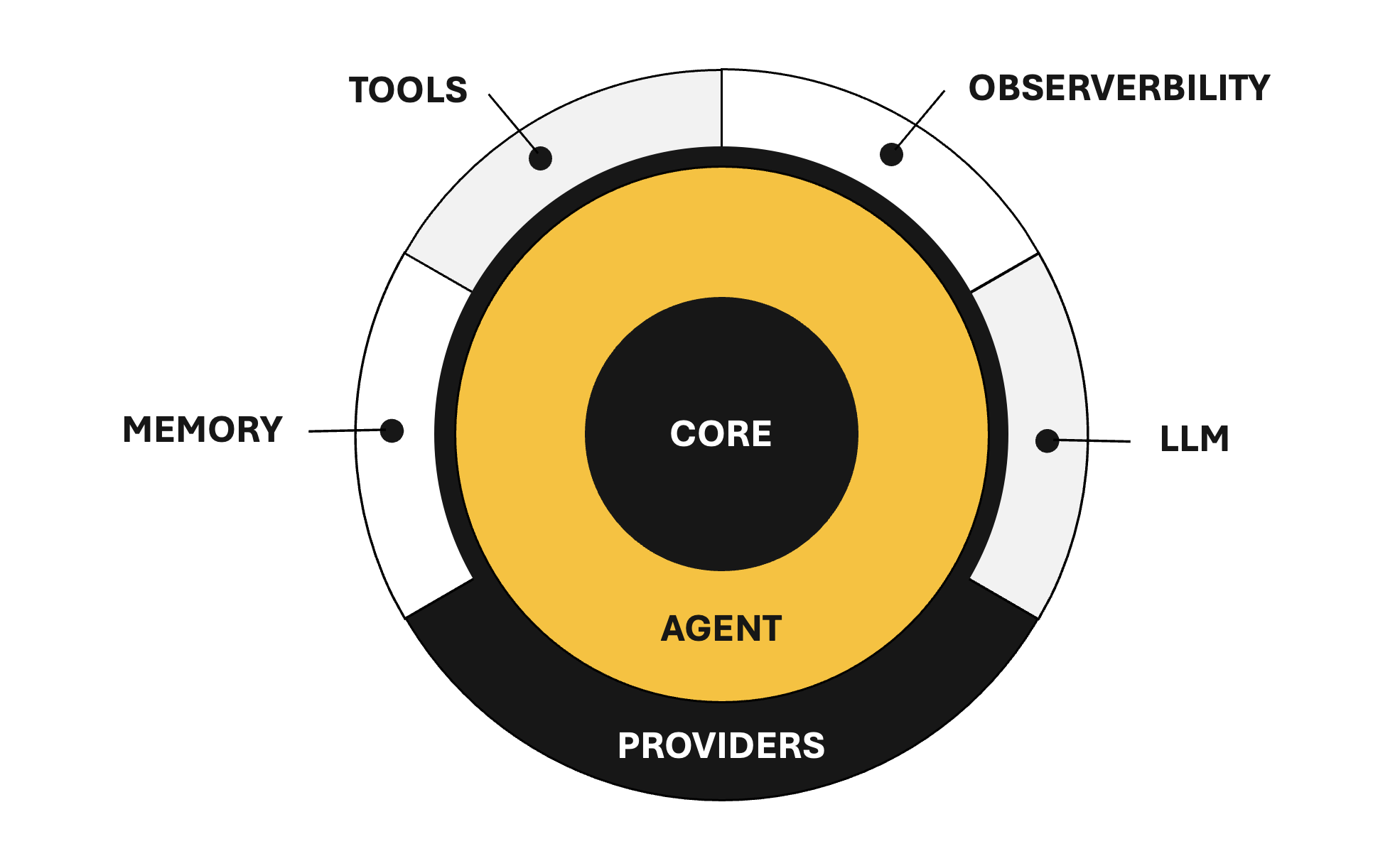
Package Ecosystem
The framework is modular — install only what you need:
| Package | Description |
| --- | --- |
| @agentic-eng/agent (this package) | Agent class, reasoning loop, and re-exports from core packages |
| @agentic-eng/core | Shared types, enums, and error classes |
| @agentic-eng/provider | Interface-only contracts (LlmProvider, MemoryProvider, ObservabilityProvider) |
| @agentic-eng/tool | Tool interface and ToolRegistry |
| @agentic-eng/memory | Memory implementations (FlatFileMemory) |
| @agentic-eng/observability | Observability implementations (ConsoleObserver, NoopObserver) |
This package (@agentic-eng/agent) is the main entry point. It re-exports all types from core, all interfaces from provider, and the ToolRegistry from tool — so for most users, this is the only required install. Memory and observability implementations are optional add-ons.
Installation
npm install @agentic-eng/agent

# Optional — add concrete implementations as needed:
npm install @agentic-eng/memory          # FlatFileMemory (KNL-based persistence)
npm install @agentic-eng/observability    # ConsoleObserver, NoopObserver
Quick Start
1. Implement an LLM Provider
The framework ships zero LLM dependencies — you bring your own backend (OpenAI, Anthropic, local models, etc.):
import type { LlmProvider } from '@agentic-eng/provider';
import type { Message, Completion, CompletionChunk } from '@agentic-eng/core';

const myProvider: LlmProvider = {
  async chat(messages: Message[]): Promise<Completion> {
    const response = await callYourLLM(messages);
    return { message: { role: 'assistant', content: response.text } };
  },

  async *chatStream(messages: Message[]): AsyncIterable<CompletionChunk> {
    for await (const chunk of streamYourLLM(messages)) {
      yield { delta: chunk.text, done: chunk.finished };
    }
  },
};
2. Create an Agent
import { Agent } from '@agentic-eng/agent';

const agent = new Agent({
  name: 'assistant',
  provider: myProvider,
  systemPrompt: 'You are a helpful assistant.',
});
3. Invoke the Agent
Non-streaming — runs the full reasoning loop and returns the final result:
const result = await agent.invoke('What is the capital of Thailand?');
console.log(result.content);               // "Bangkok is the capital of Thailand."
console.log(result.trace.totalIterations);  // 1
Streaming — yields chunks as they arrive (single-pass, no reasoning loop):
for await (const chunk of agent.invokeStream('Tell me about Thailand.')) {
  process.stdout.write(chunk.delta);
}
Adding Tools for Agent
Tools let the agent interact with external systems. Define tools with the Tool interface and group them in a ToolRegistry (both re-exported from @agentic-eng/tool):
import { ToolRegistry } from '@agentic-eng/tool';
import type { Tool } from '@agentic-eng/tool';

const calculator: Tool = {
  definition: {
    name: 'calculator',
    description: 'Evaluates arithmetic expressions.',
    inputSchema: {
      type: 'object',
      properties: {
        expression: { type: 'string', description: 'Math expression to evaluate' },
      },
      required: ['expression'],
    },
  },
  async execute(input) {
    const result = evaluate(input.expression as string);
    return { toolName: 'calculator', success: true, output: String(result) };
  },
};

const tools = new ToolRegistry();
tools.register(calculator);

const agent = new Agent({
  name: 'math-agent',
  provider: myProvider,
  tools,
});

const result = await agent.invoke('What is 42 × 17?');
// Agent calls calculator tool, gets 714, returns formatted answer
The agent uses a hybrid schema approach to save tokens:
- Every LLM call — only tool names + descriptions are sent (~10 tokens per tool)
- When a tool is needed — the full JSON Schema for that specific tool is injected on demand
This scales well even with 50+ tools registered. See @agentic-eng/tool for the full ToolRegistry API.
Adding Memory for Agent
Memory lets the agent persist knowledge across invocations. The LLM decides when to store information. Install the optional memory package:
npm install @agentic-eng/memoryimport { FlatFileMemory } from '@agentic-eng/memory';
const agent = new Agent({
name: 'assistant',
provider: myProvider,
memory: new FlatFileMemory({ directory: './agent-memory' }),
});Memories are stored as KNL DATA blocks. You can also implement your own backend (vector DB, Redis, Postgres, etc.) — see @agentic-eng/memory for details, or implement the MemoryProvider interface from @agentic-eng/provider directly.
Adding Observability for Agent
Every lifecycle point emits a structured event, designed for OTEL integration. Install the optional observability package:
npm install @agentic-eng/observabilityimport { ConsoleObserver } from '@agentic-eng/observability';
const agent = new Agent({
name: 'assistant',
provider: myProvider,
observability: new ConsoleObserver(),
});Console output:
[AEF] 14:23:05.123Z INVOKE:START agent="assistant" prompt="What is 42 × 17?"
[AEF] 14:23:05.124Z ITER:START iteration=1/5
[AEF] 14:23:05.125Z LLM:START messages=3
[AEF] 14:23:05.830Z LLM:END tokens=142
[AEF] 14:23:05.831Z TOOL:START tool="calculator"
[AEF] 14:23:05.832Z TOOL:END tool="calculator" success=true
[AEF] 14:23:06.201Z ITER:END iteration=2 action="done"
[AEF] 14:23:06.202Z INVOKE:END agent="assistant" iterations=2 completed=true
You can also implement your own observer for OTEL, Datadog, etc. — see @agentic-eng/observability for details, or implement the ObservabilityProvider interface from @agentic-eng/provider directly.
Event Types
| Event | When |
| --- | --- |
| agent.invoke.start / end | Invoke lifecycle |
| agent.invoke_stream.start / end | Stream lifecycle |
| agent.iteration.start / end | Each reasoning iteration |
| llm.call.start / end | Each LLM API call |
| tool.call.start / end | Tool execution |
| tool.schema.inject | Full schema injected for a tool |
| tool.not_found | LLM requested unknown tool |
| memory.store | Knowledge persisted |
| agent.error | Any error during execution |
Error Handling
All errors extend AgenticError for easy catching:
import { MaxIterationsError, ProviderError } from '@agentic-eng/core';

try {
  await agent.invoke('Complex task');
} catch (error) {
  if (error instanceof MaxIterationsError) {
    console.log(`Gave up after ${error.iterationsCompleted} iterations`);
  } else if (error instanceof ProviderError) {
    console.log('LLM call failed:', error.cause);
  }
}
| Error | When |
| --- | --- |
| AgentConfigError | Invalid agent configuration |
| ProviderError | LLM provider call fails |
| MaxIterationsError | Reasoning loop exceeds limit |
| ReasoningParseError | LLM returns invalid JSON |
| ToolExecutionError | Tool execution fails |
API Reference
AgentConfig
interface AgentConfig {
  name: string;                       // Required — unique agent name
  provider: LlmProvider;              // Required — your LLM backend
  description?: string;               // What this agent does
  systemPrompt?: string;              // Custom system prompt
  defaultOptions?: ChatOptions;       // Default LLM options (temperature, maxTokens, etc.)
  maxIterations?: number;             // Max reasoning iterations (default: 5)
  memory?: MemoryProvider;            // Knowledge persistence (@agentic-eng/memory)
  tools?: ToolRegistry;               // Available tools (@agentic-eng/tool)
  observability?: ObservabilityProvider; // Event observer (@agentic-eng/observability)
}
InvokeResult
interface InvokeResult {
  content: string;       // Final answer
  trace: ReasoningTrace; // Full reasoning trace (iterations, completed, totalIterations)
}
Agent Methods
| Method | Returns | Description |
| --- | --- | --- |
| invoke(prompt, options?) | Promise<InvokeResult> | Run reasoning loop to completion |
| invokeStream(prompt, options?) | AsyncIterable<CompletionChunk> | Stream a single-pass response |
| getMessages() | Message[] | Copy of conversation history |
| clearHistory() | void | Reset conversation |
Full Example
import { Agent } from '@agentic-eng/agent';
import { ToolRegistry } from '@agentic-eng/tool';
import type { Tool } from '@agentic-eng/tool';
import type { LlmProvider } from '@agentic-eng/provider';
import { FlatFileMemory } from '@agentic-eng/memory';
import { ConsoleObserver } from '@agentic-eng/observability';

// 1. Provider — bring your own LLM
const provider: LlmProvider = { /* your implementation */ };

// 2. Tools — give the agent capabilities
const weatherTool: Tool = {
  definition: {
    name: 'weather',
    description: 'Gets current weather for a city.',
    inputSchema: {
      type: 'object',
      properties: { city: { type: 'string', description: 'City name' } },
      required: ['city'],
    },
  },
  async execute(input) {
    const data = await fetchWeather(input.city as string);
    return { toolName: 'weather', success: true, output: JSON.stringify(data) };
  },
};

const tools = new ToolRegistry();
tools.register(weatherTool);

// 3. Agent — compose everything together
const agent = new Agent({
  name: 'travel-assistant',
  provider,
  systemPrompt: 'You are a helpful travel planning assistant.',
  tools,
  memory: new FlatFileMemory({ directory: './memory' }),
  observability: new ConsoleObserver(),
  maxIterations: 10,
});

// 4. Use
const result = await agent.invoke('What should I pack for Bangkok next week?');
console.log(result.content);
Feedback & Contact
Have questions, feedback, or ideas? I'd love to hear from you:
- Email: [email protected]
- LinkedIn: Lahiru Nimantha