npm package discovery and stats viewer.

Discover Tips

  • General search

    [free text search, go nuts!]

  • Package details

    pkg:[package-name]

  • User packages

    @[username]

Sponsor

Optimize Toolset

I’ve always been into building performant and accessible sites, but lately I’ve been taking it extremely seriously. So much so that I’ve been building a tool to help me optimize and monitor the sites that I build to make sure that I’m making an attempt to offer the best experience to those who visit them. If you’re into performant, accessible and SEO friendly sites, you might like it too! You can check it out at Optimize Toolset.

About

Hi, 👋, I’m Ryan Hefner  and I built this site for me, and you! The goal of this site was to provide an easy way for me to check the stats on my npm packages, both for prioritizing issues and updates, and to give me a little kick in the pants to keep up on stuff.

As I was building it, I realized that I was actually using the tool to build the tool, and figured I might as well put this out there and hopefully others will find it to be a fast and useful way to search and browse npm packages as I have.

If you’re interested in other things I’m working on, follow me on Twitter or check out the open source projects I’ve been publishing on GitHub.

I am also working on a Twitter bot for this site to tweet the most popular, newest, random packages from npm. Please follow that account now and it will start sending out packages soon–ish.

Open Software & Tools

This site wouldn’t be possible without the immense generosity and tireless efforts from the people who make contributions to the world and share their work via open source initiatives. Thank you 🙏

© 2026 – Pkg Stats / Ryan Hefner

@ahggg/dsh-side-chat

v0.4.0

Published

Codex-style side conversations for DeepSeek Harness

Readme

dsh-side-chat

在不离开当前 DeepSeek Harness 主会话的情况下,针对选中的文本发起一个独立的侧边对话。

兼容性:当前版本仅适配 @deepseek-ai/[email protected]

English

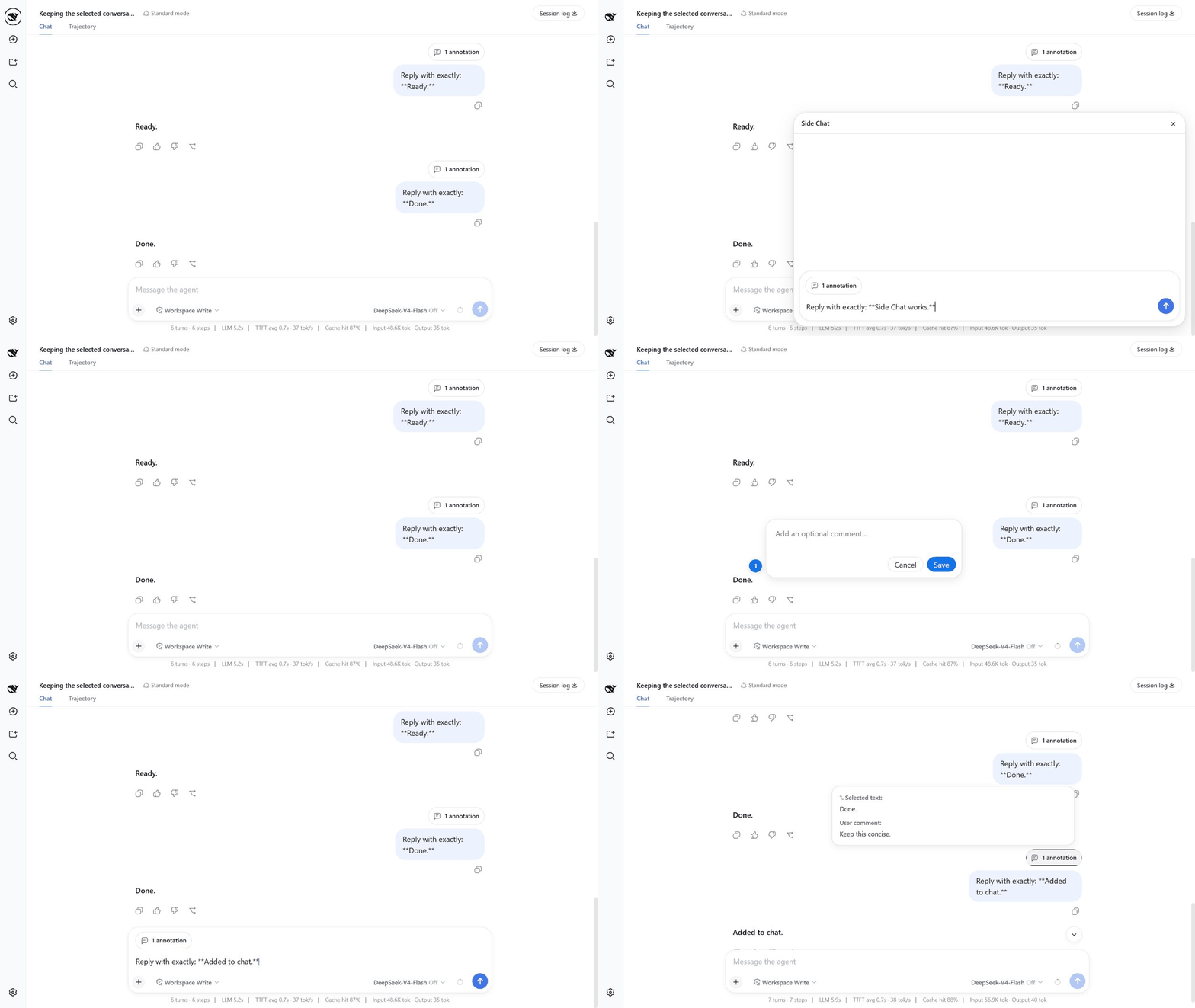
先在 Side Chat 中询问选中文本,再把带批注的选区加入主会话

安装

如果尚未安装 DSH rc.6,先安装它,然后把插件添加到 Web profile:

npm install --global @deepseek-ai/[email protected]
dsh plugin --profile web add @ahggg/dsh-side-chat

从希望 Agent 操作的真实工程目录启动 DSH:

cd E:\path\to\your-project
dsh web --port 3080

打开 DSH 输出的网址,插件会自动加载到 Web 客户端中。

使用 Side Chat

  1. 在主会话中至少完成一轮对话。
  2. 在一条已完成的用户或助手消息内选中文字。
  3. 点击 Add to chat 可以先填写一条可选批注,再把引用加入主会话输入框;点击 More details 可以立即发送详细解释请求;点击 Ask in side chat 可以自己输入聚焦问题。
  4. 自己输入消息或问题时,按 Enter 发送。
  5. 完成后按 Esc,或者点击 × 关闭。

常用操作:

  • Shift+Enter 换行。
  • 点击 Add to chat 后,按 Enter 或点击 Save 保存 annotation;点击批注框外部或点击 Cancel 则直接取消。
  • Add to chat 会保留输入框中已有的草稿,并可把多段带序号的文本及各自的可选批注汇总到同一个 annotation 胶囊中。
  • 输入框会随内容自动增高,达到最大高度后在内部滚动。
  • 回复生成期间,发送图标会替换为停止按钮。
  • Assistant 回复使用 DSH 原生 Markdown 渲染。
  • hover N annotations 可以预览每一段所选文本及对应批注。
  • 发送前可以 hover annotation 胶囊并点击 × 移除;发送后,同一个胶囊会显示在用户消息上方。
  • 主会话会一直保留在页面中,不会自动切换到 child Session。

会话和数据如何处理

第一次发送时,插件会在所选消息处创建一个真实的 DSH Session fork。child 会继承完整事件前缀、模型配置、preset 和 workspace。保持前缀不变有利于供应商的 prompt cache 复用,但不保证一定命中缓存。

关闭 Side Chat 时,插件会停止正在运行的任务、归档 child Session,并释放其 Agent;不会删除 child 的磁盘历史。因此,child 和复制的完整前缀会占用正常的 DSH Session 存储空间。

父会话与 child 共享同一个 workspace。Side Chat 中产生的文件修改、命令执行及其他工具副作用都是真实的,关闭面板不会撤销它们。

当前限制

  • 选区必须位于同一条已完成消息内。
  • 暂不支持附件和 /side
  • 关闭后不能从面板重新打开原 Side Chat。
  • 暂无自动历史清理或“保留为普通会话”操作。
  • 已归档的 child 可能短暂出现在普通会话列表中。

升级或卸载

升级到最新稳定版并重启 DSH:

dsh plugin --profile web update @ahggg/dsh-side-chat --latest

刚发布新版本时,pnpm 可能复用旧的 registry metadata,导致已有安装仍停留在旧版。只清理这个包的 metadata 缓存,然后重试升级:

pnpm cache delete "@ahggg/dsh-side-chat"
dsh plugin --profile web update @ahggg/dsh-side-chat --latest

卸载插件:

dsh plugin --profile web remove @ahggg/dsh-side-chat

许可证

MIT