
@ai-gui/plugin-topology
v0.49.0
Published
Infrastructure topology diagrams for AIGUI — nodes in hosts and racks, links, states, laid out automatically, with steps that play a process: messages moving, nodes failing over.

Maintainers
 cy_li
Readme
@ai-gui/plugin-topology
Infrastructure topology diagrams for AIGUI: nodes in hosts,
racks and zones, the links between them and the state each is in — laid out automatically — with
steps that play a process over them: a write travelling to the primary, the replication to its
replica, the replica taking over when the primary fails.
pnpm add @ai-gui/core @ai-gui/plugin-topologyimport { topology } from "@ai-gui/plugin-topology"
const plugins = [topology()]What the model writes
Nothing is placed by hand. The model says what exists, where it lives and what connects to what; dagre lays it out in layers and the groups are drawn round their members. A step says only what changes — a state set in step 2 holds afterwards.
{
  "title": "Database replication",
  "groups": [
    { "id": "h1", "label": "node-a" },
    { "id": "h2", "label": "node-b" }
  ],
  "nodes": [
    { "id": "app", "label": "app", "kind": "client" },
    { "id": "db1", "label": "db", "kind": "database", "group": "h1", "state": "primary", "note": "primary" },
    { "id": "db2", "label": "db", "kind": "database", "group": "h2", "state": "secondary", "note": "replica" }
  ],
  "links": [
    { "from": "app", "to": "db1", "label": "writes" },
    { "id": "rep", "from": "db1", "to": "db2", "label": "sync replication" }
  ],
  "steps": [
    { "caption": "The app writes to the primary", "messages": [{ "from": "app", "to": "db1", "label": "write" }], "highlight": ["db1"] },
    { "caption": "The primary replicates the write to the replica", "messages": [{ "from": "db1", "to": "db2", "label": "data" }] },
    { "caption": "The replica acks once on disk; only then is the write complete", "messages": [{ "from": "db2", "to": "db1", "label": "ack" }] },
    { "caption": "node-a fails; replication stops", "states": { "db1": "failed" }, "links": { "rep": "down" } },
    { "caption": "node-b is promoted and takes over writes", "states": { "db2": "primary" }, "highlight": ["db2"] }
  ]
}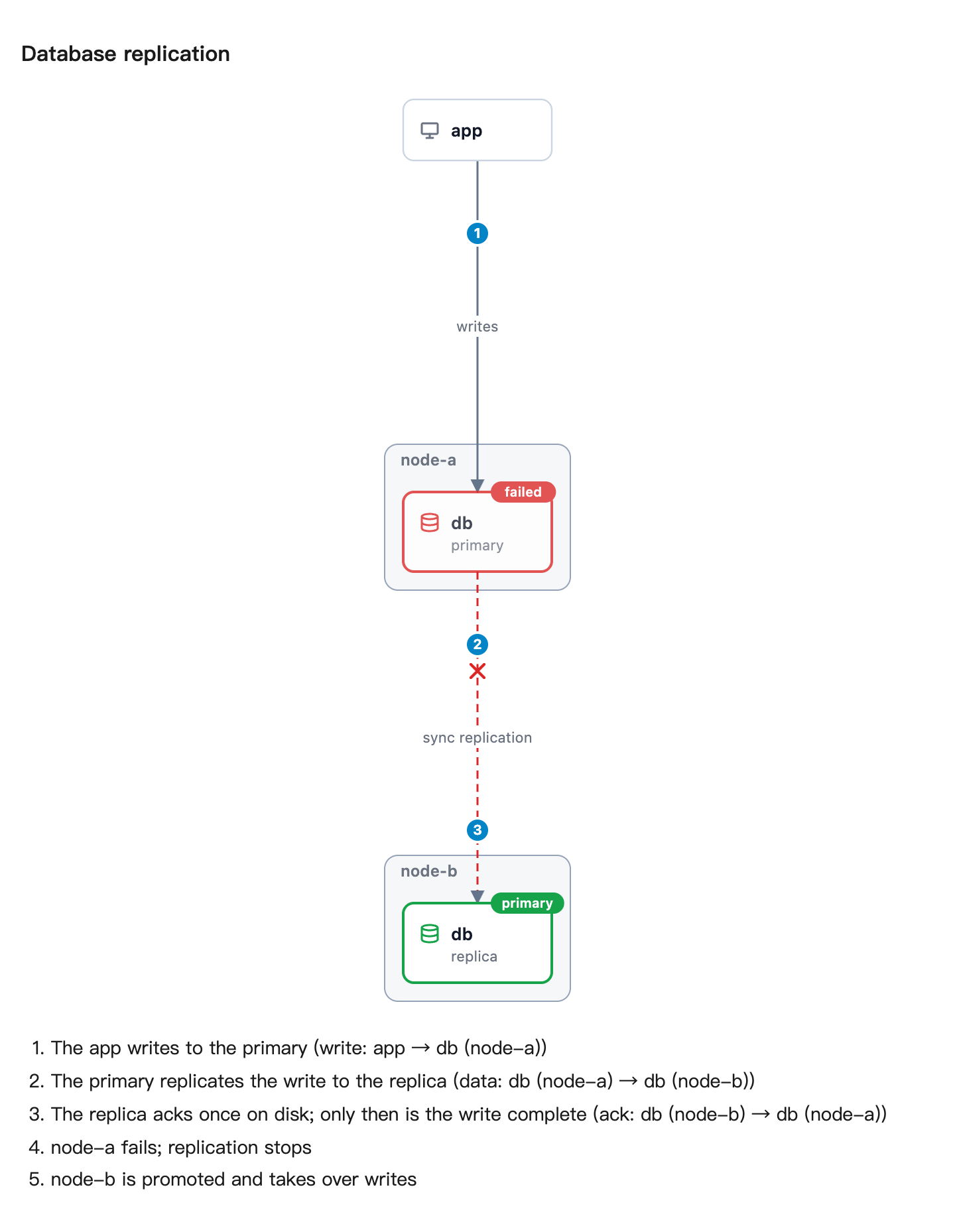
In the page the steps play: each step's messages travel along the links, then its state changes
land, with controls to pause and step. Drawn still (animate: false, as @ai-gui/image draws it),
every message is a numbered marker on its route and the steps are listed under the picture.
| | |
| --- | --- |
| Node | id, label, kind (server, vm, container, disk, database, network, balancer, client, service, process, queue, cloud), group, state, note |
| State | primary active ok (green), secondary standby (blue), syncing degraded warning (amber), failed down (red), offline unknown (grey), diskless (purple) |
| Group | id, label, group (nested inside another) |
| Link | from, to, id, label, style (solid, dashed), directed, state (up, down, active) |
| Step | caption, messages (from, to, label), states, links, highlight |
Every reference is checked: a link to a node that does not exist, a group inside itself, an empty
group or a step changing a link with no id is refused with a message naming it.
Options
animate?: boolean— play the steps.falsedraws the finished state with every step numbered. Defaulttrue.stepMs?: number— milliseconds per step. Default 2400.maxNodes?: number— refuse a topology with more nodes than this. Default 60.maxSourceBytes?: number— refuse a larger fence before parsing it. Default 48 KiB.