
@ai-sdk-letta/provider
v0.1.1
Published
Vercel AI SDK LanguageModel for Letta agents over the Letta Agent SDK. Unofficial port of letta-ai/vercel-ai-sdk-provider.

Maintainers
 leokoko
Readme
@ai-sdk-letta/provider
A Vercel AI SDK LanguageModel for Letta agents, speaking the Letta Code
app-server protocol through @letta-ai/letta-agent-sdk.
Unofficial. This package is a port of Letta's MIT-licensed
@letta-ai/vercel-ai-sdk-provider(Copyright (c) 2025 Letta) from the Letta REST client to the Letta Agent SDK. It is maintained as part of ai-sdk-letta, is not affiliated with or endorsed by Letta or Vercel, and keeps the original MIT license (LICENSE). The upstream git history is preserved in this repository. See PORT-NOTES.md for what changed and why.
Provider or Agent? Use this provider when you want generateText /
streamText against an existing Letta agent, with Letta running its own
tools. Use the ai-sdk-letta LettaAgent when your
application owns the tools and the human interactions (approvals and
questions) and you want a persistent agent defined in code.
What is Letta?
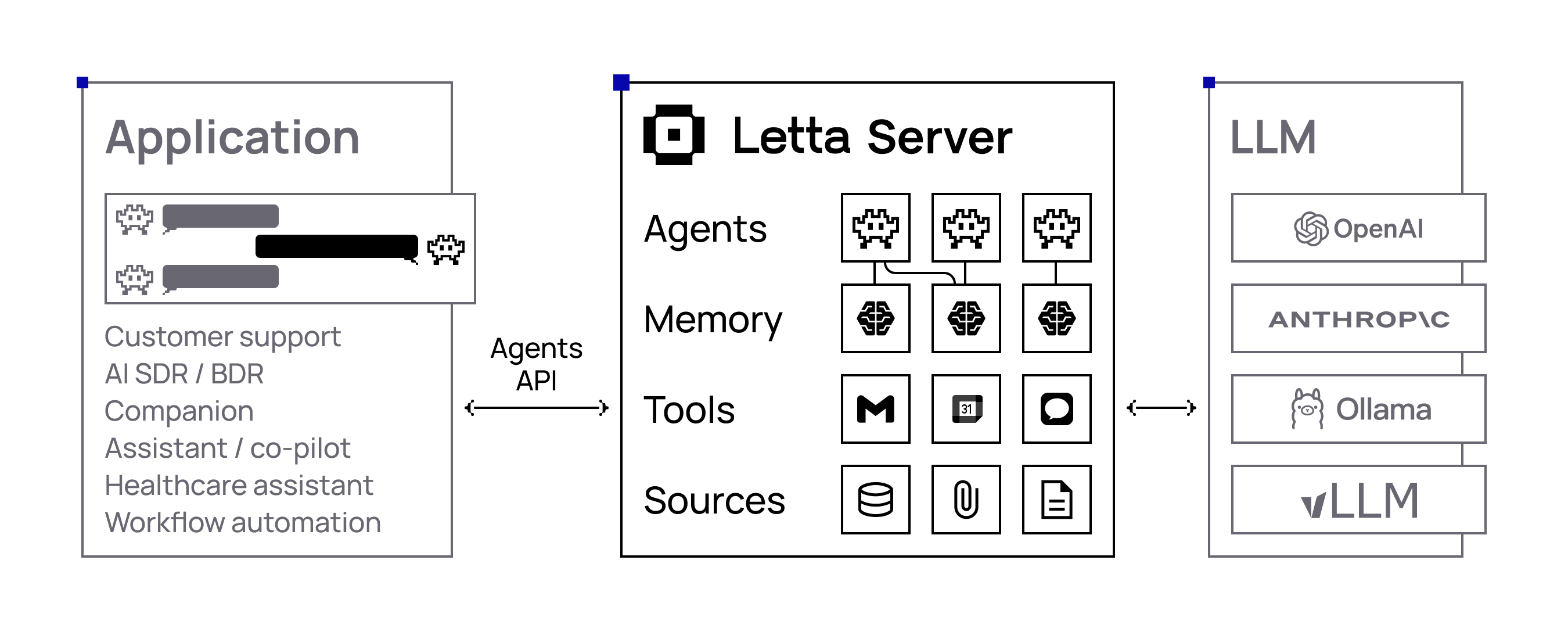
Letta is an open-source platform for building stateful agents with advanced memory and infinite context length. Built with persistence and memory management, with full support for custom tools and MCP (Model Context Protocol). Letta agents can remember context across sessions, learn from interactions, and maintain consistent personalities over time. Letta agents maintain memories across sessions and continuously improve, even while they sleep.
Letta Provider Features for Vercel AI SDK v5+
- 🤖 Agent-Based Architecture: Work directly with Letta agents that maintain persistent memory and state
- 💬 Streaming & Non-Streaming Support:
- AI SDK Core:
streamText(),generateText() - AI SDK UI:
useChat()
- AI SDK Core:
- 🧠 AI Reasoning Tokens: Access to both agent-level and model-level reasoning with source attribution
- 🛠️ Tool Integration: Support for agent-configured tools and MCP (Model Context Protocol)
- ⏱️ Configurable Timeouts: Custom timeout settings for long-running agent operations
- 🔄 Message Conversion: Built-in utilities to convert between Letta and AI SDK message formats
- 🎯 Provider Options: Letta-specific configuration through
providerOptions.agent - 📡 Real-time Features: Support for background processing, pings, and multi-step agent workflows
- 🔗 Cloud & Local Support: Compatible with both Letta Cloud and self-hosted Letta instances
- ⚡ React Integration: Optimized for Next.js and React applications with
useChathook support
Installation
npm install @ai-sdk-letta/provider ai zodai (7.x) and zod (4.x) are peer dependencies. This package starts at
0.1.0 under its new name; see CHANGELOG.md for the fork's
history.
Quick Start
1. Choose a backend
The provider speaks the Letta Code app-server protocol, so it works against Letta Cloud, a local runtime, or an app server you host yourself.
import { lettaCloud, lettaLocal, lettaRemote } from '@ai-sdk-letta/provider';

// Letta Cloud — set LETTA_API_KEY
const cloud = lettaCloud;

// Local runtime — the SDK spawns its own app-server; state under ~/.letta
const local = lettaLocal;

// Your own app server
const remote = lettaRemote({
  url: 'ws://your-host:4500',
  authToken: process.env.APP_SERVER_TOKEN, // capability token, if enabled
});
Start a self-hosted app server with:
letta server --listen ws://0.0.0.0:4500 \
  --ws-auth capability-token --ws-token-file /path/to/token
Give the agent model access on that machine (letta connect anthropic-oauth,
letta connect anthropic --api-key ..., letta connect ollama, …).
2. Basic Usage
Send Message - Non-Streaming Text Generation
import { lettaCloud } from '@ai-sdk-letta/provider';
import { generateText } from 'ai';

const result = await generateText({
  model: lettaCloud(), // Model configuration (LLM, temperature, etc.) is managed through your Letta agent
  providerOptions: {
    letta: {
      agent: { id: 'your-agent-id' }
    }
  },
  prompt: 'Write a vegetarian lasagna recipe for 4 people.',
});

console.log(result.text);
Send Message - Streaming Responses
import { lettaCloud } from '@ai-sdk-letta/provider';
import { streamText } from 'ai';

const result = streamText({
  model: lettaCloud(), // Model configuration (LLM, temperature, etc.) is managed through your Letta agent
  providerOptions: {
    letta: {
      agent: { id: 'your-agent-id' }
    }
  },
  prompt: 'Tell me a story about a robot learning to paint.',
});

for await (const textPart of result.textStream) {
  console.log(textPart);
}
3. Configure the session (Advanced)
Everything about how a turn runs — model override, reasoning effort,
permission mode, allowed tools, client-executed tools, MCP servers — is set
through providerOptions.letta.session, which is passed to the SDK's
resumeSession:
const result = await generateText({
  model: letta(),
  providerOptions: {
    letta: {
      agent: { id: 'agent-...', conversationId: 'conv-for-this-user' },
      session: {
        model: 'anthropic/claude-fable-5',
        reasoningEffort: 'medium',
        permissionMode: 'unrestricted',
        allowedTools: ['TaskList'],
      },
    },
  },
  prompt: 'Summarise today\'s tasks.',
});
Sessions are cached per agent/conversation and reused across turns, so these
options take effect when a conversation's session is first opened. Call
letta.close() on shutdown to release them.
The 1.x request parameters (maxSteps, background, timeoutInSeconds,
includePings, ...) were REST-specific and are no longer accepted; passing
them produces a call warning. See CHANGELOG.md.
Configuration
Environment Variables
| Variable | Description | Used by |
|----------|-------------|---------|
| LETTA_API_KEY | Letta Cloud API key | lettaCloud |
Self-hosted and local backends take their configuration as arguments rather
than environment variables. LETTA_BASE_URL is no longer used: it addressed
the retired REST API, which an app server does not serve.
Provider Setup
Letta Cloud
import { lettaCloud } from '@ai-sdk-letta/provider';
const model = lettaCloud(); // model/settings live on the Letta agent
Local runtime
Agent state stays on this machine and tools execute here.
import { lettaLocal } from '@ai-sdk-letta/provider';
const model = lettaLocal();
Self-hosted app server
import { lettaRemote } from '@ai-sdk-letta/provider';

const letta = lettaRemote({
  url: 'ws://your-host:4500',
  authToken: process.env.APP_SERVER_TOKEN,
});
const model = letta();
Tools execute on the app-server machine, not the caller's.
Some runtimes — notably test runners such as vitest — ship a global
WebSocket that fails to connect. Pass an implementation explicitly there:
import WebSocket from 'ws';
lettaRemote({ url, authToken, WebSocket });
One agent, many users
Pass a conversationId per end user to get isolated transcripts over one
shared agent memory:
providerOptions: {
  letta: { agent: { id: 'agent-...', conversationId: 'conv-for-this-user' } },
}
Omit it to use the agent's default conversation.
Tool calls
Letta agents run their own tools. The provider reports each call the agent
makes as a provider-executed tool call (providerExecuted: true), so you
do not need to register anything with the AI SDK — tool-call and
tool-result parts appear in the stream, generateText returns them in
toolCalls/toolResults, and the AI SDK will neither look them up, execute
them, nor wait for a client result. tool() remains available purely as a
typing convenience for callers who want typed tool parts.
One thing you must set: a permission mode. The default asks a human to
approve tool calls, and a provider has no approver attached, so tool-using
turns fail with approval_conflict:
providerOptions: {
  letta: {
    agent: { id: 'agent-...' },
    session: { permissionMode: 'unrestricted', allowedTools: ['TaskList'] },
  },
}
unrestricted runs server-side tools (including Bash) without prompting;
scope the toolset with allowedTools accordingly.
To run a tool in your own process (for example with the end user's
credentials), pass Letta AgentTools through session.tools.
Custom configuration
import { createLetta } from '@ai-sdk-letta/provider';

const letta = createLetta({ backend: 'remote', url: 'ws://host:4500', authToken: '...' });
const model = letta();
Working with Letta Agents
Creating a New Agent
// https://docs.letta.com/api-reference/agents/create

import { LettaAgentClient } from "@letta-ai/letta-agent-sdk";

const client = new LettaAgentClient({
  backend: 'cloud',
  project: "your-project-id" // optional param
});

// Create a new agent
const agent = await client.agents.create({
  name: 'My Assistant',
  model: 'openai/gpt-4o-mini',
  embedding: 'openai/text-embedding-3-small'
});

console.log('Created agent:', agent.id);
Using Existing Messages
import { convertToAiSdkMessage } from '@ai-sdk-letta/provider';
import { lettaCloud } from '@ai-sdk-letta/provider';
import { generateText, convertToModelMessages } from 'ai';

// Load messages from Letta agent
const lettaMessages = await client.agents.getMessages(agentId);

// Convert to AI SDK format
const uiMessages = convertToAiSdkMessage(lettaMessages);
React/Next.js Integration
Streaming API Route
// app/api/chat/route.ts - For real-time streaming with useChat
import { lettaCloud } from '@ai-sdk-letta/provider';
import { streamText, convertToModelMessages } from 'ai';

export async function POST(req: Request) {
  const { messages, agentId } = await req.json();

  if (!agentId) {
    throw new Error('Agent ID is required');
  }

  const result = streamText({
    model: lettaCloud(),
    providerOptions: {
      letta: {
        agent: { id: agentId }
      }
    },
    messages: convertToModelMessages(messages),
  });

  return result.toUIMessageStreamResponse({
    sendReasoning: true, // Include AI reasoning in responses
  });
}
Streaming Chat Component (with useChat)
// app/Chat.tsx
'use client';

import { useChat } from '@ai-sdk/react';
import { DefaultChatTransport, UIMessage } from 'ai';
import { useState } from 'react';

interface ChatProps {
  agentId: string;
  existingMessages?: UIMessage[];
}

export function Chat({ agentId, existingMessages = [] }: ChatProps) {
  const [input, setInput] = useState('');

  const { messages, sendMessage, status } = useChat({
    transport: new DefaultChatTransport({
      api: '/api/chat',
      body: { agentId },
    }),
    messages: existingMessages,
  });

  const isLoading = status === 'streaming' || status === 'submitted';

  return (
    <div>
      {/* Messages */}
      <div>
        {messages.map((message) => (
          <div key={message.id}>
            <strong>{message.role === 'user' ? 'You' : 'Assistant'}:</strong>
            {/* Handle message parts (for reasoning, tools, etc.) */}
            {message.parts?.map((part, index) => (
              <div key={index}>
                {part.type === 'text' && <div>{part.text}</div>}
                {part.type === 'reasoning' && (
                  <div style={{ color: 'blue', fontSize: '0.9em' }}>
                    💭 {part.text}
                  </div>
                )}
              </div>
            ))}
          </div>
        ))}
      </div>

      {/* Input form */}
      <form onSubmit={(e) => {
        e.preventDefault();
        if (input.trim()) {
          sendMessage({ text: input });
          setInput('');
        }
      }}>
        <input
          value={input}
          onChange={(e) => setInput(e.target.value)}
          placeholder="Type your message..."
          disabled={isLoading}
        />
        <button type="submit" disabled={isLoading}>
          {isLoading ? 'Sending...' : 'Send'}
        </button>
      </form>
    </div>
  );
}
// app/page.tsx - Streaming chat page
import { LettaAgentClient } from '@letta-ai/letta-agent-sdk';
import { convertToAiSdkMessage } from '@ai-sdk-letta/provider';
import { Chat } from './Chat';
export default async function HomePage() {
const agentId = process.env.LETTA_AGENT_ID;
if (!agentId) {
throw new Error('LETTA_AGENT_ID environment variable is required');
}
// Load existing messages
const client = new LettaAgentClient({
token: process.env.LETTA_API_KEY
});
const lettaMessages = await client.agents.getMessages(agentId);
const existingMessages = convertToAiSdkMessage(lettaMessages);
return (
<div>
<h1>Streaming Chat with Letta Agent</h1>
<Chat
agentId={agentId}
existingMessages={existingMessages}
/>
</div>
);
}AI SDK v5 Compatibility
This provider is compatible with AI SDK v5 and uses the updated UI message and tool part structures.
Key changes you should be aware of when consuming the provider in v5:
- Tool invocation parts are typed per tool:
type: "tool-${toolName}"(the old generictool-invocationpart has been removed from v5 UI types). - Tool results should be read from
output(notresult). Error cases usestate: 'output-error'and may includeerrorText. - Reasoning parts live in the UI message
partsarray with{ type: 'reasoning', text }. - File attachments use a standard
filepart with{ type: 'file', url, mediaType }. - Import UI utilities (if needed) from
aidirectly —@ai-sdk/ui-utilsis removed in v5. - Use
providerOptions(notproviderMetadata) when passing provider-specific options at call time. - If you specify token limits, prefer
maxOutputTokensover the legacymaxTokens.
Examples (reading tool parts and files from UI messages):
// Tool parts (v5): type is "tool-<name>"
const isToolPart = (part: { type: string }): boolean => part.type.startsWith('tool-');

// File parts (v5): standard file attachment with URL and media type
const isFilePart = (part: any): part is { type: 'file'; url: string; mediaType: string } => part?.type === 'file' && typeof part.url === 'string';

message.parts?.forEach((part) => {
  if (isToolPart(part)) {
    // state can be: 'input-available' | 'output-available' | 'output-error'
    if ('toolCallId' in part) console.log('Tool call:', part.toolCallId);
    if ('input' in part && part.input != null) console.log('Input:', part.input);
    if ('output' in part && part.output != null) console.log('Output:', part.output);
    if ('errorText' in part && part.errorText) console.error('Tool Error:', part.errorText);
  }
  if (isFilePart(part)) {
    console.log('File URL:', part.url, 'Media Type:', part.mediaType);
  }
});
Advanced Features
System prompts
A Letta agent owns its instructions: they live in its memory blocks and
persona, and evolve as the agent learns. A system message in the AI SDK
prompt therefore has nowhere to go and is not forwarded; the provider emits
a call warning if one is present. Configure instructions on the agent (via the
Letta CLI, the agent's memory, or createAgent) rather than per request.
Only the newest user message is sent each turn — the agent holds the
transcript server-side, so earlier history in the prompt is not replayed.
Reasoning Support
Both streamText and generateText support AI reasoning tokens:
Streaming with Reasoning
const result = streamText({
  model: lettaCloud(),
  providerOptions: {
    letta: {
      agent: { id: agentId }
    }
  },
  messages: convertToModelMessages(messages),
});

// Include reasoning in UI message stream
return result.toUIMessageStreamResponse({
  sendReasoning: true,
});
Non-Streaming with Reasoning
const result = await generateText({
  model: lettaCloud(),
  providerOptions: {
    letta: {
      agent: { id: agentId }
    }
  },
  messages: convertToModelMessages(messages),
});

// generateText inherently includes `reasoning`
// https://ai-sdk.dev/docs/ai-sdk-core/generating-text
const reasoningParts = result.content.filter(part => part.type === 'reasoning');
reasoningParts.forEach(reasoning => {
  console.log('AI thinking:', reasoning.text);
});
Distinguishing Agent vs Model Reasoning
Letta provides two types of reasoning that you can distinguish in your UI:
// Type guard for reasoning parts
const isReasoningPart = (part: { type: string; [key: string]: unknown }) =>
  part.type === "reasoning" && "text" in part && typeof part.text === "string";

// Helper to determine reasoning source
const getReasoningSource = (part: {
  type: string;
  text: string;
  source?: string;
  providerMetadata?: { reasoning?: { source?: string } };
}) => {
  const source = part.providerMetadata?.reasoning?.source || part.source;

  if (source === "reasoner_model") {
    return {
      source: "model" as const,
      text: part.text,
    };
  }

  if (source === "non_reasoner_model") {
    return {
      source: "agent" as const,
      text: part.text,
    };
  }

  // Default to model reasoning if source is unclear
  return {
    source: "model" as const,
    text: part.text,
  };
};

// Usage in your UI components
message.parts?.forEach((part) => {
  if (isReasoningPart(part)) {
    const { source, text } = getReasoningSource(part);

    if (source === "model") {
      console.log("🧠 Model Reasoning (from language model):", text);
    } else if (source === "agent") {
      console.log("🤖 Agent Reasoning (from Letta platform):", text);
    }
  }
});
Reasoning Types:
- Model Reasoning (
reasoner_model): Internal thinking from the language model itself - Agent Reasoning (
non_reasoner_model): The internal reasoning of the agent signature
Message Conversion
Convert between Letta message formats and AI SDK formats:
import { convertToAiSdkMessage } from '@ai-sdk-letta/provider';

// Convert Letta messages to AI SDK UIMessage format (for UI components)
const uiMessages = convertToAiSdkMessage(lettaMessages, {
  allowMessageTypes: [
    'user_message',
    'assistant_message',
    'system_message',
    'reasoning_message'
  ]
});

// Convert to ModelMessages for generateText/streamText
const modelMessages = convertToModelMessages(uiMessages);
Working with Tools
Letta agents support custom tools and MCP (Model Context Protocol). Unlike traditional AI SDK usage, tools are configured at the agent level in Letta, not passed to the AI SDK calls.
Tool Configuration
Tools are configured through your agent on Letta via API or UI.
Reading files
When agents perform filesystem operations, the results can be rendered through tool calls.
The filesystem is agent-managed, so you don't need special functions with the AI SDK to access it. Once you attach a folder to an agent, the agent can automatically use filesystem tools (open_file, grep_file, search_file) to browse the files to search for information.
See guide here.
Using Tools with AI SDK
Once tools are configured on your agent, they work seamlessly with both streaming and non-streaming. Tool calls are handled automatically by Letta, so you don't need to define or execute tool functions in your AI SDK code.
Tool calls the agent makes are reported as provider-executed, so the AI SDK needs no tool definitions to accept them. If you want typed tool parts in your code, the provider includes a helper to create typed placeholders:
import { lettaCloud } from '@ai-sdk-letta/provider';
import { z } from 'zod';

// Use with streaming
const streamResult = streamText({
  model: lettaCloud(),
  tools: {
    // Tools can be defined with just a name
    web_search: lettaCloud.tool("web_search"),
    memory_insert: lettaCloud.tool("memory_insert"),
    analytics: lettaCloud.tool("analytics"),

    // Typing only - execution is handled by Letta, and registration is optional
    structured_tool: lettaCloud.tool("structured_tool", {
      description: "A tool with typed inputs",
      inputSchema: z.object({
        event: z.string(),
        properties: z.record(z.any()),
      }),
    }),
  },
  providerOptions: {
    letta: {
      agent: { id: agentId },
    }
  },
  messages: messages,
});

// Use with non-streaming
const generateResult = await generateText({
  model: lettaCloud(), // replace with lettaLocal() if you're self-hosted, or letta() for custom configs
  tools: {
    // Tools can be defined with just a name
    web_search: lettaCloud.tool("web_search"),
    memory_replace: lettaCloud.tool("memory_replace"),
    core_memory_append: lettaCloud.tool("core_memory_append"),
    database_query: lettaCloud.tool("database_query"),
    my_custom_tool: lettaCloud.tool("my_custom_tool"),

    // Typing only - execution is handled by Letta, and registration is optional
    typed_query: lettaCloud.tool("typed_query", {
      description: "Query with typed parameters",
      inputSchema: z.object({
        query: z.string(),
      }),
    }),
  },
  providerOptions: {
    letta: {
      agent: { id: agentId },
    }
  },
  messages: messages,
});Note: The actual tool execution happens in Letta, and the provider marks those calls providerExecuted, so registering them is optional — it only adds typing for consumers of the stream. Tool names should match the tools configured on your Letta agent.
Accessing Tool Calls
Tool calls appear in message parts as named tool types (e.g., tool-web_search, tool-calculator):
import { ToolUIPart } from 'ai';

// Type guard for named tool parts (AI SDK v5)
const isNamedTool = (part: {
  type: string;
  [key: string]: unknown;
}): part is ToolUIPart => part.type.startsWith("tool-");

// Filter tool parts from message parts
const toolParts = message.parts?.filter(isNamedTool) || [];

toolParts.forEach(part => {
  console.log('Tool Type:', part.type); // e.g., "tool-web_search", "tool-calculator"

  // Safely access properties that may exist
  if ("state" in part) {
    console.log('State:', part.state); // e.g., "input-available", "output-available", "output-error"
  }

  if ("toolCallId" in part) {
    console.log('Call ID:', part.toolCallId);
  }

  if ("input" in part && part.input !== null && part.input !== undefined) {
    console.log('Input:', part.input);
  }

  if ("output" in part && part.output !== null && part.output !== undefined) {
    console.log('Output:', part.output);
  }

  // Handle errors if present
  if ("errorText" in part && part.errorText) {
    console.error('Tool Error:', part.errorText);
  }
});
MCP Integration
Letta supports Model Context Protocol (MCP) for advanced tool integration:
// MCP tools are configured in Letta and work automatically
const result = streamText({
  model: lettaCloud(),
  providerOptions: {
    letta: {
      agent: { id: agentId } // Tools are configured in your Letta agent
    }
  },
  messages: convertToModelMessages(messages),
});

// MCP tool calls appear in the stream just like regular tools
for await (const part of result.textStream) {
  if (part.type === 'tool-call') {
    console.log('MCP tool called:', part.toolName);
  }
}
Example Usage Patterns
Using Provider Options (Recommended)
Both streaming and non-streaming approaches use the same provider pattern:
// Non-streaming
const result = await generateText({
  model: lettaCloud(),
  prompt: 'Hello!',
  providerOptions: {
    letta: {
      agent: { id: 'your-agent-id' }
    }
  },
});

// Streaming
const stream = streamText({
  model: lettaCloud(),
  prompt: 'Hello!',
  providerOptions: {
    letta: {
      agent: { id: 'your-agent-id' }
    }
  },
});
Long-running turns
The agent runs its full tool loop server-side within one turn; there is no
per-request step limit to set. To bound a turn, use the AI SDK's abortSignal
(honoured, and stops the agent server-side) or AbortSignal.timeout(ms):
const result = await generateText({
  model: letta(),
  providerOptions: { letta: { agent: { id: 'agent-...' } } },
  prompt: 'Research this thoroughly.',
  abortSignal: AbortSignal.timeout(120_000),
});
An aborted turn completes with finishReason: "other".
Stop conditions
Tool calls the agent makes are reported as provider-executed, so the AI SDK
never starts a second step to run them: each generateText/streamText call
is exactly one Letta turn regardless of stopWhen. Use stopWhen only if you
drive your own client-side tools alongside the agent.
When to Use Each Approach
Use generateText (non-streaming) when:
- You need complete response before proceeding
- Building batch processing or automation
- You want to analyze the full response (tokens, reasoning, tools)
- Using custom fetch or server-side processing
Use streamText (streaming) when:
- Building real-time chat interfaces
- You want immediate user feedback
- Using
useChator similar AI SDK UI hooks - Building interactive conversational experiences
## API Reference

### Provider Functions

- `lettaCloud()` - Pre-configured provider for Letta Cloud
- `lettaLocal()` - Pre-configured provider for local Letta instance
- `createLetta(options)` - Create a custom provider instance

### Utility Functions

- `convertToAiSdkMessage(messages, options?)` - Convert Letta messages to AI SDK format

### Configuration Options

```typescript
interface LettaProviderOptions {
  letta: {
    agent: {
      id?: string;              // required: the Letta agent to run against
      conversationId?: string;  // optional: one conversation per end user
    };
    session?: {                 // passed to the SDK's resumeSession
      model?: string;
      reasoningEffort?: "low" | "medium" | "high";
      permissionMode?: "standard" | "acceptEdits" | "unrestricted";
      allowedTools?: string[];
      tools?: AgentTool[];      // run in YOUR process
      mcpServers?: McpServers;
      canUseTool?: CanUseToolCallback;
      cwd?: string;
    };
  };
}
Troubleshooting
Common Issues
Agent not found error:
// List available agents
import { LettaAgentClient } from '@letta-ai/letta-agent-sdk';

const client = new LettaAgentClient({ backend: 'cloud' });
const agents = await client.agents.list();
console.log('Available agents:', agents.map(a => ({ id: a.id, name: a.name })));
Authentication errors:
- Verify
LETTA_API_KEYis set correctly in your environment - Check that your API key has necessary permissions
- Ensure the agent exists and is accessible with your API key
Type compatibility issues:
- Make sure you're using the latest version of the provider
- Use
convertToAiSdkMessagewhen loading existing messages from Letta - Import
UIMessagefrom'ai'package, not'@ai-sdk/ui-utils'
Local development:
# Set environment for local developmentRequirements
- Node.js 18+
- Vercel AI SDK 5.0+
- A Letta account (for cloud) or local Letta instance
License
MIT License - see LICENSE for details.
Support
Contributing
We welcome contributions! Please see our Contributing Guide for details.
- Fork the repository
- Create a feature branch
- Make your changes
- Add tests if applicable
- Submit a pull request