
@aichixiaojuzi/dsh-model-quick-switch
v0.2.2
Published
Provider-first model switcher for the DSH composer. 输入框里的双栏模型切换器:所有供应商一级可见,可拖动排序、别名、收藏与最近使用。

Maintainers
 aichixiaojuzi
Readme
模型快捷切换 · Quick Model Switch


一个 DSH Web 客户端插件:把输入框工具行里的「模型」菜单换成供应商优先的双栏面板。
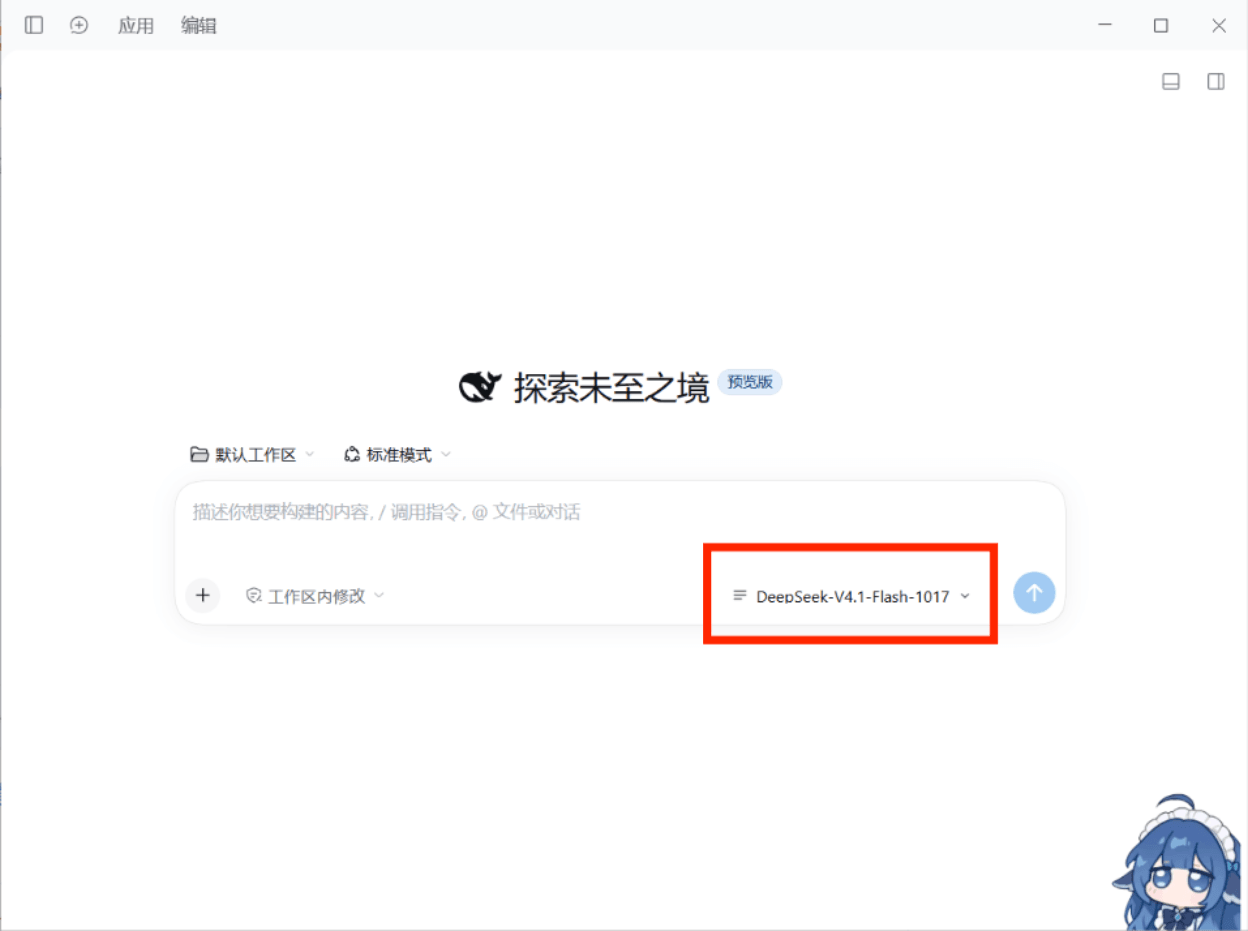
① 新会话界面:插件就装在输入框工具行的「模型」位置
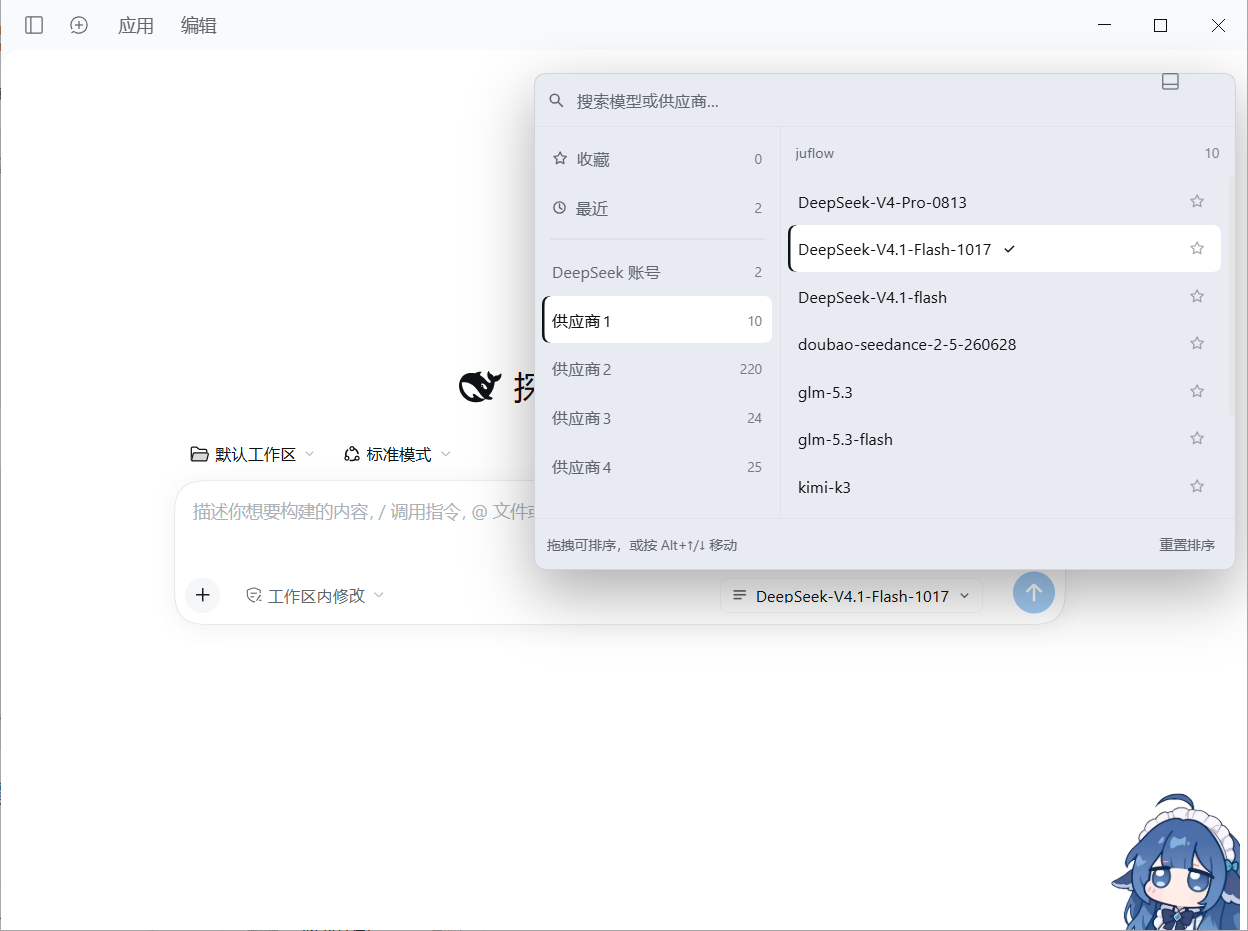
② 点开后展开的完整面板:左侧是所有供应商,右侧是该供应商的模型
它解决什么
供应商一多,官方那个分组下拉要一层层找。这个插件让所有供应商在左侧一级菜单里直接可见, 鼠标扫过就换右边的模型列表,点一下即切换。排序、别名、收藏、最近使用都按你自己的习惯来。
安装
# 桌面端(profile 名为 desktop)
dsh plugin --profile desktop add @aichixiaojuzi/dsh-model-quick-switch

# Web 端(profile 名为 web)
dsh plugin --profile web add @aichixiaojuzi/dsh-model-quick-switch
也可以在 GUI 的插件市场里搜 dsh-model-quick-switch 安装。
从源码安装(先 clone 到本地):
dsh plugin --profile desktop add link:C:/path/to/dsh-model-quick-switch装好后刷新页面。输入框工具行原来的模型入口会变成这个双栏面板的入口。
功能
- 双栏:左列 = 收藏 / 最近 / 全部供应商(一级可见);右列 = 该供应商的模型。
- 选中态:已选模型与左侧当前供应商同一种高亮(实心底色 + 左侧品牌色竖条); 鼠标扫过只给临时底色,移开就只剩「当前选中」那一行亮着。
- 拖拽排序:供应商顺序、每个供应商内的模型顺序、收藏顺序都能拖;
键盘用户按
Alt + ↑/↓移动当前行。 - 收藏:点模型行右侧的星标,长期置顶在「收藏」里。
- 最近使用:每次成功切换自动记录最近 12 个。
- 搜索:顶部输入框按模型名 / 供应商名(含你起的别名)模糊匹配,跨供应商出结果。
- 模型右键菜单:在右侧任一模型上右键即可重命名(别名,同样参与搜索)或收藏。
- 刷新供应商与模型:从左侧供应商右键菜单触发,重新解析并加载已配置好的供应商与模型, 新加的 key / 供应商不用重启应用。
- 删掉不用的供应商:右键 →「从面板删除」把它从面板里移除(只影响面板,随时可恢复)。
- 推理强度:选中模型后,行下方展开该模型适配器声明的档位,点一下即切档。
- 模型 badge:目录自带的标签(如「新」)显示在模型名旁。
- 键盘:
↑/↓移动、Home/End首尾、PageUp/PageDown翻页、Enter选定、Esc关闭。 - 失败可见:某个供应商的目录加载失败时,它不会占用左栏供应商列表;错误状态仍保留在目录中,并可通过供应商刷新再次尝试。
- 不抢座位:会话不可用时(例如子代理会话)主动留空,把位置交还官方席位。
供应商右键菜单
在左侧任一供应商上右键(仅限真实供应商行,不含「收藏/最近」):
| 菜单项 | 作用 | |---|---| | 重命名 | 就地改本机显示别名,回车保存、Esc 取消、留空恢复原名。别名会参与搜索,但不改底层 id、不影响调用 | | 打开面板时默认选它 | 面板每次打开都停在这个供应商;再次点选可取消(右侧圆点标记当前默认) | | 置顶 / 上移 / 下移 | 不拖拽也能排序,到达边界时自动置灰 | | 重置该组模型顺序 | 只清掉这个供应商的模型顺序,不影响别组 | | 全部加入收藏 / 清空该组收藏 | 批量把该供应商的模型收进「收藏」或全部移出 | | 刷新供应商与模型 | 强制同步当前会话的最新配置;加完 key、供应商或模型后不用重启应用 | | 从面板删除 | 该供应商从左栏、搜索、收藏、最近里一起消失;只改本机面板,profile 里的配置不动,左栏底部会留一行「已删除 N 个 · 恢复」 |
模型右键菜单
在右侧任一模型上右键:
| 菜单项 | 作用 | |---|---| | 重命名 | 就地改本机显示名,回车保存、Esc 取消、留空恢复原名。别名参与搜索,不改底层模型 id | | 恢复原名 | 起了别名才有意义,等价于把名字清空 | | 收藏 / 取消收藏 | 与行右侧的星标同效 |
数据与边界
- 选择走官方
ctx.modelDirectories服务(同一个session.selectModel),/model弹窗与这里永远一致;Host 拒绝会以红字显示在面板底部。 - 顺序、别名(供应商与模型各一份)、默认供应商、收藏、最近、已删除的供应商都保存在
浏览器 localStorage(
dsh.model-quick-switch.v1), 不写 profile 配置、不新增 Host 路由、不注册 locale 命名空间。 - 只替换
conversation.input.model这一个可视席位。 - 「从面板删除」是面板本地操作:它只是让这个供应商在这一栏里不出现, profile 里的供应商配置原样保留,重新加载或换台机器都还在。
- 插件不联网、不上报、不读取任何密钥;它只读 Host 已经下发的模型目录。
卸载
插件页禁用该 bundle,官方模型选择器立刻回来。收藏与排序数据要一并清掉的话,
删除浏览器的 dsh.model-quick-switch.v1 这一条 localStorage 即可。
开发
# 渲染 / 行为冒烟测试(53 项断言,含两个右键菜单、供应商/模型别名、删除与恢复、
# 重新加载按钮、默认供应商、badge、空目录兜底)
node dev/smoke.mjs

# 语法检查
node --check client.js
node --check index.js
改动 client.js 后不需要重新构建:客户端模块由 profile 直接加载,刷新页面即可。
已知限制
- 收藏里若某个模型暂时从目录中消失,它的键仍保留,重新出现时回到收藏里。
- 触发按钮在窄屏下仍显示模型名(超出省略),不做图标化收缩。
- 「重命名」只改显示名(供应商和模型都一样);目录名称本身来自 Host,插件不改写。
- 打开插件面板会自动强制重新解析当前会话的模型目录;列表头部的 ↻ 可再次手动强制刷新。 Host 自己拒绝的供应商仍会以红字报出来。
许可
MIT © 2026 aichixiaojuzi