
@aicut/core
v0.7.2
Published
Framework-agnostic core for the AiCut video editor — canvas timeline, data model, pluggable PlaybackEngine (HTML5 / Canvas / WebCodecs), plus opt-in 3D lighting picker.

Maintainers
 zzqinnpm
Readme
@aicut/core
Framework-agnostic engine for the AiCut video editor — canvas timeline, plain-JSON projects, pluggable playback. Main entry has zero runtime deps; opt-in sub-entries bundle their own (three.js for
/lighting, mp4box.js for/webcodecs).



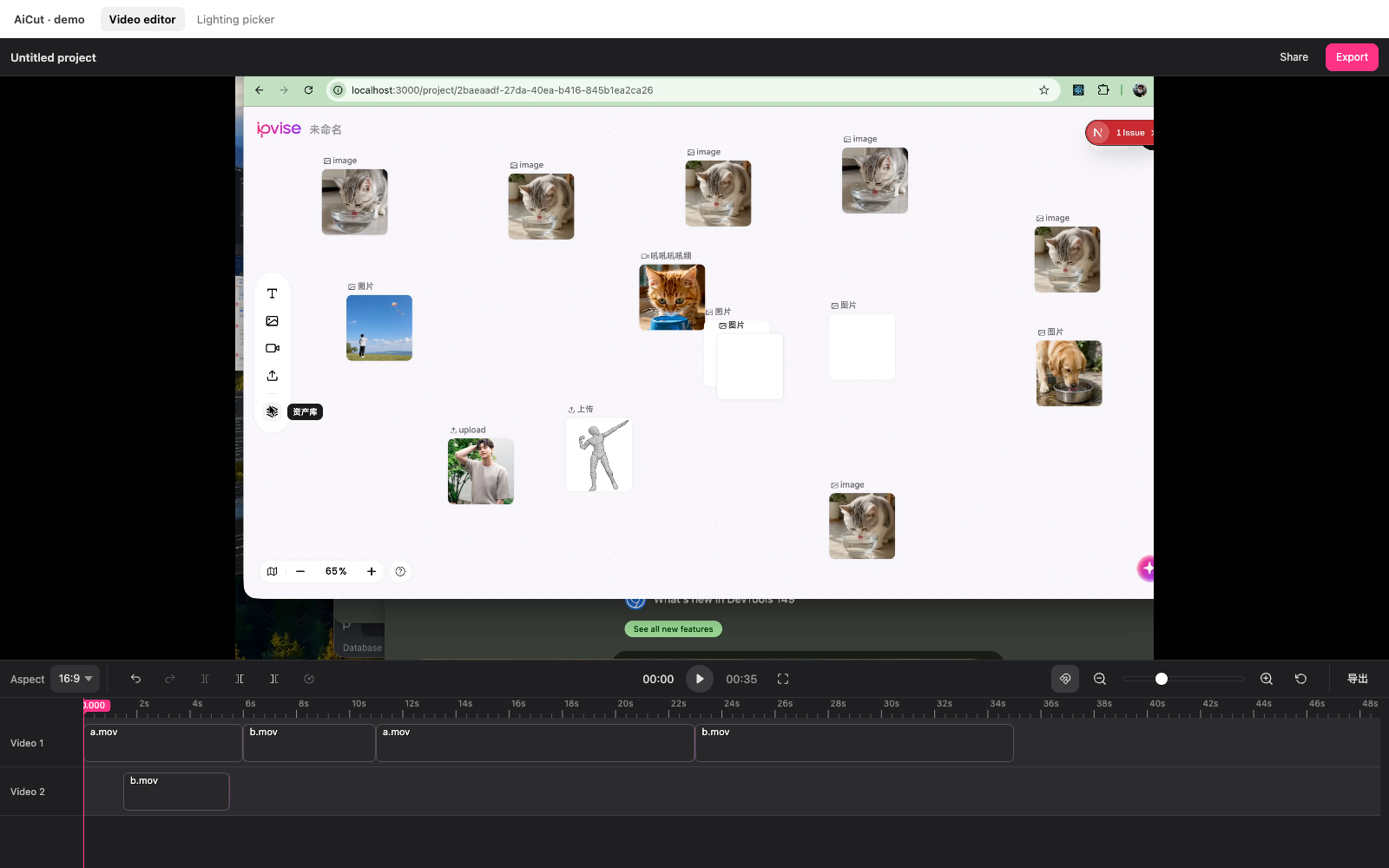
For React or Vue apps, prefer @aicut/react or @aicut/vue — they wrap this same engine.
Install
pnpm add @aicut/coreQuick start
import { Editor } from "@aicut/core";
import "@aicut/core/styles.css";

const editor = Editor.create({
  container: document.getElementById("app")!,
  project: {
    version: 1,
    sources: [
      { id: "s1", url: "/media/a.mp4", kind: "video", name: "a.mp4" },
    ],
    tracks: [{
      id: "t1",
      kind: "video",
      clips: [{ id: "c1", sourceId: "s1", in: 0, out: 5000, start: 0 }],
    }],
  },
});

editor.on("change", ({ project }) => {
  localStorage.setItem("aicut", JSON.stringify(project));
});

editor.on("export", ({ project }) => {
  fetch("/api/export", {
    method: "POST",
    headers: { "content-type": "application/json" },
    body: JSON.stringify({ project }),
  });
});
API at a glance
// Playback
editor.play(); editor.pause(); editor.togglePlay();
editor.seek(timeMs);

// Editing
editor.split();          // at playhead
editor.trimLeft();
editor.trimRight();
editor.removeClip(clipId);
editor.setClipSpeed(clipId, 2);
editor.undo(); editor.redo();

// Project state
editor.getProject();
editor.setProject(project);
editor.reset();
editor.addSource({ id, url, kind: "video" });
editor.addTrack("video");
editor.moveClip(clipId, { start, trackId, newTrack });

// Viewport
editor.setScale(80);     // px per second
editor.setSnap(false);
editor.setSelection(clipId);

// UI
editor.setTheme({ controlsBg: "#fff" });
editor.setLocale({ undo: "Annuler" });
editor.requestExport();  // → fires "export" event
Events
editor.on("change",          ({ project }) => /* … */);
editor.on("time",            ({ timeMs }) => /* … */);
editor.on("export",          ({ project }) => /* … */);
editor.on("selectionChange", ({ clipId }) => /* … */);
editor.on("historyChange",   ({ canUndo, canRedo }) => /* … */);
editor.on("ready",           ({ sourceId }) => /* … */);
editor.on("scaleChange",     ({ pxPerSec }) => /* … */);
editor.on("snapChange",      ({ snap }) => /* … */);
editor.on("error",           ({ error }) => /* … */);
Each on returns an unsubscribe function.
Theming
Editor.create({
  container,
  project,
  theme: {
    controlsBg: "#1f1f22",
    controlsText: "rgba(255, 255, 255, 0.85)",
    controlsBorder: "rgba(255, 255, 255, 0.08)",
    controlsHover: "rgba(255, 255, 255, 0.08)",
    controlsActive: "rgba(255, 255, 255, 0.12)",
    previewBg: "#000",                 // letterbox colour
  },
});
Every key is also a plain CSS custom property — .aicut-root { --aicut-controls-bg: …; } works too. Call editor.setTheme(…) to swap at runtime.
i18n
English by default. Bundled localeZh covers the whole editor (toolbar tooltips, exit-fullscreen overlay, canvas track headers).
import { Editor, localeZh } from "@aicut/core";

Editor.create({ container, project, locale: localeZh });

editor.setLocale({ undo: "Annuler" });   // partial override
Host slots
The editor reserves four slot DOM elements for host-supplied controls. Library paints nothing into any of them; populated slots show, empty ones collapse.
// Header above the preview — collapses entirely when both empty.
editor.headerLeft.textContent = "Untitled project";
const exportBtn = document.createElement("button");
exportBtn.textContent = "Export";
exportBtn.onclick = () => editor.requestExport();
editor.headerRight.appendChild(exportBtn);

// Toolbar bookends (next to the built-in icons)
editor.toolbarLeft.appendChild(aspectDropdown);
editor.toolbarRight.appendChild(customIconBtn);
| Slot | Where |
| --- | --- |
| editor.headerLeft / editor.headerRight | Optional header row above the preview |
| editor.toolbarLeft / editor.toolbarRight | Bookends on the toolbar row |
The standalone Timeline also exposes toolbarLeft / toolbarRight when constructed with toolbar: true.
Playback engine
The Editor talks to playback through a single interface (PlaybackEngine).
The default engine is HtmlVideoEngine — one hidden <video> per source,
swapped at clip boundaries. Zero deps, works in every browser, but seek
snaps to the nearest keyframe (the browser owns the decode pipeline).
For frame-accurate scrubbing, multi-track compositing, transitions, or a custom render pipeline (WebGL compositor, IPC bridge to a native player, WebRTC stream consumer), pass your own factory:
import {
  Editor,
  type PlaybackEngine,
  type PlaybackEngineFactory,
} from "@aicut/core";

const myFactory: PlaybackEngineFactory = ({ host, project }) => {
  // host: a div the editor owns. Mount whatever surface you need.
  // project: the initial Project — pre-warm decoders, etc.
  return new MyEngine(host, project); // implements PlaybackEngine
};

Editor.create({ container, project, playbackEngine: myFactory });
The contract — every engine implements this exactly:
interface PlaybackEngine {
  setProject(next: Project): void;
  play(): void;
  pause(): void;
  isPlaying(): boolean;
  getTime(): Ms;
  seek(timeMs: Ms): void;
  destroy(): void;

  // Optional event hooks — Editor assigns these after construction.
  onTimeUpdate?: (ms: Ms) => void;
  onEnded?: () => void;
  onError?: (err: Error) => void;
  onReady?: () => void;
  onSourceMetadata?: (sourceId: string, durationMs: Ms) => void;
}
Engines that can't emit a particular event (e.g. no audio metadata)
simply never call that hook. The Editor re-emits engine events as its
own time / pause / error / ready / change events, so your host
code is unaffected by which engine is in use.
Bundled engines
| Engine | Where | Decoder | Renderer | Cost |
| --- | --- | --- | --- | --- |
| HtmlVideoEngine | main | browser | raw <video> | 0 deps |
| CanvasCompositorEngine | main | browser | ctx.drawImage | 0 deps |
| WebCodecsEngine | @aicut/core/webcodecs | VideoDecoder (frame-accurate) | ctx.drawImage(VideoFrame) | bundles mp4box.js (~200 KB) |
The WebCodecs path is on its own sub-entry so consumers who don't ask for it pay nothing for the demuxer. Feature-detect before constructing:
import {
  WebCodecsEngine,
  isWebCodecsSupported,
} from "@aicut/core/webcodecs";

const factory: PlaybackEngineFactory = isWebCodecsSupported()
  ? (opts) => new WebCodecsEngine({ ...opts, debug: true })
  : htmlVideoEngineFactory;

Editor.create({ container, project, playbackEngine: factory });
WebCodecsEngine v1 covers single-track MP4/MOV playback (H.264 / HEVC / VP9 / AV1 — whatever the browser's VideoDecoder supports). Multi-track compositing, audio, transitions land in follow-up releases on the same surface.
Timeline density
Defaults are tuned for desktop. For compact viewports (laptop side panels, embedded editors), shrink the bottom area and / or row height:
Editor.create({
  container,
  project,
  timelineHeight: 160,     // outer height of the bottom timeline area
                           // (default 240). Scrolls internally when
                           // tracks overflow.
  trackHeight: 40,         // each track row (default 56). Affects clip
                           // body + thumbnail strip.
  rulerHeight: 22,         // time-label strip (default 24).
});
| Option | Default | Useful range | Notes |
| --- | --- | --- | --- |
| timelineHeight | 240 | 120 – 480 | Outer height of .aicut-timeline. Reactive in the React + Vue wrappers — swap any time. Internal scroll appears when tracks don't fit. |
| trackHeight | 56 | 28 – 96 | Per-row pixel height. Applied process-wide via setTimelineMetrics (see below). Re-apply by remounting the editor. |
| rulerHeight | 24 | 18 – 36 | Time-label strip height. Same lifecycle as trackHeight. |
For runtime control without an editor option, call the underlying setter directly:
import { setTimelineMetrics } from "@aicut/core";

setTimelineMetrics({ trackHeight: 36, rulerHeight: 20 });
TRACK_HEIGHT and RULER_HEIGHT are ESM live bindings — re-reading them after the setter returns the updated values.
Keyframes (per-clip panX / panY / scale animation)
Off by default. Flip on, and all three playback engines (HTML5 / Canvas / WebCodecs) interpolate per-clip transforms between adjacent keyframes — the bread-and-butter motion-template feature (think CapCut "动画").
const editor = Editor.create({
  container,
  project,
  keyframes: { enabled: true },
});

// Per-property — pin only the props you care about, others ride the
// static base (Clip.panX / Clip.panY / Clip.scale).
editor.addKeyframe("clip-1", "scale", { time: 0,    value: 1                       });
editor.addKeyframe("clip-1", "scale", { time: 2000, value: 2.5, easing: "easeInOut" });
editor.addKeyframe("clip-1", "scale", { time: 4000, value: 1                       });
editor.setKeyframeValue("clip-1", kfId, 1.8);     // tweak one kf's value
editor.setKeyframeEasing("clip-1", kfId, "easeOut");
editor.moveKeyframe("clip-1", kfId, 1500);        // shift to t=1.5s
editor.removeKeyframe("clip-1", kfId);

// Toolbar-style "K at playhead" — one click drops kfs for all 3 props.
editor.setSelection("clip-1");
editor.toggleKeyframeAtPlayhead();
The data lives on Clip.keyframes: Keyframe[], one entry per animated property at one moment in clip-local time:
type KeyframeProp = "panX" | "panY" | "scale";
type EasingKind = "linear" | "easeIn" | "easeOut" | "easeInOut";

interface Keyframe {
  id: string;
  prop: KeyframeProp;
  time: Ms;            // clip-local; 0 = clip's `in`
  value: number;       // CSS px for pan, multiplier for scale
  easing?: EasingKind; // optional outgoing curve; omitted = linear
}

interface Clip {
  // ...
  panX?: number; panY?: number; scale?: number; // static base
  keyframes?: Keyframe[];
}
| Behavior | |
| --- | --- |
| Per-property model | panX / panY / scale animate independently. Pre-easing tuple-keyframes ({time, x, y, scale}) auto-migrate via normalizeProject. |
| Easing | 4 cubic curves stored on the leaving kf (AE / Premiere / CapCut convention). editor.setKeyframesEasingAtTime(clipId, time, "easeInOut") updates all 3 props at a moment atomically. |
| Drag-burst undo | editor.beginInteraction() / endInteraction() coalesce a 30+ tick pointermove drag into ONE history entry. Hosts wrap continuous gestures with these for clean ⌘Z. |
| Snap | Each keyframe contributes a timeline-absolute target — dragging snaps to other keyframes / clip edges / playhead. |
| Lossless split | splitClipAt mid-segment inserts interpolated boundary keyframes per property so cutting and not moving the halves plays back identically to the un-cut clip. |
| All engines animate | HTML5 (CSS transform on wrapper div), Canvas + WebCodecs (ctx.clip() + ctx.translate/scale), and the backend exporter all share the same interpolation. |
| Backend export | @aicut/backend-ts and @aicut/backend-go both compile keyframes to ffmpeg t-expressions in scale=…:eval=frame + overlay=…:eval=frame filters. Pass output: { width, height, fps } in the request — required for the kf path. |
Read the live transform anywhere (e.g. host-rendered thumbnails) via the pure helper:
import { getEffectiveTransform, getTransformAtTimelineTime } from "@aicut/core";

const t = getEffectiveTransform(clip, localMs);
// → { panX: 100, panY: 0, scale: 1.5 }
Lighting picker (opt-in sub-entry)
A separate component for AI-relighting workflows — drag a light dot around a 3D sphere wrapping a subject frame, control brightness / color / direction. Three.js is bundled only on this sub-entry, so consumers of the video editor pay zero bytes for it.
The library renders only the picker (scene + controls). Smart-mode UI (prompt textarea, preset thumbnails, Generate button, close handling) is host code laid out beside <LightingEditor>.
import { LightingEditor } from "@aicut/core/lighting";
import "@aicut/core/styles.css";

const ed = LightingEditor.create({
  container: document.getElementById("light")!,
  subjectImageUrl: "/frames/subject.jpg",
  onChange: (cfg) => console.log(cfg),
});

// Runtime control
ed.setView("front");
ed.setConfig({ brightness: 0.8, color: "#ffaa3a" });
ed.setSubjectImage("/frames/another-subject.jpg");
ed.reset();                  // restore safe defaults

// Footer slot — the only DOM region the library leaves for host action
// buttons (Reset, Generate, save-preset, etc.). Library renders nothing
// into it; host appends whatever it wants:
const resetBtn = document.createElement("button");
resetBtn.textContent = "Reset";
resetBtn.onclick = () => ed.reset();
ed.controlsFooter.appendChild(resetBtn);

// Host snapshot for "Generate" — call from your own button
function onGenerate() {
  const cfg = ed.getConfig();
  fetch("/relight", { method: "POST", body: JSON.stringify(cfg) });
}
Locale extension LightingLocale (separate from the video editor's Locale) is exported with lightingLocaleEn / lightingLocaleZh.
Standalone Timeline
import { Timeline } from "@aicut/core";

const tl = Timeline.create({
  container: document.getElementById("strip")!,
  project: singleClipProject,
  showHeader: false,
  readOnly: true,
  onSeek: (ms) => console.log("picked", ms),
});
Useful for a frame-picker, thumbnail strip, or read-only preview.
Data model
interface Project {
  version: 1;
  sources: MediaSource[];
  tracks: Track[];
}

interface MediaSource {
  id: string; url: string; kind: "video" | "audio";
  duration?: number; name?: string;
}

interface Track { id: string; kind: "video" | "audio"; clips: Clip[]; }

interface Clip {
  id: string; sourceId: string;
  in: Ms; out: Ms;     // window into the source (exclusive at `out`)
  start: Ms;            // position on the timeline
  speed?: number;
}

type Ms = number;       // integer milliseconds; no frame-rate coupling