
@aicut/vue
v0.7.3
Published
Vue 3 wrapper for the AiCut video editor + lighting picker — thin declarative shells over @aicut/core.

Maintainers
 zzqinnpm
Readme
@aicut/vue
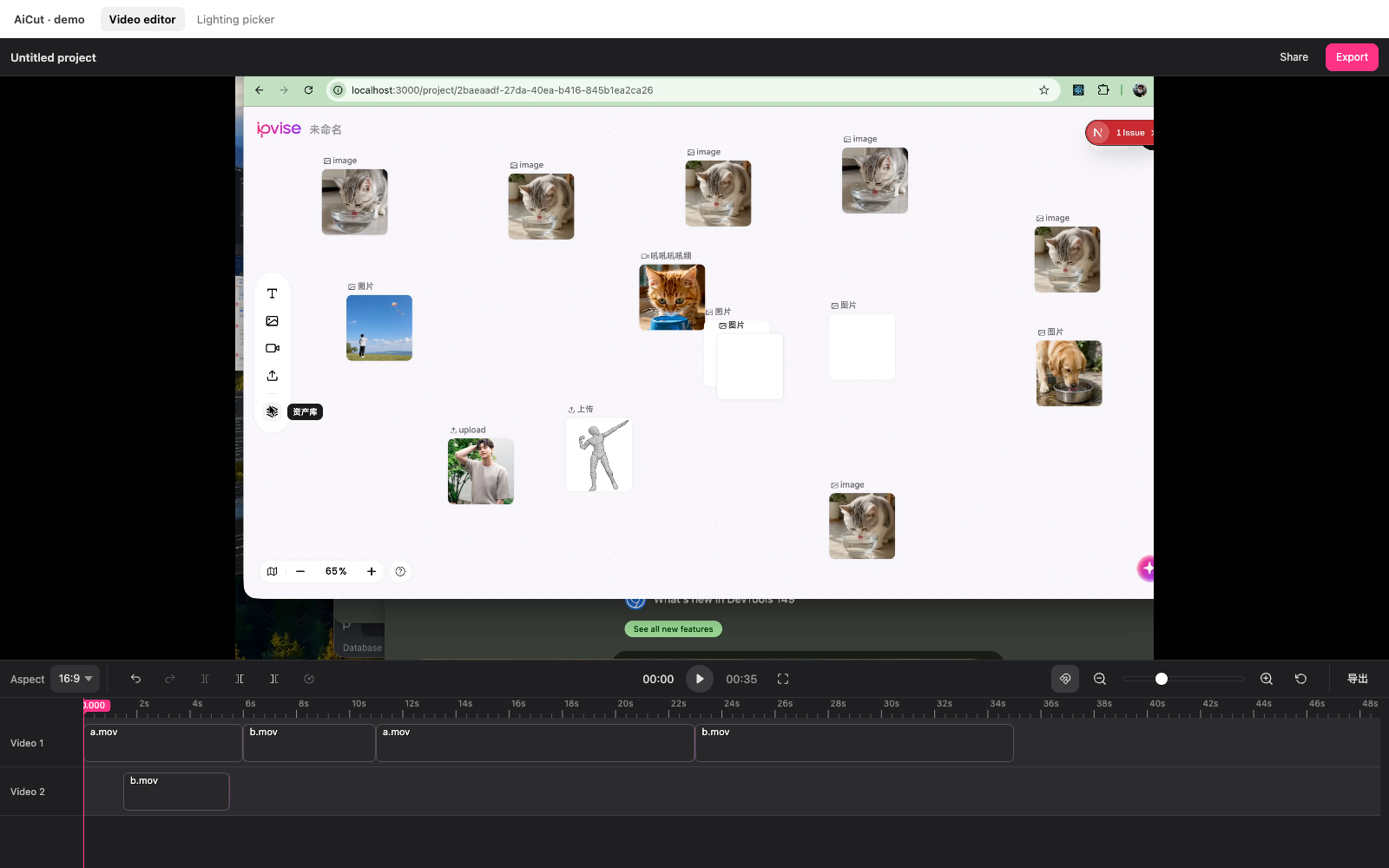
Vue 3 wrapper for the AiCut video editor — canvas timeline, custom toolbar slots, theming, i18n, drop-in
<VideoEditor>.



Install
pnpm add @aicut/vue @aicut/coreQuick start
<script setup lang="ts">
import { ref } from "vue";
import {
  VideoEditor,
  type EditorApi,
  type Project,
} from "@aicut/vue";
import "@aicut/core/styles.css";

const project: Project = {
  version: 1,
  sources: [
    { id: "s1", url: "/media/a.mp4", kind: "video", name: "a.mp4" },
  ],
  tracks: [{
    id: "t1",
    kind: "video",
    clips: [{ id: "c1", sourceId: "s1", in: 0, out: 5000, start: 0 }],
  }],
};

const editor = ref<{ api(): EditorApi | null } | null>(null);

function save(p: Project) {
  console.log("autosave", p);
}

async function doExport(p: Project) {
  await fetch("/api/export", {
    method: "POST",
    body: JSON.stringify({ project: p }),
  });
}
</script>

<template>
  <VideoEditor
    ref="editor"
    :default-project="project"
    @change="save"
    @export="doExport"
    style="height: 600px"
  />
</template>
The component is uncontrolled for project state. Restore later with:
editor.value?.api()?.setProject(saved);Props
interface VideoEditorProps {
  defaultProject?: Project;
  theme?: Theme;                          // CSS-var overrides; reactive
  locale?: Partial<Locale>;               // EN default; pass localeZh for ZH; reactive

  playbackEngine?: PlaybackEngineFactory; // pluggable playback; default
                                          //   HtmlVideoEngine. Bound at mount.
  timelineHeight?: number;                // outer height of bottom area
                                          //   (default 240). Reactive.
  trackHeight?: number;                   // per-row height (default 56);
                                          //   process-wide, initial-only.
  rulerHeight?: number;                   // time-label strip (default 24).
}
Slots
Two named slots — headerLeft and headerRight — fill the optional header bar above the preview. Empty by default; the header collapses entirely when both are unused, so the default layout is identical to before they existed.
<VideoEditor :default-project="project">
  <template #headerLeft>
    <strong>Untitled project</strong>
  </template>
  <template #headerRight>
    <button @click="share">Share</button>
    <button @click="editor?.api()?.requestExport()">Export</button>
  </template>
</VideoEditor>
Events
ready              (api: EditorApi)
change             (project: Project)
export             (project: Project)        // fired by api.requestExport()
time-update        (timeMs: number)
play               ()
pause              ()
selection-change   (clipId: string | null)
error              (error: Error)
The exposed api() returns the full EditorApi described in @aicut/core — play, pause, seek, split, setProject, requestExport, setTheme, setLocale, and more.
Theming
<VideoEditor
  :theme="{
    controlsBg: '#f6f6f8',
    controlsText: 'rgba(0, 0, 0, 0.78)',
    controlsBorder: 'rgba(0, 0, 0, 0.08)',
    controlsHover: 'rgba(0, 0, 0, 0.06)',
    controlsActive: 'rgba(0, 0, 0, 0.08)',
    previewBg: '#e4e4e7',
  }"
  /* … */
/>
i18n
<script setup lang="ts">
import { ref, computed } from "vue";
import { VideoEditor, localeEn, localeZh, type Locale } from "@aicut/vue";

const lang = ref<"en" | "zh">("en");
const locale = computed<Locale>(() =>
  lang.value === "zh" ? localeZh : localeEn,
);
</script>

<template>
  <VideoEditor :locale="locale" /* … */ />
</template>
locale swap re-titles the toolbar and re-paints canvas labels in place.
Compact viewports
Default chrome is sized for desktop. For laptop side panels or embedded editors, shrink the bottom area to reclaim preview height:
<script setup lang="ts">
import { ref } from "vue";
const timelineHeight = ref(160);
</script>

<template>
  <VideoEditor
    :default-project="project"
    :timeline-height="timelineHeight"
    :track-height="40"
  />
</template>
timelineHeight is reactive — bind it to a slider and the editor recompacts in place. trackHeight / rulerHeight are initial-only (process-wide via setTimelineMetrics); change + remount to re-apply. Range guidance: timelineHeight ∈ [120, 480], trackHeight ∈ [28, 96], rulerHeight ∈ [18, 36].
Custom playback engine
The editor talks to playback through a single interface. The default is
HtmlVideoEngine (one hidden <video> per source, swap on clip
boundaries). To plug in a different one — WebCodecs, WebGL compositor,
desktop-wrapper IPC bridge — pass a factory:
<script setup lang="ts">
import { VideoEditor, type PlaybackEngineFactory } from "@aicut/vue";

const myEngine: PlaybackEngineFactory = ({ host, project }) =>
  new MyCustomEngine(host, project); // implements PlaybackEngine
</script>

<template>
  <VideoEditor
    :default-project="project"
    :playback-engine="myEngine"
    /* initial-only — bound at mount */
  />
</template>PlaybackEngine, PlaybackEngineFactory, PlaybackEngineOptions, and
the built-in HtmlVideoEngine are re-exported from @aicut/vue so
you don't need a separate @aicut/core import to write one.
See @aicut/core's playback section for the full interface contract.
WebCodecs engine (opt-in sub-entry)
For frame-accurate playback via the browser's VideoDecoder API, import from the sub-entry so mp4box.js (~200 KB) only loads when you ask for it:
<script setup lang="ts">
import { computed } from "vue";
import { VideoEditor } from "@aicut/vue";
import {
  WebCodecsEngine,
  isWebCodecsSupported,
} from "@aicut/vue/webcodecs";

const factory = computed(() =>
  isWebCodecsSupported()
    ? (opts) => new WebCodecsEngine({ ...opts, debug: true })
    : undefined,
);
</script>

<template>
  <VideoEditor :playback-engine="factory" /* … */ />
</template>
WebCodecsEngine v1 covers single-track MP4/MOV playback (H.264 / HEVC / VP9 / AV1 — whatever the browser's VideoDecoder supports). Multi-track compositing, audio, transitions land in follow-up releases.
Keyframes (panX / panY / scale animation)
Off by default. Flip the keyframes prop and all three playback engines (HTML5, Canvas, WebCodecs) start interpolating per-clip transforms between adjacent keyframes. Diamond markers appear on the timeline; drag them, edit values via the floating panel, snap them to each other.
<script setup lang="ts">
import { ref } from "vue";
const kfEnabled = ref(true);
const edgeNav = ref(true);
function onKfSelection(t: { clipId: string; keyframeId: string } | null) {
  console.log(t);
}
</script>

<template>
  <VideoEditor
    ref="editor"
    :default-project="project"
    :keyframes="{ enabled: kfEnabled }"
    :clip-edge-nav="{ enabled: edgeNav }"
    @keyframe-selection-change="onKfSelection"
  />
</template>
// Per-property mutators on the editor API.
api.addKeyframe("clip-1", "scale", { time: 0, value: 1 });
api.addKeyframe("clip-1", "scale", { time: 2000, value: 2.5, easing: "easeInOut" });
api.setKeyframeValue("clip-1", kfId, 1.8);
api.setKeyframeEasing("clip-1", kfId, "easeOut");
// Toolbar-style "K at playhead" drops all 3 props at once.
api.setSelection("clip-1");
api.toggleKeyframeAtPlayhead();Keyframe, KeyframeProp, EasingKind, EffectiveTransform, getEffectiveTransform, getTransformAtTimelineTime, IDENTITY_TRANSFORM, isIdentityTransform are all re-exported from @aicut/vue for thumbnail / preview rendering outside the editor.
Backend export: both @aicut/backend-ts and @aicut/backend-go compile keyframes to ffmpeg t-expressions (scale=…:eval=frame + overlay=…:eval=frame). Pass output: { width, height, fps } in the export request — required for the keyframe filter graph to apply.
See @aicut/core's keyframes section for the full API.
<LightingEditor> (opt-in sub-entry)
A 3D lighting director for AI relighting flows — separate sub-entry; three.js bundles only here.
<script setup lang="ts">
import { ref } from "vue";
import {
  LightingEditor,
  type LightingConfig,
} from "@aicut/vue/lighting";
import type { LightingEditor as CoreLightingEditor } from "@aicut/core/lighting";
import "@aicut/core/styles.css";

const editor = ref<{ api(): CoreLightingEditor | null } | null>(null);

function onChange(cfg: LightingConfig) {
  console.log(cfg);
}

function onGenerate() {
  const cfg = editor.value?.api()?.getConfig();
  if (cfg) fetch("/relight", { method: "POST", body: JSON.stringify(cfg) });
}
</script>

<template>
  <!-- Library renders ONLY the picker; the Smart panel beside it is
       host code in your own template. -->
  <div style="display: flex; gap: 16px">
    <LightingEditor
      ref="editor"
      subject-image-url="/frames/subject.jpg"
      @change="onChange"
    >
      <!-- Reset / Generate / save-preset / etc. go into the controls
           column's footer slot — the only host-supplied surface the
           library reserves space for. -->
      <template #controlsFooter>
        <button @click="editor?.api()?.reset()">Reset</button>
      </template>
    </LightingEditor>
    <aside>
      <textarea placeholder="Describe the mood…" />
      <button @click="onGenerate">Generate</button>
    </aside>
  </div>
</template>
Props: subjectImageUrl, defaultConfig, defaultView, theme, locale. Slots: controlsFooter. Events: ready, change.
Exposed API (editor.api()): setConfig, getConfig, setSubjectImage, setView, setTheme, setLocale, reset.
The library is intentionally scoped to the picker — Smart mode UI / Generate buttons / layout live in host code.
Standalone <Timeline>
<script setup lang="ts">
import { ref } from "vue";
import { Timeline } from "@aicut/vue";

const picked = ref(0);
</script>

<template>
  <Timeline
    :default-project="singleClipProject"
    :show-header="false"
    read-only
    @seek="(ms) => (picked = ms)"
  />
</template>