
@aikotools/repo-maintenance
v1.9.1
Published
Web-based dashboard for managing multi-repo monorepos. Dependency graph visualization, cascade updates, bulk operations, and Git management across all your packages.

Maintainers
 darlenya
Readme
RepoHub
Web-based dashboard for managing multi-repo monorepos. Provides dependency graph visualization, cascade updates, bulk operations, and Git management across all your packages.
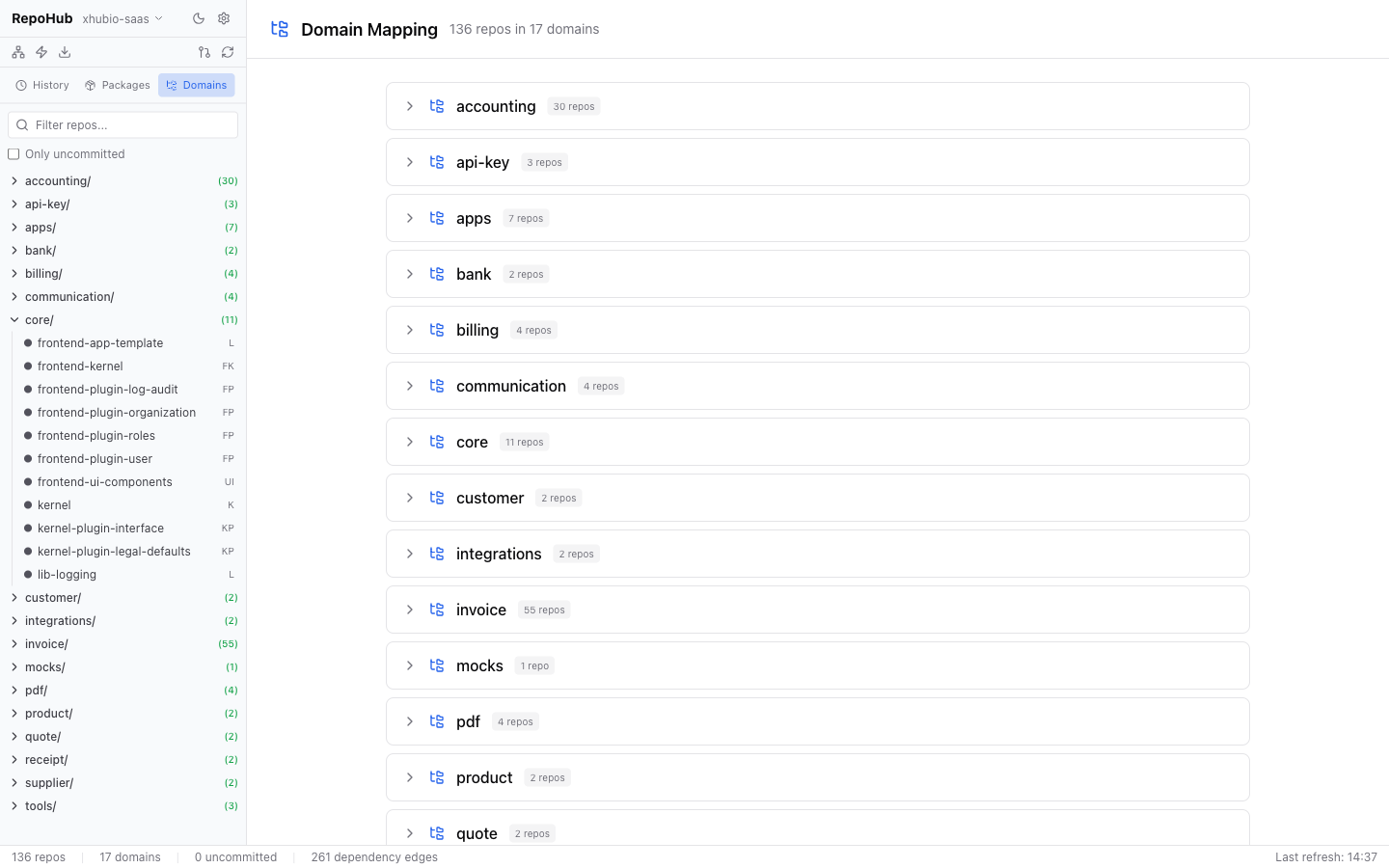
Features
- Desktop app — native window (Electron) that bundles the backend; prebuilt installers on GitHub Releases
workspace.reposmanifest — drive repo layout, git URL and branch from a single vcstool file as the source of truth- Dashboard with repo statistics and domain overview
- Interactive dependency graph visualization with domain filtering
- Cascade updates — propagate dependency changes through the entire chain
- Pull All — clone/pull all repos from GitHub in parallel
- Bulk operations — run shell commands across multiple repos
- Repository detail with diff viewer, dependencies, commit & push
- File-URL dependency management — switch between
file:and npm versions - Persistent operation history for cascade and pull-all runs
Installation
Desktop app (recommended)
Download a prebuilt installer from the GitHub Releases page. CI builds them for every desktop-v* tag and attaches them to the release:
| File | Platform |
|------|----------|
| RepoHub-*-universal.dmg | macOS (Intel + Apple Silicon) |
| RepoHub.Setup.*.exe | Windows |
| RepoHub-*.AppImage | Linux |
The app bundles its own backend — no separate Node.js install needed. Builds are currently unsigned: on macOS right-click → Open once (or xattr -dr com.apple.quarantine RepoHub.app); on Windows pick "Run anyway" in SmartScreen. git must be installed on the machine.
CLI (npm)
npm install -g @aikotools/repo-maintenance
repohub   # serves the dashboard at http://localhost:3100
Quick Start
Launch the desktop app (or run
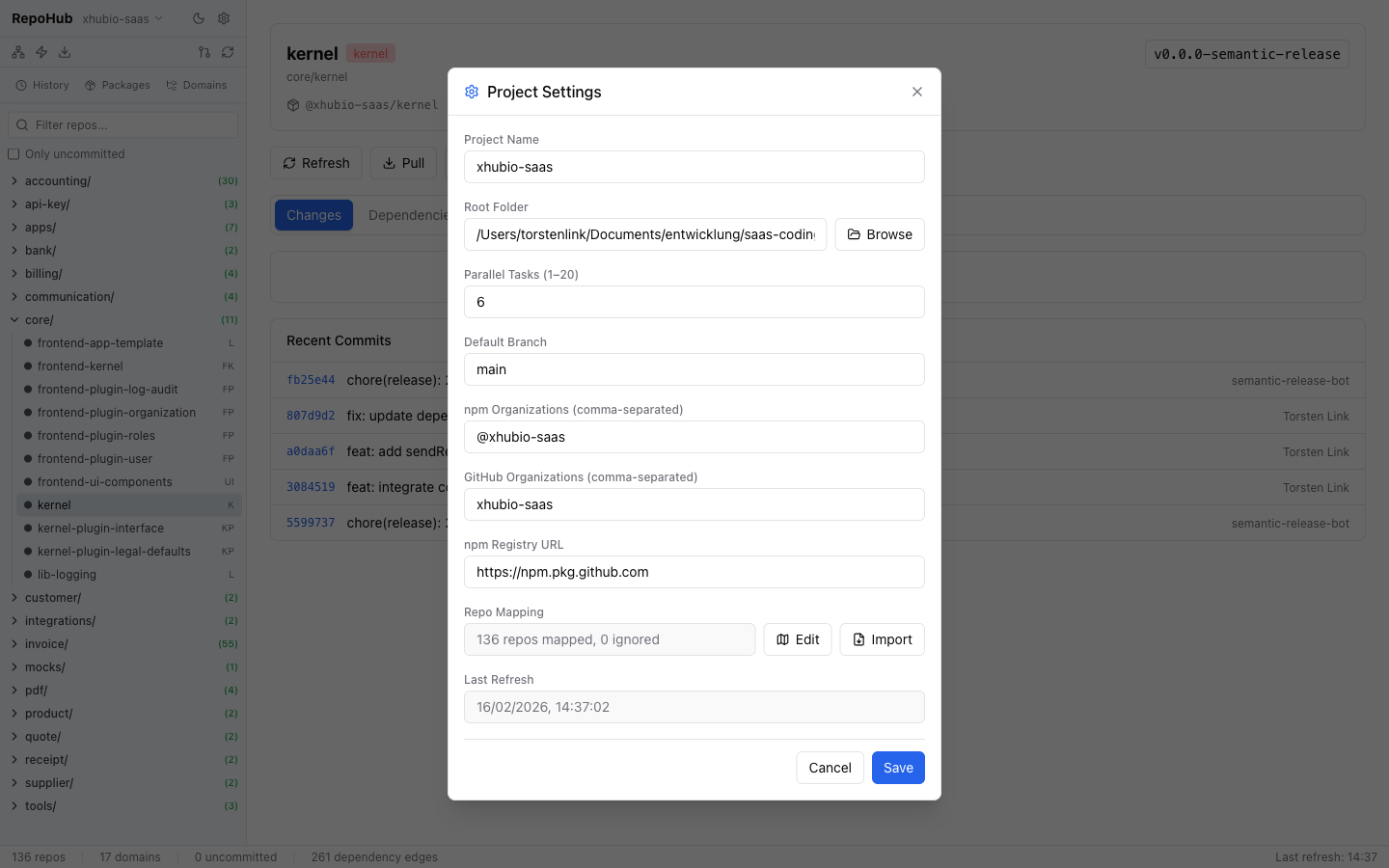
repohuband open http://localhost:3100)Click the gear icon (Settings) and choose one of:
A) Point at a
workspace.repos(recommended) — set the workspace.repos field to your vcstool manifest. Root folder, GitHub org, ignore list and per-repo branch are then derived from the file — no manual mapping. Use Regenerate to rewrite the manifest from the current on-disk state.B) Configure manually:
- Project Name — a label for your monorepo
- Root Folder — path to the directory containing all your repos
- npm Organizations — scoped packages to detect as internal deps (e.g.
@myorg) - GitHub Organizations (required) — for Pull All operations (e.g.
myorg) - Parallel Tasks (1–20, default: 6) · Default Branch (e.g.
main)
Click "Refresh repo structure" to scan your repos
Multiple projects: Use the project switcher in the sidebar header to create and switch between projects. To delete a project, first switch to a different one — then hover over the project to delete and click the trash icon.
Prerequisites
| Tool | Version | Purpose |
|------|---------|---------|
| Node.js | 24+ | Runtime (CLI only — the desktop app bundles it) |
| Git | — | Repository operations |
| GitHub CLI (gh) | — | Pull All only in manual GitHub-org mode (not needed with workspace.repos) |
When using workspace.repos, Pull All clones each repo's URL directly — no gh required. In manual GitHub-org mode, gh must be authenticated (gh auth login).
Feature Details
Repository Detail
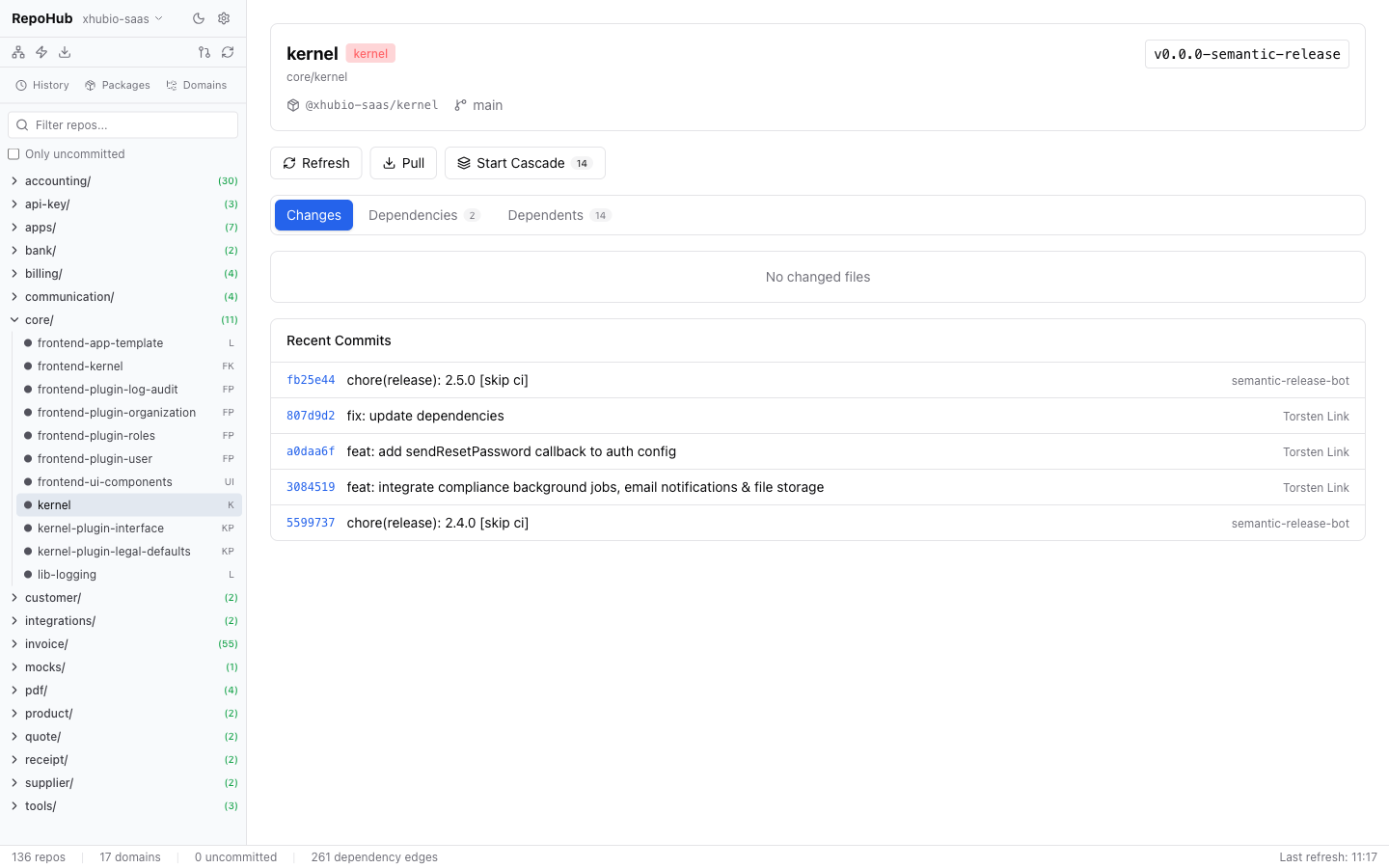
Click on any repo in the sidebar to open the detail view:
- Changes tab — modified files with diff viewer. Untracked files can be added to
.gitignorewith one click. - Dependencies tab — internal dependencies with links to the respective repo.
- Dependents tab — repos that depend on this repo.
- Actions — Refresh, Pull, Start Cascade.
- Recent Commits — last commits for the repo.
Dependency Graph
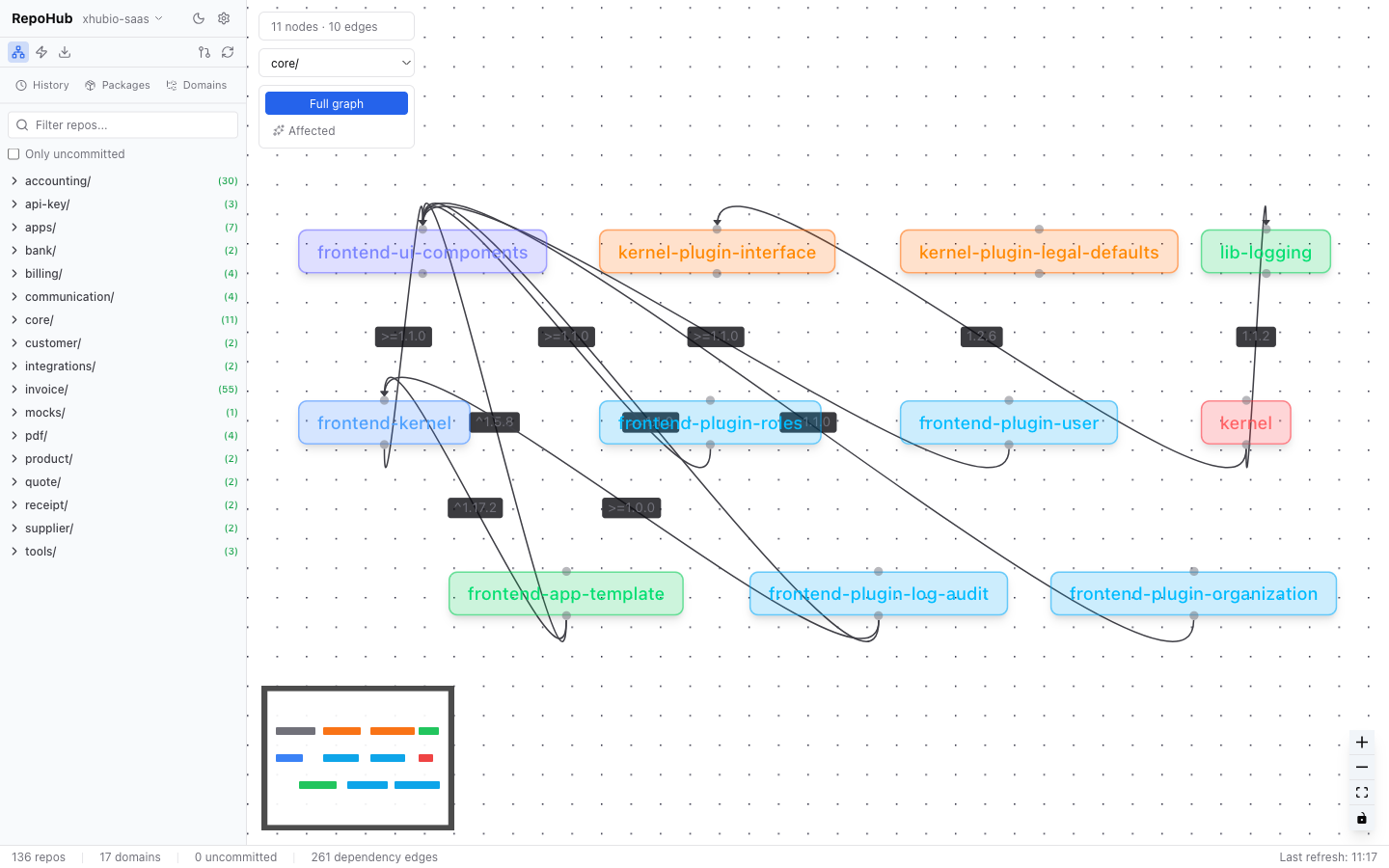
Interactive visualization of all internal dependencies as a node-edge graph (React Flow). Filter by domain, toggle between full graph and affected-only views. Click on a node to navigate to the repo detail.
Pull All
Synchronizes all repos. Two modes:
- With
workspace.repos— clones each missing repo from its manifest URL at the listed branch; pulls existing ones. No GitHub API/ghneeded. - Manual GitHub-org mode — fetches repos via
gh repo listand clones them into the mapped domain folder.
In both cases: clones missing repos, pulls existing ones (skipping repos with uncommitted changes), and shows live per-repo progress.
Status types:
| Status | Meaning | |--------|---------| | Updated | Successfully pulled | | Already up-to-date | No changes | | Cloned | Newly cloned from GitHub | | Skipped | In ignore list | | Unmapped | No domain mapping configured | | Has changes | Skipped due to uncommitted changes | | Failed | Error during pull/clone |
Repo mapping: With a workspace.repos this is derived from the manifest (and the Repo Mapping editor is hidden). In manual GitHub-org mode, edit it via Settings > Repo Mapping > Edit to assign repos to domains or ignore them.
Cascade Updates
Propagates dependency updates automatically through the entire dependency chain.
Example: lib-core is updated. Cascade automatically updates all dependent packages in the correct order (topologically sorted, layer by layer).
Workflow:
- Select source repo (e.g.
lib-core) - Tool calculates all affected repos in topological order
- Configure options:
- Wait for CI — wait between layers for CI/CD to publish
- Run Tests — run tests before committing
- Commit Prefix — e.g.
deps:orchore:
- Review the plan and start
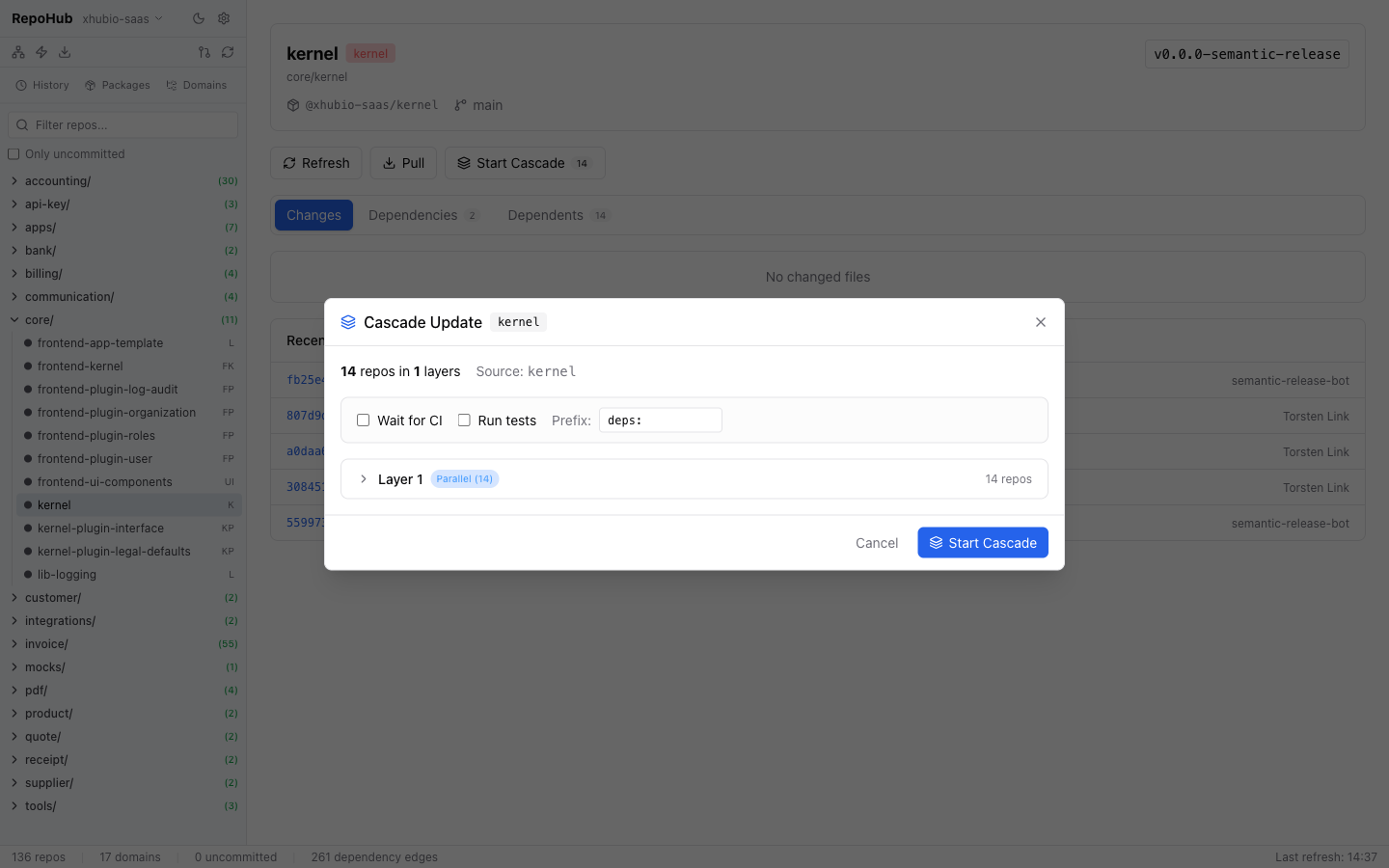
Per repo, the cascade executes:
- Update
package.jsondependencies npm install- Run tests (optional)
- Commit + Push
- Wait for CI (optional) + resolve published version
Controls during execution: Pause, Resume, Abort, Skip Failed, manually set version.
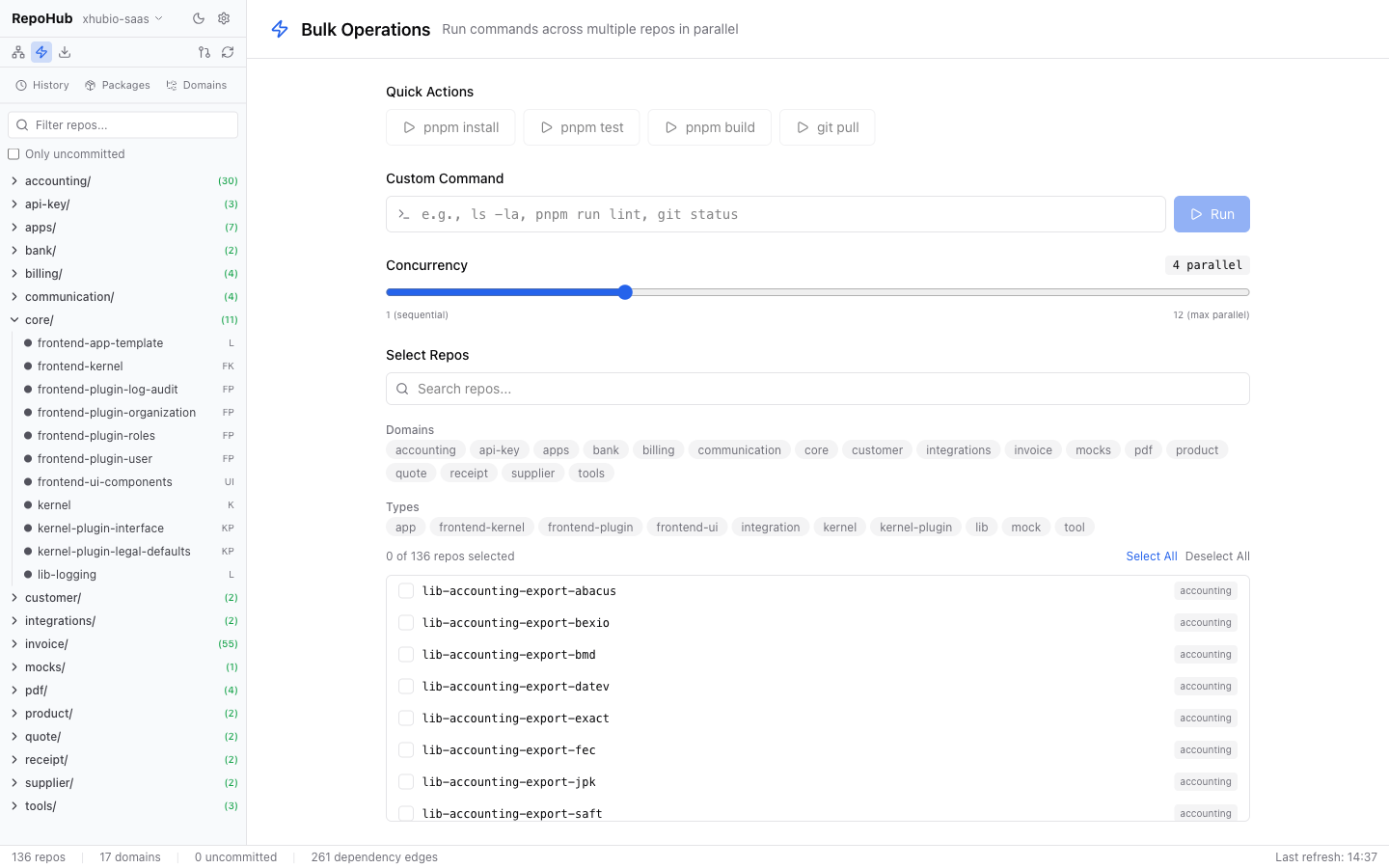
Bulk Operations
Run arbitrary shell commands across multiple repos in parallel:
- Filter repos by domain, type, or search term
- Enter a command (e.g.
npm run build,git status,npm test) - Choose concurrency (1–20)
- Start — live output per repo with exit code and duration
Packages (File-URL Management)
Shows repos with file: dependencies in package.json. Enables batch switching between local file: paths (development) and npm versions (production).
History
Persistent history of all Cascade and Pull All operations with status, affected repos, and duration.
Configuration
Environment (.env)
PORT=3100                                # Backend port
VITE_PORT=3101                           # Vite dev server port
NPM_REGISTRY=https://npm.pkg.github.com # npm registry (for Cascade version resolution)
Project Settings
Configured via the Settings dialog (gear icon) in the UI. Persisted in .repoMaintenance/project.json.
| Setting | Description | Default |
|---------|-------------|---------|
| Project Name | Label for your monorepo | — |
| workspace.repos | Path to a vcstool manifest; when set, the source of truth for layout/URL/branch (derives the fields below) | — |
| Root Folder | Path containing all repos (derived from workspace.repos when set) | — |
| Parallel Tasks | Concurrency for bulk/pull operations (1–20) | 6 |
| Default Branch | Branch used for pull fallback | main |
| npm Organizations | Scoped packages detected as internal deps | — |
| GitHub Organizations (required) | Used by Pull All to list/clone repos | — |
| npm Registry URL | Registry for version resolution | https://npm.pkg.github.com |
| Git Clone Protocol | Protocol for cloning repos: ssh or https | ssh |
| Quick Actions | Configurable commands for bulk operations | pnpm install, pnpm test, pnpm build, git pull |
| Repo Mapping | Assigns GitHub repos to local domain folders | Auto-generated on refresh |
workspace.repos (single source of truth)
Point the workspace.repos setting at a vcstool manifest and it becomes the one place that defines your repos:
repositories:
  repo/backend/core-backend:
    type: git
    url: [email protected]:myorg/core-backend.git
    version: main
  repo/integrations/landing:
    type: git
    url: [email protected]:myorg/landing.git
    version: feature/new-pages   # per-repo branch is respected
When set, RepoHub:
- derives root folder, GitHub org, npm org, ignore list and per-repo branch from the file (these are no longer stored separately in
project.json); - surfaces not-yet-cloned repos from the manifest as
missing(Pull All can clone them at the listed branch); - can regenerate the manifest from the current on-disk state via the Regenerate button (handy after adding/moving repos).
Directory Structure
The scanner supports two directory layouts:
Hierarchical (domain folders containing repos):
rootFolder/
├── core/
│   ├── kernel/          ← repo with package.json
│   └── kernel-plugin/   ← repo with package.json
├── invoice/
│   ├── lib-invoice-common/
│   └── outbound/        ← known sub-group
│       └── lib-invoice-outbound-de/
└── apps/
    └── invoice/
        └── saas-invoice-backend/
Flat (repos directly in root folder):
rootFolder/
├── lib-accounting-export-abacus/   ← repo with package.json
├── lib-accounting-export-bexio/    ← repo with package.json
└── lib-accounting-export-bmd/      ← repo with package.json
Both layouts are auto-detected. A directory is recognized as a repo if it contains a package.json with a name field. The repo mapping is auto-generated on refresh — flat repos map to "." (root), hierarchical repos map to their domain folder.
Git Clone Protocol
Controls how new repos are cloned during Pull All:
- SSH (default):
[email protected]:org/repo.git— requires SSH key configured with GitHub - HTTPS:
https://github.com/org/repo.git— requires a credential helper (e.g.gh auth setup-git)
Data Storage
.repoMaintenance/
├── project.json          # Project config (app prefs only when workspace.repos drives layout)
├── cached-repos.json     # Repo cache (for fast startup)
├── cached-graph.json     # Dependency graph cache
├── cascade-history/      # Cascade execution logs
└── pull-history/         # Pull All execution logs
Development
For contributors working on RepoHub itself:
git clone <repo-url>
cd repo-maintenance
pnpm install
cp .env.example .env     # Adjust if needed
pnpm dev                 # Backend (3100) + Frontend (3101) concurrently
| Script | Description |
|--------|-------------|
| pnpm dev | Development (backend + frontend) |
| pnpm build | TypeScript + Vite build |
| pnpm start | Start production server |
| pnpm desktop | Run the Electron desktop app locally |
| pnpm desktop:build | Build desktop installers (.dmg/.exe/.AppImage) into release/ |
Cutting a desktop release: push a desktop-v* tag (e.g. git tag desktop-v1.0.0 && git push --tags) or run the Desktop Build workflow from the Actions tab. CI builds macOS (universal) / Windows / Linux installers and attaches them to a GitHub Release. Artifacts are unsigned (add code-signing secrets to enable signing/notarization).
| pnpm test | Lint + build + depcheck + tests with coverage |
| pnpm lint | ESLint |
| pnpm format | Prettier |
| pnpm depcheck | Check for unused dependencies |
Tech Stack
| Component | Technology | |-----------|------------| | Backend | Node.js + Hono + tRPC | | Frontend | React 19 + Vite + Tailwind CSS 4 | | State | TanStack Query (polling for live updates) | | Graph | React Flow (@xyflow/react) | | Git | simple-git | | Icons | Lucide React |
License
MIT