
@aitytech/agentkits-memory
v2.3.0
Published
Persistent memory system for AI coding assistants via MCP. Works with Claude Code, Cursor, Copilot, Windsurf, Cline.

Maintainers
 linhld
Readme
Features
| Feature | Benefit | |---------|---------| | 100% Local | All data stays on your machine. No cloud, no API keys, no accounts | | Blazing Fast | Native SQLite (better-sqlite3) = instant queries, zero latency | | Zero Config | Works out of the box. No database setup required | | Multi-Platform | Claude Code, Cursor, Windsurf, Cline, OpenCode — one setup command | | MCP Server | 9 tools: save, search, timeline, details, recall, list, update, delete, status | | Auto-Capture | Hooks capture session context, tool usage, summaries automatically | | AI Enrichment | Background workers enrich observations with AI-generated summaries | | Vector Search | sqlite-vec semantic similarity with multilingual embeddings (100+ languages) | | Web Viewer | Browser UI to view, search, add, edit, delete memories | | 3-Layer Search | Progressive disclosure saves ~87% tokens vs fetching everything | | Lifecycle Mgmt | Auto-compress, archive, and clean up old sessions | | Export/Import | Backup and restore memories as JSON |
How It Works
Session 1: "Use JWT for auth"          Session 2: "Add login endpoint"
┌──────────────────────────┐          ┌──────────────────────────┐
│  You code with AI...     │          │  AI already knows:       │
│  AI makes decisions      │          │  ✓ JWT auth decision     │
│  AI encounters errors    │   ───►   │  ✓ Error solutions       │
│  AI learns patterns      │  saved   │  ✓ Code patterns         │
│                          │          │  ✓ Session context        │
└──────────────────────────┘          └──────────────────────────┘
         │                                      ▲
         ▼                                      │
    .claude/memory/memory.db  ──────────────────┘
(SQLite, 100% local)- Setup once —
npx @aitytech/agentkits-memoryconfigures your platform - Auto-capture — Hooks record decisions, tool usage, and summaries as you work
- Context injection — Next session starts with relevant history from past sessions
- Background processing — Workers enrich observations with AI, generate embeddings, compress old data
- Search anytime — AI uses MCP tools (
memory_search→memory_details) to find past context
All data stays in .claude/memory/memory.db on your machine. No cloud. No API keys required.
Design Decisions That Matter
Most memory tools scatter data across markdown files, require Python runtimes, or send your code to external APIs. AgentKits Memory makes fundamentally different choices:
| Design Choice | Why It Matters |
|---------------|----------------|
| Single SQLite database | One file (memory.db) holds everything — memories, sessions, observations, embeddings. No scattered files to sync, no merge conflicts, no orphaned data. Backup = copy one file |
| Native Node.js, zero Python | Runs wherever Node runs. No conda, no pip, no virtualenv. Same language as your MCP server — one npx command, done |
| Token-efficient 3-layer search | Search index first (~50 tokens/result), then timeline context, then full details. Only fetch what you need. Other tools dump entire memory files into context, burning tokens on irrelevant content |
| Auto-capture via hooks | Decisions, patterns, and errors are recorded as they happen — not after you remember to save them. Session context injection happens automatically on next session start |
| Local embeddings, no API calls | Vector search uses a local ONNX model (multilingual-e5-small). Semantic search works offline, costs nothing, and supports 100+ languages |
| Background workers | AI enrichment, embedding generation, and compression run asynchronously. Your coding flow is never blocked |
| Multi-platform from day one | One --platform=all flag configures Claude Code, Cursor, Windsurf, Cline, and OpenCode simultaneously. Same memory database, different editors |
| Structured observation data | Tool usage is captured with type classification (read/write/execute/search), file tracking, intent detection, and AI-generated narratives — not raw text dumps |
| No process leaks | Background workers self-terminate after 5 minutes, use PID-based lock files with stale-lock cleanup, and handle SIGTERM/SIGINT gracefully. No zombie processes, no orphaned workers |
| No memory leaks | Hooks run as short-lived processes (not long-running daemons). Database connections close on shutdown. Embedding subprocess has bounded respawn (max 2), pending request timeouts, and graceful cleanup of all timers and queues |
Web Viewer
View and manage your memories through a modern web interface.
npx @aitytech/agentkits-memory webThen open http://localhost:1905 in your browser.
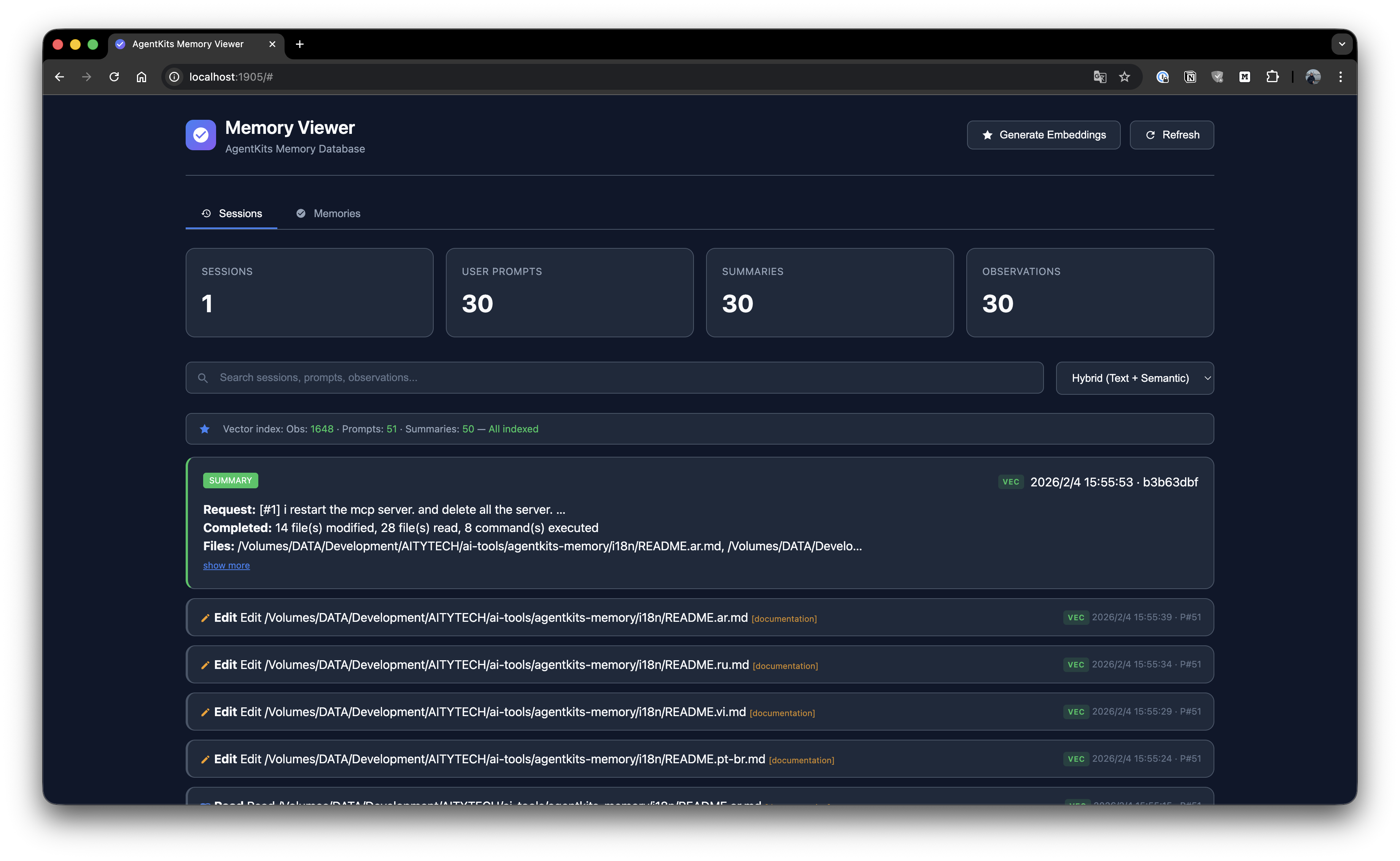
Session List
Browse all sessions with timeline view and activity details.
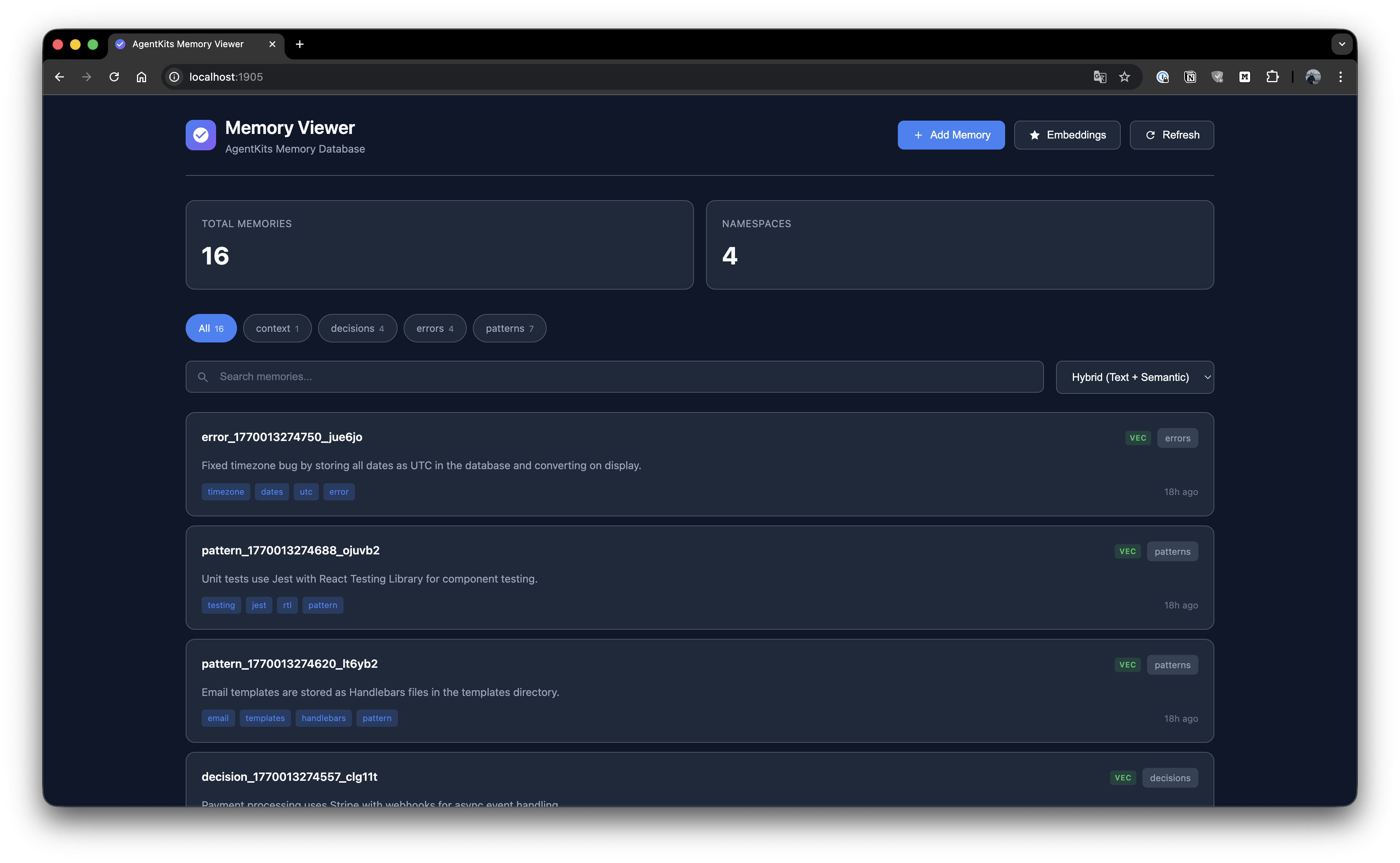
Memory List
Browse all stored memories with search and namespace filtering.
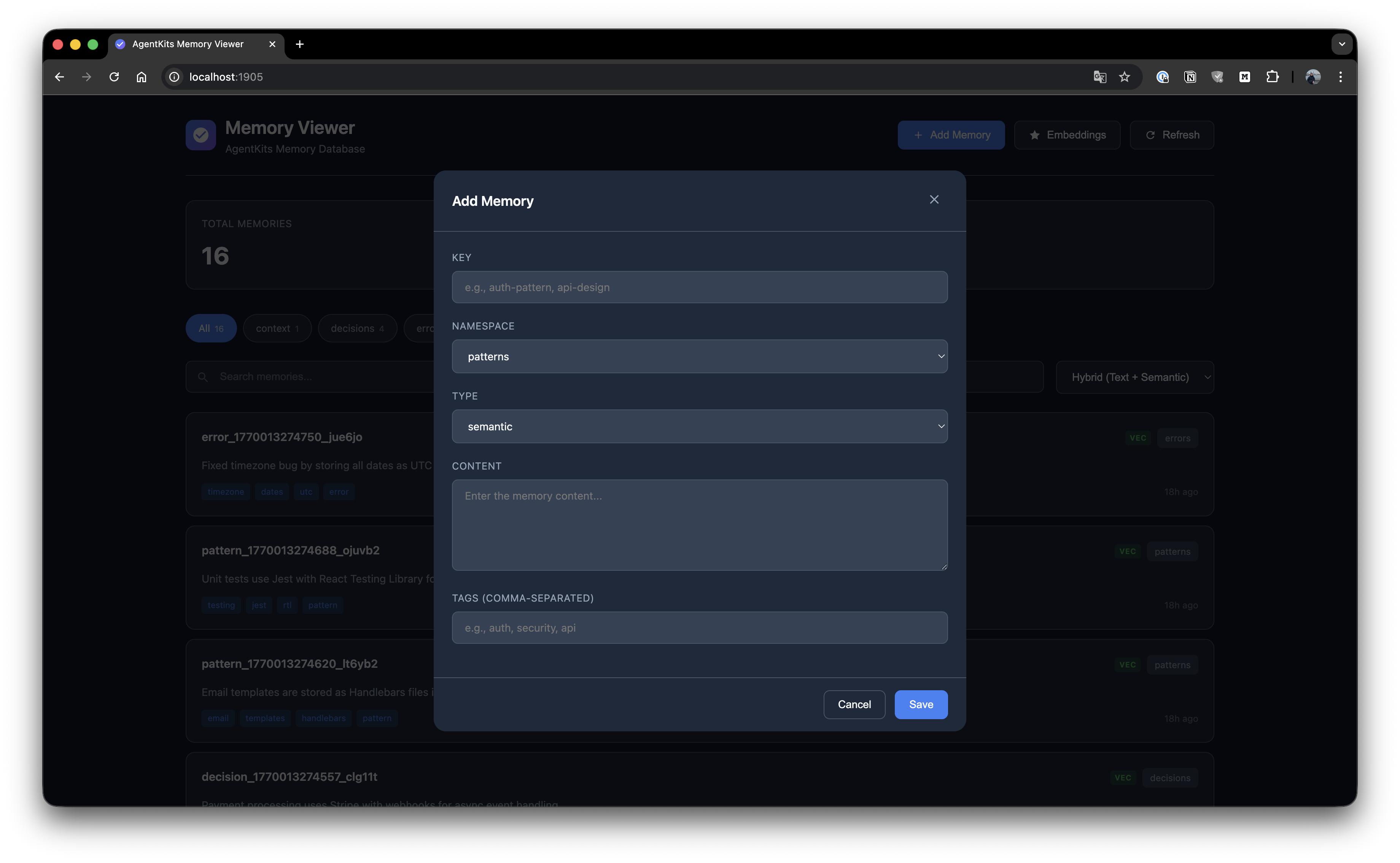
Add Memory
Create new memories with key, namespace, type, content, and tags.
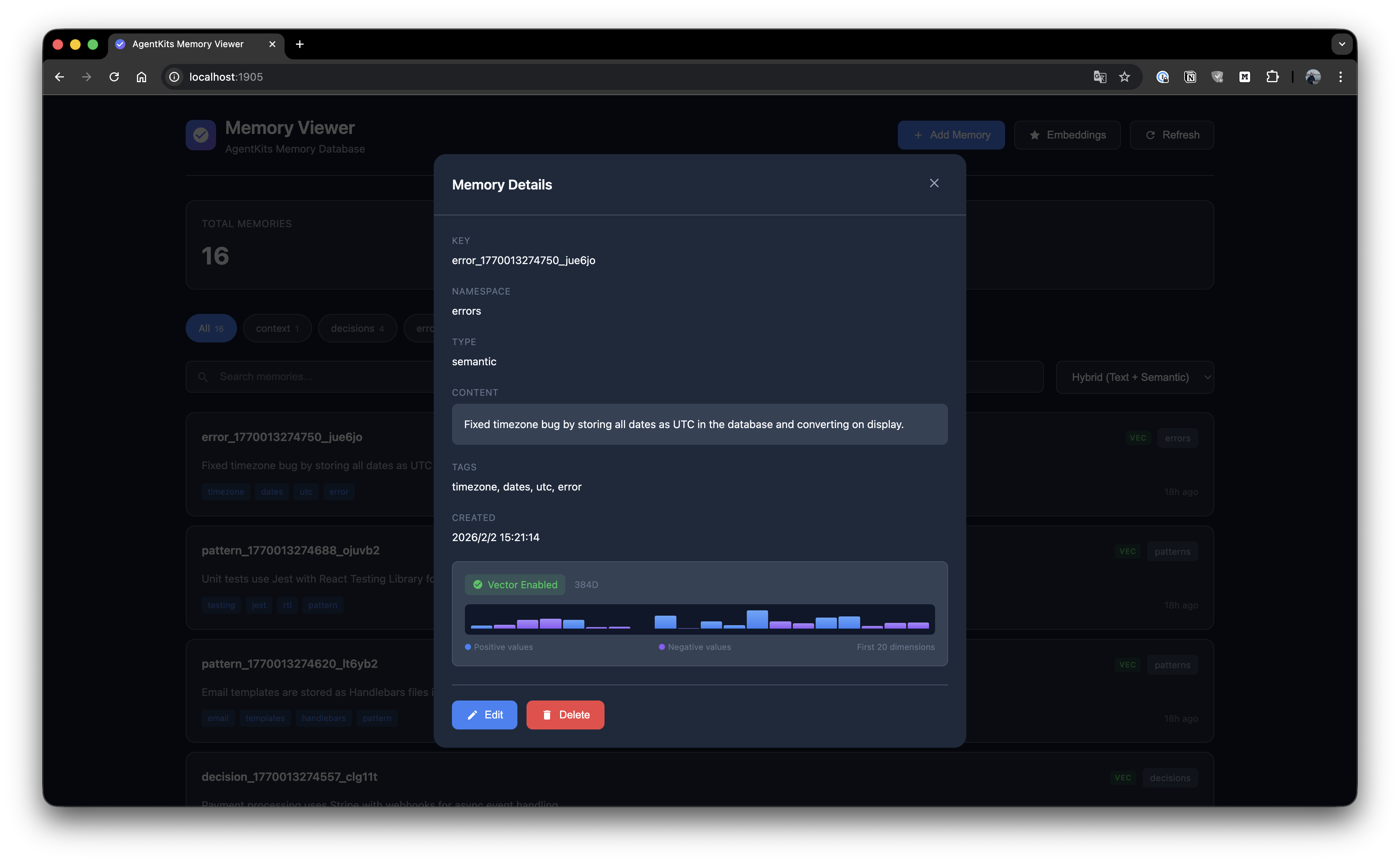
Memory Details
View full memory details with edit and delete options.
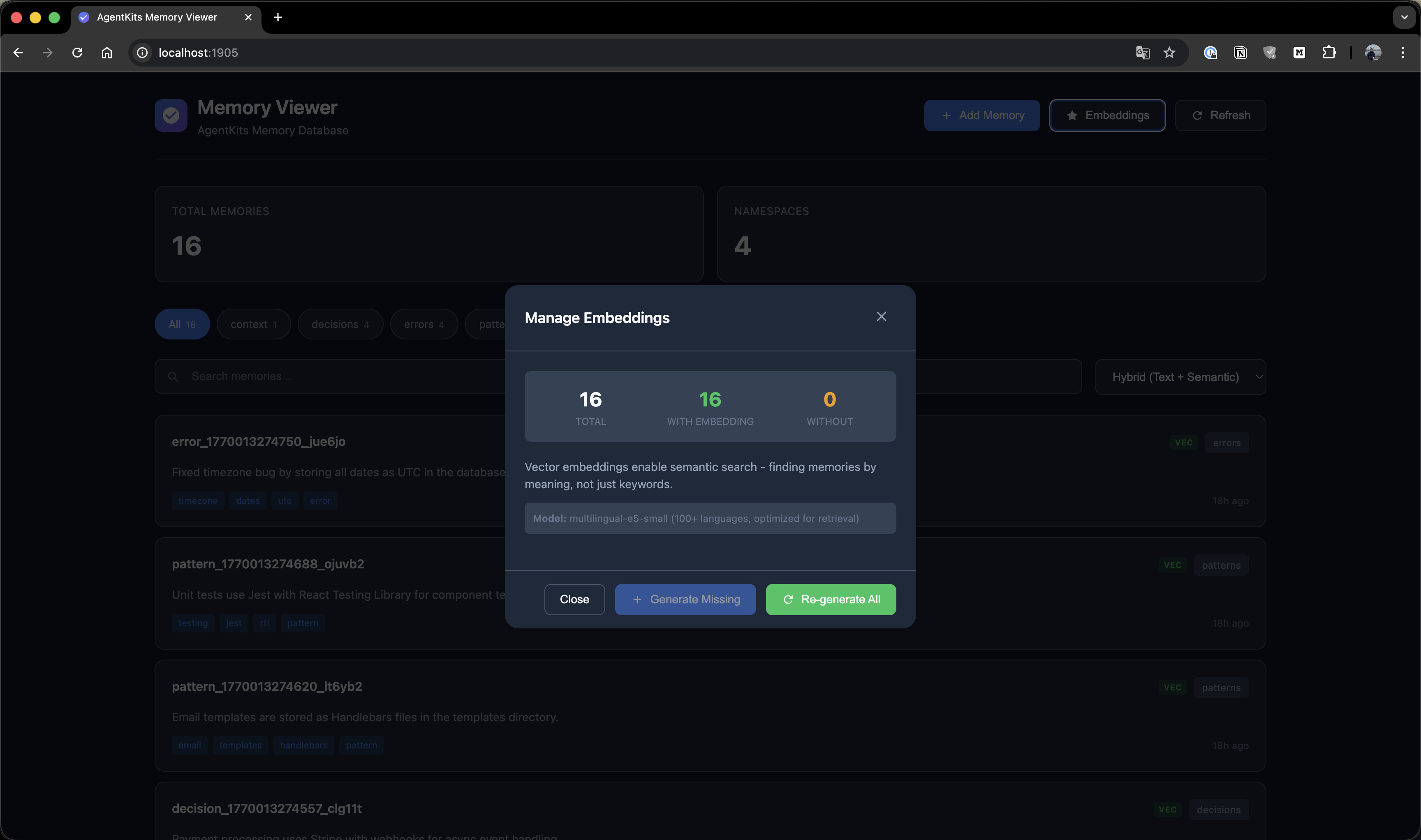
Manage Embeddings
Generate and manage vector embeddings for semantic search.
Quick Start
Option 1: Claude Code Plugin Marketplace (Recommended for Claude Code)
Install as a plugin with one command — no manual configuration needed:
/plugin marketplace add aitytech/agentkits-memory
/plugin install agentkits-memory@agentkits-memory
This installs hooks, MCP server, and memory workflow skill automatically. Restart Claude Code after installation.
Option 2: Automated Setup (All Platforms)
npx @aitytech/agentkits-memoryThis auto-detects your platform and configures everything: MCP server, hooks (Claude Code/OpenCode), rules files (Cursor/Windsurf/Cline), and downloads the embedding model.
Target a specific platform:
npx @aitytech/agentkits-memory --platform=cursor
npx @aitytech/agentkits-memory --platform=windsurf,cline
npx @aitytech/agentkits-memory --platform=all
Option 3: Manual MCP Configuration
If you prefer manual setup, add to your MCP config:
{
  "mcpServers": {
    "memory": {
      "command": "npx",
      "args": ["-y", "@aitytech/agentkits-memory", "server"]
    }
  }
}
Config file locations:
- Claude Code:
.claude/settings.json(embedded inmcpServerskey) - Cursor:
.cursor/mcp.json - Windsurf:
.windsurf/mcp.json - Cline / OpenCode:
.mcp.json(project root)
3. MCP Tools
Once configured, your AI assistant can use these tools:
| Tool | Description |
|------|-------------|
| memory_status | Check memory system status (call first!) |
| memory_save | Save decisions, patterns, errors, or context |
| memory_search | [Step 1] Search index — lightweight IDs + titles (~50 tokens/result) |
| memory_timeline | [Step 2] Get temporal context around a memory |
| memory_details | [Step 3] Get full content for specific IDs |
| memory_recall | Quick topic overview — grouped summary |
| memory_list | List recent memories |
| memory_update | Update existing memory content or tags |
| memory_delete | Remove outdated memories |
Progressive Disclosure (Token-Efficient Search)
AgentKits Memory uses a 3-layer search pattern that saves ~70% tokens compared to fetching full content upfront.
How It Works
┌─────────────────────────────────────────────────────────────┐
│  Step 1: memory_search                                      │
│  Returns: IDs, titles, tags, scores (~50 tokens/item)       │
│  → Review index, pick relevant memories                     │
└─────────────────────────────────────────────────────────────┘
                             ↓
┌─────────────────────────────────────────────────────────────┐
│  Step 2: memory_timeline (optional)                         │
│  Returns: Context ±30 minutes around memory                 │
│  → Understand what happened before/after                    │
└─────────────────────────────────────────────────────────────┘
                             ↓
┌─────────────────────────────────────────────────────────────┐
│  Step 3: memory_details                                     │
│  Returns: Full content for selected IDs only                │
│  → Fetch only what you actually need                        │
└─────────────────────────────────────────────────────────────┘
Example Workflow
// Step 1: Search - get lightweight index
memory_search({ query: "authentication" })
// → Returns: [{ id: "abc", title: "JWT pattern...", score: 85% }]

// Step 2: (Optional) See temporal context
memory_timeline({ anchor: "abc" })
// → Returns: What happened before/after this memory

// Step 3: Get full content only for what you need
memory_details({ ids: ["abc"] })
// → Returns: Full content for selected memory
Token Savings
| Approach | Tokens Used | |----------|-------------| | Old: Fetch all content | ~500 tokens × 10 results = 5000 tokens | | New: Progressive disclosure | 50 × 10 + 500 × 2 = 1500 tokens | | Savings | 70% reduction |
CLI Commands
# One-command setup (auto-detects platform)
npx @aitytech/agentkits-memory
npx @aitytech/agentkits-memory setup --platform=cursor   # specific platform
npx @aitytech/agentkits-memory setup --platform=all      # all platforms
npx @aitytech/agentkits-memory setup --force             # re-install/update

# Start MCP server
npx @aitytech/agentkits-memory server

# Web viewer (port 1905)
npx @aitytech/agentkits-memory web

# Terminal viewer
npx @aitytech/agentkits-memory viewer
npx @aitytech/agentkits-memory viewer --stats
npx @aitytech/agentkits-memory viewer --json

# Save from CLI
npx @aitytech/agentkits-memory save "Use JWT with refresh tokens" --category pattern --tags auth,security

# Settings
npx @aitytech/agentkits-memory hook settings .
npx @aitytech/agentkits-memory hook settings . --reset
npx @aitytech/agentkits-memory hook settings . aiProvider.provider=openai aiProvider.apiKey=sk-...

# Export / Import
npx @aitytech/agentkits-memory hook export . my-project ./backup.json
npx @aitytech/agentkits-memory hook import . ./backup.json

# Lifecycle management
npx @aitytech/agentkits-memory hook lifecycle . --compress-days=7 --archive-days=30
npx @aitytech/agentkits-memory hook lifecycle-stats .
Programmatic Usage
import { ProjectMemoryService } from '@aitytech/agentkits-memory';

const memory = new ProjectMemoryService({
  baseDir: '.claude/memory',
  dbFilename: 'memory.db',
});
await memory.initialize();

// Store a memory
await memory.storeEntry({
  key: 'auth-pattern',
  content: 'Use JWT with refresh tokens for authentication',
  namespace: 'patterns',
  tags: ['auth', 'security'],
});

// Query memories
const results = await memory.query({
  type: 'hybrid',
  namespace: 'patterns',
  content: 'authentication',
  limit: 10,
});

// Get by key
const entry = await memory.getByKey('patterns', 'auth-pattern');
Auto-Capture Hooks
Hooks automatically capture your AI coding sessions (Claude Code and OpenCode only):
| Hook | Trigger | Action |
|------|---------|--------|
| context | Session Start | Injects previous session context + memory status |
| session-init | User Prompt | Initializes/resumes session, records prompts |
| observation | After Tool Use | Captures tool usage with intent detection |
| summarize | Session End | Generates structured session summary |
| user-message | Session Start | Displays memory status to user (stderr) |
Setup hooks:
npx @aitytech/agentkits-memoryWhat gets captured automatically:
- File reads/writes with paths
- Code changes as structured diffs (before → after)
- Developer intent (bugfix, feature, refactor, investigation, etc.)
- Session summaries with decisions, errors, and next steps
- Multi-prompt tracking within sessions
Multi-Platform Support
| Platform | MCP | Hooks | Rules File | Setup |
|----------|-----|-------|------------|-------|
| Claude Code | .claude/settings.json | ✅ Full | CLAUDE.md (skill) | --platform=claude-code |
| Cursor | .cursor/mcp.json | — | .cursorrules | --platform=cursor |
| Windsurf | .windsurf/mcp.json | — | .windsurfrules | --platform=windsurf |
| Cline | .mcp.json | — | .clinerules | --platform=cline |
| OpenCode | .mcp.json | ✅ Full | — | --platform=opencode |
- MCP Server works with all platforms (memory tools via MCP protocol)
- Hooks provide auto-capture on Claude Code and OpenCode
- Rules files teach Cursor/Windsurf/Cline the memory workflow
- Memory data always stored in
.claude/memory/(single source of truth)
Background Workers
After each session, background workers process queued tasks:
| Worker | Task | Description |
|--------|------|-------------|
| embed-session | Embeddings | Generate vector embeddings for semantic search |
| enrich-session | AI Enrichment | Enrich observations with AI-generated summaries, facts, concepts |
| compress-session | Compression | Compress old observations (10:1–25:1) and generate session digests (20:1–100:1) |
Workers run automatically after session end. Each worker:
- Processes up to 200 items per run
- Uses lock files to prevent concurrent execution
- Auto-terminates after 5 minutes (prevents zombies)
- Retries failed tasks up to 3 times
AI Provider Configuration
AI enrichment uses pluggable providers. Default is claude-cli (no API key needed).
| Provider | Type | Default Model | Notes |
|----------|------|---------------|-------|
| Claude CLI | claude-cli | haiku | Uses claude --print, no API key needed |
| OpenAI | openai | gpt-4o-mini | Any OpenAI model |
| Google Gemini | gemini | gemini-2.0-flash | Google AI Studio key |
| OpenRouter | openai | any | Set baseUrl to https://openrouter.ai/api/v1 |
| GLM (Zhipu) | openai | any | Set baseUrl to https://open.bigmodel.cn/api/paas/v4 |
| Ollama | openai | any | Set baseUrl to http://localhost:11434/v1 |
Option 1: Environment Variables
# OpenAI
export AGENTKITS_AI_PROVIDER=openai
export AGENTKITS_AI_API_KEY=sk-...

# Google Gemini
export AGENTKITS_AI_PROVIDER=gemini
export AGENTKITS_AI_API_KEY=AIza...

# OpenRouter (uses OpenAI-compatible format)
export AGENTKITS_AI_PROVIDER=openai
export AGENTKITS_AI_API_KEY=sk-or-...
export AGENTKITS_AI_BASE_URL=https://openrouter.ai/api/v1
export AGENTKITS_AI_MODEL=anthropic/claude-3.5-haiku

# Local Ollama (no API key needed)
export AGENTKITS_AI_PROVIDER=openai
export AGENTKITS_AI_BASE_URL=http://localhost:11434/v1
export AGENTKITS_AI_MODEL=llama3.2

# Disable AI enrichment entirely
export AGENTKITS_AI_ENRICHMENT=false
Option 2: Persistent Settings
# Saved to .claude/memory/settings.json — persists across sessions
npx @aitytech/agentkits-memory hook settings . aiProvider.provider=openai aiProvider.apiKey=sk-...
npx @aitytech/agentkits-memory hook settings . aiProvider.provider=gemini aiProvider.apiKey=AIza...
npx @aitytech/agentkits-memory hook settings . aiProvider.baseUrl=https://openrouter.ai/api/v1

# View current settings
npx @aitytech/agentkits-memory hook settings .

# Reset to defaults
npx @aitytech/agentkits-memory hook settings . --reset
Priority: Environment variables override settings.json. Settings.json overrides defaults.
Lifecycle Management
Manage memory growth over time:
# Compress observations older than 7 days, archive sessions older than 30 days
npx @aitytech/agentkits-memory hook lifecycle . --compress-days=7 --archive-days=30

# Also auto-delete archived sessions older than 90 days
npx @aitytech/agentkits-memory hook lifecycle . --compress-days=7 --archive-days=30 --delete --delete-days=90

# View lifecycle statistics
npx @aitytech/agentkits-memory hook lifecycle-stats .
| Stage | What Happens |
|-------|-------------|
| Compress | AI-compresses observations, generates session digests |
| Archive | Marks old sessions as archived (excluded from context) |
| Delete | Removes archived sessions (opt-in, requires --delete) |
Export / Import
Backup and restore your project memories:
# Export all sessions for a project
npx @aitytech/agentkits-memory hook export . my-project ./backup.json

# Import from backup (deduplicates automatically)
npx @aitytech/agentkits-memory hook import . ./backup.json
Export format includes sessions, observations, prompts, and summaries.
Memory Categories
| Category | Use Case |
|----------|----------|
| decision | Architecture decisions, tech stack picks, trade-offs |
| pattern | Coding conventions, project patterns, recurring approaches |
| error | Bug fixes, error solutions, debugging insights |
| context | Project background, team conventions, environment setup |
| observation | Auto-captured session observations |
Storage
Memories are stored in .claude/memory/ within your project directory.
.claude/memory/
├── memory.db          # SQLite database (all data)
├── memory.db-wal      # Write-ahead log (temp)
├── settings.json      # Persistent settings (AI provider, context config)
└── embeddings-cache/  # Cached vector embeddings
CJK Language Support
AgentKits Memory has automatic CJK support for Chinese, Japanese, and Korean text search.
Zero Configuration
When better-sqlite3 is installed (default), CJK search works automatically:
import { ProjectMemoryService } from '@aitytech/agentkits-memory';

const memory = new ProjectMemoryService('.claude/memory');
await memory.initialize();

// Store CJK content
await memory.storeEntry({
  key: 'auth-pattern',
  content: '認証機能の実装パターン - JWT with refresh tokens',
  namespace: 'patterns',
});

// Search in Japanese, Chinese, or Korean - it just works!
const results = await memory.query({
  type: 'hybrid',
  content: '認証機能',
});
How It Works
- Native SQLite: Uses
better-sqlite3for maximum performance - Trigram tokenizer: FTS5 with trigram creates 3-character sequences for CJK matching
- Smart fallback: Short CJK queries (< 3 chars) automatically use LIKE search
- BM25 ranking: Relevance scoring for search results
Advanced: Japanese Word Segmentation
For advanced Japanese with proper word segmentation, optionally use lindera:
import { createJapaneseOptimizedBackend } from '@aitytech/agentkits-memory';

const backend = createJapaneseOptimizedBackend({
  databasePath: '.claude/memory/memory.db',
  linderaPath: './path/to/liblindera_sqlite.dylib',
});
Requires lindera-sqlite build.
API Reference
ProjectMemoryService
interface ProjectMemoryConfig {
  baseDir: string;              // Default: '.claude/memory'
  dbFilename: string;           // Default: 'memory.db'
  enableVectorIndex: boolean;   // Default: false
  dimensions: number;           // Default: 384
  embeddingGenerator?: EmbeddingGenerator;
  cacheEnabled: boolean;        // Default: true
  cacheSize: number;            // Default: 1000
  cacheTtl: number;             // Default: 300000 (5 min)
}
Methods
| Method | Description |
|--------|-------------|
| initialize() | Initialize the memory service |
| shutdown() | Shutdown and persist changes |
| storeEntry(input) | Store a memory entry |
| get(id) | Get entry by ID |
| getByKey(namespace, key) | Get entry by namespace and key |
| update(id, update) | Update an entry |
| delete(id) | Delete an entry |
| query(query) | Query entries with filters |
| semanticSearch(content, k) | Semantic similarity search |
| count(namespace?) | Count entries |
| listNamespaces() | List all namespaces |
| getStats() | Get statistics |
Code Quality
AgentKits Memory is thoroughly tested with 970 unit tests across 21 test suites.
| Metric | Coverage | |--------|----------| | Statements | 90.29% | | Branches | 80.85% | | Functions | 90.54% | | Lines | 91.74% |
Test Categories
| Category | Tests | What's Covered | |----------|-------|----------------| | Core Memory Service | 56 | CRUD, search, pagination, categories, tags, import/export | | SQLite Backend | 65 | Schema, migrations, FTS5, transactions, error handling | | sqlite-vec Vector Index | 47 | Insert, search, delete, persistence, edge cases | | Hybrid Search | 44 | FTS + vector fusion, scoring, ranking, filters | | Token Economics | 27 | 3-layer search budgets, truncation, optimization | | Embedding System | 63 | Cache, subprocess, local models, CJK support | | Hook System | 502 | Context, session-init, observation, summarize, AI enrichment, service lifecycle, queue workers, adapters, types | | MCP Server | 48 | All 9 MCP tools, validation, error responses | | CLI | 34 | Platform detection, rules generation | | Integration | 84 | End-to-end flows, embedding integration, multi-session |
# Run tests
npm test

# Run with coverage
npm run test:coverage
Requirements
- Node.js LTS: 18.x, 20.x, or 22.x (recommended)
- MCP-compatible AI coding assistant
Node.js Version Notes
This package uses better-sqlite3 which requires native binaries. Prebuilt binaries are available for LTS versions only.
| Node Version | Status | Notes | |--------------|--------|-------| | 18.x LTS | ✅ Works | Prebuilt binaries | | 20.x LTS | ✅ Works | Prebuilt binaries | | 22.x LTS | ✅ Works | Prebuilt binaries | | 19.x, 21.x, 23.x | ⚠️ Requires build tools | No prebuilt binaries |
Using Non-LTS Versions (Windows)
If you must use a non-LTS version (19, 21, 23), install build tools first:
Option 1: Visual Studio Build Tools
# Download and install from:
# https://visualstudio.microsoft.com/visual-cpp-build-tools/
# Select "Desktop development with C++" workload
Option 2: windows-build-tools (npm)
npm install --global windows-build-toolsOption 3: Chocolatey
choco install visualstudio2022-workload-vctoolsSee node-gyp Windows guide for more details.
AgentKits Ecosystem
AgentKits Memory is part of the AgentKits ecosystem by AityTech - tools that make AI coding assistants smarter.
| Product | Description | Link | |---------|-------------|------| | AgentKits Engineer | 28 specialized agents, 100+ skills, enterprise patterns | GitHub | | AgentKits Marketing | AI-powered marketing content generation | GitHub | | AgentKits Memory | Persistent memory for AI assistants (this package) | npm |
Star History
License
MIT