
@akashpandey/agent-relay
v1.3.1
Published
Pass the baton between Claude Code, Codex, Antigravity, and OpenCode with a single Unix command.

Maintainers
 akashpandey
Readme
agent-relay



Talk to the AI assistant you're already using — Claude Code, Codex, Antigravity, or OpenCode — and let it delegate, review, or hand off a task to another model without you ever leaving that tab.
How It Works (in 30 seconds)
Install once:
npm install -g @akashpandey/agent-relay
relay install
relay installauto-detects your installed AI tools, links the skills, registers MCP servers, and starts your local dashboard.Stay in your AI conversation: Prompt your assistant naturally:
"Use agent-relay to have Codex review
src/auth.tsfor security vulnerabilities and verify all tests pass."Watch live or wait for the verified answer: Open
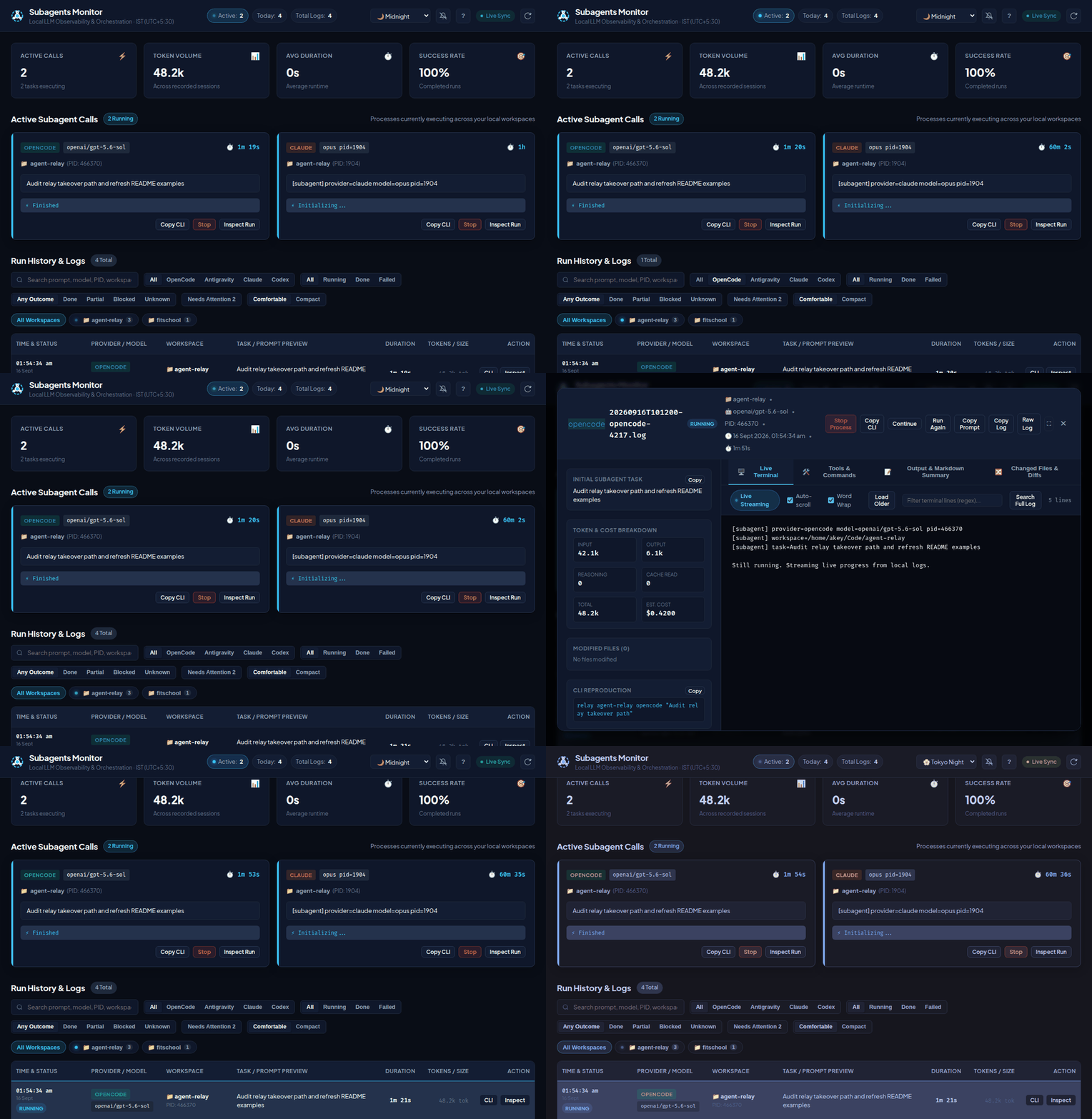
http://localhost:4242to watch the subagent run in real time. When finished, your assistant receives a verified pass/fail outcome and summarizes the result directly in your chat.
What makes agent-relay different?
| What you might do today | With agent-relay |
|---|---|
| Open 3 terminal tabs to run Claude Code, Codex, and Gemini manually. | Stay in one tab. Your primary assistant delegates to the others for you. |
| Copy-paste error messages and code diffs across different AI CLIs. | Structured handoffs with workspace context and automatic rollback on failure. |
| Wonder if an agent actually finished or just exited with 0. | Strict acceptance contracts — tasks only report pass when verified. |
| Run out of tokens or hit provider rate limits mid-task. | Automatic failover chains (relay takeover or model fallback chains). |
| Cloud dashboards and telemetry tracking your code. | 100% local. Runs on SQLite on your own machine. Zero tracking. |
📖 Getting Started Guide — step-by-step setup, first verified task, dashboard controls, and updates. Harness plugins are also available.
GitHub release guide — prepare a tested version tag and downloadable install bundle.
The npm package name is @akashpandey/agent-relay.
The unscoped agent-relay package belongs to another project. CLI commands and
harness plugin names remain unchanged.
Table of contents
- The idea
- Harness-friendly design
- Why these wrappers exist
- What they are good for
- Requirements
- Install
- Usage
- Typical scenarios
- MCP Server
- Cross-Harness Relay Takeover (Token Exhaustion Handoff)
- Session reuse
- Task routing
- Model catalogues & Dynamic Family Aliases
- opencode-agent
- opencode-agent-fallback
- antigravity-agent
- claude-agent
- codex-agent
- Observability
- Process Cleanup
- Notes
- License
Commands below assume a global install with
npm install -g @akashpandey/agent-relayorinstall-skillonPATH. Running straight from a git checkout without adding it toPATH? Prefix each command with./instead (./relay,./codex-agent, and so on).
A local-first operator toolkit for the coding-agent CLIs you already use. Under the hood: a shared skill and MCP server your harness already knows how to use, a small set of provider wrappers, and a local dashboard for watching progress.
The idea
agent-relay didn't start as a CLI. It started as a skill file — a short set of instructions telling Claude Code, and later Codex, how to invoke a wrapper script and call a particular model when a task needed a second opinion or a different pair of hands. The wrapper existed so those instructions could stay simple: one stable command shape, no matter which provider CLI sat underneath.
As the pattern got used more, it needed rules — how to wait for a real result instead of guessing from a stream of text, how to tell a genuine success from a process that just exited zero, how to hand a task to a different provider when one ran out of context or quota mid-task. Those rules are the acceptance contract every wrapper still returns today.
Then came MCP — not a replacement for the skill, its structured twin. A skill teaches an assistant how to act; an MCP server gives it typed tools to act with. Together they mean what this project always meant: you stay in the conversation you're already having. You don't open a second terminal, switch tabs, or babysit another CLI by hand. You tell your assistant what you need, it delegates through agent-relay, and it comes back with a real answer — pass, fail, or blocked — without you ever leaving the tab you started in.
The terminal commands and MCP tool names documented below are the mechanism, not the point. The point is a tab that never has to become three.
Harness-friendly design
These wrappers are intentionally command-shaped so another coding agent can call them without knowing the underlying provider CLI.
The harness only needs to know:
- command name
- working directory
- task text
- optional environment variables
Everything else stays inside the wrapper:
- workspace wiring
- prompt framing
- provider-specific flags
- timeout handling
- basic observability
That gives you a stable delegation surface even if the underlying CLI syntax changes later.
Why these wrappers exist
The main purpose of these wrappers is to make agent delegation easy from any harness that can run a shell command.
That includes:
- Claude Code
- Codex CLI
- OpenCode
- shell scripts
- local automation tools
- other agent runners
The underlying CLIs already work, but their raw command lines are noisy, backend-specific, and awkward to embed repeatedly in prompts or automation. These wrappers give you one stable entrypoint per agent with the same basic shape:
- take a task as an argument or from stdin
- treat the current directory as the workspace root
- inject a small non-interactive system prompt
- pass through a few useful runtime knobs via environment variables
- add enough observability to tell whether the run is alive or stuck
- tee every run's combined output to a timestamped log file under
~/agent-relay/logs/(path override:AGENT_RELAY_LOG_DIR), printed in the startup banner, so a backgrounded run can be tailed live instead of waiting for the final result
That makes them useful as lightweight building blocks inside terminal workflows, shell scripts, and agent harnesses where one model needs to hand off a task to another model through a plain command invocation.
Included wrappers:
opencode-agentopencode-agent-fallbackantigravity-agentclaude-agentcodex-agent
Terms
- Harness — the AI coding tool you are using: Claude Code, Codex, OpenCode, or Antigravity.
- Wrapper — agent-relay's script that runs one of those tools non-interactively.
- Workspace — the repository directory where a task runs.
- Session — a provider's conversation or continuation ID used to resume a task.
- Takeover — handing an in-progress task to a different harness.
Why these four harnesses, specifically
Claude Code, Codex CLI, and the Antigravity CLI are each a lab's own official entrypoint to its frontier models — Anthropic's, OpenAI's, and Google's. Between them, three wrappers already reach most frontier models simply by going through the harness their own maker ships. OpenCode is the fourth because it isn't tied to one lab: point it at almost any model through a subscription or a plain API key, covering what the other three don't.
That's why the wrapper list stops at four — it's not an arbitrary cap, it's already most of the model landscape. The MCP server and shared skill aren't limited the same way: any harness that can load an MCP server or a skill can use agent-relay's dashboard, logs, and structured results directly, with or without a dedicated wrapper script.
What they are good for
Use agent-relay when you want a bounded coding task to run without opening another interactive UI, and want a way to inspect or continue it afterward.
| Use case | Example task | Where agent-relay helps | |---|---|---| | Delegate from an AI coding session | Ask another provider to write tests for one module | A shared shell/MCP interface keeps the primary agent in control | | Get an independent review | Have a second model inspect a proposed fix without editing | Separate provider sessions and saved results make feedback easy to revisit | | Diagnose a failing build | Reproduce one failure, find its cause, and propose a narrow fix | Run logs, verification entries, and follow-up sessions preserve the investigation | | Split implementation work | Assign isolated modules to workers in separate Git worktrees | Exact workspace paths keep each run in its intended checkout | | Recover an interrupted task | Switch providers after a quota limit or context ceiling | Takeover assembles available local session context and current Git state | | Maintain several repositories | Review test gaps, dependency changes, or documentation drift | Workspace aliases and the dashboard make runs easier to find and inspect | | Script repeatable checks | Run a review prompt from a local script or a trusted automation runner | Non-interactive commands and structured results give the caller an acceptance surface | | Compare providers | Ask two models to review the same unchanged diff | A consistent task interface and separate logs support manual comparison |
These are caller-directed workflows, not built-in autonomous pipelines. Give each run a clear scope, file ownership, and verification target.
They are not a queueing system or autonomous workflow engine. relay provides
run lookup, structured result parsing, continuation, and cross-harness takeover,
but retries and multi-step planning still belong to the caller.
Scope and safety
- Agent-relay does not provide models or credentials. Install and authenticate the provider CLIs you intend to use; you do not need all four. Provider usage limits and charges still apply.
- Local-first means the harness stores run data locally, not that inference is offline. Provider CLIs may send prompts, code, and takeover context to their configured services. Treat logs and session history as sensitive.
- Non-interactive execution is not a security sandbox. Wrappers can disable approval prompts, and permissions depend on the provider and host configuration. Use trusted repositories and isolated environments; do not run untrusted pull-request instructions with secrets or privileged access.
- For parallel edits, use separate worktrees or explicitly disjoint ownership. Agent-relay does not lock files, merge changes, or resolve worker conflicts.
- A successful process exit is not proof that the task is complete. Inspect the structured result and independently verify consequential changes before merging or deploying.
Requirements
These wrappers assume the backing CLIs are already installed on the host:
- Linux, or Linux inside WSL2 (verify on your machine). Native Windows and macOS are not validated; wrappers use Linux utilities.
- Node.js 24+ is recommended and used in CI; the declared minimum is 22.5.0. The dashboard image uses Node 22.
- At least one authenticated provider CLI:
opencode,agy,claude, orcodex, discovered through PATH. Executable paths can be overridden; see the getting-started guide.
They are meant for a machine where those tools already exist. The wrappers do not install or manage them.
Install
Two quick commands set up everything (CLI binaries, skills, MCP servers, and dashboard):
npm install -g @akashpandey/agent-relay
relay install
What happens behind the scenes:
npm install -ginstalls the unifiedrelayCLI, MCP server, and provider wrappers (claude-agent,codex-agent, etc.).relay installdoes the rest:- Wires the Skills: Symlinks the shared
agent-relayskill into all detected harnesses (~/.claude/skills,~/.codex/skills,~/.gemini/skills, etc.). - Registers MCP Tools: Configures the
agent-relayMCP server with Claude Code, Codex, Antigravity, and OpenCode. - Optional Hook: Offers to add a one-line Claude Code SessionStart reminder.
- Starts the Dashboard: Launches the local web monitor at
http://localhost:4242(Docker if available, or plain background process).
- Wires the Skills: Symlinks the shared
(If you already have the CLI installed and just want to update or sync the agent skill via skills.sh, you can run npx skills add akashpandey/agent-relay -g).
Alternative: Install via Harness Plugin Marketplaces
If your harness supports native plugins and you prefer installing directly inside the chat UI:
# In Claude Code:
claude plugin marketplace add akashpandey/agent-relay
claude plugin install agent-relay@agent-relay

# In Codex:
codex plugin marketplace add akashpandey/agent-relay
codex plugin add agent-relay@agent-relay

# In Antigravity CLI:
agy plugin install "$HOME/agent-relay/plugins/agent-relay"
(See 📖 Harness plugins guide for full configuration and OpenCode setup).
That's the whole setup. From here, go to whichever harness you configured and just talk to it — ask it to delegate, review, or hand off a task to another model. It calls agent-relay through the skill/MCP tools for you; you don't need to open a separate terminal or type a wrapper command yourself unless you want to (see Usage below for that direct/scripting path).
If installing from a git checkout instead, use the manual installer:
install-skillThis links commands into ~/.local/bin and the tracked skill at
skills/agent-relay/ into Codex, Claude, OpenCode, Gemini, and shared agent skill
directories. Existing agent-relay skill directories are replaced. If a
target CLI/skill link already points somewhere else, a warning prints the old
and new target before replacing it; pass --force to skip that warning (the
link is still replaced either way — the installer never prompts). Update the
source here; keep the checkout and do not edit the installed links.
skills/agent-relay/ is also the canonical source for the plugin skill.
After editing it, run npm run sync:skills and commit the generated plugin copy
with the source. Packaging synchronizes it automatically, and tests reject
drift. Standalone links read checkout updates in a fresh harness session;
cached plugins require a versioned update/reinstall and restart. See
skill update behavior.
Usage
Once installed, most people never type these directly — you just talk to your harness and it calls agent-relay for you through the skill/MCP. The commands below are for direct terminal use: scripts, CI, or driving a provider from outside any harness.
opencode-agent "Fix the bug"
printf '%s\n' "Review this repo" | opencode-agent
opencode-agent --models

antigravity-agent "Implement TASK.md"
printf '%s\n' "Review this repo" | antigravity-agent
antigravity-agent --models

claude-agent "Review this repo"
printf '%s\n' "Review this repo" | claude-agent
claude-agent --models

codex-agent "Review this repo"
printf '%s\n' "Review this repo" | codex-agent
codex-agent --models
agent-doctor
relay (or agent) is the preferred front door when you want workspace aliases or quick continuation:
relay init             # Auto-discover git repos and configure workspaces
relay mcp install      # Auto-wire MCP server into Claude, OpenCode, Codex, Antigravity
relay workspaces
relay doctor
relay dashboard         # Check dashboard HTTP availability
relay dashboard restart # Restart the configured Docker/hook setup
relay my-app opencode "Review this repo"
relay codex "Review the current directory"
relay attention my-app
relay prune --dry-run --older-than 30d
relay result my-app
relay open my-app
relay last my-app
relay continue my-app "Fix the issue from the previous run"
relay continue my-app --to opencode "Finish tests using another harness"
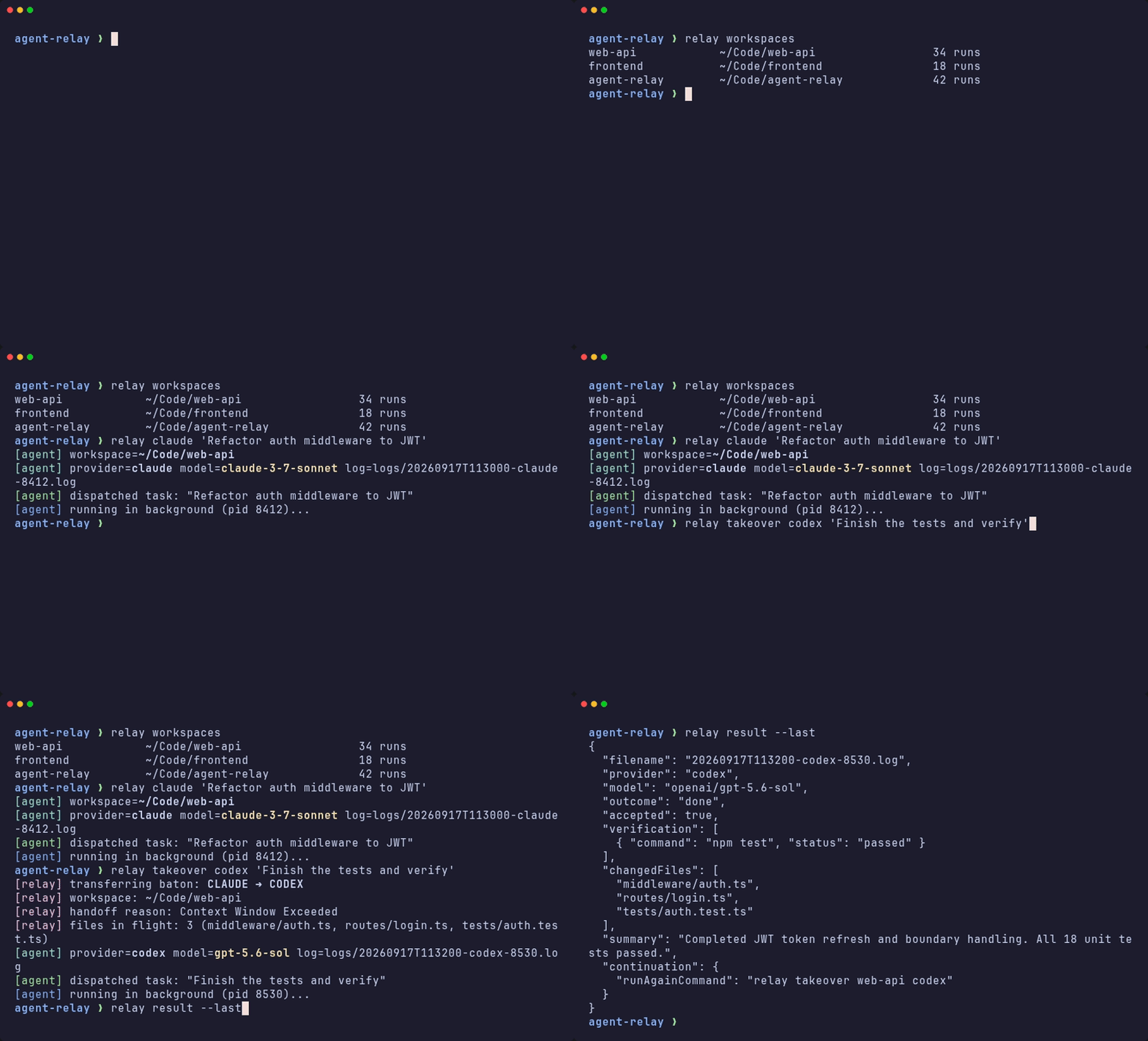
relay takeover my-app codex "Pick up where Claude/OpenCode left off"
Provider wrappers still work directly and use the current working directory as the workspace root. When a launch directory maps to a canonical project workspace, the startup banner also prints canonical_workspace=...; the run still executes in the original directory.
Canonical workspace grouping is shared by the wrappers and dashboard. Optional config lives at ~/.config/agent-relay/workspaces.json as either an array of absolute repo paths or an object of names to absolute repo paths. Override the path with AGENT_RELAY_WORKSPACES_CONFIG or the default code root with AGENT_RELAY_CODE_ROOT.
Run agent-doctor to check Docker, the dashboard container, the compose symlink, and the post-commit restart hook.
Typical scenarios
The examples below assume installation is complete and the selected provider is authenticated. Replace paths and workspace aliases with your own. Each invocation runs a real provider task and may incur usage charges.
1. Delegate implementation and verify it
cd /path/to/repo
relay opencode "Fix the failing parser test. Limit edits to the parser and its tests; run the targeted test suite and report the result."
relay result --last
Use this from a terminal or an AI coding session. The caller reviews the changed files and verification, rather than treating a zero exit code as acceptance.
2. Ask for a second opinion
cd /path/to/repo
relay claude "Review the current git diff for regressions and missing tests. Do not edit files. Return findings with file and line references."
Choose a different provider from the one that made the changes. Asking for no edits is a task instruction, not an enforced read-only permission boundary.
3. Investigate, then continue the same session
relay my-app codex "Reproduce the failing parser test and identify the root cause. Do not edit files yet. Report the reproduction command and a proposed fix."
relay result my-app
relay continue my-app "Implement the proposed parser fix and rerun the reproduction test."
Continue only after reviewing the diagnosis. Same-provider continuation requires a recorded provider session ID; unrelated tasks should start fresh sessions.
4. Run isolated workers in separate worktrees
cd /path/to/repo
git worktree add -b relay-parser-tests ../repo-parser-tests
git worktree add -b relay-docs ../repo-docs
codex-agent --workspace ../repo-parser-tests "Add parser edge-case tests only. Run the parser test suite; do not commit." &
claude-agent --workspace ../repo-docs "Update parser documentation only. Check examples against the source; do not commit." &
wait
Inspect each run's structured result and each worktree's diff before integrating changes. Shell wait only waits for processes; it does not verify task acceptance. Separate worktrees isolate files, but not shared databases, services, or other external side effects.
5. Hand off when a provider cannot continue
relay takeover my-app codex "Finish the remaining tests. Preserve existing changes and report any missing context."
relay result my-app
Takeover uses available local history and Git state to build a new prompt. It is a context summary, not a transfer of the original provider's internal state; the receiving agent still needs to verify assumptions.
6. Review several repositories from a script
for workspace in api web worker; do
  relay "$workspace" codex "Review test coverage gaps. Do not edit files; report the three highest-risk gaps with file references."
  relay result "$workspace"
done
Configure these aliases first with relay init. The loop runs sequentially; the caller decides whether to retry, stop, or act on a result. For an MCP-driven equivalent, launch with run_agent, inspect with get_run_result or wait_for_run, and explicitly check accepted before scheduling dependent work.
7. Compare providers on an unchanged input
cd /path/to/repo
codex-agent "Review the current git diff. Do not edit files; report regressions and missing tests."
claude-agent "Review the current git diff. Do not edit files; report regressions and missing tests."
Keep the checkout unchanged between runs and compare the saved results. Agent-relay provides the runs and logs, not an automated benchmark or quality score.
MCP Server
Harness plugins
Native integrations are included for all four harnesses:
| Harness | Package |
|---|---|
| Claude Code | .claude-plugin manifest, shared skill, and bundled MCP |
| Codex | .codex-plugin manifest, shared skill, and bundled MCP |
| Antigravity CLI | plugin.json, mcp_config.json, and shared skill |
| OpenCode | Native JavaScript plugin that adds guidance and registers MCP |
Follow the plugin installation guide after installing the host CLI. Plugins share the host's run data and do not install providers or start the dashboard. Avoid duplicate manual MCP registrations. Interactive loading, real workspace-listing tool calls, and OpenCode prompt injection passed Linux verification; delegated worker execution and other platforms remain separate verification targets.
Structured tools
agent-relay-mcp exposes a local stdio MCP server for agents that prefer
structured tools over shell commands. It wraps the existing SQLite/dashboard
surfaces; it does not replace the wrappers, logs, or dashboard.
Example MCP command:
agent-relay-mcpAvailable tools include run_agent, list_workspaces, list_runs, get_session_history,
get_run_result, wait_for_run, get_log_tail, search_log, continue_run, takeover_run,
doctor, list_models, and kill_run. Use run_agent to launch tasks directly without shell syntax,
list_runs with q and since/until to search past tasks, get_session_history to inspect
conversation turns and reasoning from prior sessions, takeover_run to inspect or pass the baton,
list_models to inspect available model selectors, and kill_run to terminate runaway processes.
Use get_run_result or wait_for_run for acceptance checks; raw log tools are diagnostic only.
The human asks in natural language; the harness model makes the MCP call. For example, a user might type:
Ask Codex to add tests for the parser in this repository and run the test suite.The model can call run_agent and wait for the full structured result:
{
  "name": "run_agent",
  "arguments": {
    "provider": "codex",
    "prompt": "Add parser tests and run the test suite.",
    "workspace": "/path/to/repository",
    "wait": true
  }
}
Because wait defaults to true, the call blocks and returns a result
directly:
{
  "accepted": true,
  "outcome": "done",
  "summary": "Added parser edge-case tests and verified the test suite.",
  "verification": [
    {
      "command": "npm test",
      "status": "passed",
      "reason": ""
    }
  ]
}
Cross-Harness Relay Takeover (Token Exhaustion Handoff)
When you hit a rate limit, quota exhaustion, or context ceiling midway in an interactive harness session (Claude Code, Codex CLI, Antigravity CLI, or OpenCode) or in an agent run, you don't need to re-explain the task from scratch.
agent-relay inspects the local session logs across all four harnesses, extracts the working context, inspects current repository changes (git status & git diff), and packages a structured baton-pass prompt for the target agent harness:
# Take over in current workspace using Codex:
relay takeover codex

# Take over a named workspace using OpenCode:
relay takeover my-app opencode

# Take over with an explicit directive:
relay takeover my-app claude "Finish the remaining unit tests and report verification"

# Continue a previous agent run but switch provider:
relay continue my-app --to codex "Continue where the last run stopped"
What gets passed during takeover:
- Original User Goal: Extracted from the previous harness session.
- Files Touched / Inspected: Working file list referenced by the prior harness.
- Previous Harness Status: The last assistant message, including detected exhaustion causes (e.g. rate limits or token limits).
- Git Workspace State: Uncommitted changes via
git status -sandgit diff --stat. - Target Directive: Clear instructions for the new harness to seamlessly resume and complete the objective.
In the Web Dashboard, opening any run modal provides a 🔀 Relay Takeover card with 1-click commands to transition that run to any alternate harness.
Session reuse
Fresh runs persist their provider session. For a sequential follow-up, pass the
prior provider session/conversation ID through AGENT_RELAY_SESSION:
AGENT_RELAY_SESSION='<provider-session-id>' \
  codex-agent "Implement the fix you proposed."
The wrappers map this to each CLI's native resume option. Do not reuse one
session across parallel workers or unrelated tasks; context and file intent
will mix. Copy the provider ID from its run output or session list; every
wrapper also keeps the full run log under AGENT_RELAY_LOG_DIR.
The compact result from agent-wait and /api/runs/<log>/result includes a
continuation object when a session ID is available. Use
continuation.sameSessionCommand when the same agent should fix its own
issue or continue a closely related task. Use a fresh session for unrelated work
or parallel workers.
Task routing
Power users can choose a provider and model by task type without putting personal
model preferences in AGENTS.md or CLAUDE.md. Create a repository config with
relay config init, or a personal global config with relay config init --global.
Both commands generate examples and discovered model names for editing; they refuse
to overwrite an existing config. relay install also creates the global sample
when absent, so edit that file if you have already installed relay. The config
uses JSON with optional comments.
{
  "routing": {
    "ui": {
      "provider": "opencode",
      "model": "glm/latest",
      "keywords": ["ui", "layout", "component"],
      "patterns": ["src/components/**", "*.css"]
    },
    "backend": {
      "provider": "codex",
      "model": "latest",
      "keywords": ["api", "database", "migration"],
      "patterns": ["server/**", "migrations/**"]
    }
  },
  "default": { "provider": "codex" }
}
These are examples, not built-in assignments. Set each provider to one of
opencode, codex, claude, or antigravity, and use a model selector accepted
by that provider's wrapper. The generated available_models_on_host field is
informational; it does not select a model. No credentials belong in this file.
relay route ui "Update the settings layout" runs a named route in the current
repository. relay route my-repo backend "Fix the API" uses a configured workspace
alias. MCP run_agent accepts route: "ui" with prompt and optional workspace;
omit both route and provider to match task keywords, then targetPath patterns,
then default. Rules are checked in file order and the first match wins. Pattern
matching needs a targetPath supplied by the caller; relay does not infer touched
files from the prompt. An explicit provider bypasses routing, and an explicit
model overrides the route model.
Relay searches the target workspace and its parent directories for
.agent-relay.json, .agent-relay.jsonc, or agent-relay.json, then uses
~/.config/agent-relay/routing.json if none is found. Set
AGENT_RELAY_ROUTING_CONFIG to change the global path. The nearest repository
config replaces the global config; they are not merged. A missing named route or
invalid config fails the launch rather than silently choosing another model.
Routing applies to launches made through relay route or MCP run_agent; direct
provider commands and other agent tools do not consult this config.
Model catalogues & Dynamic Family Aliases
All wrappers support dynamic model family aliases so you never have to hardcode stale version strings in automation or orchestrations (like Council of Experts):
| Wrapper | Family Alias | Dynamically Resolves To |
|---|---|---|
| antigravity-agent | gemini-flash / flash / latest | Newest Gemini Flash (High) (e.g. Gemini 3.8 Flash (High)) |
| antigravity-agent | gemini-pro / pro | Newest Gemini Pro (High) (e.g. Gemini 3.1 Pro (High)) |
| opencode-agent | openai/latest / openai/sol / gpt-sol | Newest OpenAI GPT Sol (e.g. openai/gpt-5.6-sol) |
| opencode-agent | glm/latest / zai/latest / glm | Newest Z.AI GLM (e.g. zai-coding-plan/glm-5.3) |
| opencode-agent | glm/flash / zai/flash | Newest Z.AI GLM Flash (e.g. zai-coding-plan/glm-5.3-flash) |
| opencode-agent | opencode-go/qwen-latest | Newest Qwen Max (e.g. opencode-go/qwen3.8-max) |
| opencode-agent | opencode-go/deepseek-latest | Newest DeepSeek Pro (e.g. opencode-go/deepseek-v4-pro) |
| codex-agent | latest / sol / gpt-sol | Newest GPT Sol (e.g. gpt-5.6-sol) |
| claude-agent | opus / sonnet / latest | Latest Anthropic model alias |
Refresh or re-list available models before relying on snapshot lists:
opencode-agent --models --refresh
antigravity-agent --models
OpenCode
opencode-agent --models exposes supported providers:
opencode-go/deepseek-v4-flash
opencode-go/deepseek-v4-pro
opencode-go/glm-5.3
opencode-go/gpt-5.6-luna
opencode-go/qwen3.8-max
openai/gpt-5.4-mini
openai/gpt-5.6-sol
openai/gpt-5.6-terra
openai/gpt-5.6-luna
zai-coding-plan/glm-5.2
zai-coding-plan/glm-5.3
zai-coding-plan/glm-5.3-flash
Antigravity
antigravity-agent --models lists the models available via Antigravity CLI:
gemini-3.8-flash-high
gemini-3.8-flash-medium
gemini-3.8-flash-low
gemini-3.7-flash-high
gemini-3.7-flash-medium
gemini-3.7-flash-low
gemini-3.6-flash-high
gemini-3.1-pro-high
claude-opus-4-6-thinking
claude-sonnet-4-6
gpt-oss-120b-medium
Claude Code
Claude Code supports native model selectors: opus, sonnet (and alias latest).
Codex
Codex selectors: latest (gpt-5.6-sol), terra (gpt-5.6-terra), luna (gpt-5.6-luna).
opencode-agent
Environment variables:
OPENCODE_MODEL- model inprovider/modelformatOPENCODE_VARIANT- optional model variantOPENCODE_AGENT- optional agent nameOPENCODE_TIMEOUT- timeout in seconds, default7200OPENCODE_LOGS- set to0to suppress wrapper log bannerAGENT_RELAY_SESSION- optional OpenCode session ID to resumeAGENT_RELAY_LOG_DIR- directory for the run's tee'd log file, default~/agent-relay/logs
Every agent final answer is asked to end with a JSON task outcome contract:
{
  "outcome": "done|partial|blocked|failed",
  "summary": "...",
  "changedFiles": [],
  "verification": [
    { "command": "pnpm test", "status": "passed|failed|skipped", "reason": "" }
  ],
  "blockers": [],
  "incomplete": [],
  "nextSteps": []
}
The JSON object must be the final non-whitespace output.
status=completed only means the wrapper process finished. Automation should accept delegated work only when outcome=done and attentionRequired=false from agent-wait or /api/runs/<log>/result.
Do not tail logs to determine task completeness. Logs are diagnostic output; agent-wait and /api/runs/<log>/result are the machine-readable acceptance surfaces.
agent-wait exits nonzero when any structured result has accepted=false.
Behavior:
- runs
opencode run --dir "$PWD" --auto - enables
--print-logsby default - prints a startup banner (including the run log path) so hung runs are easier to identify
- tees combined stdout+stderr to a timestamped file under
AGENT_RELAY_LOG_DIR(default~/agent-relay/logs/) for diagnostics when a structured result reports a blocker or failure - preserves the underlying command's real exit code even though output goes
through
tee
Best fit:
- coding tasks that benefit from
opencode's tool/runtime setup - runs where session/log visibility matters
- cases where you want to see startup, stream, and loop progress
Model note: opencode-go/glm-5.2 is token-heavy for the same work as
zai-coding-plan/glm-5.2, so the wrapper auto-reroutes any request for
OPENCODE_MODEL=opencode-go/glm-5.2 to zai-coding-plan/glm-5.2 and prints
a one-line notice to stderr when it does. Ask for zai-coding-plan/glm-5.2
directly to skip the redirect notice.
opencode-agent-fallback
Motivation: a model can hit its monthly quota or a rate limit mid-session with
no warning — opencode-go/glm-5.2 did exactly this once, several minutes into
a real task, after already burning real work. The failure looked identical to
"the model is being slow," and the wasted turns weren't discovered until the
transcript was checked by hand. This wrapper probes before committing to the
real task, so quota exhaustion is caught in seconds, not minutes, and falls
over to the next model in a priority chain automatically.
Environment variables:
OPENCODE_MODEL_CHAIN- required, comma-separatedprovider/modellist in priority orderOPENCODE_PROBE_TIMEOUT- seconds for the cheap probe call per candidate, default30OPENCODE_TIMEOUT- seconds for the real task once a model is selected, default7200OPENCODE_VARIANT,OPENCODE_AGENT,OPENCODE_LOGS- passed through toopencode-agentfor the real task
Behavior:
- for each model in the chain, sends a one-word probe prompt through
opencode-agentwith a short timeout - greps the probe output for known quota/rate-limit phrasing (
usage limit,quota,rate limit,429,insufficient_quota,AI_APICallError) - skips a candidate on a quota/rate-limit match or any other probe failure, logging why to stderr
- the first candidate that probes clean gets the real task, on the real
OPENCODE_TIMEOUT - prints which model was actually selected to stderr
Example:
OPENCODE_MODEL_CHAIN='opencode-go/glm-5.2,zai-coding-plan/glm-5.2,zai-coding-plan/glm-5-turbo' \
  opencode-agent-fallback "Build the UI described in TASK.md"
Best fit:
- any dispatch where you'd otherwise hardcode one model and hope it's not exhausted
- long delegation sessions (like a multi-task implementation plan) where quota can run out partway through
antigravity-agent
Environment variables:
AGY_MODEL- model label exactly as shown byagy modelsAGY_PRINT_TIMEOUT- print-mode timeout, default120mAGY_LOG_FILE- optional path passed toagy --log-file(agy's own internal log, separate from the wrapper's run log)AGY_LOGS- set to0to suppress wrapper log bannerAGENT_RELAY_SESSION- optional Antigravity conversation ID to resumeAGENT_RELAY_LOG_DIR- directory for the run's tee'd log file, default~/agent-relay/logs
Behavior:
- runs
agy --print - passes the current directory via
--add-dir - prints a startup banner (including the run log path) for basic observability
--printis blocking/silent by design (no incremental stdout until the run finishes), so the wrapper's own tee'd log is the only way to watch a backgrounded antigravity run mid-flight —agy's own--log-file, if set, captures a separate internal debug log- tees combined stdout+stderr to a timestamped file under
AGENT_RELAY_LOG_DIR - preserves the underlying command's real exit code even though output goes
through
tee
Best fit:
- second-opinion reviews
- alternative-model passes on the same prompt
- simple one-shot tasks where a final printed response is enough
claude-agent
Environment variables:
CLAUDE_MODEL- Claude Code model alias or full model IDCLAUDE_FALLBACK_MODEL- optional comma-separated fallback aliases or IDsCLAUDE_EFFORT- optionallow,medium,high,xhigh, ormaxreasoning effortCLAUDE_TIMEOUT- timeout in seconds, default7200CLAUDE_LOGS- set to0to suppress the wrapper log bannerAGENT_RELAY_SESSION- optional Claude Code session ID to resumeAGENT_RELAY_LOG_DIR- directory for the run's tee'd log file, default~/agent-relay/logs
Behavior:
- runs
claude --printwith the workspace supplied through--add-dir - uses non-persistent, non-interactive execution and passes model, fallback, and optional effort selection through
- tees combined stdout+stderr to a timestamped log file and preserves the real exit code
Claude Code has no live model-list command; claude-agent --models prints
the selectors documented by the installed CLI instead.
codex-agent
Environment variables:
CODEX_MODEL- optional Codex model selectorCODEX_EFFORT- optionallow,medium,high,xhigh,max, orultrareasoning effortCODEX_SANDBOX- sandbox mode; defaults toworkspace-write, with an automaticdanger-full-accessfallback only when the host blocks Bubblewrap user namespacesAGENT_RELAY_SESSION- optional Codex session ID to resumeCODEX_TIMEOUT- timeout in seconds, default7200CODEX_LOGS- set to0to suppress the wrapper log bannerAGENT_RELAY_LOG_DIR- directory for the run's tee'd log file, default~/agent-relay/logs
Behavior:
- runs
codex execin the current workspace with non-interactive approval handling - persists new sessions and resumes
AGENT_RELAY_SESSIONwhen provided; passes model and reasoning effort through - defaults to the
workspace-writesandbox; on hosts that block Bubblewrap user namespaces, automatically falls back todanger-full-access; setCODEX_SANDBOXexplicitly to prevent fallback - tees combined stdout+stderr to a timestamped log file and preserves the real exit code
Codex has no live model-list command; codex-agent --models prints the
selectors documented by the installed CLI instead.
Observability
The dashboard uses SQLite for durable run metadata and logs/ for optional
raw terminal streams. Wrappers tee combined stdout+stderr to a timestamped
file under ~/agent-relay/logs/ (override with AGENT_RELAY_LOG_DIR). The path
is printed in the startup banner, so a run launched in the background can be
watched live:
OPENCODE_MODEL='openai/gpt-5.5' opencode-agent "long task" &
tail -f ~/agent-relay/logs/<the-run-log-printed-above>.log
This exists because, unmodified, opencode streams tool/loop progress to
stderr while agy --print and claude --print may not print incrementally — a
backgrounded antigravity run looked identical whether it was working or
hung. Teeing to a discoverable log file fixes that for all wrappers, uniformly,
without depending on upstream CLI verbosity flags. opencode-agent-fallback
inherits this for free since it shells out to opencode-agent for both
its probe and real task calls.
The logs/ directory is gitignored and not rotated. Clean it out periodically
if it grows (rm -rf ~/agent-relay/logs/*); the dashboard keeps indexed run
metadata in data/subagents.db, but full raw-log download/search is only
available while the corresponding log file still exists.
Process Cleanup
An agent can leave things running after it exits — a npm run dev &
it forgot to stop, a background server started to "test" something. All
wrapper types clean this up automatically:
- When a user systemd manager is available, the CLI runs in a transient
service with
KillMode=control-groupandRuntimeMaxSec. Stopping that unit kills every descendant, including a daemonized process that changes directory. The wrapper also stops it onEXIT,INT,TERM, orHUP. - Without a user systemd manager, the wrapper falls back to
setsid, process-group termination, and its workspace-based/procscan. That fallback can miss a process that both daemonizes and changes directory.
The systemd path bounds even an orphaned wrapper by its runtime limit. The fallback remains useful on hosts without systemd user services.
Notes
- These wrappers are intentionally thin. They normalize prompt shapes and runtime flags.
- Executables are discovered via
PATHby default. You can override individual binary paths via environment variables (AGENT_RELAY_CLAUDE_BIN,AGENT_RELAY_AGY_BIN,AGENT_RELAY_OPENCODE_BIN,AGENT_RELAY_CODEX_BIN). - They assume the current working directory is the repo or workspace you want the agent to operate on.
License
MIT © Akash Pandey