
@alanlee97/vue3-flex-box
v0.0.4
Published
## 简介 | Description


Readme
FlexBox Component For Vue3
简介 | Description
基于vue3开发的FlexBox组件。
A flex-box component developed based on vue3.
使用 | Usage
基本使用
安装 | Install
npm i @alanlee97/vue3-flex-box引入组件 | Import Component
在需要使用flex-box组件的地方引入。
In the place where you need to use the flex - box component into it.
import FlexBox from '@alanlee97/vue3-flex-box';或者全局引入,在main.ts中引入组件。
Or you can globally import flex-box, import it in main.ts.
import { createApp } from 'vue'
import FlexBox from '@alanlee97/vue3-flex-box';
import '@alanlee97/vue3-flex-box/dist/style.css';

const app = createApp(App);
app.component('flex-box', FlexBox);
app.mount('#app');
引入样式 | Import Style
在main.ts中引入样式。
Import style file in main.ts.
import '@alanlee97/vue3-flex-box/dist/style.css';验证是否生效 | Validation
<script setup lang="ts">
// This starter template is using Vue 3 <script setup> SFCs
// Check out https://v3.vuejs.org/api/sfc-script-setup.html#sfc-script-setup
import FlexBox from '@alanlee97/vue3-flex-box';
</script>

<template>
  <FlexBox space-between>
    <div>1</div>
    <div>2</div>
  </FlexBox>
</template>
可以看到效果,组件生效了。
You can see that the component works.
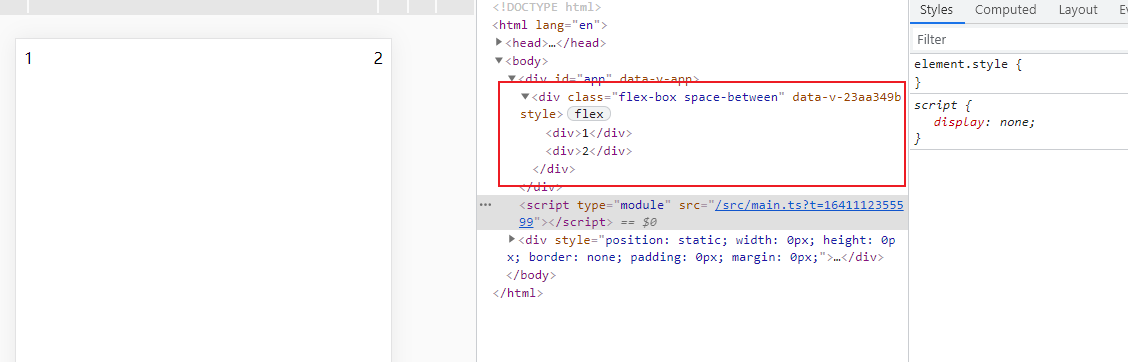
通过v-flex指令使用flex-box | Use flex-box with v-flex directive
注册v-flex指令 | Register v-flex directive
import { createApp } from 'vue'
import App from './App.vue'
import '@alanlee97/vue3-flex-box/dist/style.css';
import { vFlex } from '@alanlee97/vue3-flex-box';

const app = createApp(App);
app.directive('flex', vFlex);
app.mount('#app');
通过指令修饰符的方式控制flex的效果 | Control the effect of flex by directive modifiers
<div v-flex.space-between>
  <div>1</div>
  <div>2</div>
</div>

<div v-flex.between.wrap.center-v>
  <div>1</div>
  <div>2</div>
</div>
FlexBox属性 | Attributes
| 属性 | 类型 | 默认值 | 说明 | | --------------- | ---------------- | ------ | ------------------------------------------------------------ | | height | string | number | | 盒子的高度 Height of box | | width | string | number | | 盒子的宽度 Width of box | | centerH | boolean | false | 元素水平居中 Center element horizontally | | centerV | boolean | false | 元素垂直居中 Center elements vertically | | centerHV | boolean | false | 元素水平垂直居中 Center elements horizontally and vertically | | spaceBetween | boolean | false | 元素两边对齐 Align elements on both sides | | between | boolean | false | spaceBetween的属性简写(别名),元素两边对齐 The attribute abbreviation (alias) of spaceBetween | | spaceAround | boolean | false | 元素两边间距环绕 The spacing between two sides of the element is half of the other spacing | | around | boolean | false | spaceAround的属性简写(别名),元素两边间距环绕Attribute abbreviation (alias) of spaceAround | | spaceEvenly | boolean | false | 元素间距均等Space elements equally | | evenly | boolean | false | spaceEvenly的属性简写(别名),元素间距均等Attribute abbreviation (alias) of spaceEvenly | | directionRow | boolean | false | flex-box的方向,水平方向Direction of flex box, horizontal-direction | | directionR | boolean | false | directionRow的属性简写(别名),flex-box的方向,水平方向Attribute abbreviation (alias) of directionRow | | horizontal | boolean | false | directionRow的别名,flex-box的方向,水平方向Attribute abbreviation (alias) of directionRow | | directionColumn | boolean | false | flex-box的方向,垂直方向Direction of flex box, vertical-direction | | directionC | boolean | false | directionColumn的属性简写(别名),flex-box的方向,垂直方向Attribute abbreviation (alias) of directionColumn | | vertical | boolean | false | directionColumn的别名,flex-box的方向,垂直方向Attribute abbreviation (alias) of directionColumn | | direction | string | | 手动指定flex-box的方向,同css的flex-direction的取值Manually specify the direction of the flex box | | itemAlignStart | boolean | false | 元素排布的位置,从开端位置排列The position of element arrangement, arranged from the beginning | | itemAlignEnd | boolean | false | 元素排布的位置,从末端位置排列The position of the element arrangement, arranged from the end position | | flexNum | boolean | | flex的占比数,同css的flex属性的取值Flex number | | wrap | boolean | false | 是否换行Whether the element wraps |
类型定义 | Type
interface FlexBoxProps {
  height?: string | number
  width?: string | number
  centerH?: boolean
  centerV?: boolean
  centerHV?: boolean
  spaceBetween?: boolean
  between?: boolean // the alias of spaceBetween
  spaceAround?: boolean
  around?: boolean // the alias of spaceAround
  spaceEvenly?: boolean
  evenly?: boolean // the alias of spaceEvenly
  directionRow?: boolean
  directionR?: boolean // the alias of directionRow
  horizontal?: boolean // the alias of directionRow
  directionColumn?: boolean
  directionC?: boolean // the alias of directionColumn
  vertical?: boolean // the alias of directionColumn
  direction?: 'row' | 'column' | 'row-reverse' | 'column-reverse'
  itemAlignStart?: boolean
  itemAlignEnd?: boolean
  flexNum?: number
  wrap?: boolean
}