
@aleontaridis/pcb-3d-viewer
v1.1.0
Published
React 3D PCB viewer for Circuit JSON


Readme
@aleontaridis/pcb-3d-viewer
Built on top of @tscircuit/3d-viewer (GitHub): same Circuit JSON / tscircuit integration model, with rendering and viewer UI changes described below.
An updated 3D printed circuit board viewer for Circuit JSON and tscircuit.
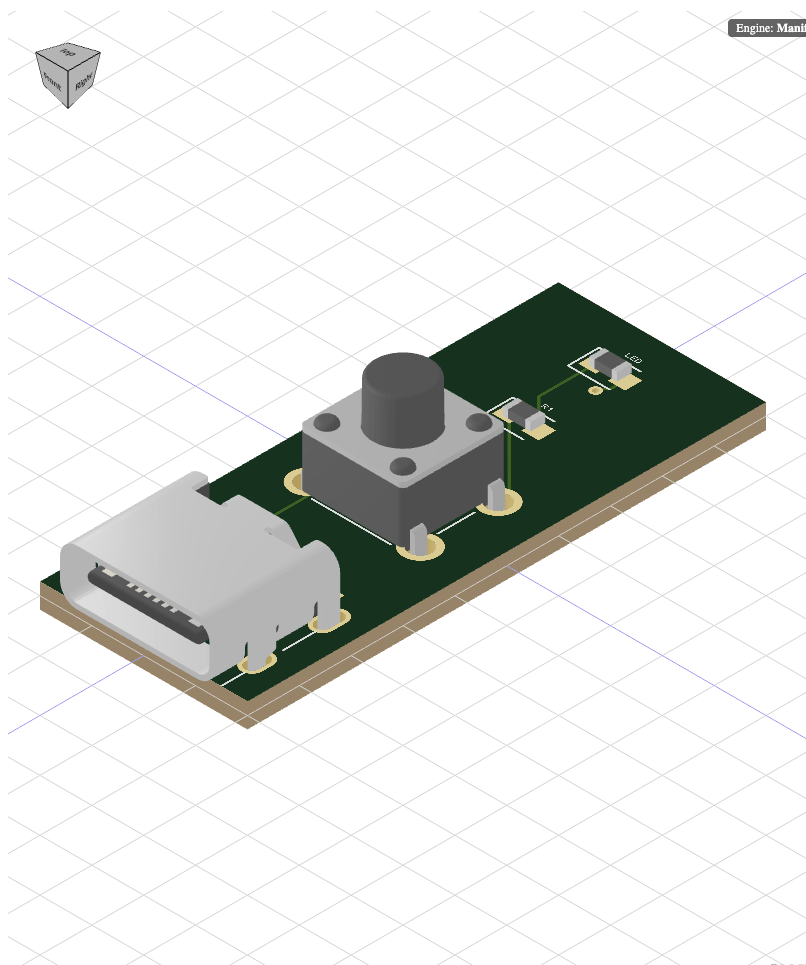
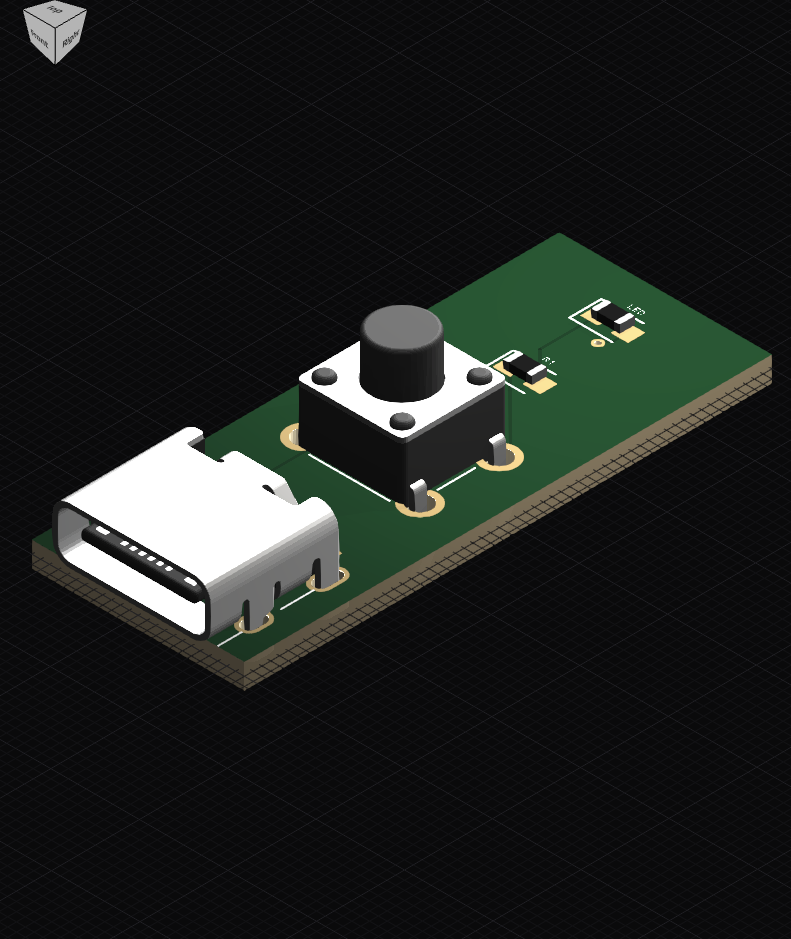
Visual comparison
Same demo board (USB-C, tactile switch, R1, LED): before = upstream viewer, after = this fork.
| Before (original library) | After (this library) |
| --- | --- |
|  |
|  |
|
What changed in this fork
Rendering and materials. The look of the viewer was rebuilt in passes: lighting and the background grid were updated, the WebGL canvas and renderer settings were tuned for clearer exposure and contrast, and the board plus parts (footprints, imported models, and board textures) were adjusted so everything reads more like real objects than flat shapes. Parts now pick up scene lighting in a more uniform way, and surface colors drive more believable metal vs plastic shading so resistors, connectors, and the board do not all look the same. Board shading was split so painted textures and solid mesh stay aligned instead of fighting each other.
Copper, board laminate, and solder mask. Copper color is defined in one place and reused wherever copper appears in both flat overlays and 3D, so the 2D layers and the 3D metal tint match. The fiberglass edge of the board uses explicit laminate coloring so the side of the PCB reads as stacked material, not one flat green slab. Solder mask, height, and shininess maps were expanded so mask, bumps, and copper interact: as you orbit the camera, you get more depth and specular variation on the green surface.
Engine simplification. The old Manifold-based mesh path (used for some hole and via geometry) was removed completely. The viewer that ships now is built on JSCAD and Three.js only; the main viewer shell was rewired, dependencies and dev stories were cleaned up, and a large block of unused geometry code was deleted.
Silkscreen and labels. Silkscreen and related overlays got a reliability pass: an outdated bounds helper was removed, and the pipelines that draw silkscreen, mask, assembly notes, and fab notes were rewired so reference designators and text land at stable size and position. The silkscreen Storybook example is the best quick visual check for label quality.
Camera and menus. Orbit, view presets, and the corner orientation control were reworked so camera motion and preset jumps feel smoother and more predictable. During the parallel-branch period, the experimental UI and the main tree were kept in step so menus and the gizmo did not drift apart. A later pass simplified how the outer viewer wires into the context menu while keeping camera presets, auto-rotate, export, and layer / appearance toggles.
For app authors. What you import and render—the main viewer component, circuit JSON, and board markup—stays the same idea as upstream even though the internals changed. Install and examples below.
Features
- 3D visualization of PCB layouts
- Interactive camera controls (pan, zoom, rotate)
- Support for various PCB components (resistors, capacitors, Chips, etc.)
- Customizable board and component rendering
Installation
npm install @aleontaridis/pcb-3d-viewerUsage
Basic Example
import React from "react"
import { CadViewer } from "@aleontaridis/pcb-3d-viewer"

const MyPCBViewer = () => {
  return (
    <CadViewer>
      <board width="20mm" height="20mm">
        <resistor
          name="R1"
          footprint="0805"
          resistance="10k"
          pcbX={5}
          pcbY={5}
        />
        <capacitor
          name="C1"
          footprint="0603"
          capacitance="1uF"
          pcbX={-4}
          pcbY={0}
        />
      </board>
    </CadViewer>
  )
}

export default MyPCBViewer
Using with circuitJson Data
import React from "react"
import { CadViewer } from "@aleontaridis/pcb-3d-viewer"
import mycircuitJsonData from "./mycircuitJsonpData.json"

const MyPCBViewer = () => {
  return <CadViewer circuitJson={mycircuitJsonData} />
}

export default MyPCBViewer
Converting to SVG (Node.js)
When using the SVG converter in Node.js environments, you'll need to provide JSDOM:
import { JSDOM } from "jsdom"
import {
  convertCircuitJsonTo3dSvg,
  applyJsdomShim,
} from "@aleontaridis/pcb-3d-viewer"

// Setup JSDOM environment
const dom = new JSDOM()
applyJsdomShim(dom)

// Convert circuit to SVG
const options = {
  width: 800,
  height: 600,
  backgroundColor: "#ffffff",
  padding: 20,
  zoom: 50,
  camera: {
    position: { x: 0, y: 0, z: 100 },
    lookAt: { x: 0, y: 0, z: 0 },
  },
}

const svgString = await convertCircuitJsonTo3dSvg(circuitJson, options)
The convertCircuitJsonTo3dSvg function accepts the following options:
width: Width of the output SVG (default: 800)height: Height of the output SVG (default: 600)backgroundColor: Background color in hex format (default: "#ffffff")padding: Padding around the board (default: 20)zoom: Zoom level (default: 1.5)camera: Camera position and lookAt configurationposition: {x, y, z} coordinates for camera positionlookAt: {x, y, z} coordinates for camera target
API Reference
<CadViewer>
Main component for rendering the 3D PCB viewer.
Props:
circuit-json: (optional) An array of AnyCircuitElement objects representing the PCB layout.children: (optional) React children elements describing the PCB layout (alternative to usingcircuit-json).resolveStaticAsset: (optional) Function that receives each component model URL (obj,wrl,stl,gltf,glb,step) and returns the resolved URL to load.
<board>
Defines the PCB board dimensions.
Props:
width: Width of the board (e.g., "20mm").height: Height of the board (e.g., "20mm").
Component Elements
Various component elements can be used as children of the <board> element:
<resistor><capacitor><chip><bug>(for ICs)
Each component has specific props for defining its characteristics and position on the board.
Advanced Usage
Custom Component Models
You can define custom 3D models for components using the cadModel prop:
<chip
  name="U1"
  footprint="soic8"
  cadModel={{
    objUrl: "/path/to/custom-model.obj",
    mtlUrl: "/path/to/custom-material.mtl",
  }}
/>
JSCAD Models
For more complex or programmatically defined models, you can use JSCAD:
<bug
  footprint="soic8"
  name="U1"
  cadModel={{
    jscad: {
      type: "cube",
      size: 5,
    },
  }}
/>
License
This project is licensed under the MIT License - see the LICENSE file for details.