
@alexeiled/pi-fusion
v0.9.0
Published
Stronger answers for hard Pi questions via a parallel model panel + judge, built on pi-subagents

Maintainers
 alexeiled
Readme
pi-fusion




Parallel models. One judge. Better answers.
pi-fusion is a Pi extension for hard technical questions.
It sends one prompt to a small panel of models that run in parallel.
A judge agent then compares the answers and returns the best realistic one.
CI covers lint, typecheck, unit tests, integration tests, package smoke tests,
and npm pack --dry-run.
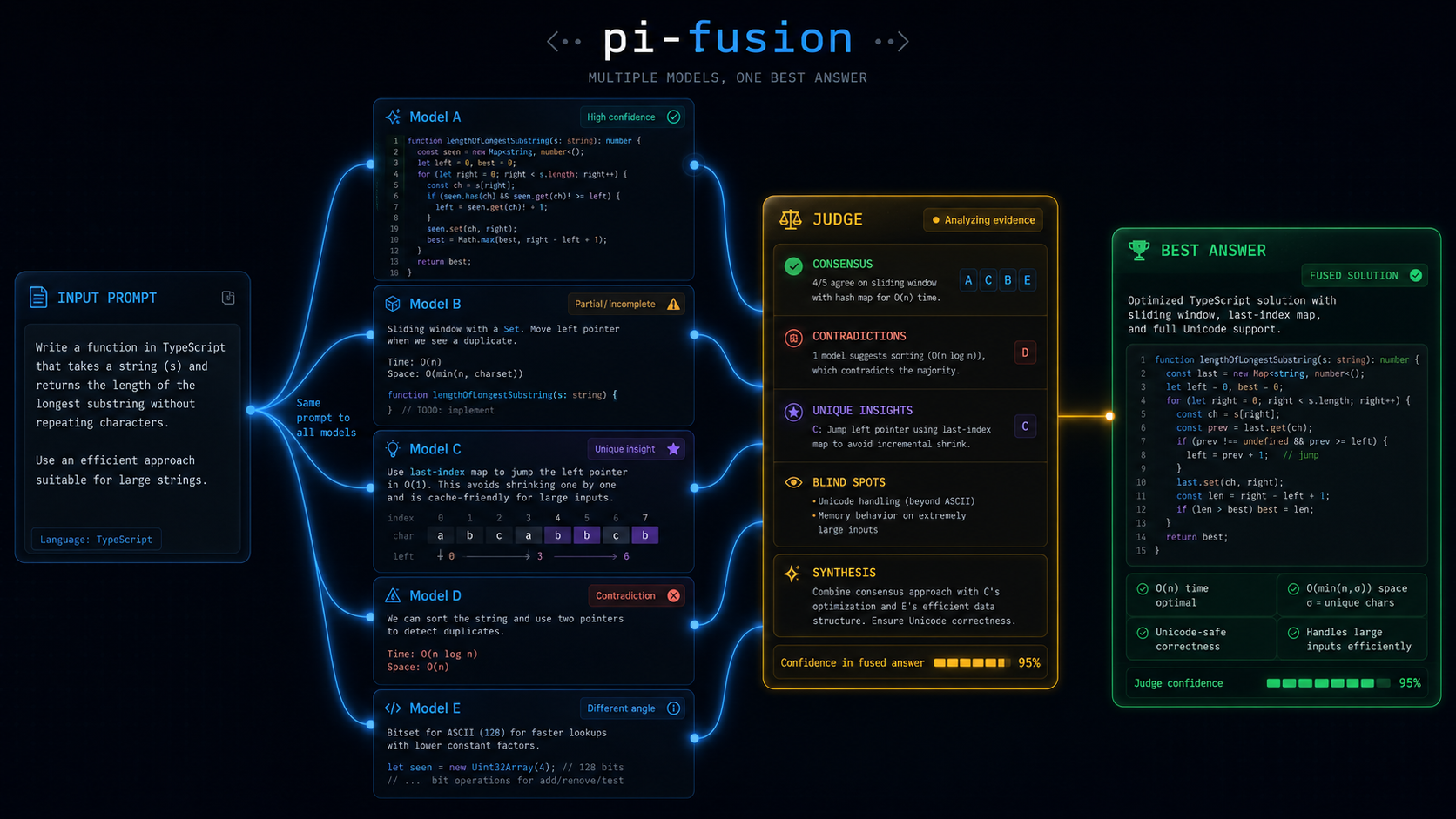
Why Fusion exists
Hard questions are often bottlenecked by one model's search path.
pi-fusion trades latency for diversity:
- the same prompt fans out to several model runs in parallel
- each model explores the problem from a different training prior and reasoning path
- overlap raises confidence
- disagreement exposes risk
- the judge keeps the strongest parts and drops weak, partial, or conflicting ones
This is evidence selection, not majority vote.
%%{init: {"theme": "base", "flowchart": {"curve": "basis", "nodeSpacing": 28, "rankSpacing": 48}, "themeVariables": {"background": "#050816", "fontFamily": "ui-monospace, SFMono-Regular, Menlo, Monaco, Consolas, monospace", "primaryTextColor": "#E5F0FF", "lineColor": "#38bdf8", "tertiaryColor": "#0b1220"}}}%%
flowchart LR
  classDef prompt fill:#071321,stroke:#38bdf8,color:#dbeafe,stroke-width:2px;
  classDef modelA fill:#081223,stroke:#38bdf8,color:#dbeafe,stroke-width:2px;
  classDef modelB fill:#120826,stroke:#a855f7,color:#f3e8ff,stroke-width:2px;
  classDef modelC fill:#08180f,stroke:#22c55e,color:#dcfce7,stroke-width:2px;
  classDef modelD fill:#241307,stroke:#f59e0b,color:#fef3c7,stroke-width:2px;
  classDef modelE fill:#260712,stroke:#ff4d8d,color:#ffd1e7,stroke-width:2px;
  classDef judge fill:#2b1905,stroke:#f59e0b,color:#fef3c7,stroke-width:3px;
  classDef answer fill:#062814,stroke:#22c55e,color:#dcfce7,stroke-width:3px;
  classDef note fill:#0b1220,stroke:#475569,color:#cbd5e1,stroke-width:1px;

  P["input prompt<br/>same question to every model"]:::prompt

  subgraph PANEL[parallel model panel]
    direction TB
    A["model A<br/>strong baseline candidate"]:::modelA
    B["model B<br/>finds contradiction"]:::modelB
    C["model C<br/>adds unique insight"]:::modelC
    D["model D<br/>fast practical path"]:::modelD
    E["model E<br/>catches edge case"]:::modelE
  end

  J["judge<br/>consensus • contradictions • blind spots"]:::judge
  R["best answer<br/>selected or synthesized"]:::answer
  N["not majority vote<br/>best evidence wins"]:::note

  P --> A
  P --> B
  P --> C
  P --> D
  P --> E

  A --> J
  B --> J
  C --> J
  D --> J
  E --> J

  J --> R
  J -.-> N

  linkStyle 0,5 stroke:#38bdf8,stroke-width:3px;
  linkStyle 1,6 stroke:#a855f7,stroke-width:3px;
  linkStyle 2,7 stroke:#22c55e,stroke-width:3px;
  linkStyle 3,8 stroke:#f59e0b,stroke-width:3px;
  linkStyle 4,9 stroke:#ff4d8d,stroke-width:3px;
  linkStyle 10 stroke:#22c55e,stroke-width:4px;
  linkStyle 11 stroke:#94a3b8,stroke-width:2px,stroke-dasharray: 5 5;
Why a panel can beat one model
Single-model answers are brittle on hard tasks. They are limited by one model's priors, one reasoning path, and one failure mode.
A panel helps because:
- different models are trained differently and make different bets
- errors are less correlated, so blind spots do not line up perfectly
- consensus is a useful confidence signal without pretending certainty
- disagreement tells you where the answer is fragile
- a judge can select or synthesize the best realistic answer from the set
The result is slower, but usually better for design choices, risk review, tricky debugging, and research-heavy questions. It is not intended for routine edits, formatting, or obvious one-step fixes.
What the judge actually does
The judge gets:
- the original prompt
- every panel output
- panel failures and blind spots
- the configured judge model
It then:
- finds consensus
- preserves real disagreements
- spots weak or incomplete answers
- pulls forward unique insights worth keeping
- returns one clear recommendation and next step
It does not edit files or spawn more subagents. It does one job: choose or synthesize the best realistic answer.
Good fit
Use it for questions like:
- Which design do we choose?
- What will break if I change this?
- Is this PR or release flow safe?
- What did I miss?
- What is the right test strategy here?
Do not use it for trivial edits, formatting, or obvious one-step fixes.
Commands
/fusion
/fusion <prompt>
/fusion --profile <name> <prompt>
/fusion --panel <models> <prompt>
/fusion -p <name> <prompt>
/fusion status
/fusion stop
/fusion continue <fusion-run-id> <panelist-number>
/fusion finish <fusion-run-id> <panelist-number>
/fusion init
Plan execution RPC
Other Pi extensions can control Fusion through the versioned event-bus contract
fusion:rpc:v1:
- emit requests on
fusion:rpc:v1:request - listen for the response on
fusion:rpc:v1:reply:<requestId>before emitting - send
{ "version": 1, "requestId": "...", "method": "...", "params": {} } - receive
{ "version": 1, "requestId": "...", "method": "...", "success": true, "data": {} }or a failure with a typederror
Methods:
ping— return the RPC version and supported methodsstart— requirespromptand a non-emptyoperationId. It accepts optionalprofile, versionedoutputContract(plan-review-v1), and positive-integer millisecond deadline overrides:panelistTimeoutMs,panelTimeoutMs,panelGraceMs, andjudgeTimeoutMs. Reusing an operation ID returns the original run instead of starting another, including after Fusion restores the Pi session history.status— return structured run state byoperationId,runId, or the current/last runresult— return a terminal run and report. An active run returnsnot_readycancel— cancel the selected active run, or report that the selected terminal run was not cancelledadopt— verify and return a run from restored session history byrunId
start returns { operationId, replayed, run }. status returns { run }.
result returns { run, callerOutput? }; callerOutput is present only when
Fusion validated a strict caller contract, and contains { contract, output }.
cancel returns { cancelled, run? }. adopt returns { adopted: true, run }.
Run state contains runId, optional operationId, phase, terminal, and
optional report or error.
Failure codes are invalid_request, unsupported_method, busy, not_found,
not_ready, unavailable, start_failed, cancel_failed, and internal.
busy, not_ready, and lookup failures include structured details when available.
Quick start
Requirements:
- Pi
- Node.js 22.19+
pi-subagents0.43.0 or later
pi install npm:pi-subagents
pi install npm:@alexeiled/pi-fusion
Optional. Only needed if a panel member uses the fusion-panelist-web or
fusion-panelist-full agent:
pi install npm:pi-web-providersThen reload Pi:
/reloadFor commands, config, and troubleshooting details, see docs/user-guide.md.
Notes
- Bare
/fusionshows a short command summary. - Config is optional. Defaults work. Use
/fusion initwhen you want project config. - Project config lives at
.pi/fusion.json. Global config lives at~/.pi/agent/fusion.json. - Output appears as a Pi custom message. Active progress also uses the
fusionstatus key. - Active runs are reconciled from
pi-subagentslifecycle artifacts, not only completion events. Verified panel outputs survive a panel deadline; unavailable perspectives and timeout failures are disclosed in a partial report when quorum is not met or coverage is incomplete. - Normal panels refill free concurrency slots immediately. Agreement-stopping panels retain quorum-sized rounds. Default panel time covers the configured concurrency waves; explicit deadlines remain hard caps.
- Optional
panelistSoftTimeoutMsasks the parent for a deadline decision. The parent can approve one continuation within the existing hard budget or ask for current findings. No reply within one minute requests finalization. Fusion reserves one minute to finalize, never revives children or extends hard deadlines, and cannot guarantee a final answer from an unresponsive provider. - Incomplete terminal snapshots get a bounded five-second reconciliation window. Late errors are retained; at a confirmed workflow deadline, genuinely absent slots become explicit failures instead of discarding successful answers.
pi-fusiondoes not own the footer.- Fusion sends your prompt and any inspected snippets to every panel model, and to the judge, through
pi-subagents. - Reports include available per-panel and judge time, aggregate model time, usage, estimated cost, and model failure details. Missing provider usage is shown as unknown.
$0.0000is a known zero cost. Modelis lifecycle metadata.Configured modelis the profile request. Both appear when the run differs from the request.stopWhenPanelAgreesis an opt-in profile setting. It requires matching high-confidence decision records with no request for more evidence, initially executes only the configured synthesis quorum (not always two) so it can avoid starting later work, records skipped panelists in the report, and still runs the judge.- Panel answers reach the judge in an order seeded from the run id, not in config order. A fixed order advantages the same member on every run, because judges favour whichever candidate they see first or last.
- Panelists can search the web by opting in to the
fusion-panelist-webagent, which requirespi-web-providers. Defaults stay local-only on purpose: tool names are a strict allowlist, so an agent declaring a tool whose extension is missing fails every task that uses it. synthesis: "merge"switches from picking the best answer to merging answers that covered different facets, using thefusion-composeragent. Panel members get facets through their optionalquestionfield. See the user guide.blindPanelLabelshides member names, roles, agents, and artifact paths from the judge, so role labels stop acting as authority cues. Your report still shows real names.fusion-panelist-fullgrantsbash,edit, andwrite. It is opt-in, it voids the read-only property the other agents have, and it is unsafe atconcurrency > 1because panelists share one working directory.
Read more
docs/user-guide.md— commands, config, profiles, privacy, troubleshootingDEVELOPMENT.md— contributor workflow