
@alicloud/xconsole-rc-button2
v1.0.0
Published
Button 强化,有它就够了


Keywords
Readme
@alicloud/xconsole-rc-button2
一个解放你代码的组件,让你写按钮、按钮组的时候不再需要承受 fusion 或 wind 的不作为而产生的头痛。
提示?确认框?上传?练接?埋点?一串按钮?
一切问题,这里都会智能地帮你搞定,你只需要一个配置。
有了它,写按钮的时候,你关心的核心永远是 Button 本身。
Fusion 不肯做的事情 - 我做
- props 有 href,应自动将 component 设置为 a
- text button 应该默认融入环境样式中去
- split button 不应在箭头上触发 onClick fusion 提供的方案并不好
简介
引入
XConsole 3 的用户,这样使用:
import {
  Dialog2
} from '@alicloud/xconsole';
非 XConsole 的用户,建议直接使用 [@alicloud/console-base-rc-dialog]。
Button
强化了的 Button 组件,旨在用配置替换繁琐的组件逻辑,以及修复 fusion / wind 不肯修复的问题,用了它,你将会看到原屎的 Button 用法就感觉难过。
除了 Fusion Button 的 props 外,新增以下 props:
prop | 类型 | 默认值 | 说明
:-- | :-- | :-- | :--
spm | string | - | 无痕埋点的 spm D 位编码,有它便会添加无痕埋点,gostr=/{业务编码};locaid=d{D 位}[;参数串]
spmCode | string | aliyun | 无痕埋点的黄金令箭业务编码(不带最前边的「/」)
spmParams | string | - | 无痕埋点的额外参数串 a=x&b=y&c=z..,需要调用者自行拼装
tooltip | string | JSX.Element | IButtonTooltip | - | 确认框,将接管 onClick
popup | string | JSX.Element | IButtonPopup | Popup 弹出层,比 tooltip 更丰富,可以控制是否展示
upload | WindPropsUpload | 上传,将透传给上传组件,注意不要和 href、onClick 混用
从此,你不再需要:
- 传
href的时候需要传入component='a',并判断target是否需要为_blank - 非得
Balloon进行包裹来展示一个tooltip,实际上又不是真正意义上的「包裹」,因为它「裹」的是自己的内容,而Button却成为了它的一个属性,本末倒置 - 写一堆的确认逻辑
- 原本要写一堆 JSX 的
MenuItem、SplitItem、ButtonGroup和Button2Ops,一个配置搞定一切,如果有按钮要被收起来放在「更多」下面,也不必担心万一那个按钮因功能开关被去掉了而产生的界面问题
你不再需要以下组件
- wind-rc-confirm 它的问题跟 Balloon 一样,你的关注点不能只在 Button 上,且没有 inline 模式
- wind-rc-row-operator 用 Button2Ops 代替,有更多的配置项,更强大,更方便
关于路由
wind 有个 wind-rc-link,但它的问题在于本末倒置,我非常 dis 这种行为。
实际上,我原先写的一版中是带路由功能的,但问题在于,如果一个组件自己带了路由功能,则意味着它将依赖于 react-router 和它的 Provider,这会导致它在实际使用场景下各种受挫。
所以,这边建议,可以在自己的项目下进行简单的封装——这就是为什么我说最好自己加一个 rc/button.ts。
TODO 如何路由,容我后面补充。
非实际案例

代码:
<Button2Ops {...{
  text: false,
  items: [{
    label: '返回'
  }, '|', {
    label: '新建目录',
    type: 'primary'
  }, {
    label: '上传文件',
    upload: {
      action: '/upload'
    }
  }, {
    mode: 'group',
    items: [{
      label: '导入'
    }, {
      label: '导出'
    }]
  }, {
    label: '批量操作',
    items: [{
      label: '设置'
    }, {
      label: '下载'
    }, {
      label: '删除'
    }]
  }, {
    label: '刷新'
  }]
}} />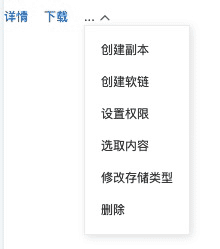
代码:
<Button2Ops {...{
  maxVisible: 3,
  items: [{
    label: '详情'
  }, {
    label: '下载'
  }, {
    label: '创建副本'
  }, {
    label: '创建软链'
  }, {
    label: '设置权限'
  }, {
    label: '选取内容'
  }, {
    label: '修改存储类型'
  }, {
    label: '删除',
    confirm: {
      title: '删除文件',
      content: <>
        <P>真的要删除文件 <code>sexylady.jpg</code>?</P>
        <P>删除后将无法找回。</P>
      </>
    }
  }]
}} />
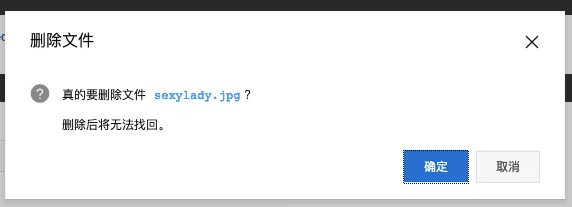
其中,「删除」点击后会先弹窗(因为它被收在「更多」里边了):
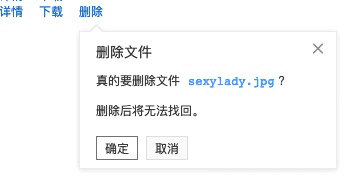
假设,以上每个功能都是有功能开关的,而最终由于功能开关而最终只剩下「详情」、「下载」和「删除」是可用的,那么,删除的确认框将展示为 inline 模式:
FAQ
国际化
利用 @alicloud/console-base-intl-basic 提供了中、英、日、繁三种,主要是用于 confirm 的 OK 和 Cancel。