
@allmaps/maplibre
v1.0.0-beta.43
Published
MapLibre classes for Allmaps

Maintainers
 bertspaan
Readme
@allmaps/maplibre
Allmaps plugin for MapLibre GL. This plugin allows displaying georeferenced IIIF images on a MapLibre map. The plugin works by loading Georeference Annotations and uses WebGL to transform images from a IIIF image server to overlay them on their correct geographical position.
See allmaps.org for more information.
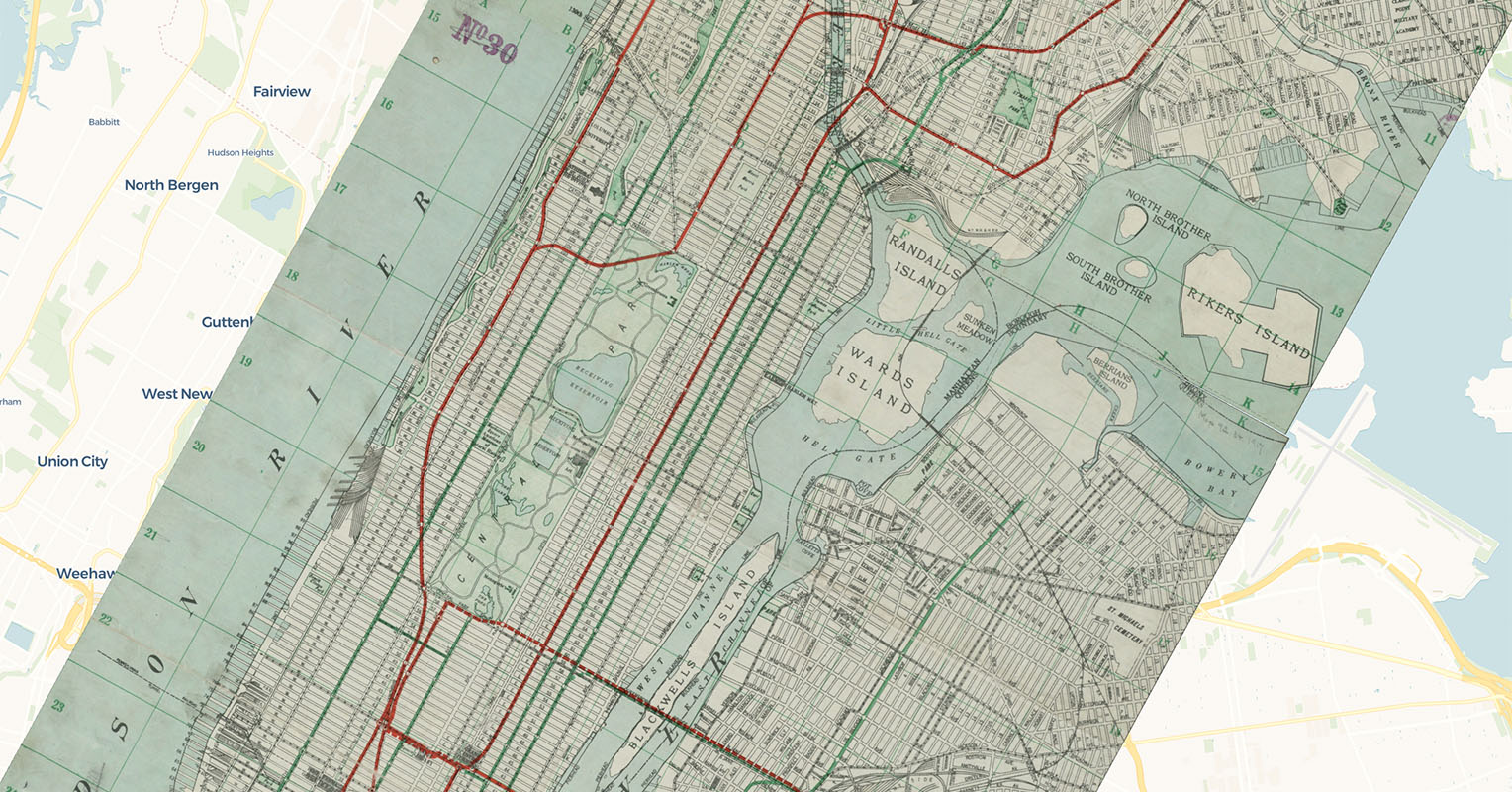
Examples:
How it works
This plugin creates a new class WarpedMapLayer which extends MapLibre's CustomLayerInterface. You can add one or multiple Georeference Annotations (or AnnotationPages with multiple Georeference Annotations) to a WarpedMapLayer, and add the WarpedMapLayer to your MapLibre map. This will render all georeferenced maps contained in the Georeference Annotation on your MapLibre map.
To understand what happens under the hood for each georeferenced map, see the @allmaps/render package.
This plugin inherits a lot of methods from @allmaps/warpedmaplayer, the core package gathering the functionality connecting the Allmaps plugins to the @allmaps/render package.
Installation
This package works in browsers and in Node.js as an ESM or an UMD module.
Install with pnpm:
pnpm install @allmaps/maplibreYou can optionally build this package locally by running:
pnpm run buildThe easiest way to test this package during local development is via @allmaps/test-plugins. A minimal example is also included in ./index.html and can be served via pnpm run dev.
Usage
Built for MapLibre 5.0, but should work with earlier versions as well.
Adding a WarpedMapLayer to a MapLibre Map
Creating a WarpedMapLayer and adding it to a map looks like this:
import { Map as MapLibreMap } from 'maplibre-gl'
import { WarpedMapLayer } from '@allmaps/maplibre'

const map = new MapLibreMap({
  container: 'map',
  // @ts-expect-error MapLibre types are incompatible
  style: 'https://basemaps.cartocdn.com/gl/voyager-gl-style/style.json',
  center: [-73.9337, 40.8011],
  zoom: 11.5,
  // Pitch is currently not supported by the Allmaps plugin for MapLibre
  maxPitch: 0
})

const annotationUrl = 'https://annotations.allmaps.org/images/d180902cb93d5bf2'
const warpedMapLayer = new WarpedMapLayer()

map.on('load', () => {
  // @ts-expect-error MapLibre types are incompatible
  map.addLayer(warpedMapLayer)
  warpedMapLayer.addGeoreferenceAnnotationByUrl(annotationUrl)
})
WarpedMapLayer is implemented using MapLibre's CustomLayerInterface. It can be added to a map like any other MapLibre layer, but there are some things to take into account:
WarpedMapLayerdoes not make use of a Source (although that could be implemented in the future, similar to @allmaps/openlayers).WarpedMapLayercurrently does not support pitch, so disable it on your map.- Just like other MapLibre layers, a WarpedMapLayer must have a unique
id. By default, theidhas the valuewarped-map-layer. When adding multiple WarpedMapLayers to your map, pass a uniqueidto their constructor:
const warpedMapLayerWithUniqueId = new WarpedMapLayer({layerId: 'my-unique-id'})Ways to load Georeference Annotations
Once the layer has been added to the map, a Georeference Annotation can be added to a WarpedMapLayer using the addGeoreferenceAnnotation and addGeoreferenceAnnotationByUrl functions:
fetch(annotationUrl)
  .then((response) => response.json())
  .then((annotation) => warpedMapLayer.addGeoreferenceAnnotation(annotation))
Or:
await warpedMapLayer.addGeoreferenceAnnotationByUrl(annotationUrl)It's also possible to create a WarpedMapList first and pass it to the layer on creation. This has the advantage of being able to compute properties of a WarpedMapList first, e.g. getting the bounds and passing it to the MapLibre Map.
import { Map as MapLibreMap } from 'maplibre-gl'

import { WarpedMapLayer } from '@allmaps/maplibre'
import { WarpedMapList } from '@allmaps/render'
import { WebGL2WarpedMap } from '@allmaps/render/webgl2'

const annotationUrl = 'https://annotations.allmaps.org/images/d180902cb93d5bf2'
const annotation = await fetch(annotationUrl).then((response) =>
    response.json()
  )

const warpedMapList = new WarpedMapList<WebGL2WarpedMap>()
await warpedMapList.addGeoreferenceAnnotation(annotation)
const bbox = warpedMapList.getMapsBbox()

map = new MapLibreMap({
  container: 'map',
  // @ts-expect-error MapLibre types are incompatible
  style: 'https://basemaps.cartocdn.com/gl/voyager-gl-style/style.json',
  // Pitch is currently not supported by the Allmaps plugin for MapLibre
  maxPitch: 0
})

map.on('load', () => {
  const warpedMapLayer = new WarpedMapLayer({ warpedMapList })
  // @ts-expect-error MapLibre types are incompatible
  map.addLayer(warpedMapLayer)
  if (bbox) {
    map.fitBounds(bbox, { padding: 20 })
  }
})
Note that the ...ByUrl() functions are not available on a WarpedMapList.
WarpedMapLayer API, Options and Events
See the @allmaps/warpedmaplayer package for the API documentation of the methods coming from the WarpedMapLayer class (shared by all Allmaps plugins). It describes the methods like addGeoreferenceAnnotation() and includes a list of all options that can be set on instances of the class and all events which are passed to the native map instance hosting the layer instance.
You can set options on the entire layer, or on a specific map on the layer (overwriting layer options):
warpedMapLayer.setLayerOptions({ visible: true })
warpedMapLayer.setMapOptions(mapId, { visible: true })
You can listen to events in the typical way:
map.on('warpedmapadded', (event) => {
  console.log(event.mapIds)
})
License
MIT
API
MapLibreWarpedMapLayerOptions
Type
SpecificMapLibreWarpedMapLayerOptions & Partial<WebGL2RenderOptions>new WarpedMapLayer(options)
Creates a WarpedMapLayer instance
Parameters
options?(Partial<MapLibreWarpedMapLayerOptions> | undefined)- options
Returns
WarpedMapLayer.
Extends
BaseWarpedMapLayerCustomLayerInterface
WarpedMapLayer#getBounds()
Get the bounding box of all maps as a MapLibre LngLatBoundsLike object
This is the default MapLibre getBounds() function
The result is returned in lon-lat EPSG:4326.
Parameters
There are no parameters.
Returns
bounding box of all maps (LngLatBoundsLike | undefined).
WarpedMapLayer#getCenterZoomBearing(options)
Get the center, zoom and bearing needed to make the Maplibre Map's viewport fit all maps in the layer.
This can be used as input for
- Map.jumpTo() for immediate change
- Map.easeTo() for smooth panning
- Map.flyTo() for a flying animation which zooms out and in
Parameters
options?(Partial<Partial<MaskOptions> & { bearingSelection: "first" | "angularMean"; fit: Fit; } & CenterZoomBearing & { pitch?: number; roll?: number; elevation?: number; } & { ...; }> | undefined)
Returns
center, zoom and bearing ({center?: LngLatLike; zoom?: number; bearing?: number}).
WarpedMapLayer#getMapCenterZoomBearing(mapId, options)
Get the center, zoom and bearing needed to make the Maplibre Map's viewport fit the selected map.
This can be used as input for
- Map.jumpTo() for immediate change
- Map.easeTo() for smooth panning
- Map.flyTo() for a flying animation which zooms out and back in
Parameters
mapId(string)options?(Partial<Partial<MaskOptions> & { bearingSelection: "first" | "angularMean"; fit: Fit; } & CenterZoomBearing & { pitch?: number; roll?: number; elevation?: number; } & { ...; }> | undefined)
Returns
center, zoom and bearing ({center?: LngLatLike; zoom?: number; bearing?: number}).
WarpedMapLayer#getMapsBounds(mapIds)
Get the bounding box of all selected maps as a MapLibre LngLatBoundsLike object
This is the default MapLibre getBounds() function
The result is returned in lon-lat EPSG:4326.
Parameters
mapIds(Array<string>)- Map IDs
Returns
bounding box of all selected maps (LngLatBoundsLike | undefined).
WarpedMapLayer#getMapsCenterZoomBearing(mapIds, options)
Get the center, zoom and bearing needed to make the Maplibre Map's viewport fit all selected maps.
This can be used as input for
- Map.jumpTo() for immediate change
- Map.easeTo() for smooth panning
- Map.flyTo() for a flying animation which zooms out and back in
Parameters
mapIds(Array<string>)options?(Partial<Partial<MaskOptions> & { bearingSelection: "first" | "angularMean"; fit: Fit; } & CenterZoomBearing & { pitch?: number; roll?: number; elevation?: number; } & { ...; }> | undefined)
Returns
center, zoom and bearing ({center?: LngLatLike; zoom?: number; bearing?: number}).
WarpedMapLayer#id
Type
stringWarpedMapLayer#map?
Type
MaplibreMapWarpedMapLayer#nativePassWarpedMapEvent(event)
Pass events
Parameters
event(Event)
Returns
void.
WarpedMapLayer#nativeUpdate()
Trigger the native update function of the map
Parameters
There are no parameters.
Returns
void.
WarpedMapLayer#onAdd(map, gl)
Method called when the layer has been added to the Map.
Parameters
map(MaplibreMap)- The Map this custom layer was just added to.
gl(WebGL2RenderingContext)- The WebGL 2 context for the map.
Returns
void.
WarpedMapLayer#onRemove()
Method called when the layer has been removed from the Map.
Parameters
There are no parameters.
Returns
void.
WarpedMapLayer#render()
Render the layer.
Parameters
There are no parameters.
Returns
void.
WarpedMapLayer#renderingMode
Type
'2d'WarpedMapLayer#type
Type
'custom'