
@allmaps/openlayers
v1.0.0-beta.87
Published
OpenLayers classes for Allmaps


Readme
@allmaps/openlayers
Allmaps plugin for OpenLayers. This plugin allows displaying georeferenced IIIF images on an OpenLayers map. The plugin works by loading Georeference Annotations and uses WebGL to transform images from a IIIF image server to overlay them on their correct geographical position.
See allmaps.org for more information.
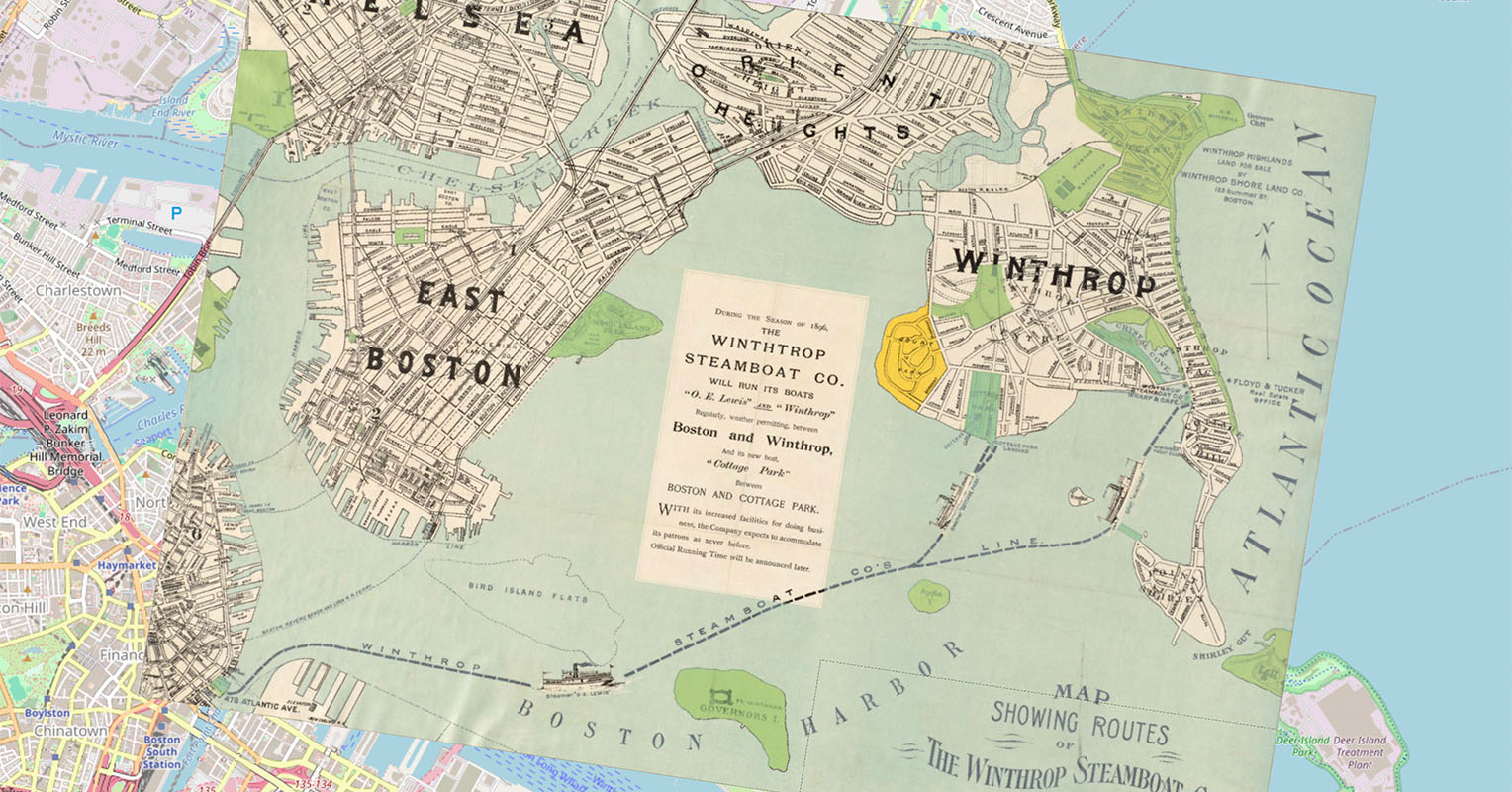
Examples:
How it works
This plugin exports the class WarpedMapLayer. You can add one or multiple Georeference Annotations (or AnnotationPages that contain multiple Georeference Annotations) to a WarpedMapLayer and add the WarpedMapLayer to your OpenLayers map. This will render all georeferenced maps defined by the Georeference Annotations.
To understand what happens under the hood for each georeferenced map, see the @allmaps/render package.
This plugin implements a lot of methods from @allmaps/warpedmaplayer, the core package gathering the functionality connecting the Allmaps plugins to the @allmaps/render package.
Installation
This package works in browsers and in Node.js as an ESM or an UMD module.
Install with pnpm:
pnpm install @allmaps/openlayersYou can optionally build this package locally by running:
pnpm run buildThe easiest way to test this package during local development is via @allmaps/test-plugins. A minimal example is also included in ./index.html and can be served via pnpm run dev.
Usage
Built for OpenLayers 10, but should work with OpenLayers 9, 8, 7 and 6 as well.
Adding a WarpedMapLayer to a MapLibre Map
Creating a WarpedMapLayer and adding a Georeference Annotation to an OpenLayers map looks like this:
import OpenLayersMap from 'ol/Map'
import Tile from 'ol/layer/Tile'
import OSM from 'ol/source/OSM'

import { WarpedMapLayer } from '@allmaps/openlayers'

const map = new OpenLayersMap({
  target: 'map',
  layers: [
    new Tile({
      source: new OSM()
    })
  ]
})

const annotationUrl = 'https://annotations.allmaps.org/maps/a9458d2f895dcdfb'
const warpedMapLayer = new WarpedMapLayer()

map.addLayer(warpedMapLayer)
warpedMapLayer.addGeoreferenceAnnotationByUrl(annotationUrl).then(() => {
  const bbox = warpedMapLayer.getBbox({
    projection: { definition: 'EPSG:3857' }
  })
  if (bbox) {
    map.getView().fit(bbox)
  }
})
Ways to load Georeference Annotations
Once the layer has been added to the map, a Georeference Annotation can be added to a WarpedMapLayer using the addGeoreferenceAnnotation and addGeoreferenceAnnotationByUrl functions:
fetch(annotationUrl)
  .then((response) => response.json())
  .then((annotation) => warpedMapLayer.addGeoreferenceAnnotation(annotation))
Or:
await warpedMapLayer.addGeoreferenceAnnotationByUrl(annotationUrl)It's also possible to create a WarpedMapList first and pass it to the layer on creation. This has the advantage of being able to compute properties of a WarpedMapList first, e.g. getting the bounds and passing it to the OpenLayers Map.
import OpenLayersMap from 'ol/Map'
import Tile from 'ol/layer/Tile'
import OSM from 'ol/source/OSM'

import { WarpedMapLayer } from '@allmaps/openlayers'
import { WarpedMapList } from '@allmaps/render'
import { WebGL2WarpedMap } from '@allmaps/render/webgl2'

const annotationUrl =
  'https://annotations.allmaps.org/manifests/8f9faeba73d67031'
const annotation = await fetch(annotationUrl).then((response) =>
    response.json()
  )
const warpedMapList = new WarpedMapList<WebGL2WarpedMap>()
await warpedMapList.addGeoreferenceAnnotation(annotation)
const bbox = warpedMapList.getMapsBbox({ projection: { definition: 'EPSG:3857' } })

const map = new OpenLayersMap({
  target: 'map',
  layers: [
    new Tile({
      source: new OSM()
    })
  ],
  view: new View().fit(bbox, {
  padding: [20, 20, 20, 20]
  })
})

const warpedMapLayer = new WarpedMapLayer({ warpedMapList })
map.addLayer(warpedMapLayer)
Note that the ...ByUrl() functions are not available on a WarpedMapList.
WarpedMapLayer API, Options and Events
See the @allmaps/warpedmaplayer package for the API documentation of the methods coming from the WarpedMapLayer class (shared by all Allmaps plugins). It describes the methods like addGeoreferenceAnnotation() and includes a list of all options that can be set on instances of the class and all events which are passed to the native map instance hosting the layer instance.
You can set options on the entire layer, or on a specific map on the layer (overwriting layer options):
warpedMapLayer.setLayerOptions({ visible: true })
warpedMapLayer.setMapOptions(mapId, { visible: true })
You can listen to events in the typical way:
map.on('warpedmapadded', (event) => {
  console.log(event.mapIds)
})
Viewport projections
Allmaps supports two types of map projections as documented in @allmaps/project: internal projections and viewport projections. OpenLayers supports custom view projections, too. The Allmaps OpenLayers plugin can read the projection of the view of an OpenLayers map and apply it.
To set a custom projection to an OpenLayers map and have Allmaps pick it up, use the register function as foreseen in OpenLayers. (This works because the plugin loads Proj4 as a peer dependency.)
Optionally, also register your custom projections with the warpedMapLayer. This allows using the projection objects (including properties like id and name) through-out Allmaps. If omitted, the plugin will create new projection object containing only the definition.
import proj4 from 'proj4'

//... other imports

// const map = ...
// const warpedMapLayer = ...

const myProjection = {
  id: 'EPSG:28992',
  name: 'RD new',
  definition:
    '+proj=sterea +lat_0=52.1561605555556 +lon_0=5.38763888888889 +k=0.9999079 +x_0=155000 +y_0=463000 +ellps=bessel +towgs84=565.4171,50.3319,465.5524,1.9342,-1.6677,9.1019,4.0725 +units=m +no_defs +type=crs'
}

proj4.defs(myProjection.id, projection.definition)
register(proj4)

// Optional
warpedMapLayer.registerProjections([myProjection])
Then, create a new view with that projection and set the bbox, computed using the current projection:
const bbox = warpedMapLayer.getBbox({ projection: myProjection })
if (bbox) {
  map.setView(
    new View({
      projection: myProjection.id
    })
  )
  map.getView().fit(bbox)
}
License
MIT
API
new OLWarpedMapEvent(type, data)
Parameters
type(string)data(unknown)
Returns
OLWarpedMapEvent.
Extends
Event
OLWarpedMapEvent#data
Type
unknownOpenLayersWarpedMapLayerOptions
Type
object & Partial<WebGL2RenderOptions>new WarpedMapLayer(options)
Creates a WarpedMapLayer instance
Parameters
options?(Partial<OpenLayersWarpedMapLayerOptions> | undefined)- the WebGL2 renderer options
Returns
WarpedMapLayer.
Extends
LayerBaseWarpedMapLayer
WarpedMapLayer#addEventListeners()
Parameters
There are no parameters.
Returns
void.
WarpedMapLayer#addGeoreferenceAnnotation(annotation, mapOptions, batchOptions)
Adds a Georeference Annotation
Parameters
annotation(unknown)- Georeference Annotation
mapOptions?(Partial<WebGL2WarpedMapOptions> | undefined)- Map options
batchOptions?(Partial<BatchOptions> | undefined)
Returns
Map IDs of the maps that were added, or an error per map (Array<BatchMapResult>).
WarpedMapLayer#addGeoreferenceAnnotationByUrl(annotationUrl, mapOptions, batchOptions)
Adds a Georeference Annotation by URL
Parameters
annotationUrl(string)- URL of a Georeference Annotation
mapOptions?(Partial<WebGL2WarpedMapOptions> | undefined)- Map options
batchOptions?(Partial<BatchOptions> | undefined)
Returns
Map IDs of the maps that were added, or an error per map (Promise<Array<BatchMapResult>>).
WarpedMapLayer#addGeoreferencedMap(georeferencedMap, mapOptions)
Adds a Georeferenced Map
Parameters
georeferencedMap(unknown)- Georeferenced Map
mapOptions?(Partial<WebGL2WarpedMapOptions> | undefined)- Map options
Returns
Map ID of the map that was added (string).
WarpedMapLayer#addImageInfos(imageInfos)
Adds image information to the WarpedMapList's image information cache
Parameters
imageInfos(Array<unknown>)- Image informations
Returns
Image IDs of the image informations that were added (Array<string>).
WarpedMapLayer#addSprites(sprites, imageUrl, imageSize)
Adds sprites to the Renderer's sprite tile cache
This adds tiles from sprites to warped maps in WarpedMapList. Load maps before running this function. This uses the image info of related maps. When using addImageInfos(), call it before calling this function.
Parameters
sprites(Array<Sprite>)- Sprites
imageUrl(string)- Image url
imageSize([number, number])- Image size
Returns
Promise<void>.
WarpedMapLayer#bringMapsForward(mapIds)
Bring maps forward
Parameters
mapIds(Iterable<string>)- IDs of the maps
Returns
void.
WarpedMapLayer#bringMapsToFront(mapIds)
Bring maps to front
Parameters
mapIds(Iterable<string>)- IDs of the maps
Returns
void.
WarpedMapLayer#canvas
Type
HTMLCanvasElementWarpedMapLayer#canvasSize
Type
[number, number]WarpedMapLayer#clear()
Removes all warped maps from the layer
Parameters
There are no parameters.
Returns
void.
WarpedMapLayer#container
Type
HTMLDivElementWarpedMapLayer#contextLost(event)
Parameters
event(Event)
Returns
void.
WarpedMapLayer#contextRestored(event)
Parameters
event(Event)
Returns
void.
WarpedMapLayer#defaultSpecificWarpedMapLayerOptions
Type
objectWarpedMapLayer#dispose()
Disposes all WebGL resources and cached tiles
Parameters
There are no parameters.
Returns
void.
WarpedMapLayer#getBbox(options)
Get the bounding box of all maps in the layer
The result is returned in lon-lat EPSG:4326 by default.
Note: more selection options are available on this function of WarpedMapList
Parameters
options?(Partial<ProjectionOptions & MaskOptions> | undefined)- Mask and projection options, defaults to applied mask and current projection
Returns
The bbox of all maps, in the chosen projection, or undefined if there were no maps (Bbox | undefined).
WarpedMapLayer#getCenter(options)
Get the center of the bounding box of all maps in the layer
The result is returned in lon-lat EPSG:4326 by default.
Note: more selection options are available on this function of WarpedMapList
Parameters
options?(Partial<ProjectionOptions & MaskOptions> | undefined)- Mask and projection options, defaults to applied mask and current projection
Returns
The center of the bbox of all maps, in the chosen projection, or undefined if there were no maps (Point | undefined).
WarpedMapLayer#getConvexHull(options)
Get the convex hull of all maps in the layer
The result is returned in lon-lat EPSG:4326 by default.
Note: more selection options are available on this function of WarpedMapList
Parameters
options?(Partial<ProjectionOptions & MaskOptions> | undefined)- Mask and projection options, defaults to applied mask and current projection
Returns
The convex hull of all maps, in the chosen projection, or undefined if there were no maps (Ring | undefined).
WarpedMapLayer#getDefaultOptions()
Get the default options the layer
Parameters
There are no parameters.
Returns
object &
  SpecificBaseRenderOptions<WebGL2WarpedMap> &
  Partial<WarpedMapListOptions<WebGL2WarpedMap>> &
  SpecificWebGL2WarpedMapOptions &
  SpecificTriangulatedWarpedMapOptions &
  WarpedMapOptions
.
WarpedMapLayer#getLayerOptions()
Get the layer options
Parameters
There are no parameters.
Returns
{ fetchFn?: FetchFn | undefined; gcps?: Array<Gcp> | undefined; resourceMask?: Ring | undefined; transformationType?: TransformationType | undefined; ... 75 more ...; warpedMapFactory?: WarpedMapFactory<...> | undefined; }.
WarpedMapLayer#getLonLatExtent()
Return the bounding box of all visible maps in the layer (inside or outside of the Viewport), in longitude/latitude coordinates.
Parameters
There are no parameters.
Returns
Extent | undefined.
- Bounding box of all warped maps
WarpedMapLayer#getMapDefaultOptions(mapId)
Get the default options of a map
These come from the default option settings for WebGL2WarpedMaps and the map's georeferenced map proporties
Parameters
mapId(string)- Map ID for which the options apply
Returns
WebGL2WarpedMapOptions | undefined.
WarpedMapLayer#getMapIds()
Get mapIds for all maps in the layer
Note: more selection options are available on this function of WarpedMapList
Parameters
There are no parameters.
Returns
The mapIds of all maps (Array<string>).
WarpedMapLayer#getMapMapOptions(mapId)
Get the map-specific options of a map
Parameters
mapId(string)- Map ID for which the options apply
Returns
Partial<WebGL2WarpedMapOptions> | undefined.
WarpedMapLayer#getMapOptions(mapId)
Get the options of a map
These options are the result of merging the default, georeferenced map, layer and map-specific options of that map.
Parameters
mapId(string)- Map ID for which the options apply
Returns
WebGL2WarpedMapOptions | undefined.
WarpedMapLayer#getMapZIndex(mapId)
Get the z-index of a map
Parameters
mapId(string)- Map ID for which to get the z-index
Returns
The z-index of a map (number | undefined).
WarpedMapLayer#getMapsBbox(mapIds, options)
Get the bounding box of all selected maps
The result is returned in lon-lat EPSG:4326 by default.
Note: more selection options are available on this function of WarpedMapList
Parameters
mapIds(Array<string>)- Map IDs
options?(Partial<ProjectionOptions & MaskOptions> | undefined)- Mask and projection options, defaults to applied mask and current projection
Returns
The bbox of all selected maps, in the chosen projection, or undefined if there were no maps matching the selection (Bbox | undefined).
WarpedMapLayer#getMapsCenter(mapIds, options)
Get the center of the bounding box of all selected maps
The result is returned in lon-lat EPSG:4326 by default.
Note: more selection options are available on this function of WarpedMapList
Parameters
mapIds(Array<string>)- Map IDs
options?(Partial<ProjectionOptions & MaskOptions> | undefined)- Mask and projection options, defaults to applied mask and current projection
Returns
The center of the bbox of all selected maps, in the chosen projection, or undefined if there were no maps matching the selection (Point | undefined).
WarpedMapLayer#getMapsConvexHull(mapIds, options)
Get the convex hull of all selected maps maps
The result is returned in lon-lat EPSG:4326 by default.
Note: more selection options are available on this function of WarpedMapList
Parameters
mapIds(Array<string>)- Map IDs
options?(Partial<ProjectionOptions & MaskOptions> | undefined)- Mask and projection options, defaults to applied mask and current projection
Returns
The convex hull of all selected maps, in the chosen projection, or undefined if there were no maps matching the selection (Ring | undefined).
WarpedMapLayer#getOpacity()
Get the layer opacity
Returns a number between 0 and 1 (the default)
Parameters
There are no parameters.
Returns
number.
WarpedMapLayer#getWarpedMap(mapId)
Get the WarpedMap instance for a map
Parameters
mapId(string)- Map ID of the requested WarpedMap instance
Returns
WebGL2WarpedMap | undefined.
WarpedMapLayer#getWarpedMapList()
Get the WarpedMapList object that contains a list of the warped maps of all loaded maps
Parameters
There are no parameters.
Returns
WarpedMapList<WebGL2WarpedMap>.
WarpedMapLayer#getWarpedMaps(mapIds)
Get the WarpedMap instances for all maps, or all selected maps
If no argument is passed, the WarpedMap instance of all maps in the layer is passed
Note: more selection options are available on this function of WarpedMapList
Parameters
mapIds?(Array<string> | undefined)- Map IDs
Returns
The WarpedMap instance of all (selected) map (Array<WebGL2WarpedMap>).
WarpedMapLayer#gl?
Type
WebGL2RenderingContextWarpedMapLayer#nativePassWarpedMapEvent(event)
Parameters
event(Event)
Returns
void.
WarpedMapLayer#nativeUpdate()
Parameters
There are no parameters.
Returns
void.
WarpedMapLayer#options
Type
object & Partial<WebGL2RenderOptions>WarpedMapLayer#registerProjections(projections)
Keep a list of registered projections.
Can optionally be used to complement OpenLayer's register(proj4) function.
To use viewport projections in OpenLayers, add projections to proj4 and register proj4 (Example: https://openlayers.org/en/latest/examples/scaleline-indiana-east.html). WarpedMapLayer reads the view's projections code, gets its definition from proj4.defs (thanks to the register() function) and constructs a new Projection type (defined in
Parameters
projections(Array<Projection>)
Returns
void.
WarpedMapLayer#registeredProjections
Type
Map<string, Projection>WarpedMapLayer#removeEventListeners()
Parameters
There are no parameters.
Returns
void.
WarpedMapLayer#removeGeoreferenceAnnotation(annotation, batchOptions)
Removes a Georeference Annotation
Parameters
annotation(unknown)- Georeference Annotation
batchOptions?(Partial<BatchOptions> | undefined)
Returns
Map IDs of the maps that were removed, or an error per map (Array<BatchMapResult>).
WarpedMapLayer#removeGeoreferenceAnnotationByUrl(annotationUrl, batchOptions)
Removes a Georeference Annotation by URL
Parameters
annotationUrl(string)- URL of a Georeference Annotation
batchOptions?(Partial<BatchOptions> | undefined)
Returns
Map IDs of the maps that were removed, or an error per map (Promise<Array<BatchMapResult>>).
WarpedMapLayer#removeGeoreferencedMap(georeferencedMap)
Removes a Georeferenced Map
Parameters
georeferencedMap(unknown)- Georeferenced Map
Returns
Map ID of the map that was removed (string).
WarpedMapLayer#removeGeoreferencedMapById(mapId)
Removes a Georeferenced Map by its ID
Parameters
mapId(string)- Map ID of the georeferenced map to remove
Returns
Map ID of the map that was removed (string).
WarpedMapLayer#render(frameState)
Render the layer.
Parameters
frameState({ pixelRatio: number; time: number; viewState: import("ol/View.js").State; animate: boolean; coordinateToPixelTransform: import("ol/transform.js").Transform; declutter: { [x: string]: import("rbush").default<import("ol/render/canvas/Executor.js").DeclutterEntry>; } | null; ... 13 more ...; renderTargets: { [x: strin...)- OpenLayers frame state
Returns
The rendered element (HTMLElement).
WarpedMapLayer#renderer
Type
WebGL2RendererWarpedMapLayer#resetLayerOptions(layerOptionKeys, animationOptions)
Reset the layer options
Undefined option keys reset all options
Doesn't reset render options or specific warped map layer options. Use setOptions() instead.
Parameters
layerOptionKeys?(Array<string> | undefined)- Keys of the layer options to reset
animationOptions?(Partial<AnimationOptions> | undefined)- Animation options
Returns
void.
WarpedMapLayer#resetMapsAndListOptions(mapIds, mapsOptionKeys, layerOptionKeys, animationOptions)
Reset the map-specific options of the specified maps, and the layer options
Omitting mapsOptionKeys or layerOptionKeys resets all options for that scope;
passing an empty array resets none.
Parameters
mapIds(Array<string>)- IDs of the maps whose options to reset
mapsOptionKeys?(| Array< | keyof SpecificTriangulatedWarpedMapOptions | keyof SpecificWebGL2WarpedMapOptions | keyof WarpedMapOptions > | undefined)- Keys of the map-specific options to reset
layerOptionKeys?(| Array< | keyof SpecificTriangulatedWarpedMapOptions | keyof SpecificWebGL2WarpedMapOptions | keyof WarpedMapOptions > | undefined)- Keys of the layer options to reset
animationOptions?(Partial<AnimationOptions> | undefined)- Animation options
Returns
void.
WarpedMapLayer#resetMapsOptions(mapIds, mapsOptionKeys, animationOptions)
Reset the map-specific options of the specified maps
Omitting mapsOptionKeys resets all options; passing an empty array resets none.
Parameters
mapIds(Array<string>)- IDs of the maps whose options to reset
mapsOptionKeys?(| Array< | keyof SpecificTriangulatedWarpedMapOptions | keyof SpecificWebGL2WarpedMapOptions | keyof WarpedMapOptions > | undefined)- Keys of the options to reset
animationOptions?(Partial<AnimationOptions> | undefined)- Animation options
Returns
void.
WarpedMapLayer#resizeCanvas(canvas, __1)
Parameters
canvas(HTMLCanvasElement)undefined([number, number])
Returns
boolean.
WarpedMapLayer#resized(entries)
Parameters
entries(Array<ResizeObserverEntry>)
Returns
void.
WarpedMapLayer#sendMapsBackward(mapIds)
Send maps backward
Parameters
mapIds(Iterable<string>)- IDs of the maps
Returns
void.
WarpedMapLayer#sendMapsToBack(mapIds)
Send maps to back
Parameters
mapIds(Array<string>)- IDs of the maps
Returns
void.
WarpedMapLayer#setLayerOptions(layerOptions, animationOptions)
Set the layer options
Doesn't set render options or specific warped map layer options. Use setOptions() instead.
Parameters
layerOptions?(Partial<WarpedMapListOptions<WebGL2WarpedMap>> | undefined)- Layer options to set
animationOptions?(Partial<AnimationOptions> | undefined)- Animation options
warpedMapLayer.setLayerOptions({ transformationType: 'thinPlateSpline' })
Returns
void.
WarpedMapLayer#setLayerTransformationType(transformationType, animationOptions)
Set the transformation type of the layer
Parameters
transformationType?(TransformationType | undefined)- Transformation type to set
animationOptions?(Partial<AnimationOptions> | undefined)- Animation options
Returns
void.
WarpedMapLayer#setMapGcps(mapId, gcps, animationOptions)
Set the GCPs of a map
This only sets the map-specific gcps option of the map
(or more specifically of the warped map used for rendering),
overwriting the original GCPs inferred from the Georeference Annotation.
The original GCPs can be reset by resetting the map-specific GCPs option,
and stay accessible in the warped map's map property.
Parameters
mapId(string)- Map ID for which to set the options
gcps(Array<Gcp>)- GCPs to set
animationOptions?(Partial<AnimationOptions> | undefined)- Animation options
Returns
void.
WarpedMapLayer#setMapOptions(mapId, mapOptions, animationOptions)
Set the map-specific options of a map
In general setting a map-specific option also sets the corresponding option of the map, since these are the result of merging the default, georeferenced map, layer and map-specific options of that map.
A special case is setting a map-specific option to undefined:
then the corresponding option is derived from the default, georeferenced map or layer option.
This is equivalent to using the reset function for map-specific option.
Parameters
mapId(string)- Map ID for which to set the options
mapOptions({ fetchFn?: FetchFn | undefined; gcps?: Array<Gcp> | undefined; resourceMask?: Ring | undefined; transformationType?: TransformationType | undefined; ... 59 more ...; debugTiles?: boolean | undefined; })- Map-specific options to set
animationOptions?(Partial<AnimationOptions> | undefined)- Animation options
Returns
void.
Examples
warpedMapLayer.setMapOptions(myMapId, { transformationType: 'thinPlateSpline' })WarpedMapLayer#setMapResourceMask(mapId, resourceMask, animationOptions)
Set the resource mask of a map
This only sets the map-specific resourceMask option of the map
(or more specifically of the warped map used for rendering),
overwriting the original resource mask inferred from the Georeference Annotation.
The original resource mask can be reset by resetting the map-specific resource mask option,
and stays accessible in the warped map's map property.
Parameters
mapId(string)- Map ID for which to set the options
resourceMask(Array<Point>)- Resource mask to set
animationOptions?(Partial<AnimationOptions> | undefined)- Animation options
Returns
void.
WarpedMapLayer#setMapTransformationType(mapId, transformationType, animationOptions)
Set the transformation type of a map
This only sets the map-specific transformationType option of the map
(or more specifically of the warped map used for rendering),
overwriting the original transformation type inferred from the Georeference Annotation.
The original transformation type can be reset by resetting the map-specific transformation type option,
and stays accessible in the warped map's map property.
Parameters
mapId(string)- Map ID for which to set the options
transformationType?(TransformationType | undefined)- Transformation type to set
animationOptions?(Partial<AnimationOptions> | undefined)- Animation options
Returns
void.
WarpedMapLayer#setMapsAndLayerOptions(mapIds, mapsOptions, layerOptions, animationOptions)
Set the map-specific options of the specified maps, and the layer options
Useful when map-specific options are changed for multiple maps at once, together with the layer options, but only one animation should be fired.
Doesn't set render options or specific warped map layer options. Use setOptions() instead.
Parameters
mapIds(Array<string>)- IDs of the maps whose options to set
mapsOptions?(Partial<WebGL2WarpedMapOptions> | undefined)- Map-specific options to apply to each of those maps
layerOptions?(Partial<WarpedMapListOptions<WebGL2WarpedMap>> | undefined)- Layer options to apply
animationOptions?(Partial<AnimationOptions> | undefined)- Animation options
Returns
void.
Examples
warpedMapLayer.setMapsAndLayerOptions([myMapId], { transformationType: 'thinPlateSpline' }, { visible: true })WarpedMapLayer#setMapsOptions(mapIds, mapsOptions, animationOptions)
Set the map-specific options of the specified maps
In general setting a map-specific option also sets the corresponding option of the map, since these are the result of merging the default, georeferenced map, layer and map-specific options of that map.
A special case is setting a map-specific option to undefined:
then the corresponding option is derived from the default, georeferenced map or layer option.
This is equivalent to using the reset function for map-specific option.
Useful when map-specific options are changed for multiple maps at once, but only one animation should be fired.
Parameters
mapIds(Array<string>)- Map IDs of the maps whose options to set
mapsOptions?(Partial<WebGL2WarpedMapOptions> | undefined)- Map-specific options to apply to each of those maps
animationOptions?(Partial<AnimationOptions> | undefined)- Animation options
Returns
void.
Examples
warpedMapLayer.setMapsOptions([myMapId], { transformationType: 'thinPlateSpline' })WarpedMapLayer#setMapsTransformationType(mapIds, transformationType, animationOptions)
Set the transformation type of maps
This only sets the map-specific transformationType option of the map
(or more specifically of the warped map used for rendering),
overwriting the original transformation type inferred from the Georeference Annotation.
The original transformation type can be reset by resetting the map-specific transformation type option,
and stays accessible in the warped map's map property.
Parameters
mapIds(Array<string>)- Map IDs for which to set the options
transformationType?(TransformationType | undefined)- Transformation type to set
animationOptions?(Partial<AnimationOptions> | undefined)- Animation options
Returns
void.
WarpedMapLayer#setOpacity(opacity)
Set the layer opacity
Parameters
opacity(number)- Layer opacity to set
Returns
void.
WarpedMapLayer#setOptions(options)
Set the options
Parameters
options?(object | Partial<WebGL2RenderOptions> | undefined)- Options to set
Returns
void.