
@amadeus-it-group/microfrontends
v0.0.11
Published
Amadeus Micro Frontend Toolkit


Readme
Amadeus Toolkit for Micro Frontends
Messaging
The Amadeus Toolkit for Micro Frontends provides a messaging system that allows micro frontends to communicate with each other. The messaging system is based on the Channel Messaging API and works across iFrames. It can also be used in the same document for talk to MFE packaged as a Web Component for example.
Features
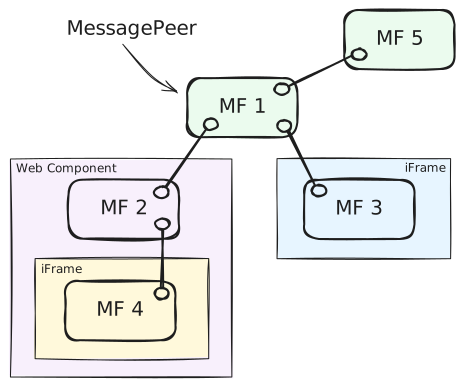
- typed and versioned message exchange between
MessagePeers - broadcasting messages across all connected micro frontends (ex.
MF1to everybody) - sending messages between two specific micro frontends (ex.
MF4toMF3) - lifecycle messages (ex.
MF5disconnected,MF3connected) - message validation before sending and upon reception
Common use-cases
- Creating a Message Peer
- Connecting to another peer
- Listening for connections
- Declaring Message types
- Sending and receiving messages
- Service messages
- Logging
- Information about the network
Creating a Message Peer
You can create several message peers and connect them to each other in any way avoiding loops. You need to provide some options when creating a peer. Only id is technically required.
import { Message, MessagePeer } from '@amadeus-it-group/microfrontends';

// 'one' is unique identifier for this peer in the network
const peer = new MessagePeer({ id: 'one' });
Connecting to another peer
A peer can either wait for incoming connections from another peer via .listen() or initiate a connection itself via .connect().
import { MessagePeer } from '@amadeus-it-group/microfrontends';

// Create two peers.
// First peer waits for any incoming connection
const one = new MessagePeer({ id: 'one' });
one.listen();

// Second peer connects to the first one
const two = new MessagePeer({ id: 'two' });
const disconnect = two.connect('one');

// if connection crosses iFrames, you might need to provide
// expected window and origin for `connect` and `listen`  methods
two.connect('one', {
  window: oneWindow,
  origin: 'https://example.com',
});

// Disconnecting
disconnect(); // 'two' disconnects from 'one'
one.disconnect('two'); // 'one' disconnects from 'two'
one.disconnect(); // 'one' disconnects from all connected peers
Listening for connections
A peer can decide which incoming connections to accept. Simplest usage is to listen for all connections without any filtering:
const stop = peer.listen(); // start listening
stop(); // stop listening; can restart anytime
More advanced usage allows you to filter incoming connections based on the peer id, source window, origin or a custom logic.
// 1. Using simple peer ids
peer.listen('two');
peer.listen(['two', 'three']);

// 2. Using matching objects
// ex. from peer 'two' from a specific iframe of the expected origin
peer.listen({
  id: 'two',
  source: iframe.contentWindow,
  origin: 'https://example.com',
});

// ex. any connection from this particular iframe
peer.listen({
  source: iframe.contentWindow,
});

// ex. any connection from this origin
peer.listen({
  origin: 'https://example.com',
});

// 3. Using a combination of ids and objects
peer.listen(['one', 'two', { id: 'three', origin: 'https://example.com' }]);

// 4. Using a custom function
// ex. filter connections based on the handshake message and where it comes from
peer.listen((message, source, origin) => {
  return true; // you decide whether to accept the connection
});
Declaring Message types
This is optional, but allows for type checking during development when sending and receiving messages.
import { Message } from '@amadeus-it-group/microfrontends';

interface HelloMessage_1_0 extends Message {
  type: 'hello';
  version: '1.0';
  greeting: string;
}

interface HelloMessage_2_0 extends Message {
  type: 'hello';
  version: '2.0';
  greetings: string[];
}

export type MyMessage = HelloMessage_1_0 | HelloMessage_2_0;
Sending and receiving messages
import { MessagePeer } from '@amadeus-it-group/microfrontends';

// Receiving messages
const one = new MessagePeer<MyMessage>({ id: 'one' });

// An observable-like interface consuming messages
one.messages.subscribe(({ payload }: MyMessage) => {
  if (payload.type === 'hello') {
    switch (payload.version) {
      case '1.0':
        console.log(payload.greeting); // string
        break;
      case '2.0':
        console.log(payload.greetings); // string[]
        break;
    }
  }
});

// Broadcast a message. Message will be type checked.
two.send({
  type: 'hello',
  version: '1.0',
  greeting: 'Hello, world!',
});

// Send a message to a specific peer. Other peers will not receive it.
two.send(
  {
    type: 'hello',
    version: '2.0',
    greetings: ['Hello', 'world!'],
  },
  {
    to: 'one',
  },
);
Service messages
There are some lifecycle messages (ServiceMessage) that are automatically sent by the library. You can listen to them using the .serviceMessages stream to avoid polluting your own messages in .message stream.
import { MessagePeer, ServiceMessage } from '@amadeus-it-group/microfrontends';

const peer = new MessagePeer({ id: 'one' });

peer.serviceMessages.subscribe(({ payload }: ServiceMessage) => {
  switch (payload.type) {
    case 'handshake':
      // instance of `HandshakeMessage`
      break;
    case 'connect':
      // instance of `ConnectMessage`
      break;
    case 'disconnect':
      // instance of `DisconnectMessage`
      break;
    case 'error':
      // instance of `ErrorMessage`
      break;
  }
});
Logging
Simple logging can be enabled via enableLogging() method. It will log all messages sent and received for debugging purposes.
import { enableLogging } from '@amadeus-it-group/microfrontends';

enableLogging();
Information about the network
// List all known peers and their accepted messages
one.knownPeers; // a map of known peers and messages they accept
one.knownPeers.get('two'); // a list of message types peer 'two' accepts