
@ambih/coding-agent-memory
v0.20.0
Published
Memory for AI coding agents: the plans, tasks, decisions, rules and bugs your agents work through, recorded automatically, shared with your team, readable by every agent through MCP, with a dashboard.

Maintainers
 ambinintsoa
Readme
Ambih Central
Central saves the plans and tasks your AI coding agent works through, automatically, while you work.
Nothing to do during a session: set it up once, and for a few hundred tokens at a time it keeps a history of how your project evolved — plans, tasks, decisions, rules, and the bugs the agent noticed.
Watch it all on a clean dashboard: each plan with a Kanban board of its tasks, moving from Open to Doing to Done as the agent works, and a map of the modules and files it planned to change.
See more on ambih.com/central. The install steps and every command, explained, are on ambih.com/central/install.
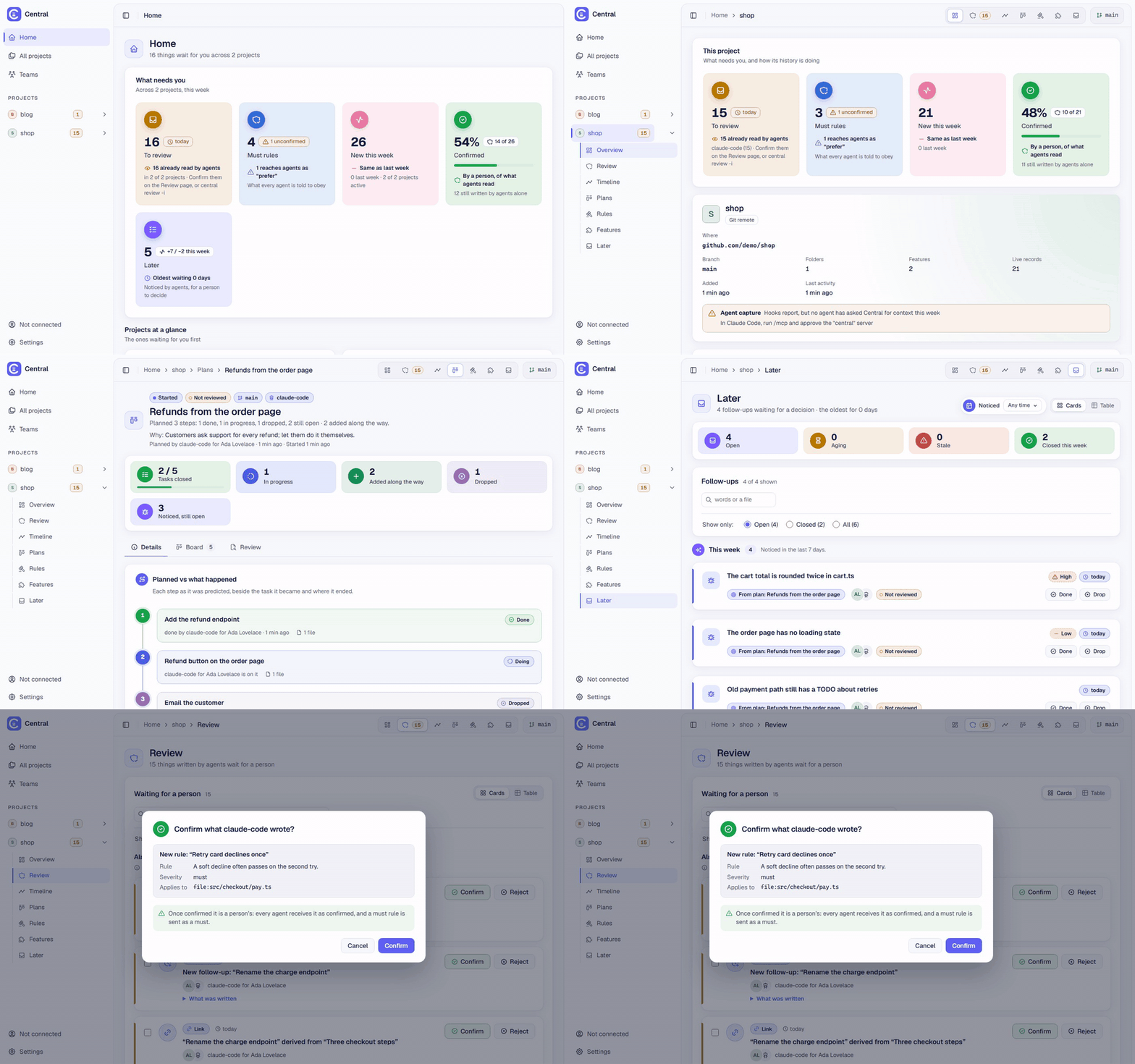
The same tour as a video: central-demo.mp4.
Install
npm install -g @ambih/coding-agent-memoryYou need Node.js 22 or newer. With pnpm, run pnpm approve-builds -g and allow better-sqlite3 before
installing; central doctor tells you if something is off.
Coming from @ambih/central-md? It is the same tool under its old name. Remove it first, since both install
the central command; your projects, history and agent setup stay as they are:
npm uninstall -g @ambih/central-md
npm install -g @ambih/coding-agent-memory
Set up your agent
Run central init in a terminal inside your project. It asks a few questions, each with an answer already
chosen, so you can press Enter through them:
- set up this project, and its name;
- which coding agents to connect (Claude Code, Codex, Cursor, VS Code with GitHub Copilot, Gemini CLI, Windsurf), with the ones you use already ticked;
- where their settings go: this machine (the default: your own settings, nothing written into the repository) or this repository (files a teammate who clones it gets, optionally kept out of git);
- what happens when an agent writes: it shows at once and Central reminds you to review it (recommended), it shows at once and Central does not ask you to review it, or it waits until you confirm it;
- with Claude Code or Codex, whether a small model may tidy task names in the background, so a task reads
"Add the coupon field" rather than the words you typed. It reads your request and the start of the changed
files, and uses a little of your Claude or Codex usage. Yes is the default;
central tidy offturns it off.
Then it lists the files it would change, and asks once (you can also show the full changes first).
central uninstall finds Central's setup for a project and takes it out again. central agent <name> only prints
the setup, if you prefer to do it by hand.
What Central then records by itself depends on the agent:
| Agent | Recorded automatically |
|---|---|
| Claude Code | Each plan as soon as Claude shows it, with one task per step, started when you accept it; without a plan, one task per request, in progress from the moment you send it (a request answered without changing a file is kept as a discussion, not a task); the files each task changed; the bugs it noticed, in the plan or at the end of a turn; its project memories (as suggestions you confirm) |
| Codex | The same as Claude Code, through its hooks: each plan it shows in plan mode, started when it starts the work; without a plan, one task per request; the files each task changed; the bugs it noticed. Codex runs a hook only once you trust it: after central init, run /hooks in Codex and trust Central's hooks. (Not yet confirmed in a real Codex session.) |
| Cursor, VS Code, Gemini CLI, Windsurf | Nothing by itself. These agents are told to record decisions, rules, plans and work for later in Central, and to read it before editing a file. What they record depends on them doing it. |
Claude Code and Codex have hooks: small commands the agent runs after each step, which tell Central what happened. The other four have no hooks Central can use yet, so for them Central only knows what the agent sends.
Everything an agent writes is labelled as the agent's until you confirm it, on the dashboard's Review page
or with central review. Reviewing is optional: review reminders are off until you turn them on (central init,
central reminders on, or the dashboard's Settings); while off, Central only mentions what is held back waiting
for you.
With Claude Code
The first time you open Claude Code in the project, it asks whether to trust the folder, and (when set up in
the repository) whether to use the central server. Say yes. A plan appears in Central as soon as Claude shows it,
with one task per step, and starts when you accept it. From then on, Central records each session by itself: the plan you
accept, its tasks as they move, the files each task changed, and the bugs Claude lists but does not fix.
Without a plan, each request you send becomes a task straight away, and its files are added as Claude edits them. A message you type while Claude is still working is added to that task rather than starting a new one. If Claude edits a file in another repository next to this one (the front end of a back end, say), that repository is registered too and gets its own task.
On the dashboard
central dashboard opens it in your browser. Besides each plan's board, a project has a Tasks page with every
task, newest first. Each task says what kind of work it was (code, tests, docs or config), read from its files.
The agent can set that itself. A request answered without changing any file is a discussion: it is not on the Tasks
page, and the Timeline lists it under Discussions.
A task's page lists the files the agent edited itself, with what else git saw change in the folder meanwhile folded underneath. "Open the whole session" shows every request of that agent session, and, on the machine it ran on, the full conversation read from the agent's own transcript. Central does not store or sync that transcript.
Setting up by hand, or another agent
central init writes these lines for you. If you set up an agent by hand, paste them into the file it reads
at the start of a session (AGENTS.md, a Cursor rule, GEMINI.md, and so on). Claude Code and Gemini CLI
get them from the server and need nothing:
Central holds this project's history: rules, decisions, follow-ups, plans, tasks.
Call get_context once when you start, with every file you will touch; follow its rules.
Record decisions, rules and work for later with propose_record, not only in your own memory: the team reads Central.
For work with several steps, track them with your task list tool.
In a plan, list bugs you will not fix under a "Noticed, not fixed" heading; Central records those itself.
Add a "Map" heading too: "- Module: `path`, `path`" lines, and "`a` → `b`" for links to new files.
Habits the person asks you to remember: propose_record note (any project); get_context query finds them.
The agent also needs the MCP server, central-mcp. Windsurf keeps its MCP servers per user, not per
project: add this to its MCP config (Settings, then MCP):
{ "mcpServers": { "central": { "command": "central-mcp" } } }On Windows, if your agent says the server did not start, use cmd as the command and /c central-mcp as
its arguments.
Commands
Each one is explained, by category, on ambih.com/central/install.
Start in a repository:
central init                         # register this project and connect your coding agent
central dashboard                    # open the dashboard in your browser
central doctor                       # check this machine and Claude Code's setup here
central uninstall                    # take Central's agent setup out of this project
central tidy off                     # stop the background tidy-up of task names (on by default)
central reminders on                 # remind you to review what agents wrote (off by default)
See the history:
central log                          # everything recorded, newest first
central show <id>                    # one record in full
central plan list                    # the plans agents made in this project
central plan show <id>               # one plan, its steps and where each task stands
central later                        # follow-ups: things noticed that should be done later
central context src/app.ts           # what an agent is told before it edits that file
central context --query "login"      # search the history by words
Confirm what the agent wrote:
central review                       # what agents wrote that nobody confirmed yet
central review -i                    # go through it, one item at a time
central approve <id>                 # confirm it
central reject <id> --reason "..."   # reject it; the agent hears why on its next call
Work on tasks and follow-ups:
central start <task id>              # you are on this task
central stop <task id>               # put it down without finishing it
central done <id>                    # the work is finished
central reopen <id>                  # it is not finished after all
central drop <id>                    # decided not to do this follow-up
Write something yourself:
central add rule "Payment goes through checkout.service" --severity must \
  --text "Never call the payment provider from a component."
central add decision "Three checkout steps" --set context="60% abandonment" --text "Cart, address, payment."
central supersede <id> --text "..."  # a new version; the old one stays in the history
central link <from id> derived_from <to id>
central trace <id>                   # where a record came from and what it led to
central feature add Checkout --path src/checkout
central session add "Checkout brainstorm" --at "2026-10-02 14:00"
Sync between machines and with a team (Pro or Team, see Plans):
central login https://central.ambih.com   # sign in with your ambih.com account
central sync --on                         # in a project: send its history and keep it in step
central sync --status                     # what is waiting to be sent
Everything else:
central agent cursor                 # print the setup for another agent (cursor, codex, vscode)
central policy required              # agents' writes stay hidden until you confirm them
central stop-server                  # stop the background server (it also stops by itself)
central remove --yes                 # delete this project's history on this machine
central --help lists every command, and central <command> --help its options.
Plans
Everything above is free and works on one machine, with no account. You pay when you want the same history on more than one machine, or shared with the people you work with.
Pro ($8 a month) syncs your own machines. Team ($15 per seat a month) shares projects with the people you work with. Prices, the checkout and questions about seats: ambih.com/central/pricing.
If you stop paying, sync stops at the end of the period you paid for. Every record already on your machines stays there and keeps working offline.
To sync, use the commands under Commands, or the dashboard: each project's page has a Sync control, and the Account page lists every project with its sync state. Turn it on once, and the project's history is on central.ambih.com, plans and boards included:
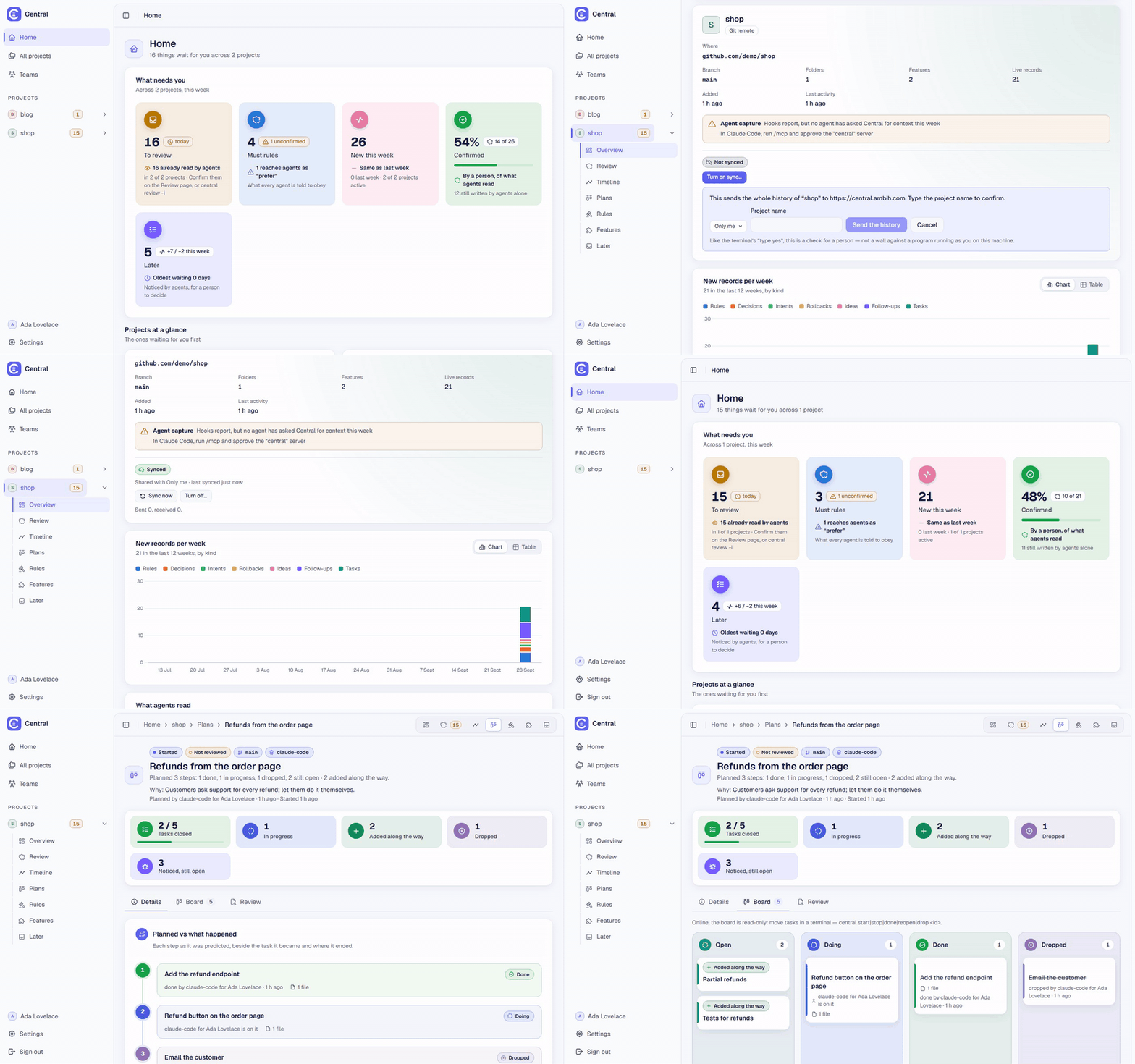
The same as a video: central-sync.mp4.
Requirements, data and licence
- Node.js 22 or newer. git is optional: without it a project is registered by its folder.
- Your history stays on your machine unless you turn sync on. It lives in
%LOCALAPPDATA%\ambih-central(Windows),~/Library/Application Support/ambih-central(macOS) or~/.local/share/ambih-central(Linux), with a backup taken every day; onlycentral remove --yesdeletes it. - Apache License 2.0. See
LICENSEin this package;THIRD-PARTY-NOTICES.txtlists what the dashboard is built with.