
@amccarthy/ngx-mat-daterange-picker
v1.2.2
Published
[](https://circleci.com/gh/ashishgkwd/ngx-mat-daterange-picker) [](https

Maintainers
 amccarthy
Readme


NgxMatDaterangePicker
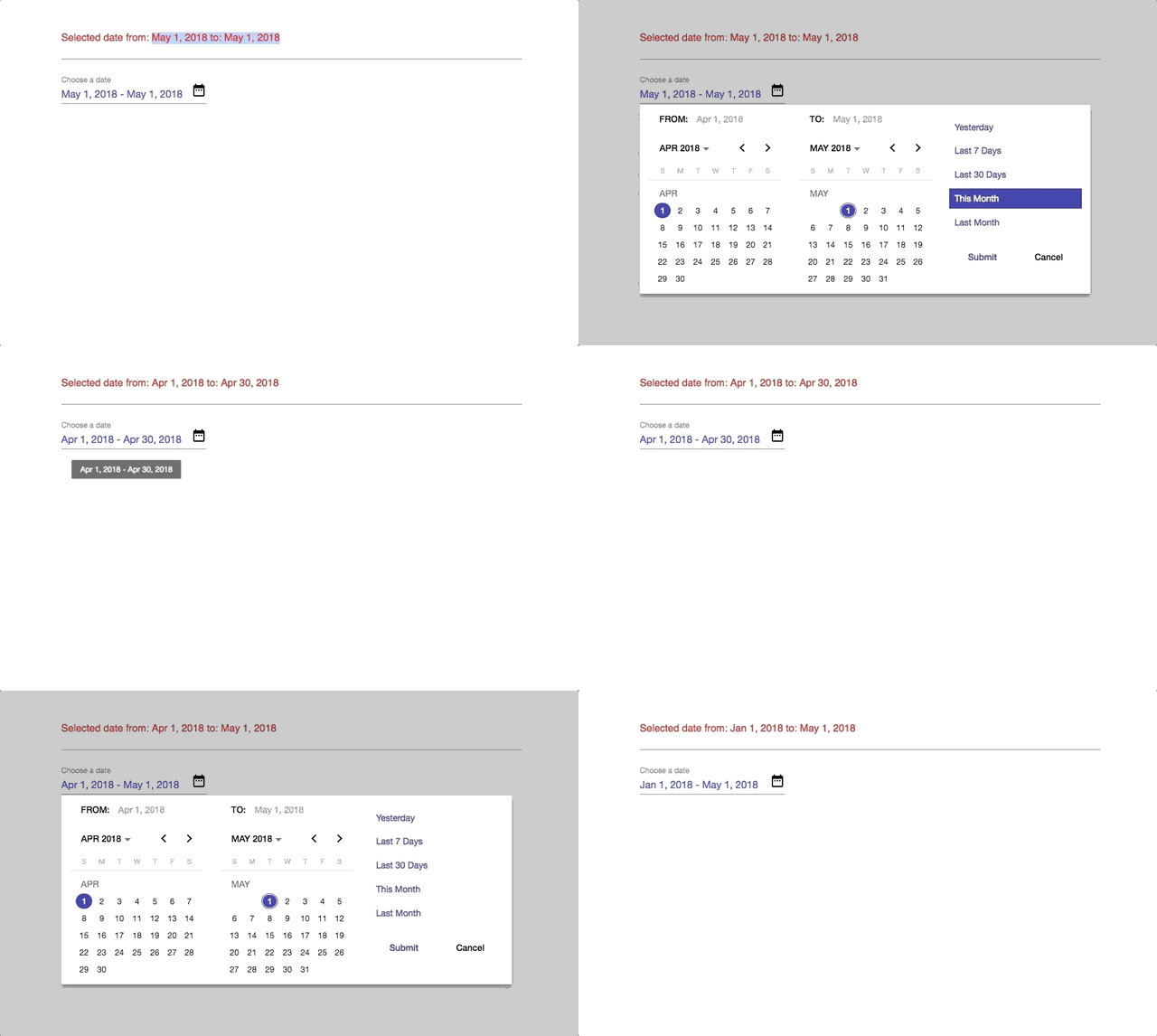
Angular Material Date range picker with configurable Date presets.
Fully compatible with latest Angular versions. Please see the installation table below for version compatability.
Packaged using ng-packagr
Demo
https://ashishgkwd.github.io/ngx-mat-daterange-picker/
Installation
Angular Version | Compatible version ---|--- 6.0 | v1.1.4 5.0 and below | v0.0.2
For Angular v6:
npm install ngx-mat-daterange-picker --save
or
yarn add ngx-mat-daterange-picker --save
For Angular v5 and below:
npm install [email protected] --save
or
yarn add [email protected] --save
NOTE: Angular Material requires the BrowserAnimationsModule and
as per #5684 BrowserAnimationsModule should only be imported in your app/main module.
app.module.ts
import {BrowserAnimationsModule} from '@angular/platform-browser/animations';

@NgModule({
  ...
  imports: [BrowserAnimationsModule],
  ...
})
Peer Dependencies
Please note and install the following peer dependencies necessary for Angular v6
"peerDependencies": {
    "@angular/animations": "^6.1",
    "@angular/cdk": "^6.1",
    "@angular/material": "^6.1"
  }
Example
Import NgxMatDrpModule module in your application module.
app.module.ts
import { NgxMatDrpModule } from 'ngx-mat-daterange-picker';

@NgModule({
  ...,
  imports: [..., NgxMatDrpModule, ...],
  ...
})
export class AppModule { }
Setup the NgxDrpOptions configuration required by the component and the handler function to receive the Range object on Date selection.
app.component.ts
import { Component } from '@angular/core';
import { NgxDrpOptions, PresetItem, Range } from 'ngx-mat-daterange-picker';

@Component({
  selector: 'app-root',
  templateUrl: './app.component.html',
  styleUrls: ['./app.component.css']
})
export class AppComponent {

  range:Range = {fromDate:new Date(), toDate: new Date()};
  options:NgxDrpOptions;
  presets:Array<PresetItem> = [];

  ngOnInit() {
    const today = new Date();
    const fromMin = new Date(today.getFullYear(), today.getMonth()-2, 1);
    const fromMax = new Date(today.getFullYear(), today.getMonth()+1, 0);
    const toMin = new Date(today.getFullYear(), today.getMonth()-1, 1);
    const toMax = new Date(today.getFullYear(), today.getMonth()+2, 0);

    this.setupPresets();
    this.options = {
                    presets: this.presets,
                    format: 'mediumDate',
                    range: {fromDate:today, toDate: today},
                    applyLabel: "Submit",
                    calendarOverlayConfig: {
                      shouldCloseOnBackdropClick: false,
                      hasBackDrop: false
                    }
                    // cancelLabel: "Cancel",
                    // excludeWeekends:true,
                    // fromMinMax: {fromDate:fromMin, toDate:fromMax},
                    // toMinMax: {fromDate:toMin, toDate:toMax}
                  };
  }

  // handler function that receives the updated date range object
  updateRange(range: Range){
    this.range = range;
  }

  // helper function to create initial presets
  setupPresets() {

    const backDate = (numOfDays) => {
      const today = new Date();
      return new Date(today.setDate(today.getDate() - numOfDays));
    }

    const today = new Date();
    const yesterday = backDate(1);
    const minus7 = backDate(7)
    const minus30 = backDate(30);
    const currMonthStart = new Date(today.getFullYear(), today.getMonth(), 1);
    const currMonthEnd = new Date(today.getFullYear(), today.getMonth()+1, 0);
    const lastMonthStart = new Date(today.getFullYear(), today.getMonth()-1, 1);
    const lastMonthEnd = new Date(today.getFullYear(), today.getMonth(), 0);

    this.presets =  [
      {presetLabel: "Yesterday", range:{ fromDate:yesterday, toDate:today }},
      {presetLabel: "Last 7 Days", range:{ fromDate: minus7, toDate:today }},
      {presetLabel: "Last 30 Days", range:{ fromDate: minus30, toDate:today }},
      {presetLabel: "This Month", range:{ fromDate: currMonthStart, toDate:currMonthEnd }},
      {presetLabel: "Last Month", range:{ fromDate: lastMonthStart, toDate:lastMonthEnd }}
    ]
  }
}
Pass the reference of the new range selection handler function to selectedDateRangeChanged event emitter and the NgxDrpOptions options reference to the options input property.
app.compnent.html
<ngx-mat-drp (selectedDateRangeChanged)="updateRange($event)" [options]="options" #dateRangePicker></ngx-mat-drp>Reset the date using ViewChild reference:
@ViewChild('dateRangePicker') dateRangePicker;

...

const today = new Date();
const resetRange = {fromDate: today, toDate: today};
this.dateRangePicker.resetDates(resetRange); // will trigger selectedDateRangeChanged
Configuration
export interface PresetItem {
    presetLabel: string;
    range: Range;
}

export interface Range {
    fromDate: Date;
    toDate: Date;
}

export interface CalendarOverlayConfig {
    panelClass?: string;
    hasBackdrop?: boolean;
    backdropClass?: string;
    shouldCloseOnBackdropClick?: boolean;
}

export interface NgxDrpOptions {
    presets: Array<PresetItem>;
    format: string;
    range: Range;
    excludeWeekends?: boolean;
    locale?: string;
    fromMinMax?: Range;
    toMinMax?: Range;
    applyLabel?: string;
    cancelLabel?: string;
    animation?: boolean;
    calendarOverlayConfig?: CalendarOverlayConfig;
    placeholder?: string;
    startDatePrefix?: string;
    endDatePrefix?: string;
}
Build
Run ng build to build the project. The build artifacts will be stored in the dist/ directory. Use the --prod flag for a production build.
Run npm run packagr to build the library project. The build artifacts will be stored in the dist/.
Running unit tests
Run ng test to execute the unit tests via Karma.
License
MIT