npm package discovery and stats viewer.

Discover Tips

  • General search

    [free text search, go nuts!]

  • Package details

    pkg:[package-name]

  • User packages

    @[username]

Sponsor

Optimize Toolset

I’ve always been into building performant and accessible sites, but lately I’ve been taking it extremely seriously. So much so that I’ve been building a tool to help me optimize and monitor the sites that I build to make sure that I’m making an attempt to offer the best experience to those who visit them. If you’re into performant, accessible and SEO friendly sites, you might like it too! You can check it out at Optimize Toolset.

About

Hi, 👋, I’m Ryan Hefner  and I built this site for me, and you! The goal of this site was to provide an easy way for me to check the stats on my npm packages, both for prioritizing issues and updates, and to give me a little kick in the pants to keep up on stuff.

As I was building it, I realized that I was actually using the tool to build the tool, and figured I might as well put this out there and hopefully others will find it to be a fast and useful way to search and browse npm packages as I have.

If you’re interested in other things I’m working on, follow me on Twitter or check out the open source projects I’ve been publishing on GitHub.

I am also working on a Twitter bot for this site to tweet the most popular, newest, random packages from npm. Please follow that account now and it will start sending out packages soon–ish.

Open Software & Tools

This site wouldn’t be possible without the immense generosity and tireless efforts from the people who make contributions to the world and share their work via open source initiatives. Thank you 🙏

© 2026 – Pkg Stats / Ryan Hefner

@amitnarw/web-mcp

v0.1.4

Published

Dedicated browser automation MCP server using an isolated Chromium profile and Extension to provide AI browser control. Fully supports OpenCode, Cursor, Claude Code, Zed Editor, Sourcegraph Cody, Windsurf, Roo Code, and OpenAI Codex.

Downloads

754

Readme

Web MCP

Web MCP is a foreground AI browser automation tool designed to act as an In-Browser Copilot. It allows AI agents (via the Model Context Protocol - MCP) to control a live Chromium browser on your desktop while providing a clear, real-time activity feed and preventing human-AI input collisions.

npm version npm downloads License: MIT Model Context Protocol


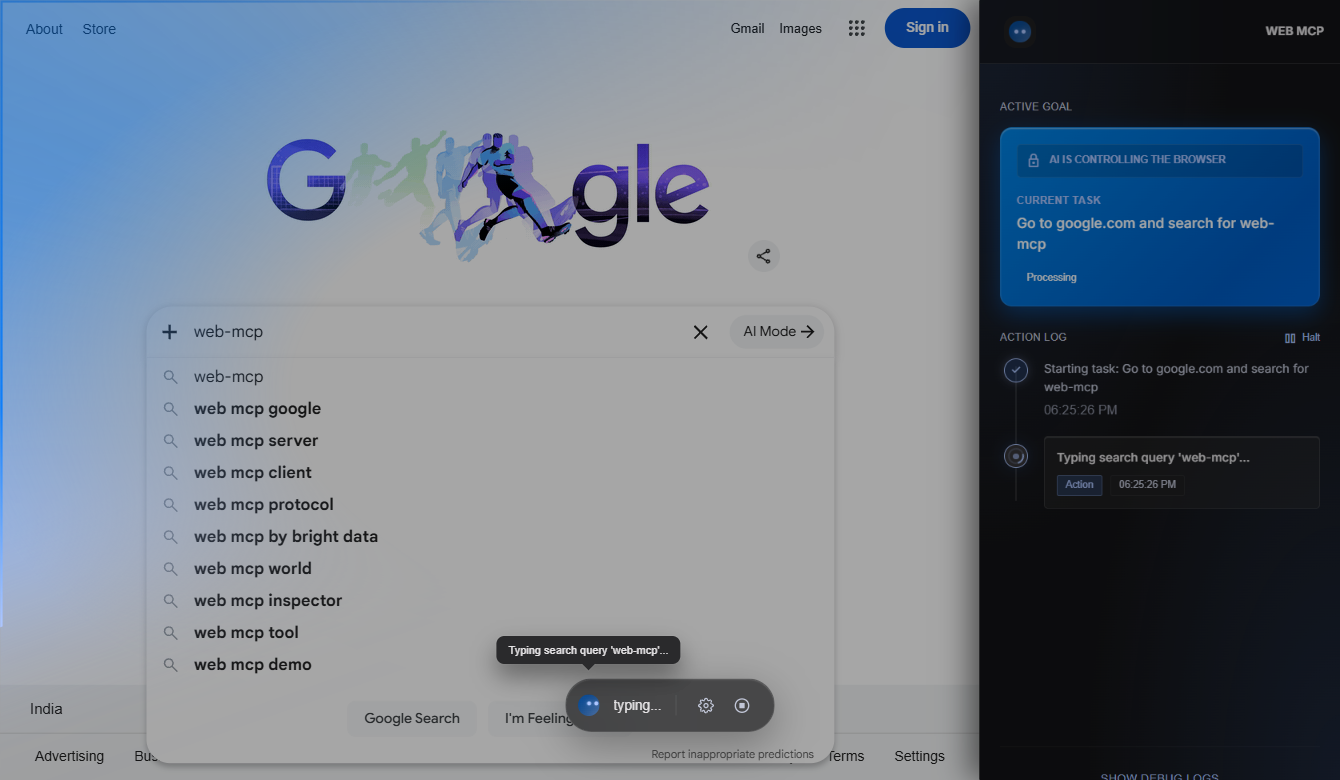
Web MCP in Action


📦 Scoped Package Name

This package is published under the scope name:

npm install -g @amitnarw/web-mcp

Note: The scoped prefix @amitnarw/ is required to ensure namespace uniqueness and security on the npm registry.

🌐 Why We Use Chromium (Instead of Google Chrome)

Modern Google Chrome builds block sideloading unpacked extensions during automated sessions. To bypass this restriction, Web MCP automatically manages and launches a dedicated Chromium instance (via Puppeteer) with developer mode enabled under an isolated profile directory (~/.web-mcp/chromium-profile-v2/).

Features

  • Zero-Friction Setup: Delivered as a single NPM package (@amitnarw/web-mcp) that bundles the Node.js MCP server and a dedicated Chromium Extension.
  • Auto-Injection: The MCP server automatically launches a dedicated Chromium profile and dynamically injects the Chromium Extension—no manual "Load Unpacked" required!
  • Visual Feedback: Features a native Chromium Side Panel with a real-time action feed and an ambient light overlay that activates when the AI takes control.
  • Human-AI Collision Protection: Web MCP uses a CSS DOM-overlay shield to physically block your hardware mouse clicks from disrupting the AI's synthetic DevTools clicks while it's actively working.
  • Multi-Agent Concurrency: Multiple AI agents (e.g. Cursor and OpenCode) can use the Web MCP singleton backend simultaneously without killing each other's sessions.
  • Zero-Zombie Background Management: The Chromium extension maintains a rigorous heartbeat with the local server. If your AI chat crashes, the browser securely self-destructs after 60 seconds to prevent memory leaks.

Prerequisites

[!IMPORTANT] A dedicated Chromium binary will be downloaded automatically when you install this package. Web MCP uses this managed Chromium instance (via Puppeteer). The background download is roughly 130MB.

🚀 Quick Start

Get up and running in less than a minute:

  1. Install globally:

    npm install -g @amitnarw/web-mcp
  2. Launch the configuration dashboard:

    web-mcp

    Select "Configure AI Client (Setup)" and choose your preferred AI client from the list.

  3. Ask your AI:

    "Go to google.com and search for OpenCode"

Supported AI Clients

The CLI auto-installer can automatically configure any of the following:

| Client | Config Location | Notes | |--------|----------------|-------| | OpenCode | ~/.opencode.json | Standard mcpServers format | | Claude Desktop | %APPDATA%/Claude/claude_desktop_config.json | Standard mcpServers format | | Claude Code (CLI) | ~/.claude/settings.json | Standard mcpServers format | | Cursor | ~/.cursor/mcp.json | Standard mcpServers format | | Windsurf | ~/.codeium/windsurf/mcp_config.json | Standard mcpServers format | | Zed Editor | %APPDATA%/Zed/settings.json | Uses context_servers key | | Sourcegraph Cody | VS Code global storage | Standard mcpServers format | | OpenAI Codex | ~/.codex/config.toml | TOML format; also installs model_instructions_file to override built-in browser | | ChatGPT Desktop | Manual (no local config file) | Instructions shown in CLI | | Antigravity IDE | ~/.gemini/antigravity/mcp_config.json | Standard mcpServers format | | Roo Code (Cline) | ~/.cline/data/settings/cline_mcp_settings.json | Standard mcpServers format |

🛠️ Exposed MCP Tools Reference

Web MCP registers 21 powerful tools natively with your AI client.

| Tool Name | Parameters | Description | |:---|:---|:---| | browser_navigate | url | Navigates the browser to the specified URL | | browser_click | selector / uid | Clicks on a DOM element using its snapshot ID or CSS selector | | browser_type | text, submitKey? | Types text into the currently focused DOM element | | browser_fill | uid, text | Directly fills a form input by its snapshot ID | | browser_scroll | direction | Scrolls the page up, down, left, or right | | browser_screenshot | | Captures a PNG screenshot of the current viewport | | browser_snapshot | | Returns the simplified DOM layout and accessibility tree | | browser_press_key | key | Dispatches a keypress event (e.g. Enter, Escape, Backspace) | | browser_wait | selector / timeout | Waits for a selector to appear or pauses for a duration | | browser_evaluate | script | Evaluates arbitrary JavaScript inside the page context | | browser_new_tab | url? | Opens a new browser tab | | browser_close_tab | | Closes the active browser tab | | browser_switch_tab | index | Switches focus to another tab by its index | | browser_get_tabs | | Lists all currently open tabs and their metadata | | browser_get_url | | Retrieves the URL of the active tab | | browser_hover | uid | Hovers the virtual mouse over an element | | browser_drag | sourceUid, targetUid | Performs a drag-and-drop action between elements | | browser_get_status | | Returns server session status (active, locked, idle) | | browser_done | | Signals completion of tasks, unlocking the overlay | | browser_stop | | Closes the browser and stops the session |

Usage

After running setup, using Web MCP is seamless:

  1. Open your AI client (e.g., OpenCode, Cursor, Claude Code).
  2. Ask the AI: "Go to google.com and search for OpenCode"
  3. The AI will call the MCP tools. Web MCP will automatically launch Chromium, attach the extension, show the action feed in the side panel, and execute the task!

CLI Commands

web-mcp                  # Interactive dashboard (recommended)
web-mcp setup            # Quick setup/uninstall (non-interactive)
web-mcp troubleshoot     # Fix environment, cache, or stuck process issues
web-mcp browser          # Manually launch the isolated Chromium browser
web-mcp mcp              # Run the raw MCP server (used by AI clients)
web-mcp status           # View server & Chromium health
web-mcp stop             # Force quit the background server and browser
web-mcp test             # Test all configured AI client setups
web-mcp help             # Show all commands

👤 Created By

Web MCP is built and maintained by Amit Narwal.

License

MIT