
@anam-ai/halftone-shader
v0.1.3
Published
Real-time WebGL halftone effect for images. Framework-agnostic engine with a React wrapper.


Readme
@anam-ai/halftone-shader
Use this to turn any image into Anam's half tone effect.
Runs entirely on the GPU via a GLSL fragment shader on a <canvas> element. Exports a framework-agnostic HalftoneEngine class for vanilla JS and a HalftoneCanvas React component as a thin wrapper around it.
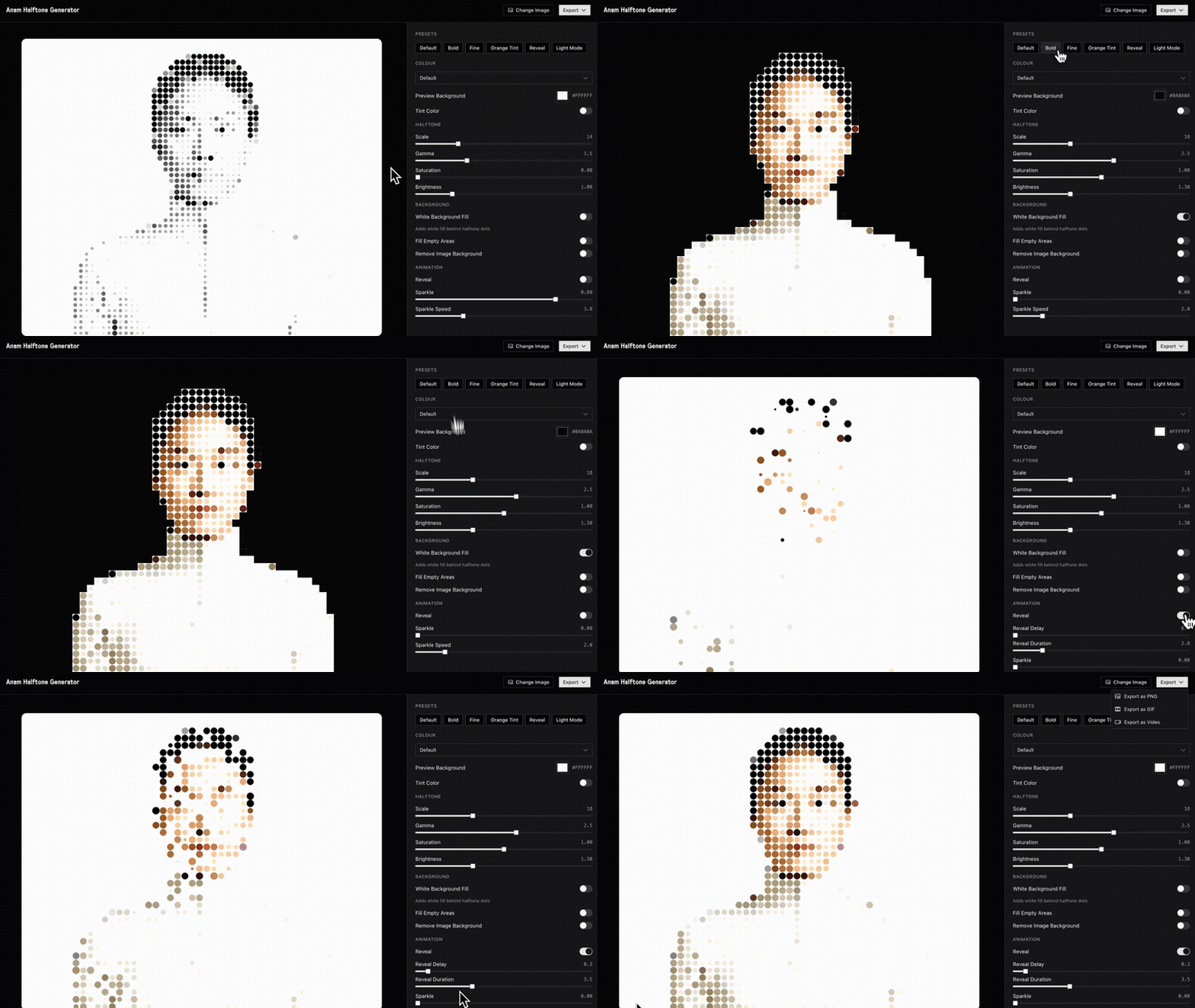
Demo: half-tone-shader.vercel.app
Install
npm install @anam-ai/halftone-shaderReact usage
Size the wrapper with aspectRatio matching your image's natural dimensions. The canvas fills its parent, so the wrapper controls the layout.
import { HalftoneCanvas, DEFAULT_SETTINGS } from '@anam-ai/halftone-shader'

function App() {
  return (
    <div style={{ width: '100%', aspectRatio: '1920 / 1080' }}>
      <HalftoneCanvas
        imageSrc="/your-image.png"
        settings={DEFAULT_SETTINGS}
      />
    </div>
  )
}
Note: Update
aspectRatioto match your image's dimensions. For a 800×600 image use'800 / 600', for a square image use'1 / 1', etc. If you swap the image for one with different dimensions, update the ratio to match.
Ref handle
Use the ref to access the underlying canvas element or reset the animation:
import { useRef } from 'react'
import { HalftoneCanvas, HalftoneCanvasHandle, DEFAULT_SETTINGS } from '@anam-ai/halftone-shader'

function App() {
  const ref = useRef<HalftoneCanvasHandle>(null)

  const exportFrame = () => {
    const canvas = ref.current?.getCanvas()
    canvas?.toBlob((blob) => { /* save blob */ }, 'image/png')
  }

  const restart = () => {
    ref.current?.resetAnimation()
  }

  return (
    <div style={{ width: '100%', aspectRatio: '1920 / 1080' }}>
      <HalftoneCanvas
        ref={ref}
        imageSrc="/your-image.png"
        settings={DEFAULT_SETTINGS}
      />
    </div>
  )
}
Next.js usage
Add 'use client' since the shader uses browser APIs (WebGL, ResizeObserver):
'use client'

import { HalftoneCanvas, DEFAULT_SETTINGS } from '@anam-ai/halftone-shader'

export default function Page() {
  return (
    <div style={{ width: '100%', aspectRatio: '1920 / 1080' }}>
      <HalftoneCanvas
        imageSrc="/your-image.png"
        settings={DEFAULT_SETTINGS}
      />
    </div>
  )
}
Vanilla JS usage
For non-React projects, use HalftoneEngine directly. Size the canvas via its container element:
<div style="width: 100%; aspect-ratio: 1920 / 1080;">
  <canvas id="my-canvas" style="width: 100%; height: 100%;"></canvas>
</div>
import { HalftoneEngine } from '@anam-ai/halftone-shader'
const canvas = document.getElementById('my-canvas')
const engine = new HalftoneEngine(canvas)
engine.setImage('/your-image.png')
engine.setSettings({ scale: 12, sparkleIntensity: 0.5 })
// Restart the reveal/sparkle timer
engine.resetAnimation()
// Clean up when done
engine.destroy()Note: Update
aspect-ratioon the container to match your image's natural dimensions. If you swap the image for one with different dimensions, update the ratio to match.
HalftoneEngine manages the full GL lifecycle including shader compilation, texture upload, the requestAnimationFrame loop, and ResizeObserver. Call destroy() to release all resources.
Settings
Pass a settings object to control the effect. Start with DEFAULT_SETTINGS and override what you need:
import { DEFAULT_SETTINGS } from '@anam-ai/halftone-shader'

const settings = {
  ...DEFAULT_SETTINGS,
  scale: 12,
  sparkleIntensity: 0.5,
  useTint: true,
  tintColor: '#FF6200',
}
| Setting | Type | Default | Description |
|---|---|---|---|
| scale | number | 14 | Dot grid size in pixels |
| gamma | number | 1.5 | Controls dot size relative to image luminance |
| saturation | number | 1 | Color saturation of dots |
| brightness | number | 1 | Dot brightness |
| colorMode | 'default' \| 'light' | 'default' | 'light' renders white dots with variable opacity |
| background | boolean | false | Render a white background behind the dots |
| useTint | boolean | false | Apply a single tint color to all dots |
| tintColor | string | '#FF6200' | Hex or RGB color for the tint |
| fillPattern | boolean | false | Fill empty (non-image) areas with an animated dot pattern |
| patternOpacity | number | 0.5 | Opacity of the fill pattern |
| sparkleIntensity | number | 0.4 | How strongly dots twinkle (0 = none) |
| sparkleSpeed | number | 2 | Speed of the sparkle animation |
| reveal | boolean | false | Animate dots appearing on load |
| revealDelay | number | 0 | Seconds before reveal starts |
| revealDuration | number | 2 | Seconds for reveal to complete |
How it works
The shader initialises a WebGL context on a <canvas> element and runs a custom GLSL fragment shader. Each frame:
- Divides the canvas into a grid of cells based on
scale - Samples the image colour at each cell centre
- Derives dot size from the luminance of that pixel
- Renders antialiased circles with optional sparkle animation via
requestAnimationFrame
The image is never rasterized or pre-processed — everything is computed on the GPU in real time.
Requirements
- A browser with WebGL support (all modern browsers)
- React 18+ (only if using
HalftoneCanvas)