
@andreashauschild/just-upload
v1.1.0
Published
Just Upload is an `angular` library **(without external dependencies)** that provides all necessary features to make file upload simple as possible. The goal of the library is to provide `services` , `models` and `examples` to implement your own custom up
Downloads
40


Readme
just-upload
Just Upload is an angular library (without external dependencies) that provides all necessary features to make file upload simple as possible. The goal of the library is to
provide services , models and examples to implement your own custom upload components.
Requires: Angular 13+
Info The developer provides a backend service (quarkus) to execute real file uploads. Files send to this api will be deleted after upload. Endpoint: https://just-upload.litexo.de
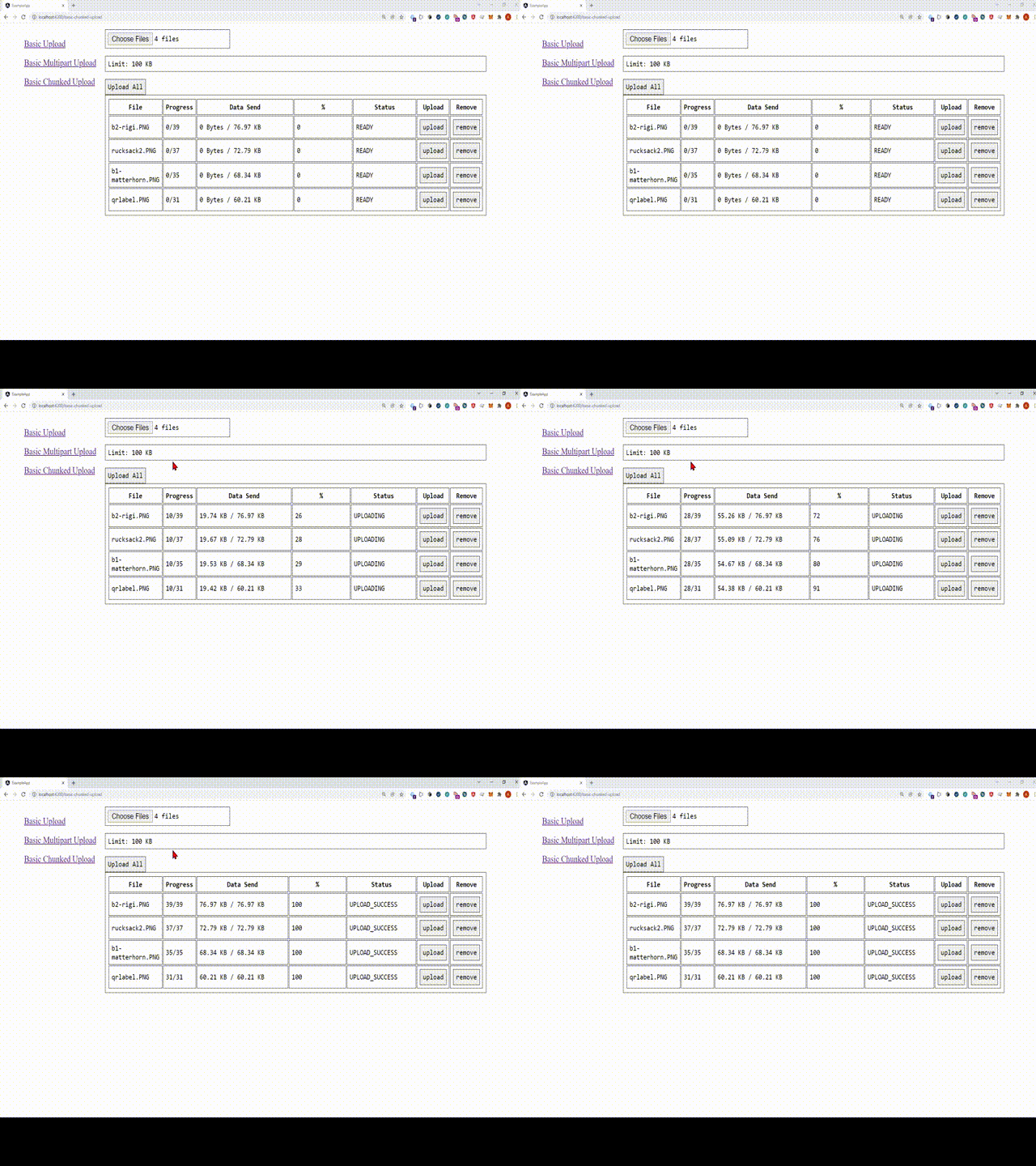
Features
- Includes Hooks to
enrich/customizerequest data likequery parametersandheaders(e.g. access tokens) - Supports different upload types:
Basic Upload- send file asapplication/octet-streamBasic Upload Multipart- uploads files asmultipart/form-dataChunked Upload- Splits a file in chunks and sends for each chunk a http request. This can be used to upload very large files which may exceeding the size limit of a single request.
- Provides a lot of useful information out of the box
- State update via Observables while uploading
- State of upload in percent
- Size of file in a human-readable format (KB, MB, GB)
- MimeType recognition
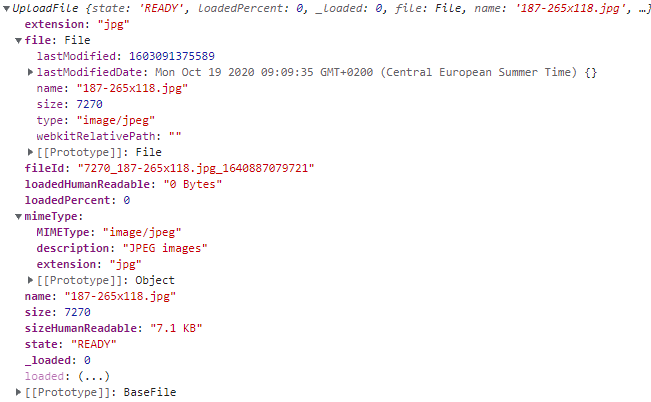
- Example of data model:
Installation
npm install @andreashauschild/just-uploadUsage
To use this library you need to import the JustUploadModule into your application. After that you can use the JustUploadService in your components.
Import the JustUploadModule
Import it in your angular app.module.ts. Furthermore, the HttpClientModule from @angular/common/http must also be imported.
@NgModule({
  declarations: [
    AppComponent
  ],
  imports: [
    HttpClientModule,
    JustUploadModule
  ],
  providers: [],
  bootstrap: [AppComponent]
})
export class AppModule {
}
Inject the Service in your Component
constructor(private service: JustUploadService)Concepts - Basic Upload
The JustUploadService helps you to create an upload object which provides all necessary functions to implement your upload.
To create an upload you need to provide a reference to a HTML file input element and a configuration.
After the creation of the upload object you can listen to changes if you subscribe to onFileProcessed and onFiledAdded.
The most simple upload looks like this (The code can be found here: example1):
Info the backend of the upload server is implemented in java with quarkus. You can find the REST-Endpoint here: BasicUploadResource.java
import {AfterViewInit, Component, ElementRef, ViewChild} from '@angular/core';
import {JustUploadService, Upload, UploadConfig} from 'just-upload';

@Component({
  selector: 'app-documentation1',
  template: `
    <!-- HTML File Input with template variables as reference    -->
    <input #fileUpload type="file">
  `,
  styles: [``]
})
export class Documentation1Component implements AfterViewInit {

  // Element reference of the file input field. Be aware that this ref will be accessible in AfterViewInit
  @ViewChild("fileUpload", {static: false})
  fileUpload: ElementRef | undefined;

  // The config for the upload
  config: UploadConfig;

  // The upload object which controls everything
  upload?: Upload;

  constructor(private service: JustUploadService) {
    // initialize basic config this will send the file immediately to the given endpoint with a post request
    this.config = {
      url: "https://just-upload.litexo.de/api/basic-upload/single-binary",
      method: "POST"
    }
  }

  // Use ngAfterViewInit because in the lifecycle step the 'upload' is set
  ngAfterViewInit(): void {

    // Setup the upload
    this.upload = this.service.createUpload(this.fileUpload!, this.config);

    // Log the processing stages of the file
    this.upload.onFileProcessed().subscribe(procced => {
      console.log("File Processed", procced);
    });

    // Log if a file was added to the upload
    this.upload.onFiledAdded().subscribe(added => {
      console.log("File Added", added);
    });
  }

}
UploadConfig - UploadFile - Upload & MultipartFormUpload
UploadConfig
The UploadConfig allows the following configurations:
| Attribute | Description |
|----------|---------------|
| url | http endpoint of the upload |
| uploadImmediately | if true files will immediately be uploaded after there added to the upload default: false |
| method | http request method that should be used (POST, PUT, PATCH) |
| maxFileSize | maximal size of a file that can be added default: 100MB |
| multi | false = single file upload; true = multi file upload |
| accept | accept value of the input field e.g. *, png jpeg jpg, see: input accept |
| beforeFileSendHook?(before: BeforeFileSend): RequestParams; | callback function that executes before the file is send. this is used to add custom header or query parameters to the request. These custom parameters must be returned as result of the callback function |
| afterFileSendHook?(after: AfterFileSend): void; | callback function that executes after the file is send |
UploadFile
The UploadFile is the file data model. It holds the browser file and additional information:
| Attribute | Description |
|----------|---------------|
| file | reference to the original file object |
| name | name of the file |
| extension | extension of the file e.g.: png, jpg |
| size | size in bytes of the file |
| sizeHumanReadable | size of file as human readable string like: 100kb, 2MB, 1GB |
| mimeType | MimeType of the file see MimeTypes.ts |
| fileId | id of the file that is uploaded. This is generated: like 128_thumbnail.png_1640697283494 |
| state | current upload state of the file see UploadState |
| loadedHumanReadable | current value of uploaded data as human readable string |
| loadedPercent | totally transferred of file in percent |
| httpResponse | stores the httpResponse of the upload. can be used for specialized response handling. can be HttpResponse, HttpErrorResponse or undefined if the file was not send yet |
Upload & MultipartFormUpload
The Upload and MultipartFormUpload will be created by a factory method of the JustUploadService. It is the main object you will work with. In case of MultipartFormUpload every file will be sent as single multipart/form-data request. This means if you have 5 files in your file list, they will be sent in 5 separate requests.
If you use Upload every file will be sent as an application/octet-stream to the server.
| Methods | Description |
|----------|-----------------------------------------------------------------------------------------------------------------------------------------------------------------------------------------------------------------------------------------------|
| uploadFile(uploadFile: UploadFile): void | Method to trigger the upload process of the given file. The method can be used if uploadImmediately is disabled |
| onFileProcessed(): Observable<UploadFile> | Subscribe for receiving progress chances while the file is processed. ReturnsUploadFile with the current state. Info: If you are uploading files with a very good connection (e.g. local server) you may get only one processing update |
| onFiledAdded(): Observable<UploadFile> | Subscribe for receiving the files that are added to the input element |
| addFile(file: File): void | Adds the File): to the upload. This can be used add files programmatically if needed. For example if you build drag and drop components.|
| addFiles(fileList: FileList): void | Adds the FileList to the upload. This can be used add files programmatically if needed. For example if you build drag and drop components.|
ChunkedUploadConfig - ChunkedUploadFile - ChunkedUpload
Chunked Upload - Splits a file in chunks and sends for each chunk a http request. This can be used to upload very large files which may exceeding the size of a single request.
The ChunkedUploadConfig allows the following configurations:
| Attribute | Description |
|----------|---------------|
| url | http endpoint of the upload |
| uploadImmediately | if true files will immediately be uploaded after there added to the upload default: false |
| method | http request method that should be used (POST, PUT, PATCH) |
| maxFileSize | maximal size of a file that can be added default: 100MB |
| multi | false = single file upload; true = multi file upload |
| accept | accept value of the input field e.g. *, png jpeg jpg, see: input accept |
| chunkSize | size of a chunk in bytes |
| beforeChunkSendHook?(before: BeforeChunkSend): RequestParams; | callback function to intercept and set parameters (e.g. header and query params) before the chunk is send to server |
| afterChunkSendHook?(after: AfterChunkSend): void; | callback function to intercept if the chunk was send and the server response was received |
ChunkedUploadFile & FileChunk
The ChunkedUploadFile represents the file that is uploaded an FileChunk represents a chunk of this file. It holds the browser file and additional information:
ChunkedUploadFile
| Attribute | Description |
|----------|---------------|
| file | reference to the original file object |
| name | name of the file |
| extension | extension of the file e.g.: png, jpg |
| size | size in bytes of the file |
| sizeHumanReadable | size of file as human readable string like: 100kb, 2MB, 1GB |
| mimeType | MimeType of the file see MimeTypes.ts |
| fileId | id of the file that is uploaded. This is generated: like 128_thumbnail.png_1640697283494 |
| state | current upload state of the file see UploadState |
| loadedHumanReadable | current value of uploaded data as human readable string |
| loadedPercent | totally transferred of file in percent |
| httpResponse | stores the httpResponse of the upload. can be used for specialized response handling. can be HttpResponse, HttpErrorResponse or undefined if the file was not send yet |
| totalChunks | Total number of chunks that will be read, based on the file size and maximum chunk size |
| maxChunkSize | Maximum size of a chunk |
| currentChunk | Provides the current chunk that will be send |
ChunkedUploadFile
| Attribute | Description |
|----------|---------------|
| uploadFile | reference to the owning ChunkedUploadFile |
| loadedPercent | uploaded percent of the file with this chunk e.g file with 10 chunks and current chunk is number 5 it will be 50 |
| loadedHumanReadable | uploaded bytes of the file with this chunk |
| finished | data of the chunk bytes |
| chunk.data | data of the chunk bytes |
| chunk.index | index of the chunk from 0..n |
| chunk.size | size of the chunk |
| chunk.offset | current offset of this chunk |
ChunkedUpload
The ChunkedUpload will be created by a factory method of the JustUploadService. It is the main object you will work with.
Every chunk will be sent as an application/octet-stream to the server.
| Attribute | Description |
|----------|---------------|
| onChunkProcessed(): Observable<ChunkedUploadFile> | Subscribe to this function to handle chunks after there where send to server |
| onFiledAdded(): Observable<ChunkedUploadFile> | Subscribe for receiving the files that are added to the input element |
| uploadFile(file: ChunkedUploadFile): void | Method to trigger the upload process of the given file. The method can be used if uploadImmediately is disabled |
| addFile(file: File): void | Adds the File): to the upload. This can be used add files programmatically if needed. For example if you build drag and drop components.|
| addFiles(fileList: FileList): void | Adds the FileList to the upload. This can be used add files programmatically if needed. For example if you build drag and drop components.|