
@andreymudri/fleetmates-deck
v0.7.2
Published
fleetmates deck: a local web deck that observes Claude Code sessions


Readme
fleetmates deck
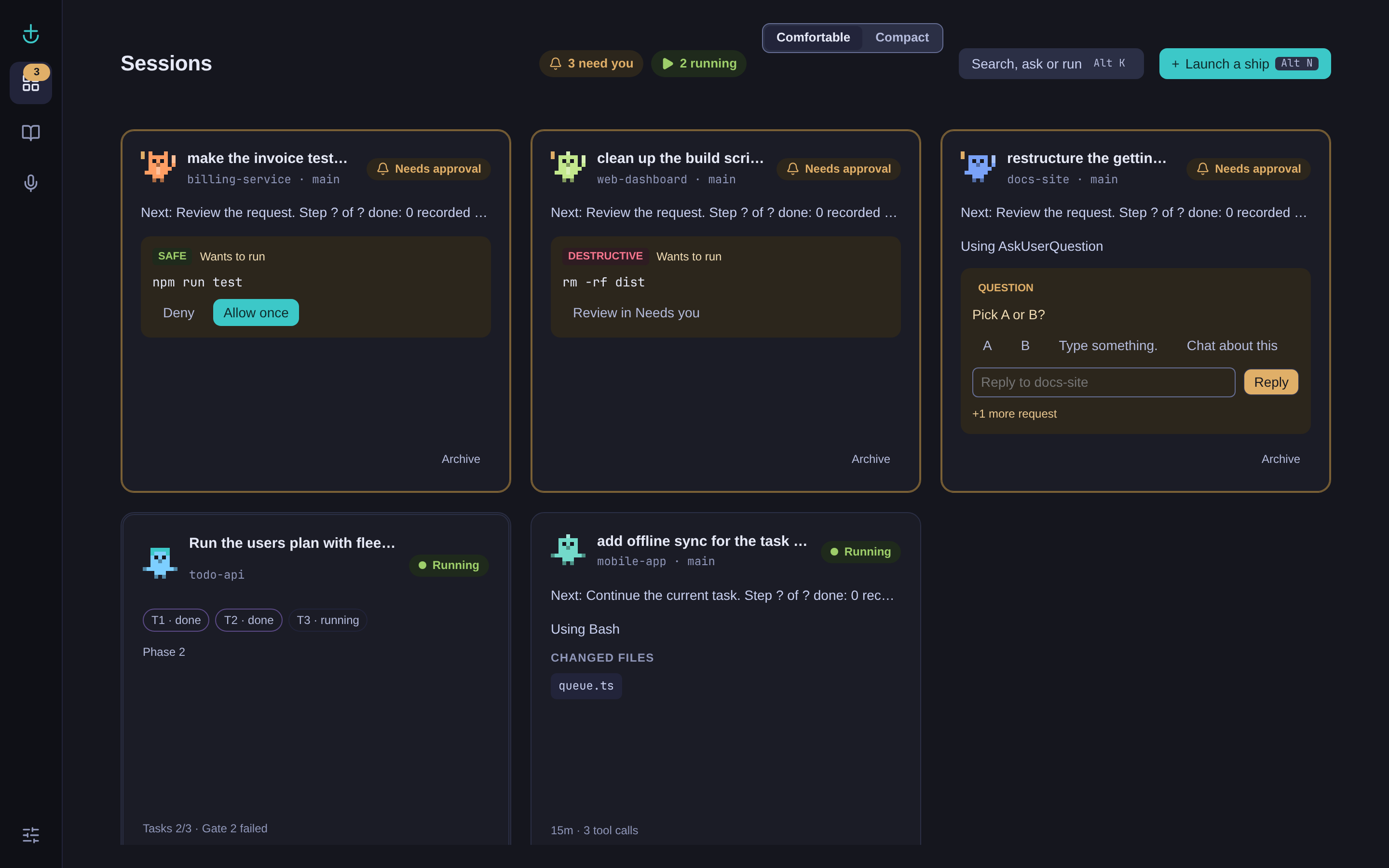
A local web deck for your Claude Code sessions. It shows which session is working, which one needs
you, and which one finished, sends a desktop popup when one is waiting on you, and, for sessions
started with fm claude or from the deck, mirrors the live terminal in the browser so you can type
into it.
Status: 0.5.0, the first version published to npm as @andreymudri/fleetmates-deck, with
the commands fleetmates-deck and fm. Includes Memory and Research on top of Meetings,
Unblock, Control, and Observe.
What M1 does
- Observes plain Claude Code sessions through user-level async hooks. Nothing about how you start
claudechanges. - Home shows every session as a card with its state (running, needs approval, asked you, idle,
no activity, done, reviewed), open requests, and counts in the header. A palette (
Alt K) jumps to any session; the Needs-you drawer lists what is waiting. - Desktop popups and a bell when a session needs you or finishes, with re-notify, and quiet mode while a TurbidAssist meeting records.
- Shows fleetmates team runs as team cards.
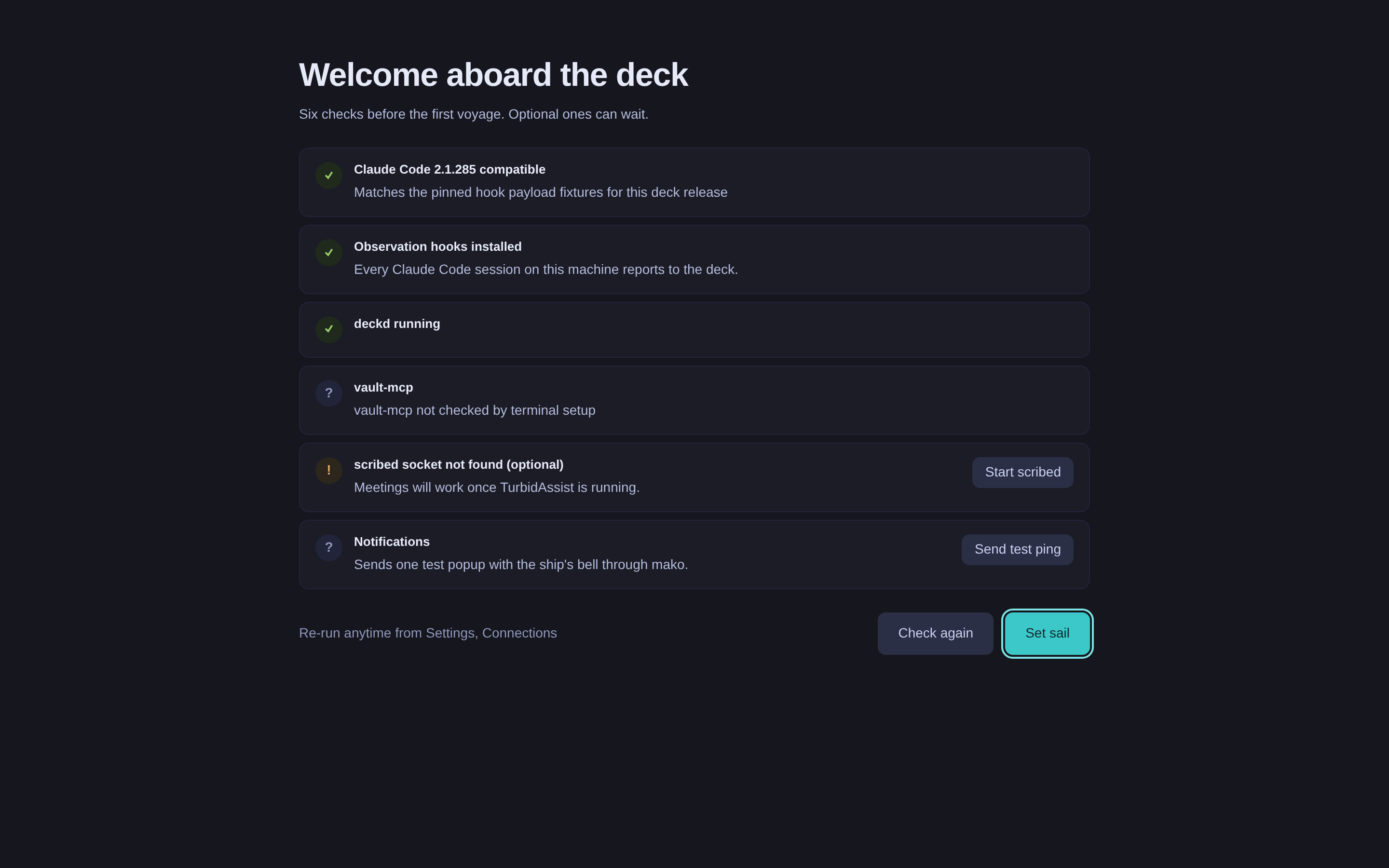
- First run checks your setup; Settings holds notification and connection preferences.
Plain claude sessions stay observed only: the deck watches them through the hooks and cannot type
into them.
What M2 adds
- Run
claudethrough the deck's PTY daemon,fleetmates-deckd, withfm claude [args]instead ofclaude [args]. The session behaves as before in your terminal, and the deck can show and drive it. - Focus (
/s/<id>) mirrors the live terminal. Keys typed in the browser reach the session; the header says whether the terminal or the browser typed last and flags a collision when both type at once. Stop, Nudge and Relaunch work from Focus; Home's quiet row has Stop and Nudge, and the palette has launch actions. - Launch from the deck: "Launch a ship" on Home or
Alt Nopens New session. Pick a repo found under the scan root (~/devby default), type a task, and the deck startsclaudein that repo and types the task once Claude Code shows its idle input box. A second plain session in a repo that is already busy gets a warning and the choice "Run as a fleetmates job". - Home has a compact density with live terminal tails. Fleetmates runs have a read-only Team run page with phases, gates, tasks, teammate tool steps and the plan. The Crew sheet customizes each repo's crew member, and Settings, Appearance sets text size, motion and density.
- Restarting the web server leaves every
fm claudeand launched session running; the browser reconnects and keeps typing into them.
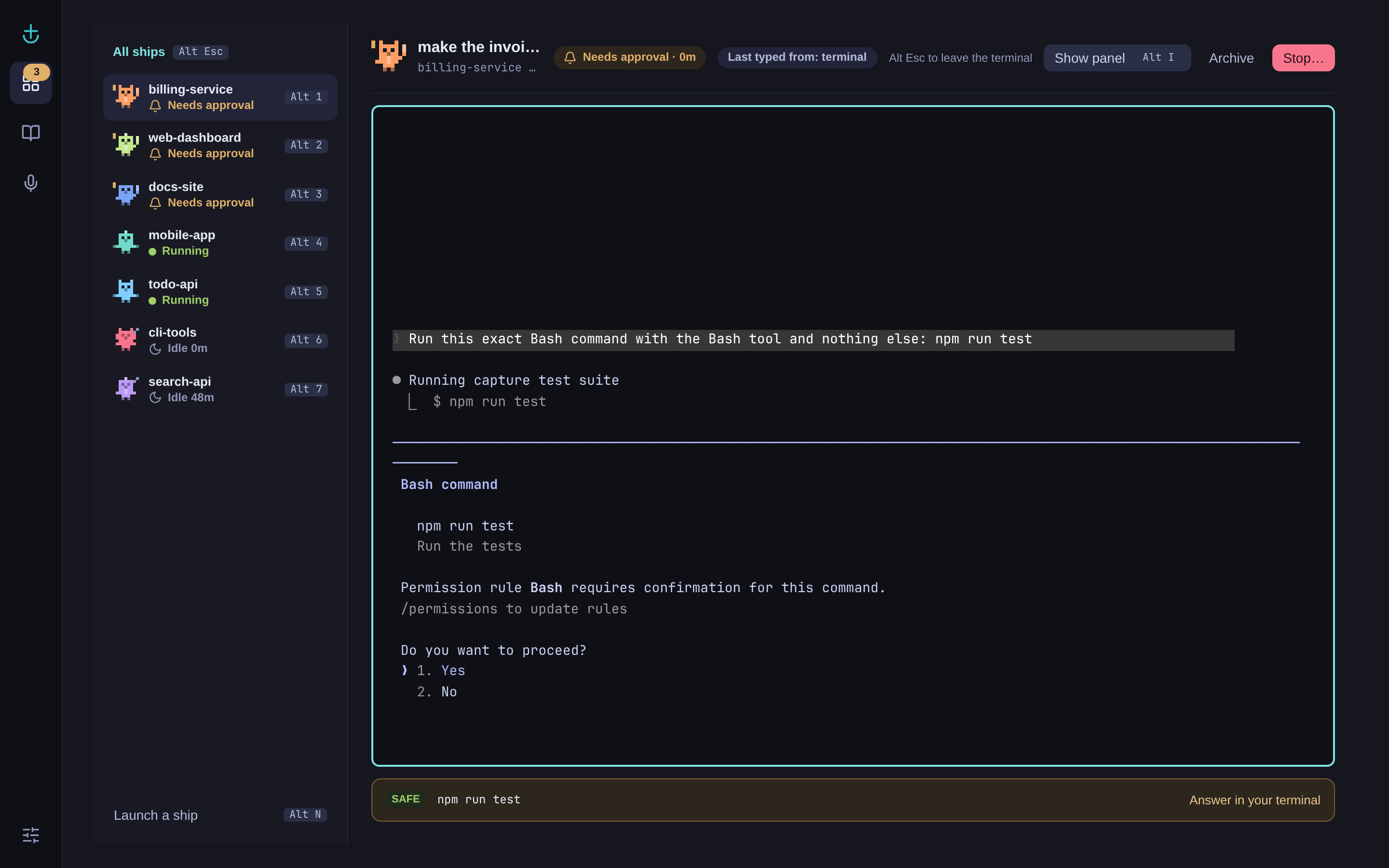
Focus mirrors the session's live terminal. The list on the left switches between sessions.
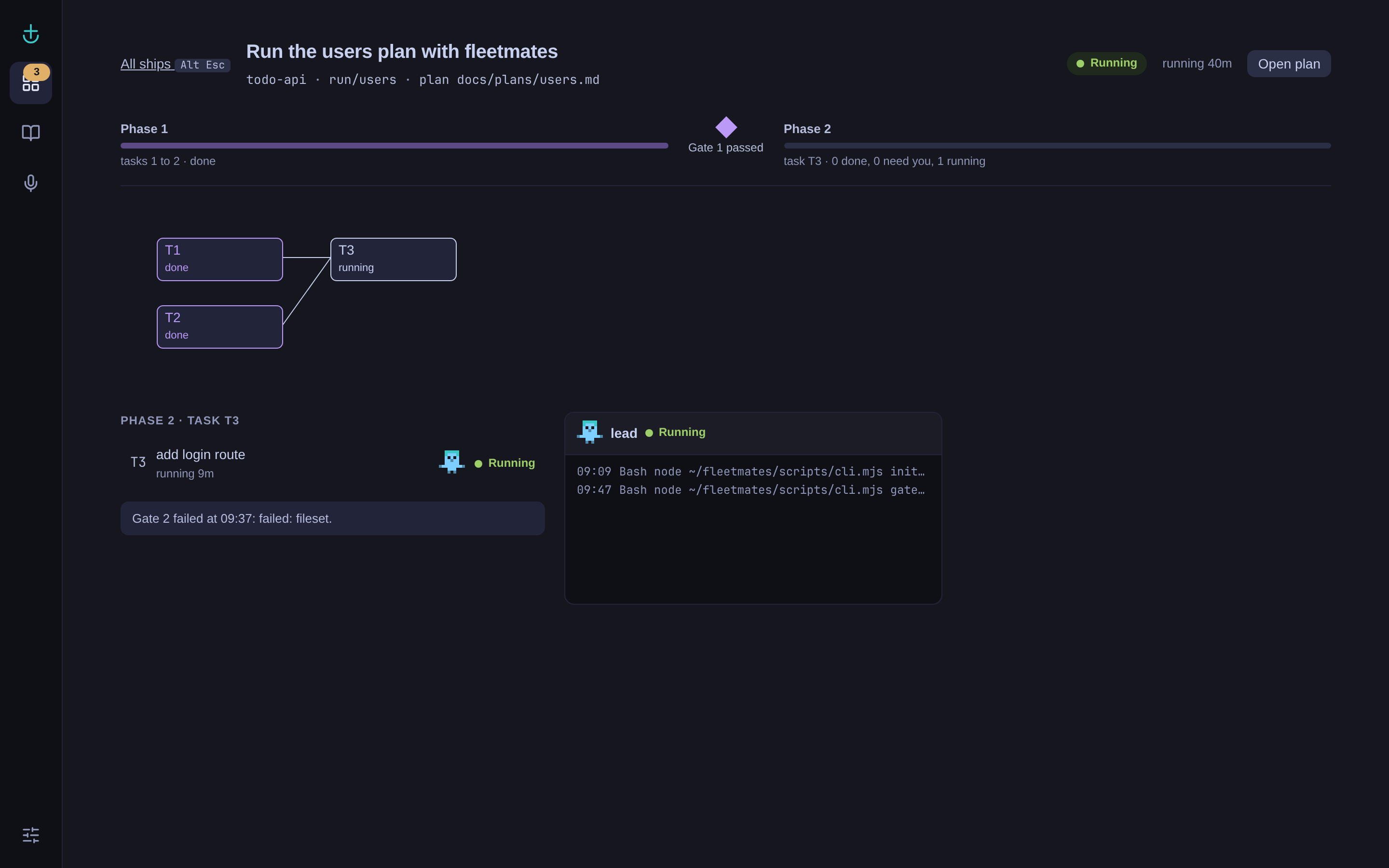
The Team run page reads the run's plan, status and branches from the repository.
The fm command
| Command | Does |
|---|---|
| fm claude [args] | Starts claude [args] inside deckd and attaches this terminal to it |
| fm attach <id\|repo> | Attaches this terminal to a session deckd already runs, by PTY id or by repo name (refused when the repo has several) |
| fm ls | Lists the sessions deckd runs: id, repo, pid, start time and attached clients |
| Ctrl ] then d | Detaches this terminal; the session keeps running in deckd. Ctrl ] twice sends one Ctrl ] |
If deckd is not running, fm claude says so and runs plain claude with the same arguments, so
you are never blocked; that session is observed only. fm attach and fm ls exit 2 when deckd is
not running.
Login environment
Sessions launched from the deck start with the environment of your login shell, not the bare
environment of the systemd service: deckd runs your shell once as a login shell when it starts and
keeps what it prints, without Claude Code's own per-session variables. fleetmates-deck doctor
names (never shows the values of) the variables that differ from the service environment. deckd
reads your profile only when it starts, so after you change your shell profile, restart deckd:
systemctl --user restart fleetmates-deckd. That ends every session running inside deckd, so do it
when none you care about runs (fm ls). Sessions started with fm claude take the environment of
the terminal you run it in.
M2 limits
- Fleetmates teammates have no terminal of their own; the Team run page shows their tool steps.
What M3 adds
Sessions that run in deckd (started with fm claude or from the deck) can be unblocked from the
browser.
- Answer permission prompts and questions from the Needs-you drawer (
Alt U), Home cards, the palette (Alt K) and the Focus PromptBar: Allow once, Deny, Reply, and the option buttons of a question. The buttons carry the same option numbers as the terminal. - The deck types the option key into the session only when the terminal still shows the prompt you answered and nobody typed in it during the last second. It then checks that the answer landed (the prompt left the screen, or Claude Code reported the tool call). If not, the row says "Your answer did not reach {repo}. The prompt is still open in its terminal." with Try again; the deck never retries on its own.
- Focus, Changes shows the diff of each changed file against the session's review baseline.
- Team run "Review N requests" opens the drawer on that run's requests only.
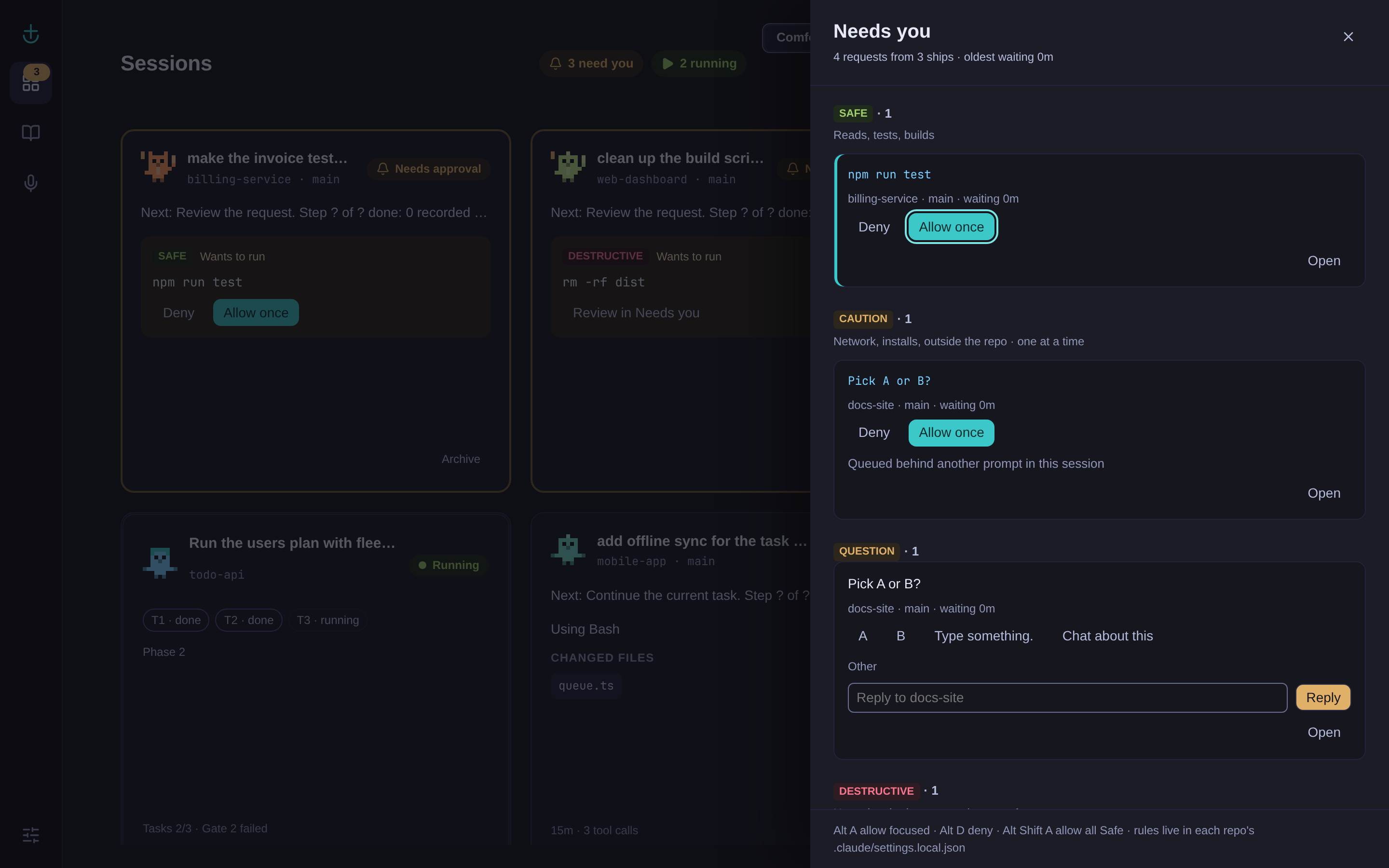
The Needs-you drawer (Alt U) groups open requests by tier.
Tiers
Every permission request gets a tier, and the server enforces what each tier allows:
| Tier | What it covers | What the deck lets you do |
|---|---|---|
| Safe | Reads, tests, builds, linters | Answer anywhere, batch ("Allow both Safe once", Alt Shift A), allow once from a popup, and get a rule suggestion |
| Caution | Network, installs, writes outside the repo, anything the deck does not know | Answer one at a time; popups offer "Open" only |
| Destructive | rm, git push --force, git reset --hard, deploys, database writes | Allow only after ticking a confirm checkbox, by click or Space; never in a batch, never from a popup, the palette or a shortcut, never a rule |
A Bash command is Safe only when it is a plain command: simple commands from a fixed list, joined by
|, &&, || or ;, with literal words and plain relative paths that stay inside the repo.
Anything else (variables, globs, cd, redirects to files, absolute or ~ paths, interpreters) is at
least Caution. The drawer shows why a request got its tier.
Tiers come from the shipped defaults in server/approvals/tiers.default.json plus your
~/.config/fleetmates/deck/tiers.json, which init creates as a stub that extends the defaults
(with tiers.schema.json beside it for your editor). You can add entries and disable default
entries by id; the floors (the deck's own token and controls, Claude Code settings and hooks, .git,
your shell start-up files and a few more) cannot be disabled. The file is watched: when it has an
error, Settings, Approval rules shows "tiers.json has an error on line {line}: {message} Using the
previous tiers." and the deck keeps the previous set, never a more permissive one.
Rules
After you allow the same Safe command 5 times in a repo (or 3, or never, in Settings), the deck
offers "Make it a rule?". Accepting writes an allow rule to <repo>/.claude/settings.local.json
under permissions.allow, so it also applies when you run plain claude in a terminal. The deck
keeps every other key and the order of the file, refuses to write through a symlink, and copies the
previous file to ~/.local/state/fleetmates/deck/backups/rules/ (the newest 20 per repo) first.
Rules you or Claude Code wrote by hand show as "added by hand". Settings, Approval rules lists the
rules of each repo, adds one by hand and revokes one.
The deck suggests rules only for exact npm run and pnpm run script names (Bash(npm run test))
and the read-only vault tools. Bash prefix rules such as Bash(cargo test:*) are refused, because a
prefix rule also allows every option a later version of the tool adds. A running Claude Code session
may keep an old rule until it restarts.
Audit
fleetmates-deck audit [--repo <name>] [--since <YYYY-MM-DD>] prints every answer, refusal,
answer that did not land, expired request, tiers load and rule change, oldest first, one per line,
with secrets in the summaries masked. Request rows are kept 30 days; tiers and rule rows are kept.
M3 limits
- Observed sessions (plain
claude) are still answered in your terminal: the deck shows them with "Answer in your terminal", and their popups offer "Open" only. - AskUserQuestion prompts with several questions or multi-select options, and MCP elicitation dialogs, are answered in the terminal.
- "Allow always" (Claude Code's option 2) is offered only when its label is exactly "Yes, and don't ask again for " and the pattern equals the deck's own rule suggestion. No real Bash prompt captured so far shows that label, so for Bash the option is not offered.
- Fleetmates teammates have no terminal of their own; the Team run page shows their tool steps.
What M4 adds
TurbidAssist meetings, from the deck, over TurbidAssist's scribed socket. TurbidAssist itself is
unchanged and stays optional: without it the rest of the deck works as before.
- Meetings (
Alt Shift 3): past meetings grouped by day with their post-processing state, the synthesized note (summary, decisions, action items), pinned moments, the full transcript and thepostmeet.logtail. Search finds a phrase in every meeting's transcript. - Record with a tag from TurbidAssist's
config.yaml. The live view shows the transcript as scribed writes it, your pins and the live ask. A recording bar on every screen has "Pin moment" (Alt P) and "Stop and summarize". A recording started elsewhere (thescribeCLI, the TUI, a key binding) shows in the deck within one 2 s poll. - Action items: "Launch as session" opens the new-session form with the item as the task; "Dismiss" hides it, with Undo. Home Calm shows "Last meeting" with its first open action item.
Where the deck finds config.yaml
Settings, Connections, "TurbidAssist config.yaml" holds the path. The default is
~/dev/turbidassist/config.yaml when that file exists; set the field when your checkout is
elsewhere. The deck reads session_dir, the vault path, vault.meetings_folder, the batch model and
the tags (synthesis.tag_policies) from it with its own small reader, and never writes to it. The
status line under the field says "Read {n} tags from {path}." or "config.yaml not found at {path}.".
Start scribed
When scribed is not running, Meetings shows a degraded card with "Start scribed" (also in Settings, Connections and First run). It runs
systemd-run --user --collect --unit=turbidassist-scribed --property=KillMode=process $SHELL -l -c 'exec scribed'so scribed runs in its own transient user unit, outside the deck's cgroup, with your login shell's
environment. Restarting the deck web server is meant to leave that unit and a recording running.
Inspect it with systemctl --user status turbidassist-scribed and
journalctl --user -u turbidassist-scribed. A custom "scribed command" in Settings is passed to the
shell as one argument, never parsed as shell text.
Quiet mode
While any client records, the deck plays no bell; desktop popups still show. Settings, Notifications "Quiet in meetings" turns this off.
Confidential meetings
A tag whose store_transcript is false in config.yaml is confidential, and so is a tag that is
not in config.yaml or any meeting while config.yaml cannot be read. The deck stores no transcript
text and no ask text for any meeting; for a confidential one it also stores no pin label and no note
path. Live lines and ask answers reach the browser as ephemeral messages that are never written to
the database or browser storage. Confidential meetings are included in search, read from the session
files on each search and never indexed or cached.
M4 limits
- The live ask uses the transcript only: it is scribed's
ask, which cannot read your vault, and shows no citations. - Pins are kept by the deck and shown only in the deck; they do not reach the meeting note.
- No speaker naming in the deck: a meeting that needs names shows
postmeet name {session}to copy. - Meeting notes are read from disk, read only, from
vault.meetings_folder; reading through vault-mcp comes in M5. - "Research first" and "Save answer to meeting note" are not shown.
Requirements
One of three platforms:
- Linux with systemd user services (the reference platform);
- macOS, where the deck runs as two launchd LaunchAgents;
- native Windows (not WSL), where the deck runs as two hidden background processes that an HKCU Run value starts at logon. On Windows every approval request asks, the deck writes no permission rules, and popups and the bell stay inside the deck tab.
Meetings are Linux only. What differs per platform is in docs/deck/16-platforms.md, and how to run the deck on macOS and Windows is in docs/deck/13-operations.md section 14.
Node.js 24.16.0 or newer (
engines>=24.16.0): Node 24.2 to 24.15node:sqlitetruncates a bound string at its first NUL. CI uses the version inhub/.node-version, on Linux, macOS and Windows.Claude Code. The hook and screen fixtures were captured from Claude Code 2.1.285;
fleetmates-deck doctortells you when yours differs.Chromium or Firefox.
For popups:
notify-send(libnotify) and a notification daemon such as mako.For Meetings (optional): TurbidAssist with its
scribeddaemon, andsystemd-runfor "Start scribed".Build tools for
node-ptyonly if no prebuilt binary matches your platform.
Install and first run
Until the package is published, install from a clone of the fleetmates repository:
git clone https://github.com/andreymudri/fleetmates.git
cd fleetmates/hub
npm ci
npm run build
node bin/fleetmates-deck.mjs init
node bin/fleetmates-deck.mjs open
npm link from hub/ puts fleetmates-deck and fm on your PATH. From the repository root,
node scripts/cli.mjs deck <cmd> and node scripts/cli.mjs ui forward to the same commands.
After the release, the install will be:
npm install -g @andreymudri/fleetmates-deck
fleetmates-deck init
fleetmates-deck open
init creates the private directories, copies the hook script, adds the deck's hooks to
~/.claude/settings.json (after writing a backup next to it), creates the token, writes and starts
the two systemd user units, then runs the setup checks. init --dry-run prints what it would do and
writes nothing. Running init again changes nothing that is already in place; --rotate-token
replaces the token.
open starts the web server if needed, checks that the process on the port is really the deck,
and opens http://127.0.0.1:47800/ in your browser with the token in the URL fragment.
| Command | Does |
|---|---|
| fleetmates-deck init [--dry-run] [--rotate-token] | Hooks, units, directories and token, then the checks |
| fleetmates-deck open | Starts the web server and opens the deck |
| fleetmates-deck doctor | The setup checks in the terminal; exits 1 when the hooks are missing |
| fleetmates-deck status | Units, sockets, hook state and Claude Code version as JSON |
| fleetmates-deck uninstall-hooks | Removes only the deck's hook entries, after a backup |
| fleetmates-deck remote-access --public-origin <url> \| --off | Opts the deck into one exact public origin for remote access (see below) |
| fleetmates-deck remote-pass | Sets the remote access passphrase, read from the terminal, stored hashed |
| fleetmates-deck audit [--repo <name>] [--since <YYYY-MM-DD>] | Prints the approvals and rule audit (M3) |
| fm claude [args], fm attach <id\|repo>, fm ls | Run, attach to and list sessions in the deck's PTY daemon (see above) |
Security model
- The web server listens on
127.0.0.1only and refuses to start on any other address. - Every API request and WebSocket connection needs a random token kept in a 0600 file under
~/.local/state/fleetmates/deck/.openhands it to the browser in the URL fragment, which is never sent over the network. - The server checks the
HostandOriginheaders, so another web page, a DNS rebinding trick or a proxy cannot talk to it. Only127.0.0.1:<port>is accepted;localhostis redirected to it. One exact public origin can be added for remote access, never a wildcard; see "Remote access from a phone". - Keys typed in the browser reach a session only over the authenticated WebSocket, for a session that tab has attached, at most 64 KiB per frame.
- The PTY daemon
fleetmates-deckdlistens on a Unix socket in a 0700 directory and is not reachable from the browser. - The hook never prints to Claude Code and never blocks it. Private files are 0600 and private directories 0700. The token and hook payloads are kept out of the default logs.
Remote access from a phone
The deck is loopback only by default and that does not change. Opting in lets you reach it from a phone on your Tailscale tailnet, as an installable PWA, with the same control you have on the laptop: terminals, approvals, everything.
Read this first. There is no read-only mode. Anyone who can reach the tunnel and knows the passphrase has full control of every session the deck drives, including typing into terminals and answering Destructive approvals. On your tailnet that means every device signed into it, and anyone you have shared the machine with. Turn it off when you do not need it.
Three steps, all on the machine that runs the deck.
Expose the port on your tailnet, HTTPS only, not on the public internet:
tailscale serve --bg 47800tailscale serve statusprints the origin it gave you, for examplehttps://machine.tail1234.ts.net. Usetailscale funnelonly if you really want the open internet to reach it; the deck cannot tell the difference, and the passphrase is then the only thing in the way.Tell the deck that origin, and set the passphrase:
 fleetmates-deck remote-access --public-origin https://machine.tail1234.ts.net
 fleetmates-deck remote-pass
 systemctl --user restart fleetmates-deck
The origin must be one exact
https://origin: no wildcard, no path, nohttp://. The deck refuses to start otherwise. It keeps accepting127.0.0.1:<port>as before, and accepts the public origin only as a wholeHostandOriginpair, so a request that mixes the two is refused.remote-access --offreturns the deck to loopback only.remote-passasks for the passphrase on the terminal, twice, and never takes it as an argument (arguments show up inpsand in your shell history). It is stored as a scrypt hash in~/.local/state/fleetmates/deck/remote-pass.json, mode 0600. At least 10 characters, and the obvious ones are refused. It also reads a piped stdin, for a password manager;echointo it and the passphrase lands in your shell history, so prefer a file or the prompt.On the phone, open the origin. The deck shows Unlock: type the passphrase, then "Add to home screen". The deck trades the passphrase for its token, the installed app keeps that token, and from then on it opens straight into the deck.
Below 768px the deck lays itself out as a phone: one column, the Rail as a labelled bottom bar, the
Focus session list dropped, 44px touch targets and the toasts clear of the home indicator. Home keeps
the full card for the sessions that need an answer and compacts the rest, so roughly five sessions fit
a screen; Needs you is a full screen pane the back button closes. That layout lives in one sheet,
web/src/styles/mobile.css.
The terminal is the one exception to full control. The phone mirrors it and types into it, with a key
bar above the keyboard for Esc, Tab, a sticky Ctrl (tap it, then the next key is the combination),
arrows and / | ~. What it never does is send its size to the server: the PTY is the one running on your machine, so a resize from a
390px phone would reflow the terminal you are working in. Claude Code output stays laid out for the
width the machine set.
What Unlock hands the phone is the deck's own token, not a per-device one. "Sign out this device"
in Settings, Connections forgets that copy on the phone; revoking a phone you no longer hold means
rotating the deck token (fleetmates-deck init --rotate-token), which signs out every client,
including your browser.
The exchange is throttled rather than locked: attempts run one at a time, a wrong one costs a delay
that doubles up to 4 seconds, anything arriving while three are already queued is refused without
being checked, and after 10 wrong answers in 5 minutes every further wrong answer is refused with a
Retry-After. Those 10 wrong answers never cause the right passphrase to be refused. The queue limit
is different: a device on your tailnet that keeps three wrong attempts in flight blocks every new
attempt, yours included, for as long as it keeps doing it. That only delays pairing a new device;
one already paired keeps its token. All of that is defence in depth: the tailnet is the real perimeter.
The installed app caches only the static shell (HTML, JS, CSS, icons, fonts). Nothing under /api
or /.well-known is ever cached, and the WebSocket does not go through the service worker, so no
session content and no token reach the cache.
What is stored, and for how long
| What | Where |
|---|---|
| Sessions, requests, events and summaries | ~/.local/state/fleetmates/deck/deck.db (SQLite) |
| Token | ~/.local/state/fleetmates/deck/token |
| Hook events while the server is down | ~/.local/state/fleetmates/deck/spool/, replayed and removed at the next start |
| Configuration, including tiers.json | ~/.config/fleetmates/deck/ |
| Backups of settings.local.json before each rule write | ~/.local/state/fleetmates/deck/backups/rules/ |
| Hook script copy | ~/.local/share/fleetmates-deck/hook/deck-hook.mjs |
| Units | ~/.config/systemd/user/fleetmates-deck.service, fleetmates-deckd.service |
The policy is a summary row per session kept forever, and the event stream and stored scrollback dropped after 30 days. The server runs this cleanup when it starts and then daily at 04:10 local time. Claude Code transcripts are linked by path, never copied.
Meeting content: the database keeps, per meeting, its id, tag, confidential flag, state, times, the source apps seen while recording, the session directory, the note path (not for a confidential meeting), pins (with no label for a confidential meeting) and dismissed action items by a hash of their text. Transcripts, notes and asks are read from TurbidAssist's files each time and never copied.
Uninstall
fleetmates-deck uninstall-hooks
systemctl --user disable --now fleetmates-deck.service fleetmates-deckd.service
rm ~/.config/systemd/user/fleetmates-deck.service ~/.config/systemd/user/fleetmates-deckd.service
systemctl --user daemon-reload
Stopping fleetmates-deckd ends every session that runs inside it (fm claude); plain claude
sessions are not affected. Then remove ~/.local/state/fleetmates/deck/, ~/.config/fleetmates/deck/
and ~/.local/share/fleetmates-deck/ if you want the data gone. The settings.json.deck-backup-*
files next to your Claude Code settings are left for you. A single uninstall command is planned.
Troubleshooting
Start with fleetmates-deck doctor and fleetmates-deck status.
- Sessions never appear. The hooks are missing or point at a deleted script: run
fleetmates-deck init, or use "Install hooks" in First run. - "This tab's key no longer matches the deck." The token changed. Run
fleetmates-deck openagain. - The web server does not start, port 47800 in use. Set
DECK_PORTin a drop-in (systemctl --user edit fleetmates-deck), restart the unit, then runfleetmates-deck open. - No popups. Run
notify-send testin a terminal and check that your notification daemon runs. - Logs:
journalctl --user -u fleetmates-deck -u fleetmates-deckd --since "10 min ago".
The full table is in docs/deck/13-operations.md section 12.
Roadmap
| Milestone | Adds |
|---|---|
| M1 Observe | Watch sessions, popups, First run, Settings |
| M2 Control | Live terminals in the browser, launch sessions, fm ls and fm attach, Team run page, Crew sheet |
| M3 Unblock | Answer approvals and questions from the deck, permission rules |
| M4 Meetings (this release) | TurbidAssist meetings: record, live transcript and ask, notes, search |
| M5 Memory ask | Ask the knowledge vault |
| M6 Deep research | Research runs |
Design documents: docs/deck/.
Development
npm ci
mkdir -p /tmp/hx && TMPDIR=/tmp/hx npm test
Use a short TMPDIR: Unix socket paths are limited to about 108 bytes. The end-to-end, security
and accessibility suites and the performance scripts are under test/e2e/ and test/perf/; each
file names its own command.
License
MIT.
Memory (prepared 0.5.0)
Memory includes a domain graph, a two-hop note preview, Browse by MOC, daily Captures,
and unresolved Misses. Ask creates a saved thread with validated note and line citations.
History restores threads; Stop cancels an answer. The palette accepts ?question, Focus
shows related, read and learned notes, and Calm Home shows captures and unanswered questions.
Set VAULT_PATH or the vaultPath connection preference. The environment wins. The server
starts vaultCommand on stdio with VAULT_PATH and VAULT_LANG; its default is
["npx", "-y", "@andreymudri/vault-mcp"]. The graph needs vault-mcp 0.4.0. Older servers
can still support Browse and Ask. A disconnected vault disables Ask while sessions and
meetings remain available. Retry uses /api/deps/vault-mcp/retry.
Ask runs claude -p --restricted --strict-mcp-config --permission-prompts none, with an empty
built-in tool list and only vault_search, vault_get_note, vault_list and vault_backlinks
allowed. Vault writes and web tools are denied. Each child has a private working directory
and a sanitized environment. One answer per thread, two concurrent children, a FIFO queue,
a 120-second total deadline and a 45-second idle deadline apply. The real Claude restricted
mode check remains an owner task; automated checks use the fake CLI.
Questions and answers stay in SQLite thread tables and ephemeral WebSocket messages. They do not enter event history, logs or browser storage. Deleting a thread uses SQLite secure deletion. A meeting becoming confidential also scrubs migration backups.
Export reviewed retrieval failures with:
fleetmates-deck export-misses --kind retrieval --out queries.jsonl
fleetmates-deck export-misses --kind all
Each line has query, expectedTopPath and askedAt. Retrieval exports note-resolved
misses; all also includes open misses. Dismissed and researched misses are excluded.
The command opens SQLite read only; output files have mode 0600.
M5 adds no vault writes, capture revert, embeddings or hybrid retrieval. Research now launches scouts, validates drafts, supports source review, and saves only an owner-approved, current vault preview. Saving requires the published vault-mcp 0.5.0 approval contract. The Deck pins this release for its contract tests. Live research runs for all three presets and the remaining milestone exit checks are still prerequisites for public use.
Structured fleet activity
Fleetmates task ledgers feed a read-only session timeline in SQLite. Focus shows the current plan phase and labels unverified derivation explicitly. Events contain fixed kinds, result enums and command fingerprints, without command output or handoff prose. Imports deduplicate events; each read is capped at 1,000 events per run and 200 per task, with a partial-history notice. Stored timeline detail expires after 30 days. An event is an observation; the gate still decides completion.
Team run renders the versioned architecture/phase JSON format as native SVG. Invalid graphs show an unavailable state. Session cards and approval prompts put the next action before progress, show recorded completed steps, and mark unknown step counts.
Before approving a recognized skill, plugin or MCP install command, the Deck runs its own local instruction lint. Clean skill instructions map to Safe, hidden/confusable text and unverified source to Caution, and refusal overrides or model shell-outs to Destructive. Existing command tiers only rise. Plugins and MCP servers remain at least Caution because instruction heuristics do not audit all executable code. The scan never executes an extension or enables an external scanner. Remote packages with no local source are unverified. A fresh scan runs before keys are sent to the terminal, including retries. Ordinary calls to already-installed MCP tools retain their existing classifier.
Research accepts up to 20 optional starting source URLs. Preflight is written before scout
launch, checks public HTTP(S) reachability with bounded HEAD requests, and probes each site's
/llms.txt first. Redirects are checked again; private addresses and URLs containing a username or password
are rejected. Without starting URLs, the lead must discover and preflight candidates before
dispatching scouts. Publication dates and engagement are optional, validated metadata. Scouts
rank them before drafting while preserving unknown values and preferring primary evidence over
popularity. The score does not establish that a source is correct.