
@anilkumarthakur/tiptap-extension-resize-youtube
v0.0.7
Published
Resizable YouTube embed extension for TipTap with drag controls and alignment options
Downloads
544

Maintainers
 anilkumarthakur
Readme
YoutubeResize - Resizable YouTube Embed for TipTap
Overview
YoutubeResize is an extension for TipTap that adds resizable YouTube iframes with drag controls and alignment options. It allows users to dynamically adjust the video size and position directly within the editor.
This extension enhances the default TipTap YouTube extension by introducing an interactive UI for resizing and aligning YouTube embeds.
Live Demo
👉 Try it here: https://tiptap-extension-resize-youtube.vercel.app/
Demo Preview
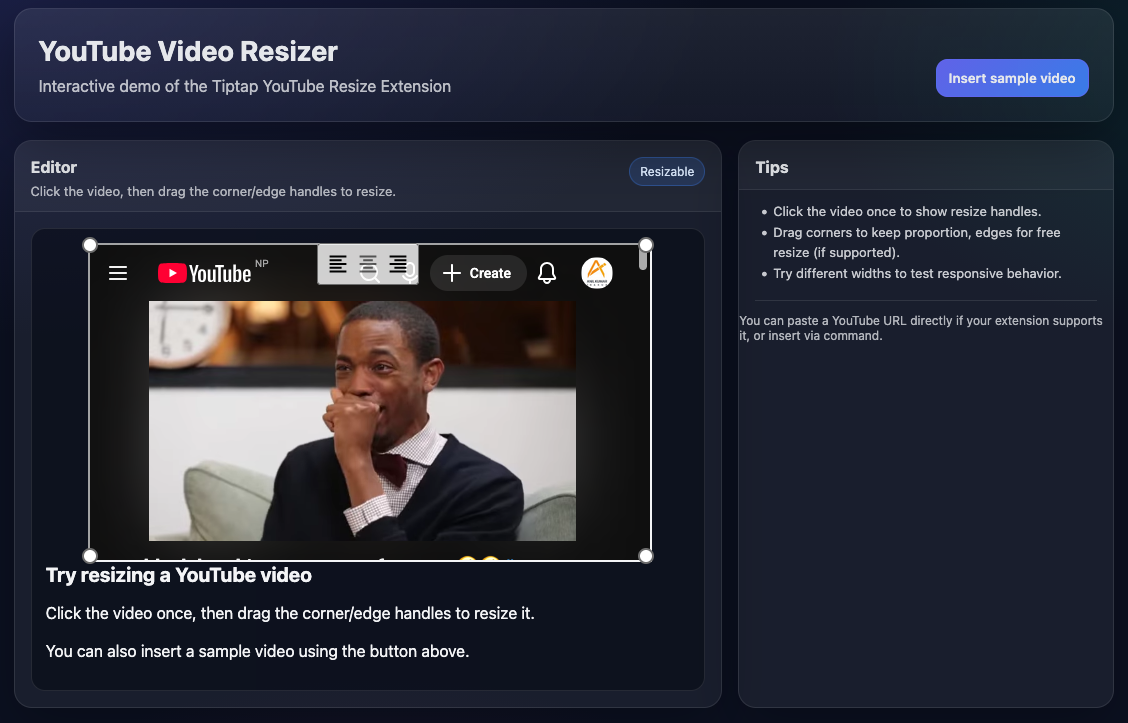
Hover over videos to show controls, drag to resize, and use alignment buttons
Features
✅ Resizable YouTube Iframes – Drag corners to resize
✅ Alignment Controls – Align videos left, center, or right
✅ Hover to Show Controls – Controls appear on hover for a clean UI
✅ Click Support – Click to also show/hide controls
✅ Auto-Hide UI – Controls hide when mouse leaves or outside click
✅ Seamless TipTap Integration – Works with existing YouTube embeds
✅ Framework Agnostic – Compatible with Vue, React, Angular, and more
Installation
Step 1: Install the Extension
npm
npm install @anilkumarthakur/tiptap-extension-resize-youtubeyarn
yarn add @anilkumarthakur/tiptap-extension-resize-youtubepnpm
pnpm add @anilkumarthakur/tiptap-extension-resize-youtubebun
bun add @anilkumarthakur/tiptap-extension-resize-youtubeUsage
Step 2: Import and Use in TipTap Editor
import { YoutubeResize } from '@anilkumarthakur/tiptap-extension-resize-youtube'

new Editor({
  extensions: [
    ...OtherExtensions,
    YoutubeResize.configure({
      controls: true,
      nocookie: true,
      width: 640,
      height: 480,
      allowFullscreen: true,
      autoplay: false
    })
  ],
  ...OtherOptions
})
How It Works
- Hover over an embedded YouTube video to show resize handles and alignment controls
- Drag the corner dots to resize the iframe dynamically
- Click alignment buttons to move the video left, center, or right
- Move mouse away or click outside to hide controls
- Click on the video also toggles controls
Why Use YoutubeResize?
Unlike the default TipTap YouTube extension, YoutubeResize provides a visual and intuitive way to resize and align YouTube videos without manually editing HTML attributes.
Perfect for content editors, CMS tools, and rich-text platforms.
Compatibility
- Works with Vue, React, Angular, and any framework using TipTap
- Requires
@tiptap/extension-youtubeas a dependency
License
MIT License — free to use in commercial and open-source projects.
Contributing
Contributions are welcome! Feel free to open issues or submit pull requests.
🚀 Happy Coding! 🚀