
@apostrophecms/font-size
v1.0.0
Published
Adds a free-form font size tool to the ApostropheCMS rich text editor.


Readme
@apostrophecms/font-size
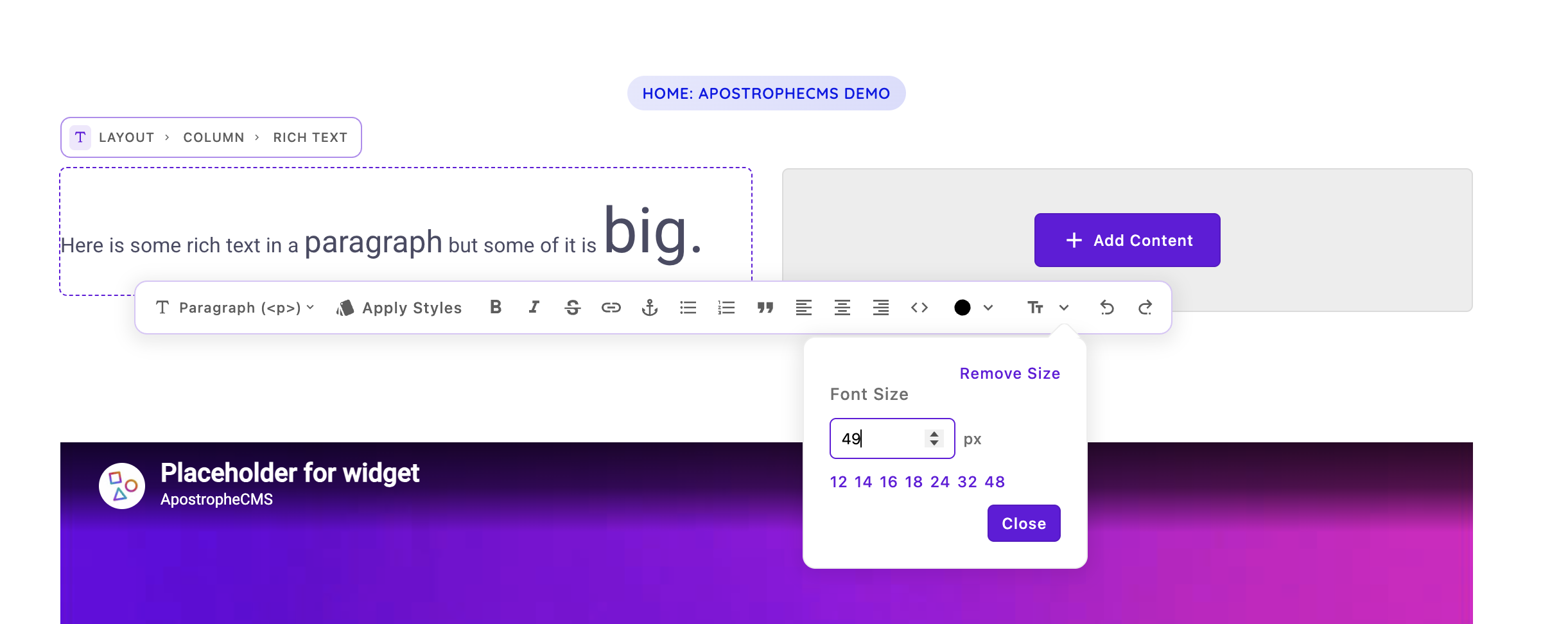
Adds a free-form font size tool to the ApostropheCMS rich text editor
toolbar. Editors select text and set its size in pixels, either by typing a
value or picking a preset. The size is stored as inline font-size styling on
a <span>, the same way the core color tool stores its value.
This feature is intentionally shipped as a separate, installable module rather than in Apostrophe core, so it is only present in the projects that want it.
When to use this module
If SEO is your primary concern, offer various heading levels instead, optionally with multiple CSS classes for each level and even the paragraph element itself. This yields the best SEO outcome because Google is looking for semantic markup, not explicit font sizes.
However, if you and your customers need the flexibility to match exact font sizes or change the font size in mid-line, this module is right for you.
Installation
npm install @apostrophecms/font-sizeThen enable it in app.js:
require('apostrophe')({
  shortName: 'my-project',
  modules: {
    '@apostrophecms/font-size': {}
  }
});
The module improves @apostrophecms/rich-text-widget, so there is nothing
else to wire up.
If you are not explicitly configuring the toolbars of your rich text widgets... that's it! The feature is available by default. If you are configuring each rich text widget toolbar explicitly, read on.
Options
This module improves @apostrophecms/rich-text-widget. An Apostrophe
improvement has no separate existence — it merges into the module it improves —
so it cannot be configured under its own name. Set these options on
@apostrophecms/rich-text-widget, not on @apostrophecms/font-size:
modules: {
  '@apostrophecms/font-size': {},
  // Configure the rich-text-widget module, NOT
  // the font-size module
  '@apostrophecms/rich-text-widget': {
    options: {
      fontSizes: [ 14, 16, 20, 28, 40 ],
      addFontSizeToDefaultToolbar: false
    }
  }
}
| Option | Default | Description |
| --- | --- | --- |
| fontSizes | [ 12, 14, 16, 18, 24, 32, 48 ] | Preset pixel sizes offered as quick choices. The numeric input remains free-form. Set to [] for free-form only. |
| addFontSizeToDefaultToolbar | true | Whether to add size to the rich text default toolbar. Set to false to make the tool available but opt in per area via the toolbar option. |
To offer the tool only in specific widgets, set addFontSizeToDefaultToolbar: false
and add 'size' to each widget's toolbar array.
How it works
- A tiptap extension (
ui/apos/tiptap-extensions/FontSize.js) adds afontSizeattribute to the sharedtextStylemark and providessetFontSize/unsetFontSizecommands. - A Vue toolbar component (
ui/apos/components/AposTiptapFontSize.vue) provides the popover with the numeric input and presets. - The module extends the widget's
sanitize-htmlallowlists so that<span style="font-size: ...px">survives sanitization — only pixel values are permitted, and only where thesizetool is enabled.