
@app4you/cookie-banner
v2.0.4
Published
Framework-independent cookie consent banner with Google Consent Mode v2 support.


Readme
Cookie Banner
Cookie consent that fits your website.
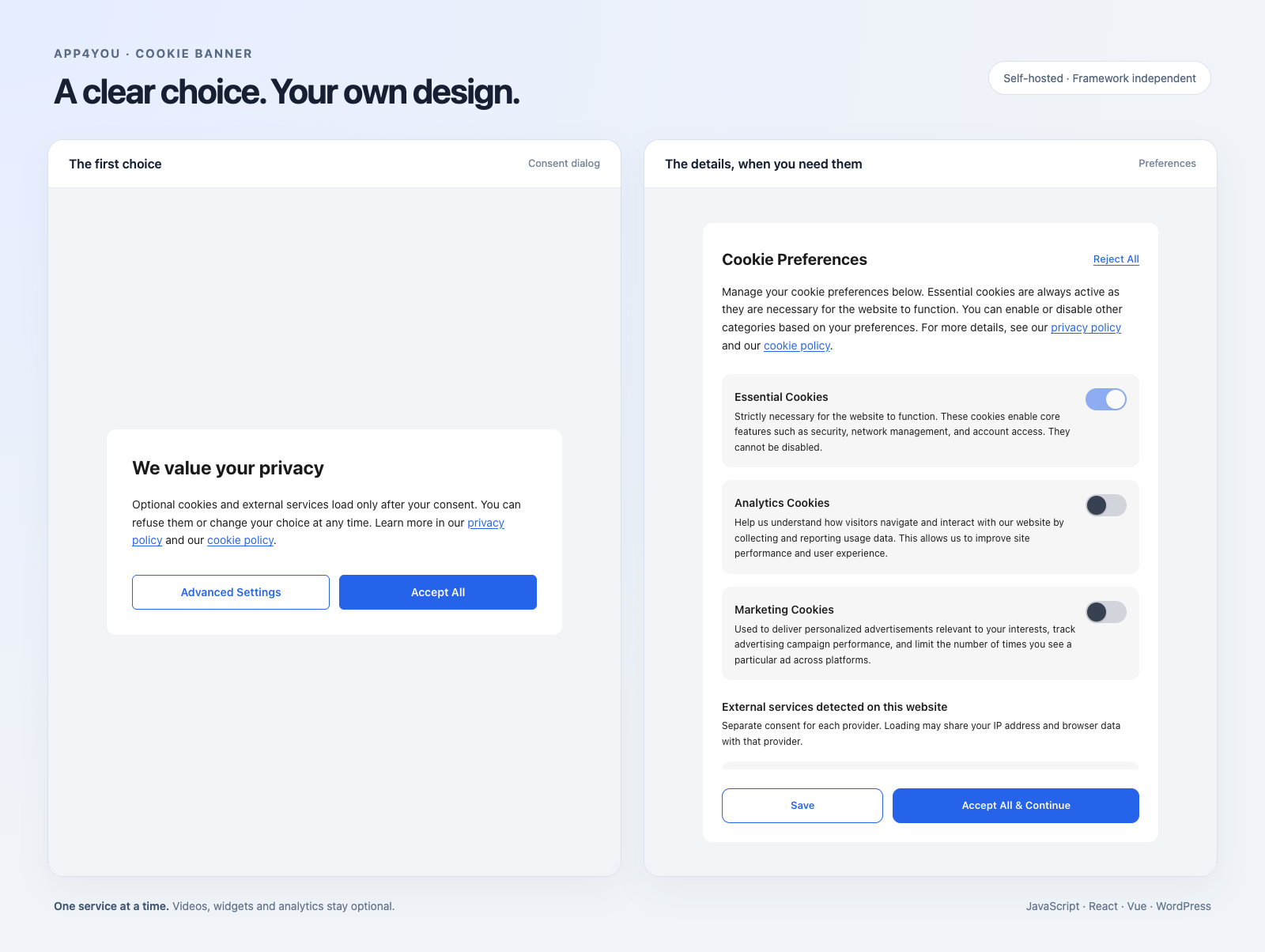
A self-hosted banner with per-service choices, blocked-content placeholders, Google Consent Mode v2 and a WordPress plugin. Use it with your existing framework.



Live demo · Quick start · Advanced · WordPress · Documentation
What you get
| | | |---|---| | Choices per service | Let visitors enable an individual video, widget or provider. | | Content that waits | Keep optional embeds and scripts inactive until consent. Show a local placeholder instead of contacting a provider for a thumbnail. | | Two layouts | A consent dialog or a bottom bar, with a preferences panel and a way to withdraw consent. | | Your framework | A bundled Preact interface behind a framework-independent API. Your app does not need React or Preact. | | Google Consent Mode v2 | Send category choices to Google Tag Manager in GTM mode. | | 10 languages | English, Polish, German, French, Spanish, Italian, Dutch, Danish, Norwegian and Swedish. |
Quick start
npm install @app4you/cookie-bannerInitialize once in the browser:
import { initializeConsent } from '@app4you/cookie-banner';

const dispose = await initializeConsent({
  mode: 'standalone',
  lang: 'en',
  controller: { name: 'Your Company' },
  noticeVersion: '1',
  purposes: 'Play optional videos on this website.',
  privacyPolicyUrl: '/privacy',
});
Use your actual company, purpose and privacy policy. Call dispose() when the integration unmounts. The import is safe during server rendering; initialize after hydration.
The banner is ready. To enable optional providers, add their disclosures and inactive embeds as shown below.
Advanced
Configure providers
import { initializeConsent } from '@app4you/cookie-banner';

const dispose = await initializeConsent({
  mode: 'standalone',
  lang: 'en',
  variant: 'modal', // or 'bar'
  noticeVersion: 'privacy-1',
  controller: { name: 'Your Company' },
  purposes: 'Play optional videos embedded on this website.',
  privacyPolicyUrl: '/privacy',
  services: [{
    id: 'youtube',
    name: 'YouTube',
    description: 'Play videos embedded on this website.',
    privacyUrl: 'https://policies.google.com/privacy',
    retention: 'Describe the retention used by your integration.',
  }],
});

// Call dispose() when the application integration is unmounted.
Replace the sample controller, purpose, retention and policy with your site's actual information. Incomplete provider information keeps that provider disabled.
In React or Next.js, initialize in a client effect. In Vue, use onMounted(). In both cases, release the returned cleanup function when the owner is unmounted. See the integration guide for an async-safe React example.
Keep optional content inactive
Use data-cb-src in place of a live src. The banner creates a placeholder and activates the embed after the visitor chooses that service.
<iframe
  data-cb-service="youtube"
  data-cb-src="https://www.youtube-nocookie.com/embed/VIDEO_ID"
  title="Product video"
  hidden
></iframe>
For React or Preact, the same attributes are available as props:
import { blockedContentProps } from '@app4you/cookie-banner';

<iframe
  {...blockedContentProps('youtube', 'https://www.youtube-nocookie.com/embed/VIDEO_ID')}
  title="Product video"
/>;
For an SDK that starts when mounted, subscribe before loading the SDK:
import { onServiceConsent } from '@app4you/cookie-banner';

const unsubscribe = onServiceConsent('support-chat', (granted) => {
  if (granted) mountChat();
  else unmountChat();
});
Register support-chat in services with its purpose, policy and retention. Call unsubscribe() when the integration is unmounted.
Make it yours
Set these fields in the configuration passed to initializeConsent():
variant: 'bar',
buttonStyle: 'standard', // 'equal' gives both decision buttons the same appearance
lang: 'en',
theme: {
  primary: '#2563eb',
  background: '#ffffff',
  text: '#1a1a1a',
},
standard shows acceptance and advanced settings first, with refusal in preferences. equal shows refusal alongside acceptance on the first layer.
Use customTexts for copy changes and localizations for route-specific languages, purposes and provider disclosures. Language configuration →
Development scanner
Inspect the current page while testing your app, without mounting a banner:
if (import.meta.env.DEV) {
  const { startCookieScan } = await import('@app4you/cookie-banner/dev');
  const stop = startCookieScan(report => console.log(report));
  // Call stop() when the integration unmounts.
}
Reports accessible cookie names, storage keys and resource origins. No stored values, no URL parameters, no uploads. The scanner is a separate entry; import it only in development. Use scanCookies() for a one-off snapshot.
Current page only: HttpOnly cookies, third-party iframe storage and server-side tracking are outside its view. Polling can miss short-lived changes; resource origins describe requests already observed in this document, not a complete network audit. Scanner details.
WordPress
Download the latest plugin ZIP, upload it under Plugins → Add New → Upload Plugin, and activate it.
The plugin adds:
- An administration panel for appearance, copy and provider information.
- Cookie/storage scanning and service detection while an administrator browses the site.
- PHP content blocking, consent-dependent CSP and cache integrations.
- Local consent-receipt storage, WPML/Polylang integration and GitHub-release updates.
The npm package contains the browser consent engine. It does not include the WordPress administration panel, database or a site-wide cookie crawler. getDetectedServices() reports configured and observed services on the current page.
How blocking works
Start with inactive HTML. A banner cannot undo requests that an existing script or live iframe has already made. Use the inert attributes above and integrate SDK loading with service consent.
For server-enforced network restrictions, enable strictCsp and send the headers returned by consentCspHeaders() from your application server. The WordPress plugin enables strict CSP by default. autoBlock adds a compatibility guard for common dynamic loaders.
Service choices and analytics/marketing category choices are separate. Withdrawing consent reloads the page, because removing a script element cannot undo an SDK's timers and listeners.
Full integration and blocking guide →
API
Import from @app4you/cookie-banner:
| Function | Purpose |
|---|---|
| initializeConsent(config) | Mount the banner; returns a cleanup function asynchronously. |
| blockedContentProps(id, src) | Generate inactive attributes for an embed. |
| blockedScriptProps(id, src) | Generate inactive attributes for a script. |
| hasServiceConsent(id) | Read the current choice for a service. |
| onServiceConsent(id, callback) | Subscribe to a service choice; returns an unsubscribe function. |
| setServiceConsent(id, granted) | Update a service choice. |
| getDetectedServices() | Read configured and observed services. |
| getConsentReceipt() | Read the current local consent receipt. |
| consentCspHeaders(options, cookieHeader) | Build consent-dependent HTTP CSP and cache headers. |
The package root is the framework-independent, SSR-safe API. /native remains a compatibility alias. /auto is the browser-only, auto-starting bundle. Migration: if you previously imported the package root just to start the banner, change that side-effect import to @app4you/cookie-banner/auto.
Documentation
| Guide | Covers | |---|---| | Integration | npm, Next.js, SDKs, WordPress, blocking and CSP. | | Consent configuration | Required information, receipts and withdrawal. | | Languages | Translations, regional overrides, WPML and Polylang. | | Deployment | SSH/SVN deployment and receipt-storage limits. |
bun install
bun run dev          # Open the development demo
bun run test         # Unit and regression tests
bun run build        # npm bundle, types, WordPress admin and plugin ZIP
bun run build:demo   # Static live demo for GitHub Pages
bun run test:demo    # Production demo, scanner and consent-gated video
Builds start with type checking. Missing translation keys, incorrect translation types or invalid editor keys stop the build.
bun run test:package        # Check the packed npm package and its SSR/types entry
bun run test:privacy        # Browser consent and network-blocking scenarios
bun run test:accessibility # Browser accessibility checkstest:package, test:privacy and test:accessibility use the generated build. Test evidence is written to the system temporary directory.
bun run deploy --dry-run    # Review the deployment plan
bun run deploy             # Build → tests → GitHub Release + ZIP → npm
Deployment requires authenticated gh and npm, plus ghdeploy. Set the same version in package.json, the plugin header, COOKIE4_VERSION and the plugin readme's Stable tag. Use a new version if the previous one is already published or staged in npm. npm may require 2FA or staged approval.
The article in example/ uses a real YouTube embed, blocked until the visitor allows YouTube. It opens with the standard dialog: acceptance and advanced settings, with refusal inside preferences. A fixed menu switches the presentation. The development scanner remains available through /dev and is not shown on the demo page. Tests mock the video provider and verify that refusal sends no provider requests.
The Live demo GitHub Actions workflow builds the demo on pushes to main and deploys example/dist to GitHub Pages. Select GitHub Actions as the Pages publishing source in the repository settings.
Sources: src/core for consent logic, src/ui for atomic controls, src/components for composed views, src/hooks for hooks, and plugin/src for the WordPress admin. Tests live in tests and plugin/tests.