
@appkit/llamacpp-cli
v2.2.0
Published
CLI tool to manage local llama.cpp servers on macOS

Maintainers
 davideweaver
Readme
llamacpp-cli
Note: llamacpp-cli only works on macOS and requires llama.cpp to be installed.
Manage llama.cpp servers like Ollama—but faster. Full control over llama-server with macOS launchctl integration.
CLI tool to manage local llama.cpp servers on macOS. Provides an Ollama-like experience for managing GGUF models and llama-server instances, with significantly faster response times than Ollama.


Status: Beta - Stable for personal use, actively maintained
Features
- 🚀 Easy server management - Start, stop, and monitor llama.cpp servers
- 🏷️ Server aliases - Friendly, stable identifiers that persist across model changes
- 🔀 Unified router - Single OpenAI-compatible endpoint for all models with automatic routing and request logging
- 🌐 Admin Interface - REST API + modern web UI for remote management and automation
- 🤖 Model downloads - Pull GGUF models from Hugging Face
- 📦 Models Management TUI - Browse, search, and delete models without leaving the TUI. Search HuggingFace, download with progress tracking, manage local models
- ⚙️ Smart defaults - Auto-configure threads, context size, and GPU layers based on model size
- 🔌 Auto port assignment - Automatically find available ports (9000-9999)
- 📊 Real-time monitoring TUI - Multi-server dashboard with drill-down details, live GPU/CPU/memory metrics, token generation speeds, and animated loading states
- 🪵 Unified logging - Activity logs (HTTP requests) and System logs (diagnostics) for all services
- ⚡️ Optimized metrics - Batch collection and caching prevent CPU spikes (10x fewer processes)
Why llamacpp-cli?
TL;DR: Much faster response times than Ollama by using llama.cpp's native server directly.
Ollama is great, but it adds a wrapper layer that introduces latency. llamacpp-cli gives you:
- ⚡️ Faster inference - Direct llama-server means lower overhead and quicker responses
- 🎛️ Full control - Access all llama-server flags and configuration options
- 🔧 Transparency - Standard launchctl services, visible in Activity Monitor
- 📦 Any GGUF model - Not limited to Ollama's model library
- 🪶 Lightweight - No daemon overhead, just native macOS services
Comparison
| Feature | llamacpp-cli | Ollama | |---------|-------------|--------| | Response Time | ⚡️ Faster (native) | Slower (wrapper layer) | | Model Format | Any GGUF from HF | Ollama's library | | Server Binary | llama.cpp native | Custom wrapper | | Configuration | Full llama-server flags | Limited options | | Service Management | macOS launchctl | Custom daemon | | Resource Usage | Lower overhead | Higher overhead | | Transparency | Standard Unix tools | Black box |
If you need raw speed and full control, llamacpp-cli is the better choice.
Management Options
llamacpp-cli offers three ways to manage your servers:
| Interface | Best For | Access | Key Features | |-----------|----------|--------|--------------| | CLI | Local development, automation scripts | Terminal | Full control, shell scripting, fastest for local tasks | | Router | Single endpoint for all models | Any OpenAI client | Model-based routing, streaming, zero config | | Admin | Remote management, team access | REST API + Web browser | Full CRUD, web UI, API automation, remote control |
When to use each:
- CLI - Local development, scripting, full terminal control
- Router - Using with LLM frameworks (LangChain, LlamaIndex), multi-model apps
- Admin - Remote access, team collaboration, browser-based management, CI/CD pipelines
Installation
npm install -g @appkit/llamacpp-cliPrerequisites
- macOS (uses launchctl for service management)
- llama.cpp installed via Homebrew:
brew install llama.cpp
Quick Start
# Search for models on Hugging Face
llamacpp search "llama 3b"

# Download a model
llamacpp pull bartowski/Llama-3.2-3B-Instruct-GGUF/llama-3.2-3b-instruct-q4_k_m.gguf

# List local models
llamacpp ls

# Create and start a server (auto-assigns port, uses smart defaults)
llamacpp server create llama-3.2-3b-instruct-q4_k_m.gguf

# Open interactive TUI dashboard (multi-server monitoring)
llamacpp
# Press 'M' to access Models Management TUI

# List all servers (static table)
llamacpp ps

# View log sizes for all servers
llamacpp logs

# Chat with your model interactively
llamacpp server run llama-3.2-3b

# Or send a single message (non-interactive)
llamacpp server run llama-3.2-3b -m "What is the capital of France?"

# Stop a server
llamacpp server stop llama-3.2-3b

# Start a stopped server
llamacpp server start llama-3.2-3b

# View logs
llamacpp server logs llama-3.2-3b -f

# Start admin interface (REST API + Web UI)
llamacpp admin start
# Access web UI at http://localhost:9200
Using Your Server
Once a server is running, it exposes an OpenAI-compatible API:
# Chat completion
curl http://localhost:9000/v1/chat/completions \
  -H "Content-Type: application/json" \
  -d '{
    "messages": [
      {"role": "system", "content": "You are a helpful assistant."},
      {"role": "user", "content": "What is the capital of France?"}
    ],
    "temperature": 0.7,
    "max_tokens": 100
  }'

# Text completion
curl http://localhost:9000/v1/completions \
  -H "Content-Type: application/json" \
  -d '{
    "prompt": "Once upon a time",
    "max_tokens": 50
  }'

# Get embeddings
curl http://localhost:9000/v1/embeddings \
  -H "Content-Type: application/json" \
  -d '{
    "input": "Hello world"
  }'

# Health check
curl http://localhost:9000/health
The server is fully compatible with OpenAI's API format, so you can use it with any OpenAI-compatible client library.
Interactive TUI
The primary way to manage and monitor your llama.cpp servers is through the interactive TUI dashboard. Launch it by running llamacpp with no arguments.
llamacpp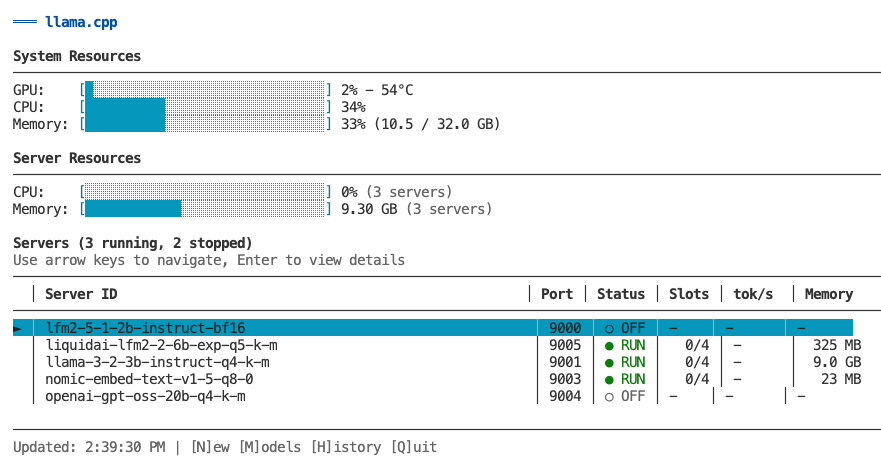
Main Features
Dashboard - Monitor all servers at a glance with real-time metrics (GPU, CPU, memory, token speed)
Server Management - Create, start, stop, configure, and remove servers with inline editors
Model Management (press M) - Browse local models, search/download from HuggingFace, delete with cascade
Router Management (press R) - Control router service, view configuration, access activity/system logs
Historical Charts (press H) - View time-series graphs with Recent (1-3min) or Hour (60min) views
Logs (press L) - Toggle between Activity (HTTP) and System (diagnostics) logs with auto-refresh
Dashboard View
┌─────────────────────────────────────────────────────────┐
│ System Resources                                         │
│ GPU: [████░░░] 65%  CPU: [███░░░] 38%  Memory: 58%     │
├─────────────────────────────────────────────────────────┤
│ Servers (3 running, 0 stopped)                          │
│   │ Server ID      │ Port │ Status │ Slots │ tok/s    │
│───┼────────────────┼──────┼────────┼───────┼──────────┤
│ ► │ llama-3-2-3b   │ 9000 │ ● RUN  │ 2/4   │ 245      │
│   │ qwen2-7b       │ 9001 │ ● RUN  │ 1/4   │ 198      │
│   │ llama-3-1-8b   │ 9002 │ ○ IDLE │ 0/4   │ -        │
└─────────────────────────────────────────────────────────┘
↑/↓ Navigate | Enter for details | [N]ew [M]odels [R]outer [H]istory [Q]uit
Navigate with arrow keys or vim keys (k/j). Press Enter on any server to see detailed metrics, active slots, and resource usage. All keyboard shortcuts are shown in the footer of each view.
Optional: GPU/CPU Metrics
For GPU and CPU utilization metrics, install macmon:
brew install vladkens/tap/macmonWithout macmon, the TUI still shows:
- ✅ Server status and uptime
- ✅ Active slots and token generation speeds
- ✅ Memory usage (via built-in vm_stat)
- ❌ GPU/CPU/ANE utilization (requires macmon)
Deprecated: llamacpp server monitor
The llamacpp server monitor command is deprecated. Use llamacpp instead to launch the TUI dashboard.
Router (Unified Endpoint)
The router provides a single unified endpoint that automatically routes requests to the correct backend server based on the model name. Supports both OpenAI and Anthropic API formats. Perfect for LLM clients that don't support multiple endpoints.
Quick Start
# Start the router (default port: 9100)
llamacpp router start

# Configure your LLM client to use http://localhost:9100
# The router automatically routes requests to the correct server based on model name
Commands
llamacpp router start       # Start the router service
llamacpp router stop        # Stop the router service
llamacpp router status      # Show router status and available models
llamacpp router restart     # Restart the router
llamacpp router config      # Update router settings (--port, --host, --timeout, --health-interval)
llamacpp router logs        # View router logs (with --follow, --activity, --system, --clear options)
Usage Example
The router acts as a single endpoint for all your models:
from openai import OpenAI

client = OpenAI(
    base_url="http://localhost:9100/v1",
    api_key="not-needed"  # API key not required for local servers
)

# Router automatically routes to the correct server based on model name
response = client.chat.completions.create(
    model="llama-3.2-3b-instruct-q4_k_m.gguf",
    messages=[{"role": "user", "content": "Hello!"}]
)

# Or use server aliases for cleaner code
response = client.chat.completions.create(
    model="thinking",  # Routes to server with alias "thinking"
    messages=[{"role": "user", "content": "Hello!"}]
)
Model Name Resolution: The router accepts model names in multiple formats:
- Full model filename:
llama-3.2-3b-instruct-q4_k_m.gguf - Server alias:
thinking(set with--aliasflag) - Partial model name:
llama-3.2-3b(fuzzy match)
Aliases provide a stable, friendly identifier that persists across model changes.
Supported Endpoints
OpenAI-Compatible:
POST /v1/chat/completions- Chat completions (routes to correct backend)POST /v1/embeddings- Text embeddings (routes to correct backend)GET /v1/models- List all available models from running servers
Anthropic-Compatible:
POST /v1/messages- Anthropic Messages API (with streaming and tool calling support)POST /v1/messages/count_tokens- Token counting (estimated)GET /v1/models/{model}- Retrieve specific model info
System:
GET /health- Router health check
Configuration
The router can be configured with:
# Change port
llamacpp router config --port 9200 --restart

# Update request timeout (ms)
llamacpp router config --timeout 60000 --restart

# Update health check interval (ms)
llamacpp router config --health-interval 3000 --restart

# Change bind address (for remote access)
llamacpp router config --host 0.0.0.0 --restart
Note: Changes require a restart to take effect. Use --restart flag to apply immediately.
Logging
The router provides two log types:
| Log Type | CLI Flag | Content |
|----------|----------|---------|
| Activity | (default) | Request routing, status codes, timing, backend selection |
| System | --system | Startup, shutdown, errors, diagnostic messages |
View logs:
# Activity logs (default) - router request routing
llamacpp router logs

# System logs - diagnostics and errors
llamacpp router logs --system

# Follow logs in real-time
llamacpp router logs --follow

# Show last 10 lines
llamacpp router logs --lines 10
Log formats:
Activity logs:
200 POST /v1/chat/completions → llama-3.2-3b-instruct-q4_k_m.gguf (127.0.0.1:9001) 1234ms | "What is..."
404 POST /v1/chat/completions → unknown-model 3ms | "test" | Error: No server found
System logs:
[Router] Listening on http://127.0.0.1:9100
[Router] PID: 12345
[Router] Proxy request failed: ECONNREFUSED
Log management:
# Clear current log file (activity or system)
llamacpp router logs --clear

# Clear all router logs (both activity and system)
llamacpp router logs --clear-all

# Rotate log files with timestamp
llamacpp router logs --rotate
What's logged:
- ✅ Model name and routing decisions
- ✅ HTTP status codes (color-coded)
- ✅ Request duration (ms)
- ✅ Backend server selection (host:port)
- ✅ First 50 chars of prompt
- ✅ Error messages and diagnostics
- Automatic rotation when exceeding 100MB
- Machine-readable format with timestamps
How It Works
- Router receives request with
modelfield - Finds running server configured for that model
- Proxies request to backend server
- Streams response back to client
If the requested model's server is not running, the router returns a 503 error with a helpful message.
Launch Integrations
llamacpp-cli can launch external tools with automatic configuration to use your local models, providing seamless integration with popular AI coding assistants.
Claude Code
Launch Claude Code (Anthropic's official AI coding assistant CLI) with your local llamacpp models:
# Launch with interactive model selection
llamacpp launch claude

# Launch with specific model
llamacpp launch claude --model llama-3.2-3b-instruct-q4_k_m.gguf

# Pass arguments to Claude Code
llamacpp launch claude --resume
llamacpp launch claude -p "what time is it?"

# Show configuration without launching
llamacpp launch claude --config

# Connect to remote router
llamacpp launch claude --host 192.168.1.100 --port 9100
How it works:
- Checks if Claude Code CLI is installed (
claudecommand) - Verifies router is running (starts it if needed)
- Fetches available models from router
- Sets environment variables:
ANTHROPIC_AUTH_TOKEN=llamacppANTHROPIC_API_KEY=""ANTHROPIC_BASE_URL=http://localhost:9100ANTHROPIC_DEFAULT_OPUS_MODEL=<selected-model>ANTHROPIC_DEFAULT_SONNET_MODEL=<selected-model>ANTHROPIC_DEFAULT_HAIKU_MODEL=<selected-model>CLAUDE_CODE_SUBAGENT_MODEL=<selected-model>
- Launches Claude Code with selected model
Anthropic Protocol Support:
The router provides full Anthropic Messages API compatibility with:
- ✅ Non-streaming and streaming responses (SSE)
- ✅ Tool/function calling (bidirectional translation)
- ✅ System prompts
- ✅ Content blocks (text, tool_use, tool_result)
- ✅ Temperature, top_p, top_k, max_tokens
- ✅ Stop sequences
- ✅ Comprehensive error handling
Tool Use Support:
For Claude Code's tool calling features to work, your model must:
- Support function calling (Llama 3.1+, Qwen 2.5+, Mistral v3+)
- Work with llama.cpp's JSON schema conversion
Recommended models:
- Llama 3.1 (8B, 70B) - Excellent function calling
- Qwen 2.5 (7B, 14B, 72B) - Best instruction following
- Mistral v3 (7B) - Good function calling
- Command R+ - Enterprise option
Text-only models will work for basic chat but won't support tool execution.
Requirements:
- Claude Code CLI installed
- Router service running (
llamacpp router start) - At least one server running with a model
Installation:
# Install Claude Code (choose one method)
npm install -g @anthropic-ai/claude-code
# or
brew install anthropics/tap/claude-code
Environment Variables:
The launch command respects the LLAMACPP_HOST environment variable:
# Use remote router by default
export LLAMACPP_HOST=http://192.168.1.100:9100
llamacpp launch claude
Remote Router Support:
You can connect to a llamacpp router running on a different machine:
# Full URL
llamacpp launch claude --router-url http://192.168.1.100:9100

# Host + Port
llamacpp launch claude --host 192.168.1.100 --port 9100

# Environment variable
export LLAMACPP_HOST=http://192.168.1.100:9100
llamacpp launch claude
Admin Interface (REST API + Web UI)
The admin interface provides full remote management of llama.cpp servers through both a REST API and a modern web UI. Perfect for programmatic control, automation, and browser-based management.
Quick Start
# Start the admin service (generates API key automatically)
llamacpp admin start

# View status and API key
llamacpp admin status

# Access web UI
open http://localhost:9200
Commands
llamacpp admin start       # Start admin service
llamacpp admin stop        # Stop admin service
llamacpp admin status      # Show status and API key
llamacpp admin restart     # Restart service
llamacpp admin config      # Update settings (--port, --host, --regenerate-key)
llamacpp admin logs        # View admin logs (with --follow, --activity, --system, --clear options)
REST API
The Admin API provides full CRUD operations for servers and models via HTTP.
Base URL: http://localhost:9200
Authentication: Bearer token (API key auto-generated on first start)
API Documentation: Interactive Swagger UI available at http://localhost:9200/api-docs
Server Endpoints
| Method | Endpoint | Description |
|--------|----------|-------------|
| GET | /api/servers | List all servers with status |
| GET | /api/servers/:id | Get server details |
| POST | /api/servers | Create new server |
| PATCH | /api/servers/:id | Update server config |
| DELETE | /api/servers/:id | Remove server |
| POST | /api/servers/:id/start | Start stopped server |
| POST | /api/servers/:id/stop | Stop running server |
| POST | /api/servers/:id/restart | Restart server |
| GET | /api/servers/:id/logs?type=activity\|system\|all&lines=100 | Get server logs (activity=HTTP, system=diagnostics) |
Model Endpoints
| Method | Endpoint | Description |
|--------|----------|-------------|
| GET | /api/models | List available models |
| GET | /api/models/:name | Get model details |
| DELETE | /api/models/:name?cascade=true | Delete model (cascade removes servers) |
| GET | /api/models/search?q=query | Search HuggingFace |
| POST | /api/models/download | Download model from HF |
Router Endpoints
| Method | Endpoint | Description |
|--------|----------|-------------|
| GET | /api/router | Get router status and config |
| POST | /api/router/start | Start router service |
| POST | /api/router/stop | Stop router service |
| POST | /api/router/restart | Restart router service |
| PATCH | /api/router | Update router config |
| GET | /api/router/logs?type=activity\|system&lines=100 | Get router logs (Activity from stdout, System from stderr) |
System Endpoints
| Method | Endpoint | Description |
|--------|----------|-------------|
| GET | /health | Health check (no auth) |
| GET | /api/status | System status |
Example Usage
Create a server:
curl -X POST http://localhost:9200/api/servers \
  -H "Authorization: Bearer YOUR_API_KEY" \
  -H "Content-Type: application/json" \
  -d '{
    "model": "llama-3.2-3b-instruct-q4_k_m.gguf",
    "port": 9001,
    "threads": 8,
    "ctxSize": 8192
  }'
Start a server:
curl -X POST http://localhost:9200/api/servers/llama-3-2-3b/start \
  -H "Authorization: Bearer YOUR_API_KEY"
List all servers:
curl http://localhost:9200/api/servers \
  -H "Authorization: Bearer YOUR_API_KEY"
Delete model with cascade:
curl -X DELETE "http://localhost:9200/api/models/llama-3.2-3b-instruct-q4_k_m.gguf?cascade=true" \
  -H "Authorization: Bearer YOUR_API_KEY"
Get server logs:
# Activity logs (HTTP requests) - default
curl "http://localhost:9200/api/servers/llama-3-2-3b/logs?type=activity&lines=50" \
  -H "Authorization: Bearer YOUR_API_KEY"

# System logs (diagnostics)
curl "http://localhost:9200/api/servers/llama-3-2-3b/logs?type=system&lines=100" \
  -H "Authorization: Bearer YOUR_API_KEY"
Get router logs:
# Activity logs (router requests)
curl "http://localhost:9200/api/router/logs?type=activity&lines=50" \
  -H "Authorization: Bearer YOUR_API_KEY"

# System logs (diagnostics)
curl "http://localhost:9200/api/router/logs?type=system&lines=100" \
  -H "Authorization: Bearer YOUR_API_KEY"
Web UI
The web UI provides a modern, browser-based interface for managing servers and models.
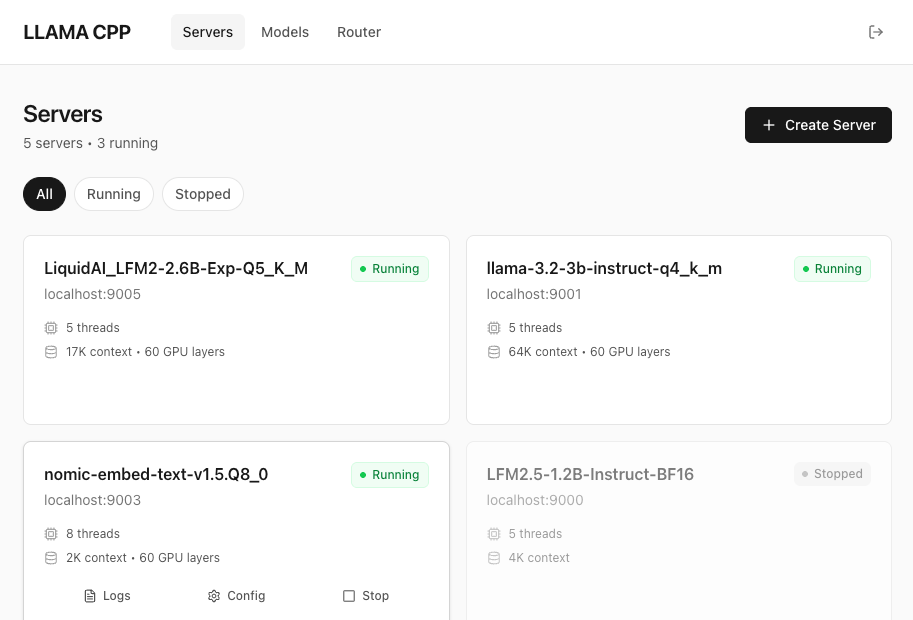
Access: http://localhost:9200 (same port as API)
Features:
- Dashboard - System overview with stats and running servers
- Servers Page - Full CRUD operations (create, start, stop, restart, delete)
- Models Page - Browse models, view usage, delete with cascade
- Real-time updates - Auto-refresh every 5 seconds
- Dark theme - Modern, clean interface
Pages:
| Page | Path | Description |
|------|------|-------------|
| Dashboard | /dashboard | System overview and quick stats |
| Servers | /servers | Manage all servers (list, start/stop, configure) |
| Models | /models | Browse models, view server usage, delete |
Building Web UI:
The web UI is built with React + Vite + TypeScript. To build:
cd web
npm install
npm run build
This generates static files in web/dist/ which are automatically served by the admin service.
Development:
cd web
npm install
npm run dev  # Starts dev server on localhost:5173 with API proxy
See web/README.md for detailed web development documentation.
Configuration
Configure the admin service with various options:
# Change port
llamacpp admin config --port 9300 --restart

# Enable remote access (WARNING: security implications)
llamacpp admin config --host 0.0.0.0 --restart

# Regenerate API key (invalidates old key)
llamacpp admin config --regenerate-key --restart

# Enable logging
llamacpp admin config --logging true --restart
Note: Changes require a restart to take effect. Use --restart flag to apply immediately.
Security
Default Security Posture:
- Host:
127.0.0.1(localhost only - secure by default) - API Key: Auto-generated 32-character hex string
- Storage: API key stored in
~/.llamacpp/admin.json(file permissions 600)
Remote Access:
⚠️ Warning: Changing host to 0.0.0.0 allows remote access from your network and potentially the internet.
If you need remote access:
# Enable remote access
llamacpp admin config --host 0.0.0.0 --restart

# Ensure you use strong API key
llamacpp admin config --regenerate-key --restart
Best Practices:
- Keep default
127.0.0.1for local development - Use HTTPS reverse proxy (nginx/Caddy) for remote access
- Rotate API keys regularly if exposed
- Monitor admin logs for suspicious activity
Logging
The admin service provides two log types:
| Log Type | CLI Flag | Content |
|----------|----------|---------|
| Activity | --activity | HTTP API requests (endpoint, status, duration) |
| System | --system | Startup, shutdown, errors, diagnostic messages |
Default: Shows both Activity and System logs (useful for debugging).
View logs:
# Both activity and system logs (default)
llamacpp admin logs

# Activity logs only (HTTP API requests)
llamacpp admin logs --activity

# System logs only (diagnostics and errors)
llamacpp admin logs --system

# Follow in real-time
llamacpp admin logs --follow

# Clear all logs
llamacpp admin logs --clear
Example Output
Starting the admin service:
$ llamacpp admin start

✓ Admin service started successfully!

  Port:    9200
  Host:    127.0.0.1
  API Key: a1b2c3d4e5f6g7h8i9j0k1l2m3n4o5p6

  API:     http://localhost:9200/api
  Web UI:  http://localhost:9200
  Health:  http://localhost:9200/health

Quick Commands:
  llamacpp admin status        # View status
  llamacpp admin logs -f       # Follow logs
  llamacpp admin config --help # Configure options
Admin status:
$ llamacpp admin status

Admin Service Status
────────────────────

Status:     ✅ RUNNING
PID:        98765
Uptime:     2h 15m
Port:       9200
Host:       127.0.0.1

API Key:    a1b2c3d4e5f6g7h8i9j0k1l2m3n4o5p6
API:        http://localhost:9200/api
Web UI:     http://localhost:9200

Configuration:
  Config:   ~/.llamacpp/admin.json
  Plist:    ~/Library/LaunchAgents/studio.appkit.llamacpp-cli.admin.plist
  Logs:     ~/.llamacpp/logs/admin.stdout  # Activity logs
            ~/.llamacpp/logs/admin.stderr  # System logs

Quick Commands:
  llamacpp admin stop          # Stop service
  llamacpp admin restart       # Restart service
  llamacpp admin logs -f       # Follow logs
Creating a server:
$ llamacpp server create llama-3.2-3b-instruct-q4_k_m.gguf

✓ Server created and started successfully!

  Model:  llama-3.2-3b-instruct-q4_k_m.gguf
  Port:   9000
  Status: Running (PID 12345)

  API endpoint: http://localhost:9000
Viewing running servers:
$ llamacpp ps

┌─────────────────────────┬──────┬────────────┬──────┬──────────┬────────┐
│ SERVER ID               │ PORT │ STATUS     │ PID  │ MEMORY   │ UPTIME │
├─────────────────────────┼──────┼────────────┼──────┼──────────┼────────┤
│ llama-3-2-3b-instruct   │ 9000 │ ✅ RUNNING │ 1234 │ 594.0 MB │ 15m    │
│ qwen2-7b-instruct-q4-k  │ 9001 │ ✅ RUNNING │ 5678 │ 1.2 GB   │ 2h     │
└─────────────────────────┴──────┴────────────┴──────┴──────────┴────────┘

Total: 2 servers (2 running, 0 stopped)
Running interactive chat:
$ llamacpp server run llama-3.2-3b

Connected to llama-3.2-3b-instruct on port 9000

You: What is the capital of France?
Assistant: The capital of France is Paris...

You: exit
One-shot message:
$ llamacpp server run llama-3.2-3b -m "What is the capital of France?"
Assistant: The capital of France is Paris...
Commands
llamacpp
Launch the interactive TUI dashboard for monitoring and managing servers.
llamacppSee Interactive TUI for full details.
llamacpp ls
List all GGUF models in ~/models directory.
llamacpp lsllamacpp search <query> [options]
Search Hugging Face for GGUF models.
# Search for models
llamacpp search "llama 3.2"

# Limit results
llamacpp search "qwen" --limit 10

# Show files for a specific result (by index number)
llamacpp search "llama 3b" --files 1
Options:
-l, --limit <number>- Max results to show (default: 20)--files [number]- Show available GGUF files for result # (e.g., --files 1)
Tip: Results are numbered. Use the number with --files to see available quantizations for that model!
llamacpp show <identifier> [options]
Show details about a model or file without downloading.
# Show model info and all GGUF files
llamacpp show bartowski/Llama-3.2-3B-Instruct-GGUF

# Show info for a specific file
llamacpp show bartowski/Llama-3.2-3B-Instruct-GGUF/Llama-3.2-3B-Instruct-Q4_K_M.gguf

# Or use --file flag
llamacpp show bartowski/Llama-3.2-3B-Instruct-GGUF --file Llama-3.2-3B-Instruct-Q4_K_M.gguf
Options:
-f, --file <filename>- Show details for a specific file
Displays: Downloads, likes, license, tags, and available GGUF files
llamacpp pull <identifier> [options]
Download a GGUF model from Hugging Face.
# Option 1: Full path (recommended)
llamacpp pull bartowski/Llama-3.2-3B-Instruct-GGUF/llama-3.2-3b-instruct-q4_k_m.gguf

# Option 2: Repo + --file flag
llamacpp pull bartowski/Llama-3.2-3B-Instruct-GGUF --file llama-3.2-3b-instruct-q4_k_m.gguf
Options:
-f, --file <filename>- Specific GGUF file (alternative to path)
llamacpp rm <model>
Delete a model file from ~/models (and stop any associated servers).
llamacpp rm llama-3.2-3b-instruct-q4_k_m.gguf
llamacpp rm llama-3.2  # Partial name matching
llamacpp ps
List all servers with status, memory usage, and uptime.
llamacpp psShows:
- Server ID and model name
- Port number
- Status (running/stopped/crashed)
- Process ID (PID)
- Memory usage (RAM consumption)
- Uptime (how long server has been running)
llamacpp logs [options]
View log sizes for all servers and perform batch log operations.
# Show table of log sizes for all servers
llamacpp logs

# Clear current logs for ALL servers (preserves archives)
llamacpp logs --clear

# Delete only archived logs for ALL servers (preserves current)
llamacpp logs --clear-archived

# Clear current + delete ALL archived logs (maximum cleanup)
llamacpp logs --clear-all

# Rotate ALL server logs with timestamps
llamacpp logs --rotate
Displays:
- Activity logs (.http) size per server
- System logs (.stderr, .stdout) size per server
- Archived logs size and count
- Total log usage per server
- Grand total across all servers
Batch Operations:
--clear- Truncates all current logs to 0 bytes (archives preserved)--clear-archived- Deletes only archived logs (current logs preserved)--clear-all- Clears current AND deletes all archives (frees maximum space)--rotate- Archives all current logs with timestamps
Use case: Quickly see which servers are accumulating large logs, or clean up all logs at once.
Server Aliases
Server aliases provide stable, user-friendly identifiers for your servers that persist across model changes. Instead of using auto-generated IDs like llama-3-2-3b-instruct-q4-k-m, you can use memorable names like thinking, coder, or gpt-oss.
Why Use Aliases?
Stability: When you change a server's model, the server ID changes (because it's derived from the model name). Aliases stay the same, preventing broken references in scripts and workflows.
Convenience: Shorter, more memorable names are easier to type and read.
Router Integration: Aliases work with the router, allowing cleaner API requests.
Usage Examples
# Create server with alias
llamacpp server create llama-3.2-3b-instruct-q4_k_m.gguf --alias thinking

# Use alias in all commands
llamacpp server start thinking
llamacpp server stop thinking
llamacpp server logs thinking
llamacpp ps thinking

# Update alias
llamacpp server config thinking --alias smart-model

# Remove alias
llamacpp server config thinking --alias ""

# Alias persists across model changes
llamacpp server config thinking --model mistral-7b.gguf --restart
llamacpp server start thinking  # Still works with new model!

# Use alias in router requests
curl -X POST http://localhost:9100/v1/messages \
  -H "Content-Type: application/json" \
  -d '{"model": "thinking", "max_tokens": 100, "messages": [{"role": "user", "content": "Hello"}]}'
Validation Rules
- Format: Alphanumeric characters, hyphens, and underscores only
- Length: 1-64 characters
- Uniqueness: Case-insensitive (can't have both "Thinking" and "thinking")
- Reserved names: Cannot use "router", "admin", or "server"
- Storage: Case-sensitive (preserves your input)
Lookup Priority
When you reference a server, the CLI checks identifiers in this order:
- Alias (exact match, case-sensitive)
- Port (if identifier is numeric)
- Server ID (exact match)
- Model name (fuzzy match)
This means aliases always take precedence, providing predictable behavior.
Server Management
llamacpp server create <model> [options]
Create and start a new llama-server instance.
llamacpp server create llama-3.2-3b-instruct-q4_k_m.gguf
llamacpp server create llama-3.2-3b-instruct-q4_k_m.gguf --port 8080 --ctx-size 16384 --verbose

# Create with a friendly alias
llamacpp server create llama-3.2-3b-instruct-q4_k_m.gguf --alias thinking

# Create multiple servers with the same model (different configurations)
llamacpp server create llama-3.2-3b-instruct-q4_k_m.gguf --ctx-size 8192 --alias short-context
llamacpp server create llama-3.2-3b-instruct-q4_k_m.gguf --ctx-size 32768 --alias long-context

# Enable remote access (WARNING: security implications)
llamacpp server create llama-3.2-3b-instruct-q4_k_m.gguf --host 0.0.0.0
Note: You can create multiple servers using the same model file with different configurations (context size, GPU layers, etc.). Each server gets a unique ID automatically.
Options:
-a, --alias <name>- Friendly alias for the server (alphanumeric, hyphens, underscores, 1-64 chars)-p, --port <number>- Port number (default: auto-assign from 9000)-h, --host <address>- Bind address (default:127.0.0.1for localhost only, use0.0.0.0for remote access)-t, --threads <number>- Thread count (default: half of CPU cores)-c, --ctx-size <number>- Context size (default: based on model size)-g, --gpu-layers <number>- GPU layers (default: 60)-v, --verbose- Enable verbose HTTP logging (default: enabled)
⚠️ Security Warning: Using --host 0.0.0.0 binds the server to all network interfaces, allowing remote access from your local network and potentially the internet. Only use this if you understand the security implications and need remote access. For local development, keep the default 127.0.0.1 (localhost only).
llamacpp server show <identifier>
Show detailed configuration and status information for a server.
llamacpp server show llama-3.2-3b       # By partial name
llamacpp server show 9000               # By port
llamacpp server show thinking           # By alias
llamacpp server show llama-3-2-3b       # By server ID
Displays:
- Server ID, alias (if set), model name, and path
- Current status (running/stopped/crashed)
- Host and port
- PID (process ID)
- Runtime info (uptime, memory usage)
- Configuration (host, threads, context size, GPU layers, verbose logging)
- Timestamps (created, last started/stopped)
- System paths (plist file, log files)
- Quick commands for common next actions
Identifiers: Alias, port number, server ID, partial model name
llamacpp server config <identifier> [options]
Update server configuration parameters without recreating the server.
# Change model while keeping all other settings
llamacpp server config llama-3.2-3b --model llama-3.2-1b-instruct-q4_k_m.gguf --restart

# Add or update alias
llamacpp server config llama-3.2-3b --alias thinking

# Remove alias (use empty string)
llamacpp server config thinking --alias ""

# Update context size and restart
llamacpp server config llama-3.2-3b --ctx-size 8192 --restart

# Update threads without restarting
llamacpp server config 9000 --threads 8

# Enable remote access (WARNING: security implications)
llamacpp server config llama-3.2-3b --host 0.0.0.0 --restart

# Toggle verbose logging
llamacpp server config llama-3.2-3b --no-verbose --restart

# Update multiple parameters
llamacpp server config llama-3.2-3b --threads 8 --ctx-size 16384 --gpu-layers 40 --restart
Options:
-a, --alias <name>- Set or update alias (use empty string""to remove)-m, --model <filename>- Update model (filename or path)-h, --host <address>- Update bind address (127.0.0.1for localhost,0.0.0.0for remote access)-t, --threads <number>- Update thread count-c, --ctx-size <number>- Update context size-g, --gpu-layers <number>- Update GPU layers-v, --verbose- Enable verbose logging--no-verbose- Disable verbose logging-r, --restart- Automatically restart server if running
Note: Changes require a server restart to take effect. Use --restart to automatically stop and start the server with the new configuration. Aliases persist across model changes, providing a stable identifier for your server.
⚠️ Security Warning: Using --host 0.0.0.0 binds the server to all network interfaces, allowing remote access. Only use this if you understand the security implications.
Identifiers: Alias, port number, server ID, partial model name
llamacpp server start <identifier>
Start an existing stopped server.
llamacpp server start thinking           # By alias
llamacpp server start llama-3.2-3b       # By partial name
llamacpp server start 9000               # By port
llamacpp server start llama-3-2-3b       # By server ID
Identifiers: Alias, port number, server ID, partial model name, or model filename
llamacpp server run <identifier> [options]
Run an interactive chat session with a model, or send a single message.
# Interactive mode (REPL)
llamacpp server run llama-3.2-3b       # By partial name
llamacpp server run 9000               # By port
llamacpp server run llama-3-2-3b       # By server ID

# One-shot mode (single message and exit)
llamacpp server run llama-3.2-3b -m "What is the capital of France?"
llamacpp server run 9000 --message "Explain quantum computing in simple terms"
Options:
-m, --message <text>- Send a single message and exit (non-interactive mode)
Identifiers: Port number, server ID, partial model name, or model filename
In interactive mode, type exit or press Ctrl+C to end the session.
llamacpp server stop <identifier>
Stop a running server by model name, port, or ID.
llamacpp server stop llama-3.2-3b
llamacpp server stop 9000
llamacpp server rm <identifier>
Remove a server configuration and launchctl service (preserves model file).
llamacpp server rm llama-3.2-3b
llamacpp server rm 9000
llamacpp server logs <identifier> [options]
View server logs with flexible filtering.
Log Types:
- Activity logs (default): HTTP request/response logs in compact format
- System logs (
--system): Server diagnostic output (stderr + stdout)
Basic usage:
# Activity logs (default) - HTTP requests
llamacpp server logs llama-3.2-3b
# Output: 2025-12-09 18:02:23 POST /v1/chat/completions 127.0.0.1 200 "What is..." 305 22 1036

# System logs - diagnostics and errors
llamacpp server logs llama-3.2-3b --system

# Follow logs in real-time
llamacpp server logs llama-3.2-3b --follow

# Last 100 lines
llamacpp server logs llama-3.2-3b --lines 100
Advanced filtering:
# System logs with errors only
llamacpp server logs llama-3.2-3b --system --errors

# Custom grep pattern
llamacpp server logs llama-3.2-3b --system --filter "error|warning"

# Include health check requests (filtered by default)
llamacpp server logs llama-3.2-3b --include-health
Log management:
# Clear current log file (truncate to zero bytes)
llamacpp server logs llama-3.2-3b --clear

# Delete only archived logs (preserves current)
llamacpp server logs llama-3.2-3b --clear-archived

# Clear current AND delete all archived logs
llamacpp server logs llama-3.2-3b --clear-all

# Rotate log file with timestamp (preserves old logs)
llamacpp server logs llama-3.2-3b --rotate
Options:
-f, --follow- Follow log output in real-time-n, --lines <number>- Number of lines to show (default: 50)--activity- Show HTTP activity logs (default)--system- Show system logs (all server output)--errors- Filter system logs for errors only--filter <pattern>- Custom grep pattern for filtering--include-health- Include health check requests (/health, /slots, /props)--clear- Clear (truncate) log file to zero bytes--clear-archived- Delete only archived logs (preserves current logs)--clear-all- Clear current logs AND delete all archived logs (frees most space)--rotate- Rotate log file with timestamp (e.g.,server.2026-01-22-19-30-00.http)
Automatic Log Rotation: Logs are automatically rotated when they exceed 100MB during:
llamacpp server start <identifier>- Rotates before startingllamacpp server config <identifier> --restart- Rotates before restarting
Rotated logs are saved with timestamps in the same directory: ~/.llamacpp/logs/
Activity Log Format:
TIMESTAMP METHOD ENDPOINT IP STATUS "MESSAGE..." TOKENS_IN TOKENS_OUT TIME_MSThe compact format shows one line per HTTP request and includes:
- User's message (first 50 characters)
- Token counts (prompt tokens in, completion tokens out)
- Total response time in milliseconds
- Health checks filtered by default (use
--include-healthto show)
Configuration
llamacpp-cli stores its configuration in ~/.llamacpp/:
~/.llamacpp/
├── config.json           # Global settings
├── router.json           # Router configuration
├── admin.json            # Admin service configuration (includes API key)
├── servers/              # Server configurations
│   └── <server-id>.json
├── logs/                 # All service logs
│   ├── <server-id>.http      # Activity: HTTP request logs
│   ├── <server-id>.stderr    # System: diagnostics
│   ├── <server-id>.stdout    # System: additional output
│   ├── router.stdout         # Router activity logs
│   ├── router.stderr         # Router system logs
│   ├── admin.stdout          # Admin activity logs
│   └── admin.stderr          # Admin system logs
└── history/              # Historical metrics (TUI)
    └── <server-id>.json
Smart Defaults
llamacpp-cli automatically configures optimal settings based on model size:
| Model Size | Context Size | Threads | GPU Layers | |------------|--------------|---------|------------| | < 1GB | 2048 | Half cores | 60 | | 1-3GB | 4096 | Half cores | 60 | | 3-6GB | 8192 | Half cores | 60 | | > 6GB | 16384 | Half cores | 60 |
All servers include --embeddings and --jinja flags by default.
GPU Layers explained:
- Default: 60 - Conservative value that works reliably on all Apple Silicon devices
- -1 (all) - Maximum performance, uses all available GPU layers. May cause OOM on very large models with limited VRAM.
- 0 (CPU only) - Useful for testing or when GPU is busy with other tasks
- Specific number - Fine-tune based on your GPU memory and model size
How It Works
llamacpp-cli uses macOS launchctl to manage llama-server processes:
- Creates a launchd plist file in
~/Library/LaunchAgents/ - Registers the service with
launchctl load - Starts the server with
launchctl start - Monitors status via
launchctl listandlsof
Services are named studio.appkit.llamacpp-cli.<model-id>.
Auto-Restart Behavior:
- When you start a server, it's registered with launchd and will auto-restart on crash
- When you stop a server, it's unloaded from launchd and stays stopped (no auto-restart)
- Crashed servers will automatically restart (when loaded)
Router and Admin Services:
- The Router (
studio.appkit.llamacpp-cli.router) provides a unified OpenAI-compatible endpoint for all models - The Admin (
studio.appkit.llamacpp-cli.admin) provides REST API + web UI for remote management - Both run as launchctl services similar to individual model servers
Known Limitations
- macOS only - Relies on launchctl for service management (Linux/Windows support planned)
- Homebrew dependency - Requires llama.cpp installed via
brew install llama.cpp - ~/models convention - Expects GGUF models in
~/modelsdirectory - Single binary - Assumes llama-server at
/opt/homebrew/bin/llama-server - Port range - Auto-assignment limited to 9000-9999 (configurable with
--port)
Troubleshooting
Command not found
Make sure npm global bin directory is in your PATH:
npm config get prefix # Should be in PATHllama-server not found
Install llama.cpp via Homebrew:
brew install llama.cppPort already in use
llamacpp-cli will automatically find the next available port. Or specify a custom port:
llamacpp server create model.gguf --port 8080Server won't start
Check the logs for errors:
llamacpp server logs <identifier> --errorsAdmin web UI not loading
Check that static files are built:
cd web
npm install
npm run build
Then restart the admin service:
llamacpp admin restartAPI authentication failing
Get your current API key:
llamacpp admin status # Shows API keyOr regenerate a new one:
llamacpp admin config --regenerate-key --restartllamacpp migrate-labels
Migrate service labels from old format (com.llama.*) to new format (studio.appkit.llamacpp-cli.*).
Note: This command is automatically triggered on first run after upgrading from versions prior to v2.1.0.
# Show what would be migrated without making changes
llamacpp migrate-labels --dry-run

# Perform migration (with confirmation prompt)
llamacpp migrate-labels

# Skip confirmation prompt
llamacpp migrate-labels --force
What it does:
- Creates a backup of all current configurations
- Stops running services
- Updates service labels and plist files
- Restarts services that were running
- Creates a marker file to prevent re-migration
Troubleshooting: If migration fails, configurations are automatically rolled back. You can also manually rollback:
llamacpp rollback-labelsDevelopment
CLI Development
# Install dependencies
npm install

# Run in development mode
npm run dev              # Launch TUI
npm run dev -- ps        # List servers (static table)
npm run dev -- ls        # List models

# Build for production
npm run build

# Clean build artifacts
npm run clean
Web UI Development
# Navigate to web directory
cd web

# Install dependencies
npm install

# Run dev server (with API proxy to localhost:9200)
npm run dev

# Build for production
npm run build

# Clean build artifacts
rm -rf dist
The web UI dev server runs on http://localhost:5173 with automatic API proxying to the admin service. See web/README.md for detailed documentation.
Releasing
This project uses commit-and-tag-version for automated releases based on conventional commits.
Commit Message Format:
# Features (bumps minor version)
git commit -m "feat: add interactive chat command"
git commit -m "feat(search): add limit option for search results"

# Bug fixes (bumps patch version)
git commit -m "fix: handle port conflicts correctly"
git commit -m "fix(logs): stream logs without buffering"

# Breaking changes (bumps major version)
git commit -m "feat!: change server command structure"
git commit -m "feat: major refactor

BREAKING CHANGE: server commands now require 'server' prefix"

# Other types (no version bump, hidden in changelog)
git commit -m "chore: update dependencies"
git commit -m "docs: fix typo in README"
git commit -m "test: add unit tests for port manager"
Release Commands:
# Automatic version bump based on commits
npm run release

# Force specific version bump
npm run release:patch  # 1.0.0 → 1.0.1
npm run release:minor  # 1.0.0 → 1.1.0
npm run release:major  # 1.0.0 → 2.0.0

# First release (doesn't bump version, just tags)
npm run release:first
What happens during release:
- Analyzes commits since last release
- Determines version bump (feat = minor, fix = patch, BREAKING CHANGE = major)
- Updates
package.jsonversion - Generates/updates
CHANGELOG.md - Creates git commit:
chore(release): v1.2.3 - Creates git tag:
v1.2.3 - Pushes tags to GitHub
- Publishes to npm with
--access public
Contributing
Contributions are welcome! If you'd like to contribute:
- Open an issue first for major changes to discuss the approach
- Fork the repository
- Create a feature branch (
git checkout -b feature/amazing-feature) - Make your changes and test with
npm run dev - Commit using conventional commits (see Releasing section)
feat:for new featuresfix:for bug fixesdocs:for documentationchore:for maintenance
- Push to the branch (
git push origin feature/amazing-feature) - Open a Pull Request
Development Tips
CLI Development:
- Use
npm run dev -- <command>to test commands without building - Check logs with
llamacpp server logs <server> --errorswhen debugging - Test launchctl integration with
launchctl list | grep studio.appkit.llamacpp-cli - All server configs are in
~/.llamacpp/servers/ - Test interactive chat with
npm run dev -- server run <model>
Web UI Development:
- Navigate to
web/directory and runnpm run devfor hot reload - API proxy automatically configured for
localhost:9200 - Update types in
web/src/types/api.tswhen API changes - Build with
npm run buildand test with admin service - See
web/README.mdfor detailed web development guide
Acknowledgments
Built on top of the excellent llama.cpp project by Georgi Gerganov and contributors.
License
MIT