
@arendajaelu/smart-id-node-client
v0.1.0
Published
Node.js library for interacting with the SK Solution Smart-ID RP V3 API (Estonia, Latvia, Lithuania) for authentication and signing.

Maintainers
 arendajaelu
Readme
Smart-ID Nodejs client
This library provides a modern, developer-friendly integration with the official Smart-ID REST API v3 from SK ID Solutions, supporting strong, secure electronic identity authentication and digital signing for users in Estonia, Latvia, and Lithuania.
It is built entirely in TypeScript, leverages well-established cryptographic libraries, and offers a clean, modular design following the builder pattern, giving developers full control over request construction, security validation, and interaction flows.
The library abstracts much of the low-level complexity of working with Smart-ID, while strictly following the official specifications and providing the tools necessary to build both cross-device (e.g., browser to mobile) and same-device (e.g., mobile app) authentication flows.
This DEMO was developed with NestJS and integrates with DEMO:https://smartid.joosep.org Smart-ID system.
Table of Contents
- Overview
- Installation
- Example Usage
- Authentication Request Builder
- Authentication Request Client
- Callback URL Validator
- Authentication Response Validator
- Authentication Identity
- Security Considerations
- Disclaimer
- References
- Credits
- License
Overview
Features
- Supports Smart-ID v3 (June 2025)
- Strongly typed request builders (Device Link & Notification Authentication)
- Full Authentication Response validation with certificate trust checks
- Smart-ID Scheme Identification (End-Entity Certificate) enforcement
- Signature reconstruction and verification logic
- Supports VC Type: numeric4 Notification flow
- Session Secret Digest and User Challenge Verifier validation
- Clean, extendable, minimal dependencies (crypto, node-forge, pkijs)
This library implements the main Smart-ID RP API flows, based on version 3 of the protocol.
Main authentication flows
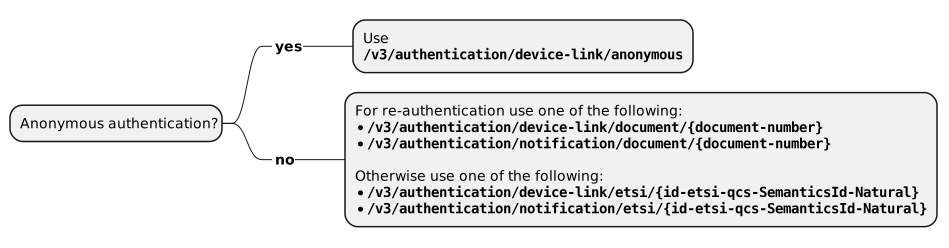
Cross-device use cases
Use case: The RP session is on a separate device from the mobile phone where the Smart-ID app is installed.
For example, the user is using a PC browser to access an RP website or a tablet to access an RP application.
Same-device use cases
Use case: The RP frontend (whether an RP app or website accessed by a mobile browser) resides on the same mobile device as the Smart-ID app.
The end user is using a mobile app or RP detects that the user is on a mobile browser so it can be assumed that the user intends to use the Smart-ID app on a same device.
Strongly prefer the BASE/v3/*/device-link/anonymous endpoints for same-device use cases unless the user’s document-number has already been established for the current session. These endpoints provide a superior user experience as no user identifier entry is required while the device-links with callbacks provide the best security protections.
However, a fallback option should also be provided to switch to the cross-device use cases.
Tutorials:
Tutorials: DEMO and Tutorials Reference: OpenAPI specification
How This Library Works
This library follows a straightforward flow:
- Use the
AuthenticationRequestBuilderto construct the appropriate request payload. - Send the request using one of the five available
SmartIdAuthClientmethods based on your use case:
getAuthenticateAnonymousDeviceLink(requestPayload)
Recommended for same-device scenarios (Web2App / App2App) where the user's document number is not yet known.getAuthenticateDeviceLinkByEtsi(idCode, requestPayload)
For cross-device or same-device use when the user's identity code is available.getAuthenticateDeviceLinkByDocument(documentNumber, requestPayload)
When the user's document number is already known.startAuthenticateNotificationByEtsi(idCode, requestPayload)
Notification-based authentication with identity code.startAuthenticateNotificationByDocument(documentNumber, requestPayload)
Notification-based authentication with document number.
- In Web2App or App2App scenarios, you can optionally use the
CallbackUrlValidatorto verify callback parameters. - Once the session completes, use the
AuthenticationResponseValidatorto verify the final Smart-ID response.
Users are free to implement additional validation logic or fully replace the built-in validation process if desired.
Installation
npm install @arendajaelu/smart-id-node-clientBefore You Start
This library is intended for developers who are already familiar with the Smart-ID system and its technical workflows.
If you are new to Smart-ID or have not yet set up your developer environment, please start by reading the official Smart-ID Demo Documentation provided by SK ID Solutions:
👉 https://sk-eid.github.io/smart-id-documentation/demo.html
The official documentation explains the Smart-ID concept, registration process, and how to obtain demo credentials required for development and testing.
Only proceed with integrating this library after you have successfully registered for demo access and understood the basic Smart-ID API structure.
The example usage
import { SmartIdAuthClient, AuthenticationRequestBuilder } from 'smart-id-node-client';

const client = new SmartIdAuthClient()
  .setApiEndpoint('https://sid.demo.sk.ee/smart-id-rp/v3');

const builder = new AuthenticationRequestBuilder()
  .withInitialCallbackUrl('https://example.com/callback')
  .withCertificateLevel('QUALIFIED');

const requestPayload = builder.build();

const session = await client.getAuthenticateAnonymousDeviceLink(requestPayload);
console.log(session);
Authentication Request Builder
The AuthenticationRequestBuilder class provides a developer-friendly, configurable way to construct valid Smart-ID DeviceLink Authentication or Notification Authentication request payloads.
This builder is designed to simplify payload construction, reduce human error, and ensure that generated requests adhere to Smart-ID protocol expectations. The resulting payload can be used directly with the SmartIdAuthClient to initiate authentication sessions.
- The builder auto-generates the rpChallenge and handles interaction encoding in Base64.
- It supports generating both DeviceLink (e.g., QR, Web2App, App2App) and Notification authentication requests.
- You retain full control over optional fields like initialCallbackUrl, capabilities, and requestProperties.
Note: The library does not perform any I/O or network communication at the builder stage — it only prepares the payload. Sending the request is done separately via Authentication Request Client (SmartIdAuthClient)
AuthenticationRequestBuilder Methods
| Method | Return Type | Description |
| ------------------------------------------------- | -------------------------------------------------- | ------------------------------------------------------------------------ |
| constructor(relyingPartyUUID, relyingPartyName) | AuthenticationRequestBuilder | Creates a new builder instance with required RP identifiers. |
| withInitialCallbackUrl(url) | this | Optional. Sets the callback URL for Web2App or App2App flows. |
| withCertificateLevel(level) | this | Optional. Sets desired certificate level (ADVANCED or QUALIFIED). |
| withHashAlgorithm(hashAlgorithm) | this | Optional. Sets hash algorithm for signature generation. |
| withRequestProperties(props) | this | Optional. Adds request-specific properties, e.g., client IP sharing. |
| withCapabilities(obj) | this | Optional. Adds custom capabilities to the request. |
| withInteractions(interaction) | this | Required. Defines the user-facing interaction shown on the Smart-ID app. |
| withVcType(vcType) | NotificationRequestBuilder | Switches to Notification Authentication request builder. |
| build() | DeviceLinkAuthRequest \| NotificationAuthRequest | Finalizes and returns the request payload for API consumption. |
Authentication Request Client
The SmartIdAuthClient serves as the primary communication layer between your application and the Smart-ID REST API. It provides methods to initiate authentication sessions, query session status, handle device link flows (QR, Web2App, App2App), and ensure proper certificate pinning for secure communication.
This client is designed for flexibility, offering fine-grained control over Smart-ID integration while promoting secure and reliable interactions.
Key Features
- Supports DeviceLink Authentication via anonymous, ETSI ID code, or document number.
- Supports Notification Authentication via ETSI ID code or document number.
- Built-in support for pinned server certificates and public key pinning.
- Session polling with automatic handling of known Smart-ID error states.
- Utility to generate secure, signed DeviceLink URLs with authCode.
- Helper methods for callback parameter generation and API configuration
Example Usage
 //Create an anonymous device link
const callbackParam = randomBytes(16).toString('hex');

const requestPayload = new AuthenticationRequestBuilder('00000000-0000-4000-8000-000000000000','DEMO')
        .withInitialCallbackUrl(
                `https://blueblackwhite.com/social/smartid?chksum=${callbackParam}`,
        )
        .withInteractions({
          type: 'displayTextAndPIN',
          displayText60: 'Authenticate with Smart-ID',
        })
        .build();

const { response, sessionStartTime } = await this.client
        .setSchemeName('smart-id-demo')
        .getAuthenticateAnonymousDeviceLink(requestPayload);

const link = this.client
        .setSchemeName('smart-id-demo')
        .createDeviceLinkUrl(response, requestPayload, sessionStartTime, {
          deviceLinkType: 'Web2App',
        });
SmartIdAuthClient Methods
DeviceLink Authentication
- ETSI = ETSI Natural Person Semantics Identifier
| Method | Description |
| -------------------------------------------------------------- | ------------------------------------------------------- |
| getAuthenticateAnonymousDeviceLink(payload) | Starts anonymous DeviceLink authentication. |
| getAuthenticateDeviceLinkByEtsi(idCode, payload) | Starts DeviceLink authentication by ETSI. |
| getAuthenticateDeviceLinkByDocument(documentNumber, payload) | Starts DeviceLink authentication by document number. |
Notification Authentication
| Method | Description |
| ------------------------------------------------------------------ | -------------------------------------------------------- |
| startAuthenticateNotificationByEtsi(idCode, payload) | Starts Notification Authentication by ETSI. |
| startAuthenticateNotificationByDocument(documentNumber, payload) | Starts Notification Authentication by document number. |
Session Handling
| Method | Description |
| ------------------------------------------- | --------------------------------------------------------------- |
| getSessionStatus(sessionID) | Retrieves the current status of an authentication session. |
| pollForSessionResult(sessionID, options?) | Polls session status until success, failure, or timeout occurs. |
DeviceLink Utilities
| Method | Description |
| --------------------------------------------------------------- | ----------------------------------------------------------------------- |
| createDeviceLinkUrl(session, payload, sessionStartTime, opts) | Generates a signed DeviceLink URL for QR, Web2App, or App2App flows. |
| generateCallbackParam() | Generates a random callback parameter (e.g., for initialCallbackUrl). |
Client Configuration
| Method | Description |
| ----------------------------------- | -------------------------------------------------------------- |
| setPublicSslKeys(fingerprints) | Configures SHA-256 public key pinning for additional security. |
| setApiEndpoint(hostUrl, version?) | Overrides Smart-ID API endpoint and version. |
| setApiVersion(version) | Updates Smart-ID API version. |
| setSchemeName(name) | Sets the scheme name used for signature payloads. |
| setBrokeredRpName(name) | Sets the brokered RP name used in DeviceLink URL generation. |
Notes on Security & Integration Scope
Supports TLS certificate pinning via pinnedCerts for robust server identity verification (preferred method).
- Supports public key hash pinning to further mitigate Man-in-the-Middle (MITM) attacks.
- Generates signed authCode for DeviceLink URLs, derived from the session secret, ensuring URL integrity.
- Provides full control over API endpoint configuration for test, staging, and production environments.
⚠️ Important: This library does not manage CA certificates or public key pinning keys. It is the developer's responsibility to securely maintain, provision, and rotate these materials as part of their infrastructure.
📦 Out-of-Scope: The library does not include logic for generating the actual QR code image for DeviceLink URLs. Generating a QR code is straightforward and intentionally left to the application layer, allowing developers to use any preferred method, for example:
import QRCode from "qrcode";

const url = client.createDeviceLinkUrl(session, payload, sessionStartTime, { deviceLinkType: "QR" });
QRCode.toFile("qrcode.png", url);
Callback Url Validator
In DeviceLink authentication flows that rely on callback URLs, such as Web2App and App2App scenarios, proper handling and verification of the callback URL is critical to ensure a secure, phishing-resistant authentication process.
According to the official Smart-ID documentation, the relying party's backend must verify that the callback parameters received from the Smart-ID app are valid, trustworthy, and have not been tampered with.
The Callback Url Validator class provides basic utilities to assist with this verification process. It allows developers to:
- Validate the presence and format of expected callback parameters.
- Check for parameter consistency and integrity.
- Detect obvious manipulation attempts.
Flexible Integration
This validator can be used as a standalone component or seamlessly integrated into the AuthenticationResponseValidator via .withCallbackUrlValidate() to achieve a streamlined, end-to-end validation flow.
The library is designed with flexibility in mind:
You may perform callback URL validation and Smart-ID session response validation independently.
You can insert custom verification steps into either validation stage to suit your application's security requirements.
NB!!!: This validator is designed to help streamline development, but developers are encouraged to review the Secure Implementation Guide and perform additional checks tailored to their risk profile and threat model.
Sample Usage
import { CallBackUrlValidator } from "./callback-url-validator";
import { CallbackValidationEntity } from "./types";

// Example callback payload received from Smart-ID flow
const entity: CallbackValidationEntity = {
    sessionSecretDigest: "computedDigestFromFrontend",
    userChallengeVerifier: "randomVerifierUsedInRequest",
    sessionSecret: "Base64SessionSecretUsedInRequest",
    schemeName: "smart-id",
    authenticationResponse: {
        state: "COMPLETE",
        result: {
            endResult: "OK",
            documentNumber: "PNOEE-1234567890",
        },
        signatureProtocol: "ACSP_V2",
        signature: {
            value: "base64SignatureValue",
            userChallenge: "expectedComputedHash",
        },
        cert: {
            value: "base64Certificate",
            certificateLevel: "QUALIFIED",
        },
    },
};

// Perform validation
const validator = new CallBackUrlValidator(entity);
const result = validator.validate().getResult();

if (result.hasError) {
    console.error("Callback validation failed:", result.errors);
} else {
    console.log("Callback successfully validated!");
}
CallBackUrlValidator Methods
| Method | Return Type | Description |
|---------------------------------|--------------------------|-----------------------------------------------------------------------------|
| constructor(entity) | CallBackUrlValidator | Creates a new validator with the provided CallbackValidationEntity. |
| validate() | this | Runs all validation checks (session status, secret digest, user challenge).|
| getResult() | AuthenticationResult | Returns the result object containing validation errors, if any. |
Private Helper Methods
| Method | Return Type | Description |
|-------------------------------------|--------------|------------------------------------------------------------------------------|
| validateSessionStatus() | void | Checks if the session completed successfully and required fields are present.|
| validateSessionSecretDigest() | void | Verifies the session secret digest matches the expected value. |
| validateUserChallengeVerifier() | void | Confirms the user challenge verifier matches the expected challenge. |
| computeSessionSecretDigest(secret)| string | Computes the expected session secret digest from the provided secret. |
| base64UrlEncode(buffer) | string | Encodes a Buffer to a URL-safe Base64 string (RFC 4648). |
Authentication Response Validator
The AuthenticationResponseValidator is a modular and extensible utility designed to facilitate comprehensive validation of Smart-ID authentication responses across all supported authentication flows, including Web2App, App2App, and traditional backend-initiated processes.
Key Capabilities
- Core validation of Smart-ID authentication response structure and content
- Certificate trust chain verification against configurable CA stores
- Certificate validity period check
- Smart-ID Scheme Identification (End-Entity Certificate) enforcement
- Optional certificate policy OID validation
- Seamless integration with CallbackUrlValidator for end-to-end validation of callback parameters in Web2App and App2App flows
Flexible, Composable Architecture
This library is designed with a developer-centric, building-block philosophy, empowering teams to tailor their validation logic based on project-specific security requirements:
- Use .validate() for full Smart-ID response validation, including mandatory ACSP_V2 signature verification
- Combine .withCallbackUrlValidate() for full-chain, end-to-end verification in callback-based flows
- The certificate trust chain and signature checks are always enforced by .validate() and cannot be omitted
Example Usage
// Developer-managed location containing trusted CA certificates
// ⚠️ IMPORTANT:
// This library does **not** download or manage CA certificates for you.
// You, as the implementer, must ensure the folder contains the correct, trusted CA certificates
// provided by SK-ID or your organization's security policy.

const resourcesPath = path.resolve(__dirname, "../certificates");
const validator = new AuthenticationResponseValidator(resourcesPath);

// validate() runs the full response check AND ACSP_V2 signature verification:
// session state, end result, certificate presence, certificate trust chain, expiry,
// certificate level, Smart-ID EKU, and the cryptographic ACSP_V2 signature.
// The signature inputs (scheme name, interaction type, flow type) MUST be set before
// validate(); if they are missing, validation fails and no identity is returned.
const result = validator
        .withSchemeName('smart-id-demo')
        .withInteractionTypeUsed('displayTextAndPIN')
        .withFlowType('Web2App')
        .withCallbackUrlValidate(callBackValidationEntity)
        .validate(authResponse, requestPayload)
        .getResult();

if (result.hasError()) {
  throw new Error(`Has errors ${JSON.stringify(result.getErrors())} `);
}

// An identity is returned ONLY when every check, including signature verification, passed.
const identity = result.getIdentity();

//Optional validation: Check if the certificate includes any of the allowed policy OIDs (e.g., Qualified Certificates)
const allowOIDs = [
  '1.3.6.1.4.1.4146.1.1',
  '1.3.6.1.4.1.4146.1.2',
  '1.3.6.1.4.1.10015.17.2',
];

const allowPoliciesCheck = validator.checkIfHasAllowedCertificatePolicies(
        identity.getCertificate(),
        allowOIDs,
);
if (!allowPoliciesCheck) {
  throw new Error('The allowPoliciesCheck was not verified.');
}

if (identity) {
    console.log(`Given Name: ${identity.getGivenName()}`);
    console.log(`Surname: ${identity.getSurName()}`);
    console.log(`Document Number: ${identity.getDocumentNumber()}`);
    console.log(`Country: ${identity.getCountry()}`);
    console.log(`Identity Code: ${identity.getIdentityCode()}`);
    console.log(`Identity Number: ${identity.getIdentityNumber()}`);
    console.log(`Valid From: ${identity.getValidFrom()}`);
    console.log(`Valid To: ${identity.getValidTo()}`);
    console.log(`Date of Birth: ${identity.getDateOfBirth()}`);
}
AuthenticationResponseValidator Methods
| Method | Return Type | Description |
| --------------------------------------------------------- | --------------------------------- | ---------------------------------------------------------------------------------------------- |
| constructor(resourcesPath, debug?) | AuthenticationResponseValidator | Creates validator, loads trusted CA certificates from provided path. |
| validate(response, payload) | this | Runs the full response and certificate validation including mandatory ACSP_V2 signature verification (structure, expiry, trust chain, certificate level, scheme checks, signature). Requires withSchemeName(), withInteractionTypeUsed() and withFlowType() to be set first; returns no identity unless the signature verifies. |
| withCallbackUrlValidate(entity) | this | Runs Callback URL Validator for Web2App/App2App. |
| checkIfHasAllowedCertificatePolicies(cert, allowedOids) | boolean | Checks if the certificate contains at least one allowed policy OID. |
| verifySignature(response, payload) | boolean | Verifies the ACSP_V2 signature against the reconstructed payload and certificate. Also invoked automatically by validate(). |
| withSchemeName(name) | this | Sets scheme name for ACSP_V2 payload reconstruction. |
| withInteractionTypeUsed(value) | this | Sets interaction type used for ACSP_V2 payload reconstruction. |
| withBrokeredRpName(name) | this | Sets brokered RP name for ACSP_V2 payload reconstruction. |
| withFlowType(value) | this | Sets flow type for ACSP_V2 payload reconstruction. |
| buildACSPV2Payload(response, payload) | string | Reconstructs the exact ACSP_V2 payload string required for signature check. |
| getTrustedCACertificates() | string[] | Returns the list of CA certificate file paths loaded for trust validation. |
| getResult() | AuthenticationResult | Returns the result containing validation errors and extracted identity. |
Notes
- CA Trust Setup: The resourcesPath should point to a directory or file containing trusted .crt or .pem CA certificates.
- DeviceLink Flows: For Web2App and App2App, always use withCallbackUrlValidate() before .validate() to properly handle callback URL parameters.
- Security Reminder: This library assists with validation but cannot guarantee full security. Production deployments should perform additional checks according to the Smart-ID Secure Implementation Guide.
Strongly recommend reviewing and following the Secure Implementation Guide provided by SK-eID. The guide describes all critical validation steps in detail and provides best practices to ensure the security and reliability of your Smart-ID integration.
NB!!!: This library aims to simplify the integration process, but production systems should carefully evaluate and, if necessary, supplement the built-in verification logic to meet their security standards.
Authentication Identity
The AuthenticationIdentity class represents the authenticated user's identity extracted from a Smart-ID certificate.
It provides convenient getters to access core identity information such as name, country, identity number, and document details.
Additionally, the class offers methods to access the raw certificate, a properly formatted PEM version, and parsed certificate details including subject, issuer, and extensions.
This class is designed to simplify the process of handling Smart-ID authentication results by encapsulating identity and certificate parsing logic.
Identity Property Getters
| Method | Return Type | Description |
|-----------------------|-------------|--------------------------------------|
| getGivenName() | string | Returns the given name. |
| getSurName() | string | Returns the surname. |
| getIdentityCode() | string | Returns the identity code. |
| getIdentityNumber() | string | Returns the identity number. |
| getCountry() | string | Returns the country. |
| getDocumentNumber() | string | Returns the document number. |
| getValidFrom() | string | Returns certificate validity start. |
| getValidTo() | string | Returns certificate validity end. |
| getDateOfBirth() | string | Returns the date of birth. |
Certificate Methods
| Method | Return Type | Description |
|--------------------------|------------------------------------------|--------------------------------------------------|
| getCertificate() | string | Returns the raw certificate (Base64). |
| getPemCertificate() | string | Returns the certificate in PEM format. |
| getParsedCertificate() | Record<string, any> \| undefined | Returns parsed subject, issuer, extensions, etc. |
| getRawCertificate() | forge.pki.Certificate \| undefined | Returns the raw forge certificate object. |
Security
This library provides essential security validation mechanisms for Smart-ID authentication flows. It implements critical checks to help ensure the integrity, authenticity, and trustworthiness of Smart-ID responses, especially for Web2App and App2App scenarios.
✅ Built-in Validations Provided by This Library
The library performs the following security validations out-of-the-box:
Session Completion Check
- Ensures the authentication session state is
"COMPLETE". - Verifies the final authentication result is
"OK". - Confirms that a valid certificate and signature are present.
- Ensures the authentication session state is
Certificate Validations
- Parses and verifies the Smart-ID end-user certificate.
- Checks certificate expiry date.
- Validates the certificate against a trusted CA store (local
.pemor.crtfiles). - Enforces Smart-ID Scheme Identification, verifying correct KeyUsage and Extended Key Usage attributes.
- Optionally verifies allowed certificate policy OIDs via
checkIfHasAllowedCertificatePolicies.
Signature Verification
- Reconstructs the signed payload based on Smart-ID specification.
- Verifies the signature using the public key extracted from the end-user's certificate.
- Supports strict signature checks for both Web2App and App2App flows.
Callback URL Parameter Validation
- Verifies session status and basic response completeness after the callback.
- Validates
sessionSecretDigestintegrity. - Validates
userChallengeVerifieragainst the signed user challenge value.
⚠️ Limitations & Required Server-Side Considerations
While this library covers key client-side verifications, the following security responsibilities remain with the relying party (your server application):
Proper Storage and Management of Trusted CA Certificates
- You must provide a valid, up-to-date CA certificate directory to ensure trust validation is meaningful.
- The library does not automatically update or fetch CA certificates.
Replay Attack Protection
- The library does not implement server-side mechanisms to prevent replay attacks.
- You must ensure that session tokens, user challenges, and session secrets are single-use and properly managed.
Strict Parameter Validation
- Any additional business-specific validations (e.g., IP whitelisting, request origin verification) are outside the scope of this library.
Backend Security
- The library assumes your server-side environment is secure.
- All sensitive materials (session secrets, brokered Relying Party names) must be protected by your backend.
Compliance with Secure Implementation Guide
- You are strongly advised to review and strictly follow the Smart-ID Secure Implementation Guide.
- This guide provides comprehensive recommendations that extend beyond what this library covers.
Important Note on Certificate Management
This library does not maintain or manage trusted CA certificates by itself.
You must explicitly provide a valid path to your trusted CA certificates when initializing the AuthenticationResponseValidator.
It is your responsibility to ensure that:
- The CA certificate files are complete, correct, and regularly updated.
- The certificate storage location is secure and accessible by your application.
Failure to provide appropriate and up-to-date CA certificates will compromise the effectiveness of trust validation.
Disclaimer
This is an independent, third-party, open-source library developed for convenience in integrating with the official Smart-ID API.
It is not developed, reviewed, endorsed, or certified by SK ID Solutions AS or any official Smart-ID authority.
The library is provided "as is", without any warranties of any kind, either express or implied.
The authors and contributors accept no liability for any direct, indirect, incidental, or consequential damages, including but not limited to security breaches, data loss, business interruption, or legal consequences resulting from the use of this library.
️️️⚠️⚠️⚠️ Use of this library is entirely at your own risk. ️️️⚠️⚠️⚠️
It is your responsibility to ensure that your Smart-ID integration fully complies with all applicable laws, regulations, and the official Smart-ID Implementation Guidelines.
For production use, thorough independent review and appropriate security measures are strongly recommended.
References
Credits
Developed and maintained by Joosep Wong | Linkedin
This library is initiated and maintained by Joosep Wong, and contributions from the community are warmly welcome. The library is released under the MIT License, making it freely available for both personal and commercial use.
License
This library is released under the MIT License.
Copyright (c) 2025-2026 Joosep Wong
It is free to use for both commercial and non-commercial purposes, without restriction beyond the standard MIT terms.
This package will never be relicensed. It is and will remain available under the MIT License permanently.