
@artinet/symphony
v0.0.13
Published
An interactive command-line interface that uses the Agent2Agent (A2A) & Model Context Protocols (MCP) to manage multi-agent systems.

Maintainers
 human01
Readme






Symphony
An experimental interactive command-line interface that uses the Agent2Agent (A2A) & Model Context Protocols (MCP) to manage multi-agent systems.
*Symphony now scans for local A2A servers on start-up with no additional configuration required.
https://github.com/user-attachments/assets/ea5ce501-9dfd-4327-999b-d3d24275d2a1
Installation
npm install -g @artinet/symphonyQuick Start
symphonyRequirements
- Node.js ≥ 18.9.1
- Recommended: 20 || ≥ 22
Recommended
Recommended for Default Agents
- Official Fetch MCP Server:
uvx mcp-server-fetch - Official Filesystem MCP Server:
npx -y @modelcontextprotocol/server-filesystem - Official Memory MCP Server:
npx -y "@modelcontextprotocol/server-memory" - Official Thinking MCP Server:
npx -y @modelcontextprotocol/server-sequential-thinking - @artinet/bash-mcp:
npx -y @artinet/bash-mcp
To Ensure that you're agents do not get confused, we strongly recommend running symphony from the same directory as your approved filesystem directory.
Config
The config folder contains relevant configuration settings for the CLI.
Configuring Tools
Stdio MCP Servers can be added by updating the mcp.json file:
{
  "bash-mcp-server": {
    "command": "npx",
    "args": ["-y", "@artinet/bash-mcp"]
  },
  "secure-filesystem-server": {
    "command": "npx",
    "args": [
      "-y",
      "@modelcontextprotocol/server-filesystem",
      "${XDG_DATA_HOME:-$HOME/.local/share}/" // Set an approved directory or it will default to /home/
    ]
  },
  "mcp-fetch": {
    "command": "uvx",
    "args": ["mcp-server-fetch"]
  },
  "sequential-thinking-server": {
    "command": "npx",
    "args": ["-y", "@modelcontextprotocol/server-sequential-thinking"]
  },
  "memory-server": {
    "command": "npx",
    "args": ["-y", "@modelcontextprotocol/server-memory"]
  }
}- To point to another mcp configuration file set
SYMPHONY_MCP_CONFIG=absolute/pathin your environment variables.
Configuring Agents
Agent configurations are found in the /config/agents folder.
- To configure a new agent define it in an extended agents.md file and it will be automatically loaded into the CLI on start-up:
---
name: Example Agent
description: Provide a brief description of the agent and what it can do.
model: deepseek-ai/DeepSeek-R1 # Pick a base model from the available models on artinet.io (defaults to Deepseek-R1)
version: "1.0.0"
skills: # Define the agents specific capabilities
  - id: example-skill
    name: Example Skill
    description: Give more specific descriptions of the kind of tasks your agent excels at.
  - id: demo-skill
    name: Demo Skill
    description: Make sure to accurately describe all of the agents capabilities to improve discovery.
tools: # Set the tools that the agent can use from the preconfigured stdio servers in your mcp.json
  - secure-filesystem-server
teams: # Assign the agent to a team and give it a role (lead {can call team members}/member {can be called by the team lead})
  - name: example-team
    role: lead
  - name: demo-team
    role: member
---
# Provide a detailed prompt for the agent that defines:
# How it should behave. (eg. "create a todo.txt file in your allowed directory and refer to it before..." )
# The scenarios in which it should call its available agents and tools (if any).
You are a helpful assistant that can...- To point to another agents folder set
SYMPHONY_AGENT_DIR=absolute/pathin your environment variables.
Logs
- Detailed logs of each session can be found in the the
artinet.logfile in the installation directory.
Discovery
Symphony will scan the system for Agent2Agent servers and add them to its manifest:
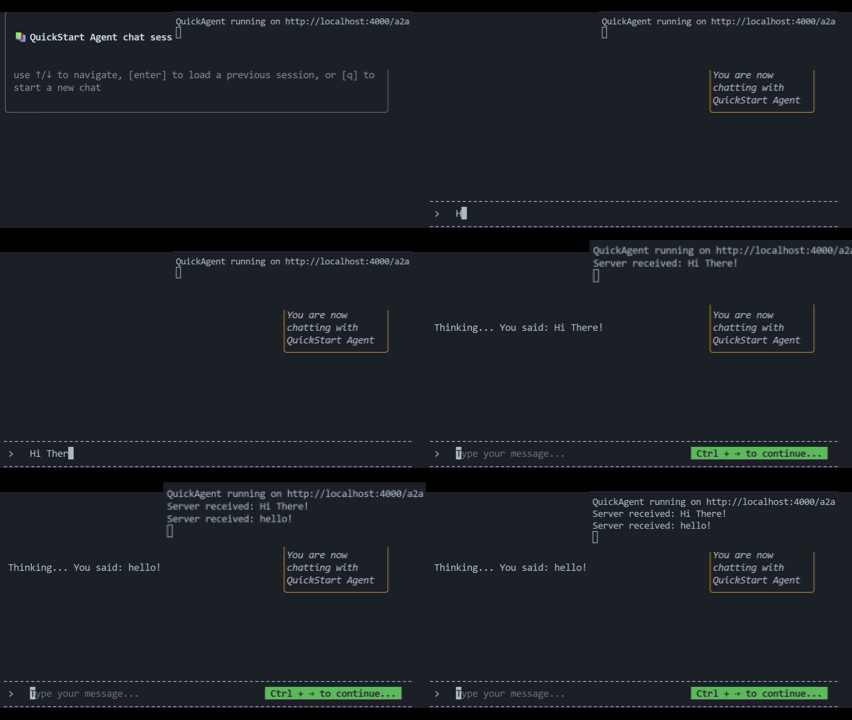
Put your A2A agent on a team by adding the artinet:symphony.teams extension to their AgentCard:
capabilities: {
  streaming: true,
  extensions: [
    {
      uri: "artinet:symphony",
      params: {
        teams: ["development", "documentation"],
      },
    },
  ],
},
License
Apache-2.0
This library is meant to empower the community to create interoperable agent swarms, as such, it's licensed under an Apache-2.0 license. We reserve the right to convert the license to a GPLv3 license at any point if its determined that derivatives of the library are being used outside the spirit of this repository.