
@asafarim/project-card
v1.5.2
Published
A React component for displaying project cards with title, image, description, tech stack, and links.

Maintainers
 asafarim.be
Readme
@asafarim/project-card
A comprehensive React component for displaying project cards with advanced features including theme support, database integration, progress tracking, and interactive elements.
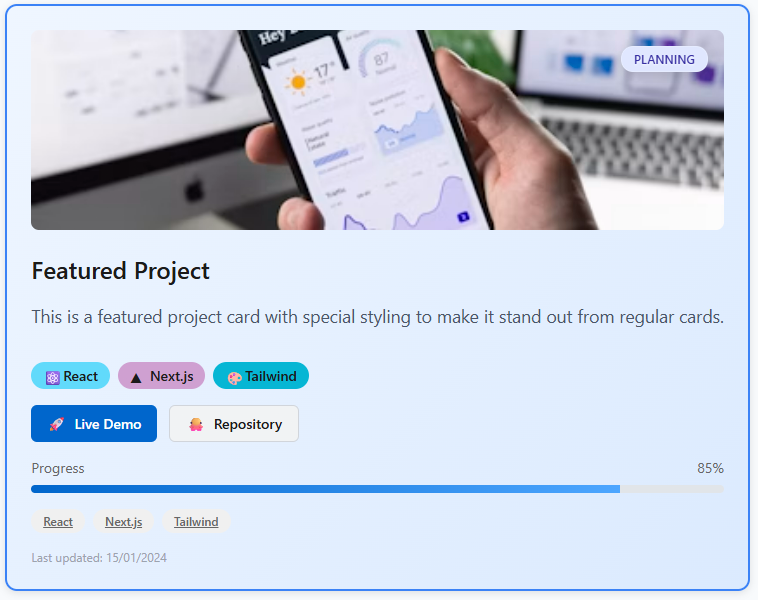
🚀 Demo
Experience the full power of the ProjectCard component with our interactive demo:
npm run demoOr explore the demo online: ProjectCard Demo
The demo showcases:
- 🌓 Advanced Theme System: Light/Dark/Auto themes with CSS custom properties
- 📱 Responsive Design: Works perfectly on all device sizes
- 🎨 Featured Cards: Special styling for important projects
- ⏳ Loading States: Beautiful loading animations
- 🏷️ Status Indicators: Multiple project statuses with visual indicators
- 🔗 Multiple Link Types: Demo, repo, documentation, and custom links
- 📊 Progress Tracking: Visual progress bars for project completion
- 🏷️ Interactive Tags: Clickable and navigable project tags
- 📅 Metadata Display: Priority, dates, budget, and detailed information
- 🗄️ Database Integration: Seamless mapping from backend models
- 🎯 TypeScript Support: Full type safety with comprehensive interfaces
Installation
npm install @asafarim/project-card

# or with yarn
yarn add @asafarim/project-card

# or with pnpm
pnpm add @asafarim/project-card
Basic Usage
import { ProjectCard } from '@asafarim/project-card';

const MyComponent = () => {
  return (
    <ProjectCard
      title="My Awesome Project"
      image="https://example.com/image.jpg"
      description="This is a description of my project"
      techStack={[
        { name: 'React', color: '#61dafb', icon: '⚛️' },
        { name: 'TypeScript', color: '#3178c6', icon: '📘' }
      ]}
      links={[
        { type: 'demo', url: 'https://example.com', label: 'Live Demo' },
        { type: 'repo', url: 'https://github.com/user/repo' }
      ]}
      currentTheme="light"
      featured={true}
      status="active"
    />
  );
};
Advanced Usage with Database Integration
import { ProjectCard, mapProject, filterPublicProjects } from '@asafarim/project-card';

// Map database project to component props
const dbProject = {
  id: 1,
  title: "E-commerce Platform",
  description: "Full-stack e-commerce solution",
  status: "In Progress",
  priority: "High",
  progress: 75,
  tags: ["React", "Node.js", "MongoDB"],
  startDate: "2024-01-15",
  dueDate: "2024-06-30",
  budget: 15000,
  isPublic: true,
  // ... other database fields
};

const MyComponent = () => {
  // Map database project to component props
  const projectProps = mapProject(dbProject);

  // Filter public projects
  const publicProjects = filterPublicProjects([dbProject]);

  return (
    <ProjectCard
      {...projectProps}
      tags={[
        { name: "React", onClick: () => console.log("React clicked") },
        { name: "Node.js", navigateTo: "https://nodejs.org" },
        { name: "MongoDB" }
      ]}
    />
  );
};
Theme System
The ProjectCard component includes a comprehensive theme system with CSS custom properties:
import { applyProjectCardTheme, createProjectCardThemeContext } from '@asafarim/project-card';

// Apply themes
applyProjectCardTheme('light');
applyProjectCardTheme('dark');
applyProjectCardTheme('auto'); // Follows system preference

// React integration
const themeContext = createProjectCardThemeContext('auto');
themeContext.setTheme('dark');
Custom Themes
import { applyCustomProjectCardTheme } from '@asafarim/project-card';

// Apply custom colors
applyCustomProjectCardTheme({
  '--pc-primary': '#ff6b6b',
  '--pc-bg-primary': '#f8f9fa',
  '--pc-text-primary': '#2d3436',
});
Props
| Prop | Type | Default | Description |
|------|------|---------|-------------|
| title | string | - | Required. The title of the project |
| image | string | - | URL to the project image/preview |
| description | string | - | Required. Project description |
| techStack | TechStackItem[] | - | Required. Array of technologies used |
| links | ProjectLink[] | - | Required. Array of project links |
| currentTheme | 'light' \| 'dark' \| 'auto' | 'light' | Theme for the card |
| className | string | '' | Additional CSS classes |
| onCardClick | () => void | - | Click handler for the card |
| showTechStackIcons | boolean | false | Whether to show tech stack icons |
| maxDescriptionLength | number | 150 | Maximum length for description |
| imageAlt | string | - | Alt text for the image |
| isLoading | boolean | false | Show loading state |
| featured | boolean | false | Highlight card as featured |
| lastUpdated | string | - | Last updated date |
| status | 'active' \| 'archived' \| 'in-progress' \| 'completed' \| 'draft' \| 'coming-soon' \| 'planning' | 'active' | Project status |
| priority | 'low' \| 'medium' \| 'high' \| 'critical' | - | Project priority level |
| progress | number | - | Project completion percentage (0-100) |
| tags | ProjectTag[] | - | Interactive project tags |
| startDate | string | - | Project start date |
| dueDate | string | - | Project due date |
| budget | number | - | Project budget amount |
| isPublic | boolean | true | Whether project is public |
Types
TechStackItem
interface TechStackItem {
  name: string;
  color?: string;
  icon?: string | ReactNode;
}
ProjectLink
interface ProjectLink {
  type: 'demo' | 'repo' | 'documentation' | 'custom';
  url: string;
  label?: string;
}
ProjectTag
interface ProjectTag {
  name: string;
  onClick?: () => void;
  navigateTo?: string;
}
ProjectFromDB
interface ProjectFromDB {
  id: number;
  title: string;
  description?: string;
  status: string;
  priority: string;
  progress: number;
  tags: string[];
  startDate?: string;
  endDate?: string;
  dueDate?: string;
  budget?: number;
  isPublic: boolean;
  isFeatured: boolean;
  thumbnailUrl?: string;
  repositoryUrl?: string;
  liveUrl?: string;
  // ... other database fields
}
Theme System
Theme Utilities
import {
  applyProjectCardTheme,
  getCurrentProjectCardTheme,
  watchProjectCardTheme,
  createProjectCardThemeContext,
  applyCustomProjectCardTheme,
  removeCustomProjectCardTheme,
  PROJECT_CARD_THEME_VARIABLES
} from '@asafarim/project-card';
Available Theme Functions
applyProjectCardTheme(theme): Apply light/dark/auto themesgetCurrentProjectCardTheme(): Get current themewatchProjectCardTheme(theme): Watch for system theme changescreateProjectCardThemeContext(initialTheme): React theme contextapplyCustomProjectCardTheme(variables): Apply custom colorsremoveCustomProjectCardTheme(variables): Remove custom colors
Database Integration
Mapping Functions
import {
  mapProject,
  mapProjects,
  filterPublicProjects,
  sortProjects
} from '@asafarim/project-card';

// Map single project
const projectProps = mapProject(dbProject);

// Map multiple projects
const projectsProps = mapProjects(dbProjects);

// Filter public projects
const publicProjects = filterPublicProjects(dbProjects);

// Sort projects by various criteria
const sortedProjects = sortProjects(dbProjects, 'priority', 'desc');
License
MIT
🎯 Features
Core Features
- Advanced Theme System: Light, dark, and auto themes with CSS custom properties
- Responsive Design: Works perfectly on all device sizes
- Status Indicators: Multiple project statuses with visual indicators
- Loading States: Beautiful loading animations
- Featured Cards: Special styling for important projects
- Tech Stack Display: With icons and colors
- Multiple Link Types: Demo, repo, documentation, and custom links
- Click Handlers: Interactive card behavior
Advanced Features
- Progress Tracking: Visual progress bars for project completion
- Interactive Tags: Clickable and navigable project tags
- Metadata Display: Priority, dates, budget, and detailed information
- Database Integration: Seamless mapping from backend models
- Custom Themes: Easy customization with CSS variables
- System Theme Detection: Automatic theme switching based on user preference
- TypeScript Support: Full type safety with comprehensive interfaces
Theme System
- CSS Custom Properties: Complete theme variable system
- Light/Dark Themes: Comprehensive color schemes
- Auto Theme: Follows system preference
- Custom Themes: Easy brand customization
- Smooth Transitions: Animated theme changes
Database Integration
- Model Mapping: Transform database models to component props
- Filtering: Filter projects by various criteria
- Sorting: Sort projects by priority, date, etc.
- Type Safety: Full TypeScript support for database models
📂 Demo Structure
The demo folder contains a complete Vite + React + TypeScript application demonstrating all component features:
demo/
├── src/
│   ├── App.tsx          # Main demo application
│   ├── index.css        # Demo-specific styles
│   └── main.tsx         # Entry point
├── package.json         # Demo dependencies
└── README.md           # Demo documentation
🔧 Development
To run the demo locally:
# Install dependencies
npm install

# Build the package
npm run build

# Start the demo
npm run demo
📚 Documentation
For detailed theme system documentation, see THEME_SYSTEM.md
🤝 Contributing
Contributions are welcome! Please see our Contributing Guide for details.