
@ask-mojo/moltcraft
v0.1.4
Published
Turn your AI agents into a living pixel world — visual dashboard for Moltbot
Downloads
65

Maintainers
 askmojo
Readme
⛏️ Moltcraft
Turn your AI agents into a living pixel world — a visual dashboard for Moltbot.


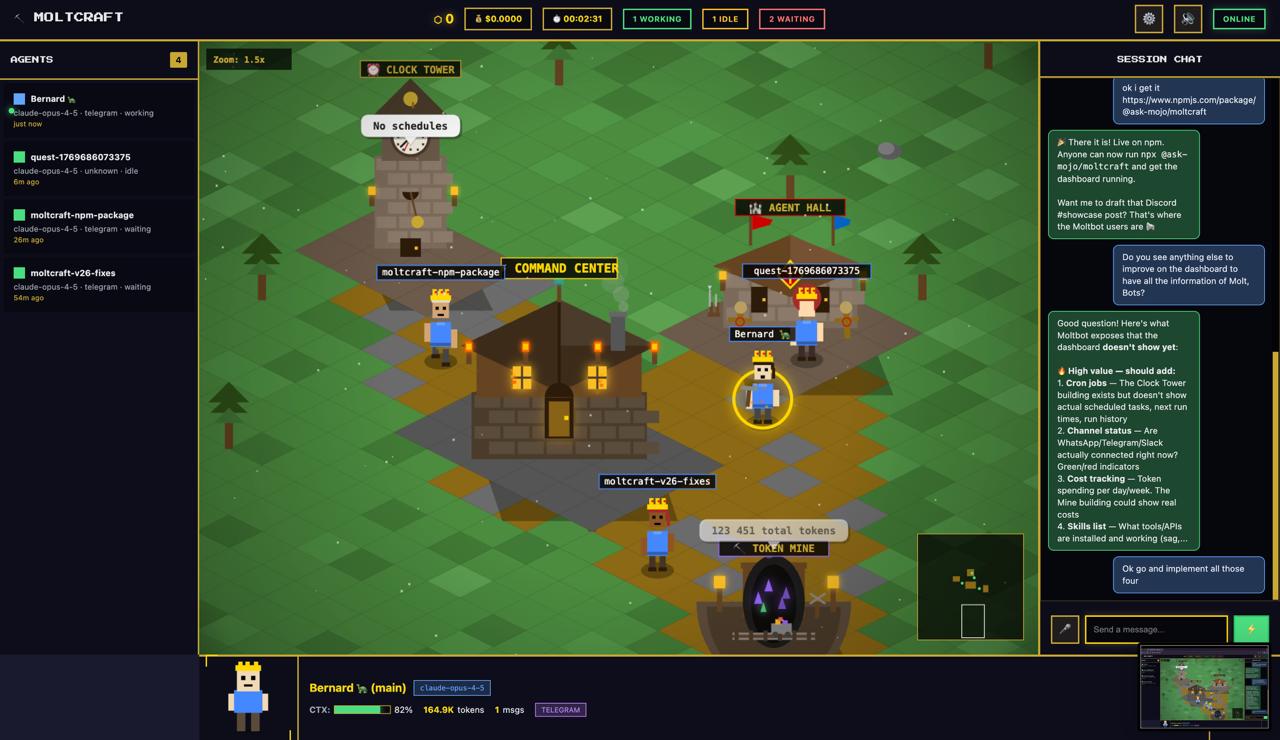
What is this?
Moltcraft is an isometric pixel-art dashboard that connects to your Moltbot gateway. Your AI agents become characters that walk, mine tokens, and complete tasks — all in real-time.
Features:
- 🎮 Isometric Minecraft-inspired world with pixel art agents
- 💬 Live chat with any agent session
- 🔊 Voice output — agents speak their responses (ElevenLabs TTS)
- 🎤 Voice input — talk to your agents (browser Speech Recognition)
- 🕐 Click buildings for real data (cron jobs, token usage, skills, channels)
- 📡 Channel status indicators (Telegram, WhatsApp, Slack)
- ⚙️ Full Moltbot config viewer
- 🌙 Day/night cycle, weather, particles
Quick Start
Option 1: One command (recommended)
npx @ask-mojo/moltcraftThis auto-detects your Moltbot config, starts the dashboard, and opens your browser. Zero config.
Option 2: Clone the repo
git clone https://github.com/askmojo/moltcraft
cd moltcraft
node server.js
# Open http://localhost:8080
Option 3: Remote access (tunnel)
npx @ask-mojo/moltcraft --tunnelCreates a temporary public URL via Cloudflare tunnel. Share the URL + your token to access remotely.
Connect
- Open
http://localhost:8080in your browser - Enter your Moltbot gateway token
- Find it:
cat ~/.moltbot/moltbot.json | grep token - Or run:
moltbot status
- Find it:
- Click JOIN SERVER
- Your agents appear in the world!
CLI Options
npx @ask-mojo/moltcraft [options]

Options:
  -p, --port PORT    Custom port (default: 8080)
  -t, --tunnel       Enable Cloudflare tunnel for remote access
  --no-open          Don't auto-open browser
  -h, --help         Show help
  -v, --version      Show version
Buildings
Click on buildings in the world to see real Moltbot data:
| Building | Data | |----------|------| | 🕐 Clock Tower | Cron jobs, schedules, last/next run | | ⛏️ Mine | Token usage, top sessions by consumption | | 🏰 Barracks | Installed skills & API status | | 📡 Command Center | Gateway config, channels, models | | 🏛️ Agent Hall | Active agent sessions |
Voice
Moltcraft supports voice input and output:
- Output (TTS): Requires ElevenLabs configured as the
sagskill in Moltbot. Agents auto-speak new responses. - Input (STT): Uses browser Speech Recognition (Chrome/Edge). Requires HTTPS or localhost.
- Mute: Click the 🔊 button to mute/unmute all sounds instantly.
Requirements
- Node.js >= 18
- Moltbot running on your machine
- A modern browser (Chrome/Edge recommended for voice features)
Tech Stack
- Zero npm dependencies
- Pure HTML/CSS/JS frontend
- Node.js proxy server (same-origin API routing)
- Web Audio API for procedural sound effects
- ElevenLabs API for TTS
- Browser Speech Recognition for STT
Links
License
MIT — do whatever you want with it. Add flying pigs if you want. 🐷