
@askeleven/send-once
v0.1.0
Published
A send happens once, and only while the approval behind it is still true. An idempotency ledger and perishable approvals for code that sends email, SMS, or anything else on an agent's behalf. Zero dependencies.


Readme
send-once
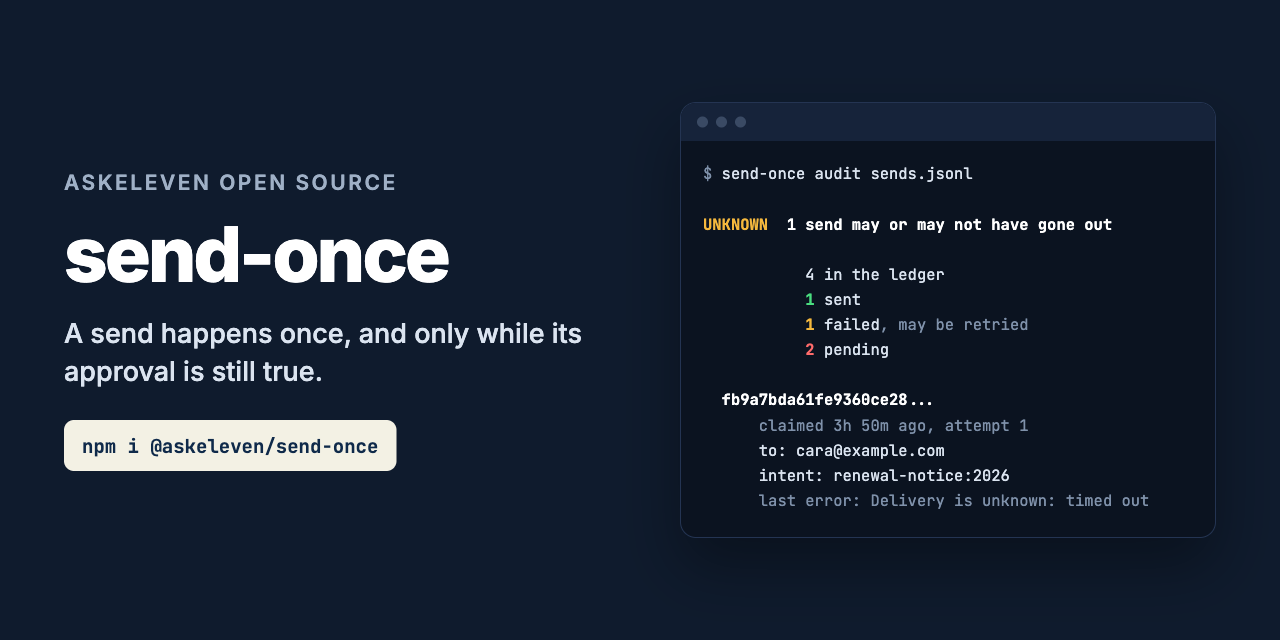
A send happens once, and only while the approval behind it is still true.
npm install @askeleven/send-onceimport { createLedger, fileStore, sendKey } from '@askeleven/send-once'
const ledger = createLedger(fileStore('./send-once.jsonl'))
const key = sendKey({ channel: 'email', to: invoice.email, intent: `invoice-reminder:${invoice.id}` })
const result = await ledger.once(key, () => mailer.send(message))
// result.outcome is 'sent', 'duplicate', 'unknown' or 'failed'Code that sends on an agent's behalf does not remember what it sent. A job reruns, a worker retries, a queue redelivers, and the same person gets the same message twice. An approval sits in a queue until the thing it approved is no longer true, and then it fires anyway. send-once is the check in the code path that sends. It writes down what is about to go out before it goes, refuses to send it a second time, and refuses to act on an approval that has expired, been edited, or been overtaken by events.
Zero dependencies. The ledger lives in a file or in your own database.
What it prevents
| What goes wrong | What send-once does |
|---|---|
| A job reruns, or two workers pick up the same task | The second once() for the key returns duplicate. Your send is not called. |
| The provider accepted the message, then the write that recorded it failed | The key was claimed before the send, so it stays pending. The next run gets unknown, not a second send. |
| The process died mid-send | Same: pending, unknown, and listed by send-once audit. |
| A timeout, where you cannot tell whether it went | Throw UncertainSendError. It stays pending and is never retried on its own. |
| A definite rejection from the provider | Recorded as failed. The next attempt may send. |
| An approval that sat in a queue past its useful life | dispatch() returns expired. Approvals last 12 hours unless you say otherwise. |
| The draft was edited after it was approved | payload_changed. |
| The facts behind the approval changed: the invoice was paid, the customer replied | stale_facts, naming each one, before and after. |
| The same recipient written two ways | Keys lower-case email addresses and reduce phone numbers to their digits. |
What it does not do
It cannot make a send exactly-once by itself. Nothing can. Between the provider accepting a message and your code writing that down, there is always a moment where a crash loses the answer. send-once makes that moment safe, by treating it as unknown rather than unsent, and makes it visible. Settling it takes a look at the provider, by a person or a reconciler you write. If your provider accepts an idempotency key, pass it the key as well (see once).
It does not send anything. You bring the send function. It knows nothing about email or SMS.
It does not collect approvals. approve() records a yes you already got. Your UI or
queue is where the person says it.
It does not look up facts. recheck is your function. send-once compares what it
returns to what was true at approval.
It does not forget. Entries are kept, which is what makes a key without a window
mean "once, ever". A file ledger grows by two lines per send; past tens of thousands of
entries, use sqlStore.
Why there is no MCP server
Idempotency has to live in the code path that sends, not in something a model is asked
to remember. A check_already_sent tool works until the model skips it, calls it after
sending, or calls the send tool twice in parallel. The claim has to be written by the
same code that calls the provider, before the call, every time.
That is what enforced in code
means: a limit that lives in a prompt is not a limit. Put once() inside the tool that
sends, and there is nothing for the model to get around.
Library API
sendKey({ channel, to, intent, window? })
sendKey({ channel: 'email', to: '[email protected] ', intent: 'invoice-reminder:inv_1042' })
// 'c144ec0f862ccfbe5f080cf5f7e88c631b68676ba781c38c64fa58c374ce3045', every time
The key names the intent, not the attempt. Every retry, every rerun, every process that tries to send the same thing to the same person gets the same key. That is what lets the ledger say no to all but one of them.
channel:'email','sms','slack', anything. Case does not matter.to: trimmed. Email addresses are lower-cased. Phone numbers keep a leading+and their digits, so+1 (555) 010-0199and+15550100199are one recipient. Anything else, such as a platform user id, is kept as written, because case can matter there.intent: what the message is for, in your words, stable across runs. Not the body: a reworded draft of the same reminder is the same intent.window: lets the same intent go out again later. A day ('2026-09-27'), a week, a billing period, anything you can recompute. Leave it out for once, ever.
The key is the sha256 of a canonical serialization, so it can be logged without the recipient in clear text. It is not a secret: anyone with the inputs can recompute it.
createLedger(store, { now? })
Returns { once, resolve, get, pending }. The ledger holds no state of its own, so any
number of ledgers in any number of processes can share one store. now is a clock
(() => Date | number), for tests.
once(key, send, meta?)
- Claims the key as
pending, durably, before callingsend. - Already
sent: returnsduplicate.sendis not called. - Already
pending: returnsunknown.sendis not called. A previous attempt may have reached the provider, so it stays that way until someone callsresolve. - Last attempt
failed: claims it again (compare-and-set, so only one retry wins) and callssend. sendreturns: the entry becomessent.sendthrows:once()does not throw. It records the failure and returnsfailed, or leaves the entry pending and returnsunknownif the error is anUncertainSendError.
| outcome | Your send was called | Entry after | What to do |
|---|---|---|---|
| sent | Yes, and returned | sent | Nothing. result is what it returned. |
| duplicate | No | sent | Nothing. It already went. |
| unknown | No, or it threw UncertainSendError | pending | Check the provider, then resolve. |
| failed | Yes, and threw | failed | Retry when you like; error has the reason. |
send receives { key, attempt }. If your provider accepts an idempotency key (many
payment and messaging APIs do), pass it key: it is stable across retries, which is
what those headers want.
If send returns a string, or an object with a string providerId, messageId, id
or sid, that is stored as the entry's providerId. The full return value comes back
as result but is not stored, because it may not be JSON.
meta is stored with the entry for the audit: who it was to, which job sent it. It
must be JSON.
If the store itself fails, once() rejects with the store's error. After a send has
run, that leaves the entry pending, so the next once() returns unknown rather than
sending a second time.
UncertainSendError
import { UncertainSendError } from '@askeleven/send-once'

await ledger.once(key, async () => {
  try {
    return await provider.send(message)
  } catch (error) {
    if (error.status >= 400 && error.status < 500) throw error // rejected: failed, may retry
    throw new UncertainSendError(error) // timeout, reset, 5xx: may have gone out
  }
})
Throw an ordinary error only when you know the message did not go out. Anything else is uncertain, and uncertain is the safe default: a duplicate cannot be unsent.
resolve(key, 'sent' | 'failed', { by?, note?, providerId? })
Settles an entry by hand, usually one left pending. failed lets the next once() send
it; sent closes it. Who, why and when are recorded on the entry. A sent entry can
never be marked failed, because failed means "may be sent again". Resolving to the
status it already has changes nothing.
get(key) and pending({ olderThan? })
get returns the entry or null. pending returns every entry whose outcome is
unknown, oldest first. olderThan ('10m') leaves out recent ones, which are probably
still in flight.
parseDuration
'30s', '15m', '12h', '2d', '500ms', or a number of milliseconds. A string with
no unit is refused rather than guessed at.
Stores
memoryStore() keeps entries in a Map. For tests, and for a process that never
restarts: everything is forgotten on exit, so a rerun after a crash will send again.
fileStore(path) is an append-only JSON Lines file. The last line for a key is its
state, and the file is its history. Claims and transitions take a lock file
(<path>.lock, created with O_EXCL), read, check, append and fsync before releasing
it, so they are atomic across every process on the machine and durable before your send
runs.
A lock whose process has died is removed once it is 30 seconds old. A lock held by a
running process, or by another host, is never taken over: after 10 seconds the call
fails with lock_timeout and names the lock file. Both limits are options
(staleLockMs, lockTimeoutMs). One machine and a local disk only; the lock is not
safe on a network filesystem.
sqlStore(query, { table, placeholder }) uses your own database through your own
driver. You pass query(sql, params), which returns what your driver returns.
Postgres
import pg from 'pg'
import { createLedger, sqlStore } from '@askeleven/send-once'

const pool = new pg.Pool()
await pool.query(sqlStore.schema())

const ledger = createLedger(sqlStore((sql, params) => pool.query(sql, params)))
SQLite
import Database from 'better-sqlite3'
import { createLedger, sqlStore } from '@askeleven/send-once'

const db = new Database('send-once.db')
db.exec(sqlStore.schema())

const store = sqlStore((sql, params) => db.prepare(sql).all(...params), { placeholder: 'question' })
const ledger = createLedger(store)
node:sqlite works the same way with new DatabaseSync(path). SQLite needs version
3.35 or newer.
Claims are INSERT ... ON CONFLICT (key) DO NOTHING RETURNING key and transitions are
UPDATE ... WHERE key = $1 AND status = $2 RETURNING key. The affected row count decides
who won, so the database does the locking. sqlStore.schema(table) returns the
CREATE TABLE statement. The default table is send_once.
Do not run these statements inside a transaction that also wraps the send. If it rolls back, the claim goes with it and the record of the send is lost.
Writing a store
A store is four async methods. Anything that can do an atomic insert-if-absent and a compare-and-set will do: Redis, DynamoDB, MongoDB, an HTTP service.
interface Store {
  // Insert only if the key has no entry. True only if this call inserted it.
  // Atomic: when two callers race, exactly one gets true.
  // Durable before it resolves true, because the send happens next.
  claim(key: string, entry: Entry): Promise<boolean>

  // Replace only if the stored entry's status is `from`. True only if it replaced it.
  transition(key: string, from: 'pending' | 'sent' | 'failed', entry: Entry): Promise<boolean>

  get(key: string): Promise<Entry | null>

  // Every entry, or only those with the given status. Returning extra is fine.
  list(filter?: { status?: 'pending' | 'sent' | 'failed' }): Promise<Entry[]>
}
Entries are plain JSON. Store them whole and hand them back unchanged. There is no unconditional write in the interface on purpose: every write the ledger makes depends on what was there, and an unconditional write is the one that loses a race.
Approvals
An approval is a person's yes to one exact payload, under the facts they could see, for a limited time.
import { approve, dispatch, createLedger, fileStore, sendKey } from '@askeleven/send-once'

// When the person says yes. Keep the result with the approval card; it is plain JSON.
const approval = approve({
  payload: draft,
  facts: { invoiceStatus: invoice.status, lastReplyAt: thread.lastReplyAt },
  ttl: '12h',
  approvedBy: user.email,
})

// Later, when it is time to send.
const result = await dispatch(approval, {
  payload: draft,
  ledger,
  key: sendKey({ channel: 'email', to: draft.to, intent: `invoice-reminder:${invoice.id}` }),
  send: (payload) => mailer.send(payload),
  recheck: async () => {
    const [invoice, thread] = await Promise.all([getInvoice(id), getThread(threadId)])
    return { invoiceStatus: invoice.status, lastReplyAt: thread.lastReplyAt }
  },
})
dispatch checks, in this order:
expired: now is pastexpiresAt. The result includesageHours.payload_changed: the payload does not hash to what was approved. Hashing uses canonical JSON with sorted keys, so key order does not matter; content does.stale_facts:recheck()reports a different value for a fact in the snapshot. The result lists each one as{ fact, before, after }. Only the snapshot's facts are compared, sorecheckcan return more than it needs to.
A refusal never calls send and never touches the ledger, so the same key can go out
later under a fresh approval. When nothing refuses, dispatch is ledger.once(), with
who approved it and when added to the entry's meta, and its result is the ledger's.
Without recheck, the facts are kept for the record but not compared. What goes in
facts is the one decision send-once cannot make for you: whatever, if it changed,
would make the person say no.
CLI audit
$ npx @askeleven/send-once audit send-once.jsonl --older-than 10m

UNKNOWN  1 send may or may not have gone out

           4 in the ledger
           1 sent
           1 failed, may be retried
           2 pending

  fb9a7bda61fe9360ce280433dd1ffd401a0055e08a1e560792ddc87f80ce71cc
      claimed 2026-09-27T16:05:21.542Z, 3h 50m ago, attempt 1
      to: [email protected]
      intent: renewal-notice:2026
      job: nightly-renewals
      last error: Delivery is unknown: Request timed out after 30000ms

  Each of these was claimed and never confirmed. The send may have reached
  the provider or may not. send-once will not send them again on its own.
  Check each one with the provider, then record what happened:
    send-once resolve send-once.jsonl <key> sent
    send-once resolve send-once.jsonl <key> failed

  1 more pending entry was claimed less than 10m ago and may still be
  sending.
Exit code 0 means nothing is unknown, 1 means something is, 2 means it could not
run. So it works as a scheduled check that pages someone:
npx @askeleven/send-once audit /var/lib/app/send-once.jsonl --older-than 15m --json || notify-opsOnce you have checked the provider:
npx @askeleven/send-once resolve send-once.jsonl fb9a7bda...71cc sent --note "in provider log"resolve records the current user as who settled it unless you pass --by. It exits
1 when it refuses (no such key, or marking a sent entry failed).
--older-than <d>      audit: leave out entries claimed more recently than this.
--by <name>           resolve: who is resolving it. Default the current user.
--note <text>         resolve: why, for the next person to read the ledger.
--json                Machine-readable output.
--no-colour           Plain text.
The CLI reads file ledgers. For sqlStore, ledger.pending() gives you the same list.
Requirements
Node 20 or newer. No dependencies. sqlStore needs Postgres, or SQLite 3.35 or newer.
Why we built it
AskEleven runs AI employees whose outbound messages a person approves first. Two things went wrong that approval alone did not catch.
An approval card sat in a queue for a day. The person approved it, and it went out exactly as drafted, to someone whose situation had changed since it was written. To them it looked like a duplicate. Nothing checked how old the approval was, or whether what it was based on was still true.
A send was accepted by the mail server, and then the database write that recorded it failed. The job saw a message that had not been sent, and sent it again, every run.
Nothing about the agent was broken either time. The checks belonged in the code that sends, and they were not there. This is those checks.
Contributing
Issues and pull requests welcome, especially:
- Store adapters you have run in production (Redis, DynamoDB, MongoDB), as examples for this README rather than as dependencies.
- Failure shapes we have not covered. If a duplicate got past send-once, open an issue with how it happened.
- Recipient normalisation that is wrong for your channel.
Run the tests with npm test. They use an injected clock, temporary files, child
processes for the cross-process races, and a fake SQL driver, so they are offline and
fast.
License
MIT. See LICENSE.