
@automaze/proof
v0.20260803.1
Published
Visual proof of work for automated code changes


Readme
Proof






A 10-second recording of your tests passing is worth more than a 200-line diff.
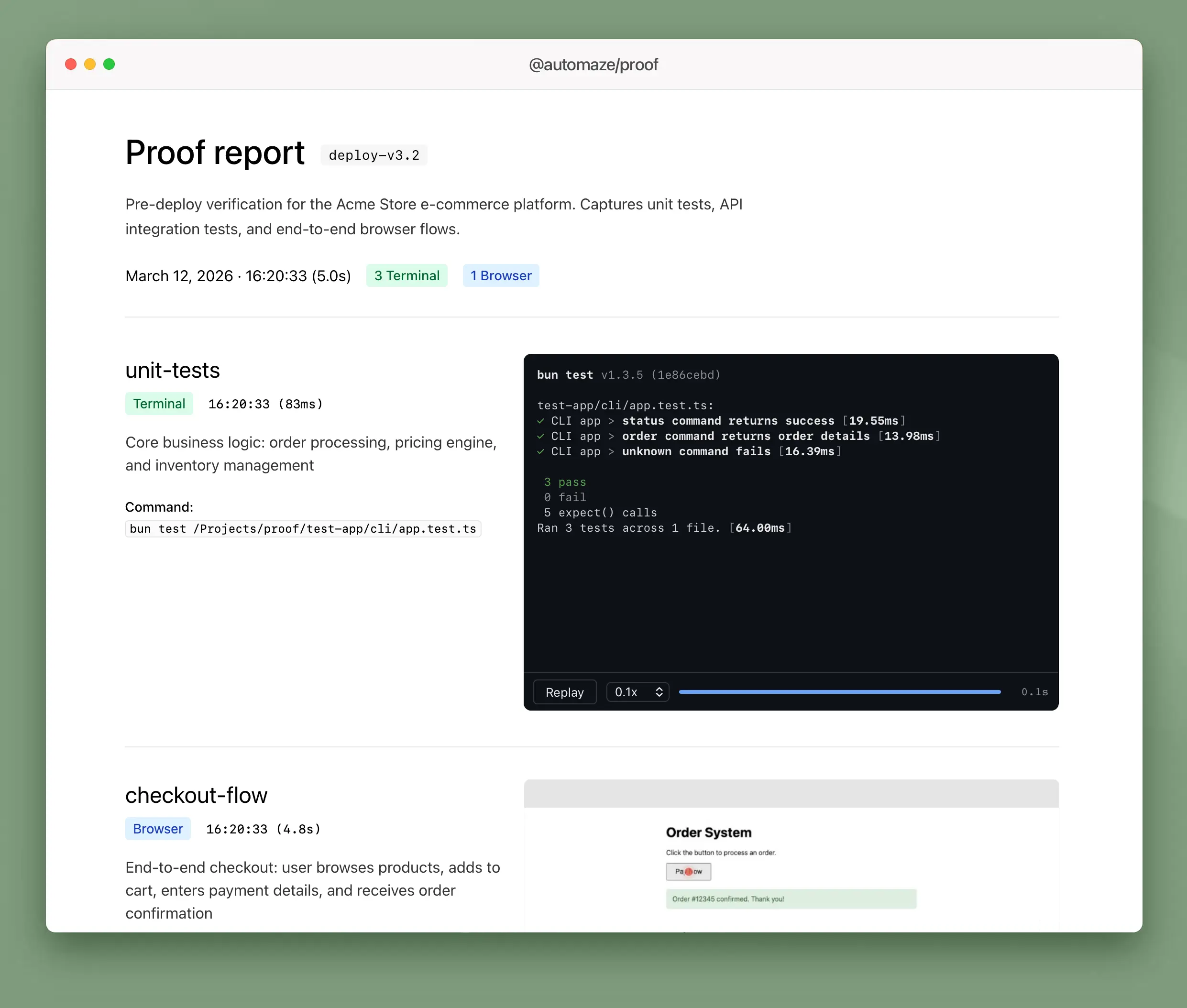
proof captures terminal output and browser interactions as shareable evidence -- animated HTML replays, videos, and structured reports. Run your tests through proof, get artifacts you can attach to PRs, send to stakeholders, or keep as a record.
[!TIP] Native mobile apps are supported. Proof can record iOS Simulator and Android emulator screens while your XCUITest or Espresso tests run, with automatic tap indicator overlays. See Simulator mode.
Get started
# macOS / Linux
curl -fsSL https://automaze.io/install/proof | sh

# Windows (PowerShell)
irm https://automaze.io/install/proof | iex

# Homebrew
brew install automazeio/tap/proof
Or install via npm (requires Node.js):
npm install -g @automaze/proofWhat it produces
Terminal capture -- runs any command, records output with real timing into a self-contained HTML player. No dependencies, works offline, plays anywhere.
Browser capture -- runs Playwright tests with video recording, collects .webm files with optional cursor highlighting.
Simulator capture -- records iOS Simulator or Android emulator screen while running your tests. Automatically overlays red dot + ripple tap indicators at the exact positions of each tap.
Report -- a proof.json manifest per run, plus a generated markdown summary linking to all artifacts.
Quick start
Use proof from TypeScript, Python, Go, or the CLI directly.
TypeScript
import { Proof } from "@automaze/proof";

const proof = new Proof({ appName: "my-app", proofDir: "./evidence" });
await proof.capture({ command: "npm test", mode: "terminal", label: "unit-tests" });
await proof.report();
Python (pip install automaze-proof)
from proof import Proof

p = Proof(app_name="my-app", proof_dir="./evidence")
p.capture(command="pytest tests/ -v", mode="terminal", label="unit-tests")
p.report()
Go (go get github.com/automazeio/proof-go)
p, _ := proof.New(proof.Config{AppName: "my-app", ProofDir: "./evidence"})
p.Capture(proof.CaptureOptions{Command: "go test ./...", Mode: "terminal", Label: "unit-tests"})
p.Report(proof.ReportOptions{})
CLI
proof capture --app my-app --command "make test" --mode terminal --label unit-tests --dir ./evidence
proof report --app my-app --dir ./evidence
That's it. evidence/ now contains an animated HTML replay of your test run and a manifest describing what was captured.
SDKs
All SDKs are thin wrappers around the same CLI binary.
| Language | Package | Install |
|----------|---------|---------|
| TypeScript | @automaze/proof | npm install @automaze/proof |
| Python | automaze-proof | pip install automaze-proof |
| Go | proof-go | go get github.com/automazeio/proof-go |
| Any language | CLI + JSON | proof --json with stdin/stdout |
Terminal mode
Runs any shell command. Captures stdout/stderr with real timestamps. Produces:
.cast-- asciicast v2, compatible with asciinema players.html-- self-contained player with play/pause, speed control (0.1x--4x), seek bar, and ANSI color rendering
Playback speed auto-adjusts based on recording duration so fast output is still readable at first play.
await proof.capture({
  command: "pytest tests/ -v",
  mode: "terminal",
  label: "api-tests",
  description: "API integration tests",
});
Works with any test runner or command: pytest, go test, cargo test, bun test, make check -- anything that writes to stdout.
Browser mode
Runs a Playwright test file with video recording enabled. Collects the .webm and copies it to the run directory.
await proof.capture({
  testFile: "tests/checkout.spec.ts",
  mode: "browser",
  label: "checkout",
  description: "User completes checkout flow",
});
Requires video: 'on' in your playwright.config.ts.
Device emulation
Capture with Playwright's built-in device descriptors (viewport, user-agent, touch emulation):
// Single device
await proof.capture({
  testFile: "tests/checkout.spec.ts",
  mode: "browser",
  device: "iPhone 14",
  label: "checkout-mobile",
});

// Multiple devices in one call
await proof.capture({
  testFile: "tests/checkout.spec.ts",
  mode: "browser",
  device: ["iPhone 14", "iPad Pro 11", "Desktop Chrome"],
  label: "checkout",
});
Custom viewports
Capture at specific viewport sizes without full device emulation:
await proof.capture({
  testFile: "tests/checkout.spec.ts",
  mode: "browser",
  viewport: ["390x844", "834x1194", "1440x900"],
  label: "checkout",
});
device and viewport are mutually exclusive. When passing an array, proof runs the test once per entry and produces separate recordings for each.
Cursor highlights
Optional. Adds a visible red cursor dot and click ripple to recordings:
import { getCursorHighlightScript } from "@automaze/proof";

test("checkout", async ({ page }) => {
  await page.addInitScript(getCursorHighlightScript());
  await page.goto("http://localhost:3000");
});
CLI
For non-TypeScript projects or CI pipelines:
# Capture terminal output
proof capture --app my-app --command "pytest tests/" --mode terminal --label tests

# Capture a Playwright test
proof capture --app my-app --test-file tests/checkout.spec.ts --mode browser

# Capture with device emulation
proof capture --app my-app --test-file tests/checkout.spec.ts --mode browser --device "iPhone 14"

# Capture at multiple viewports
proof capture --app my-app --test-file tests/checkout.spec.ts --mode browser --viewport "390x844,1440x900"

# Generate report
proof report --app my-app --format html

# Gate a pipeline on the wrapped command: exit with its code instead of 0
proof capture --app my-app --command "npm test" --mode terminal --fail-on-error
By default proof capture exits 0 even when the wrapped command fails (capturing evidence is separate from the command passing). Pass --fail-on-error (or set PROOF_FAIL_ON_ERROR=1) to propagate the wrapped command's exit code — handy in pre-push hooks and CI gates.
For automation, pipe JSON to stdin for multi-capture runs:
echo '{
  "action": "capture",
  "appName": "my-app",
  "captures": [
    { "command": "pytest tests/", "mode": "terminal", "label": "api" },
    { "command": "go test ./...", "mode": "terminal", "label": "go" }
  ]
}' | proof --json
All CLI output is JSON to stdout.
API reference
new Proof(config)
const proof = new Proof({
  appName: "my-app",       // Required. Used in directory path and manifest.
  proofDir: "./evidence",  // Default: os.tmpdir()/proof
  run: "deploy-v2",        // Default: HHMM of init time
  browser: {
    viewport: { width: 1280, height: 720 },
  },
  terminal: {
    cols: 120,             // Default: 120
    rows: 30,              // Default: 30
  },
});
proof.capture(options)
const recording = await proof.capture({
  command: "pytest tests/",          // Required for terminal mode
  testFile: "tests/orders.spec.ts",  // Required for browser mode
  testName: "should complete order", // Optional: Playwright -g filter
  label: "order-flow",               // Optional: filename prefix
  mode: "terminal",                  // "browser" | "terminal" | "auto"
  description: "Order flow tests",   // Optional: stored in manifest
  device: "iPhone 14",               // Optional: Playwright device (string or string[])
  viewport: "390x844",               // Optional: custom viewport (string or string[])
});

recording.path      // absolute path to artifact
recording.mode      // "browser" | "terminal" | "simulator"
recording.duration  // ms
recording.exitCode  // exit code of the wrapped command (0 = success)
capture() always records the run and returns the Recording even when the wrapped command fails — check recording.exitCode to gate on the result. When device or viewport is an array, capture() returns Recording[] instead of a single Recording.
proof.report()
Generates a markdown report from proof.json. Returns the report file path.
Output structure
evidence/my-app/20260312/deploy-v2/
  unit-tests-143012.cast       # asciicast recording
  unit-tests-143012.html       # animated HTML player
  checkout-143015.webm         # browser video
  proof.json                   # manifest (all entries)
  report.md                    # generated summary
Environment variables
| Variable | Description |
|----------|-------------|
| PROOF_DIR | Override default proof directory |
| PROOF_MODE | Override auto-detection (browser or terminal) |
| PROOF_FAIL_ON_ERROR | Set to 1 to exit with the wrapped command's exit code (same as --fail-on-error) |
Simulator mode
Record your iOS Simulator or Android emulator while running UI tests. Tap indicators are overlaid automatically so reviewers can see exactly what was tapped.
[!IMPORTANT] Simulators must be installed locally. Proof drives the simulator directly on your machine -- it does not provision or download simulators for you.
- iOS: Xcode and at least one iOS Simulator runtime must be installed (via Xcode → Settings → Platforms). The simulator will be booted automatically if not already running.
- Android: Android Studio and at least one AVD must be created (via Android Studio → Tools → Device Manager). The emulator will be booted automatically if not already running.
iOS (XCUITest)
proof capture \
  --app my-app \
  --mode simulator \
  --platform ios \
  --device-name "iPhone 17 Pro" \
  --command "xcodebuild test \
    -project MyApp.xcodeproj \
    -scheme MyApp \
    -destination 'platform=iOS Simulator,name=iPhone 17 Pro' \
    -parallel-testing-enabled NO \
    -disable-concurrent-destination-testing"
For pixel-accurate tap indicators, add ProofTapLogger.swift to your XCUITest target and replace element.tap() with element.proofTap(). Proof reads the tap log after the test and overlays red dot + ripple rings at the correct positions.
Android (Espresso / UIAutomator)
proof capture \
  --app my-app \
  --mode simulator \
  --platform android \
  --command "./run-espresso-tests.sh"
Write tap coordinates and relative timestamps to /tmp/proof-android-taps.json (or $PROOF_TAP_LOG) from your test script:
[
  { "element": "Login", "x": 540, "y": 1200, "offsetMs": 1000 },
  { "element": "Submit", "x": 540, "y": 1800, "offsetMs": 3500 }
]
Proof overlays red dot + ripple indicators at each position. If no tap log is found, the video is still captured without indicators.
Options
| Flag | Description |
|------|-------------|
| --platform | ios or android |
| --device-name | Simulator/AVD name to boot (uses running device if omitted) |
| --os | iOS version filter, e.g. 18.4 |
| --codec | iOS recording codec: h264 (default) or hevc |
Requirements
- Terminal mode: No external dependencies
- Browser mode:
@playwright/test,video: 'on'in Playwright config - Simulator mode (iOS): Xcode + Simulator,
ffmpegon PATH - Simulator mode (Android): Android SDK (
adb,emulator),ffmpegon PATH - Video duration:
ffprobeon PATH
Agent Skill
Proof ships with an agent skill that teaches AI coding agents how to use it. When installed, agents automatically use proof capture instead of ad-hoc approaches like tee or raw Playwright runs.
Benchmark (Claude Sonnet 4.6, 3 eval scenarios, 14 assertions):
| | With Skill | Without Skill | |---|---|---| | Pass Rate | 100% | 28% | | Assertions Passed | 14/14 | 4/14 |
The skill delivers a +72 point pass rate improvement. Full benchmark results
Support This Project
Proof was developed at Automaze for developers who ship, by developers who ship.
If Proof helps your team ship better software:
- ⭐ Star this repository to show your support
- 🐦 Follow @aroussi on X for updates and tips
[!TIP] Ship faster with Automaze. We partner with founders to bring their vision to life, scale their business, and optimize for success.
Other tools by Automaze
- VibeProxy - Native macOS menu bar app to use Claude Max & ChatGPT subscriptions with AI coding tools
- CCPM - Project management system for Claude Code using GitHub Issues and Git worktrees for parallel agent execution
- Open Royalties - The missing funding framework for bootstrappers, indie hackers, and creators
License
Apache 2.0. See LICENSE.