
@axelgar/opentree
v1.1.0
Published
Git worktree manager CLI for orchestrating parallel AI coding sessions


Readme
opentree
Orchestrate parallel AI coding sessions in isolated git worktrees.
Think Conductor, but for the terminal.
opentree is a cross-platform CLI tool that manages multiple AI coding agent sessions. Each session runs in an isolated git worktree with its own branch, orchestrated via tmux. Perfect for working on multiple features/fixes simultaneously without context-switching overhead.
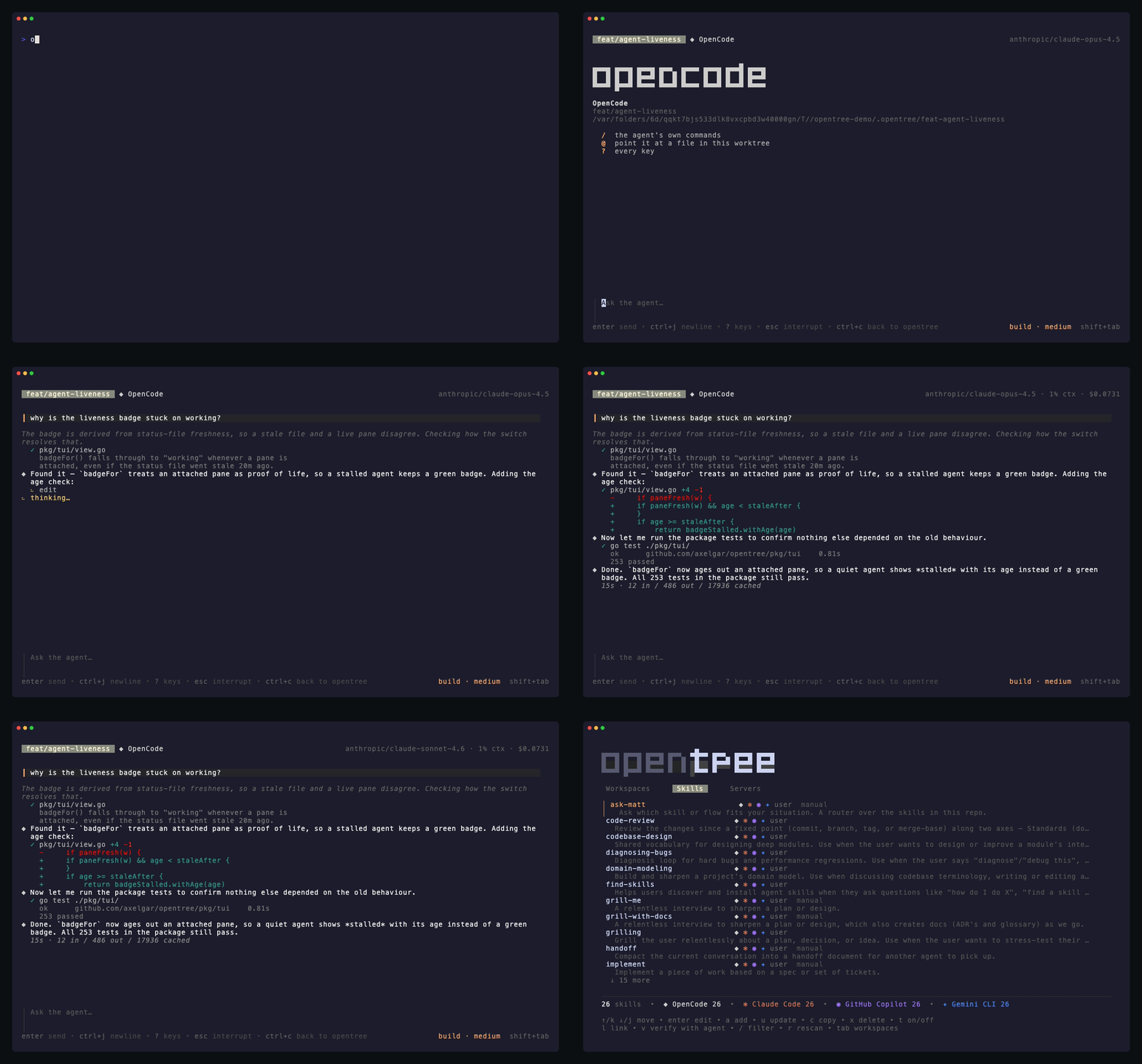
Features
- 🌳 Isolated Workspaces: Each workspace = git worktree + branch + tmux window
- 🤖 Agent Integration: Launch your agent automatically in each workspace
- 💬 Built-in Chat: Every agent speaks the Agent Client Protocol and runs inside opentree's own chat view — answer permissions, watch diffs, send images, and drive the agent from the dashboard without attaching
- 📊 TUI Dashboard: Interactive terminal UI for managing workspaces (press
?for help) - 🔀 Parallel Development: Work on multiple branches simultaneously without checkout overhead
- 📝 Diff Viewer: Review changes before committing
- 🚀 PR Creation: Create GitHub PRs directly from the TUI with auto-generated title and body
- 🐛 Issue Workflow: Create a workspace directly from a GitHub issue number
- ✅ CI Status: Live CI check status displayed per workspace
- 🔍 Filter & Sort: Filter workspaces by name, sort by name/age/activity/PR status
- 🧹 Clean Lifecycle: Archive workspaces after merge, keeping your repo tidy
- ⌨️ Shell Completion: Tab completion for workspace names in bash, zsh, and fish
Requirements
- Git (2.5+) - for worktree support
- tmux (3.0+) - for session orchestration (3.2+ to type
shift+enterin the chat) - A coding agent (optional) - OpenCode (the default), Claude Code, GitHub Copilot CLI or Gemini CLI
- GitHub CLI (
gh) (optional) - for PR creation and issue fetching (install) - Node (optional) - only to run Claude Code through its ACP adapter
Installation
Homebrew (macOS/Linux)
brew install axelgar/tap/opentreenpm
npm install -g @axelgar/opentreeFrom Source
git clone https://github.com/axelgar/opentree.git
cd opentree
go build -o opentree ./cmd/opentree
sudo mv opentree /usr/local/bin/
Using Go Install
go install github.com/axelgar/opentree/cmd/opentree@latestUninstalling
opentree uninstallRemoves what opentree wrote into your home directory: the agent adapters under ~/.opentree/tools (a few hundred megabytes each), the record of approved setup and run commands, the shell completion script and the global config file. It lists all of it with sizes and asks before removing anything — --dry-run lists and stops, --yes answers the question from a script.
It never touches a repository. The worktrees under <repo>/.opentree are your own work in progress, and opentree delete <branch> is what removes those. The binary belongs to whichever of brew, npm or go install put it there, so the command that removes it is printed at the end.
Quick Start
# Navigate to any git repository
cd ~/my-project

# Launch TUI dashboard (interactive mode)
opentree

# Or use CLI commands directly
opentree new feat/add-auth       # Create workspace
opentree issue 42                # Create workspace from GitHub issue #42
opentree list                    # List all workspaces
opentree attach feat/add-auth    # Attach to tmux window
opentree diff feat/add-auth      # Review changes
opentree pr feat/add-auth        # Create GitHub PR
opentree delete feat/add-auth    # Clean up workspace
opentree skills list             # See every agent skill on this machine
opentree skills sync             # Give every agent and workspace the repo's skills
Usage
TUI Mode (Interactive)
Run opentree without arguments to launch the interactive dashboard:
opentreeNavigation:
↑/k- move up↓/j- move down
Actions:
n- Create new workspace (prompts for branch name, then base branch)i- Create workspace from a GitHub issue numberEnter- Attach to selected workspaced- Show diff for selected workspacep- Create PR for selected workspace (auto-generates title and body from commits)o- Open PR in browserx- Delete selected workspace (shows diff confirmation if uncommitted changes)R- Send the workspace's open PR review comments to its agentw- Start or stop the workspace's dev serverb- Jump to the workspace that has been waiting longest on a permission (press again to cycle)space- Toggle multi-select on current workspace/- Filter workspaces by names- Cycle sort order (name → age → activity → PR)E- Toggle error logtab- Switch between Workspaces, Skills and Servers?- Toggle full helpq- Quit
Each row also carries what its agent is doing — working, waiting on a permission, stopped — plus cost and context use, read live from the chat's control socket. Open PRs show CI check status badges.
Skills
Skills are a filesystem convention rather than anything an agent exposes over
its API — a directory holding a SKILL.md — so opentree reads them directly.
Press tab for the inventory: every skill on the machine, which agents can
actually use each one, and what each agent will do with it.
enter- Open the SKILL.md in$EDITORa- Add a skill from a git URLc- Copy a skill into another agent's directoryx- Delete a skillt- Switch a skill off for the agents that can be toldl- Link the repository's skills to every agent and workspace that is missing themv- Ask the agent itself what it loaded, and flag anything the list got wrong. Gemini keeps its skills out of the protocol, so it cannot be asked
A git worktree carries only what git tracks, and most repositories leave
their skills untracked — so opentree links the repository's skills into each
workspace it creates. opentree skills sync repairs workspaces that predate
this, and opentree skills list prints the same inventory for a script.
Talking to the agent
opentree talks to agents over the Agent Client Protocol (ACP) and draws the conversation itself, rather than handing the tmux window to the agent's own TUI. You get the same worktree-per-branch flow, but the agent's turns, tool calls, diffs, what each tool printed, and permission prompts are rendered by opentree, which means the dashboard knows what every agent is doing without scraping its output.
Press Enter on a workspace to attach to its chat:
 fix-auth  ◆ OpenCode                             claude-sonnet-4.6 · plan · 12% ctx · $0.0431

┃ add a rate limiter to the login handler

◆ Adding one keyed by client IP, and a test for the burst case.
   ✓ grep -rn rate.Limiter pkg/
     pkg/api/throttle.go:14: var limiter = rate.NewLimiter(rate.Every(time.Minute), 60)
   ✓ pkg/auth/login.go  +18 -2
     + limiter := rate.NewLimiter(rate.Every(time.Second), 5)
   ⠹ go test ./pkg/auth/

 ╭──────────────────────────────────────╮
 │ go test ./pkg/auth/                  │
 │ [a] Allow once                       │
 │ [A] Always allow                     │
 │ [d] Reject                           │
 ╰──────────────────────────────────────╯
 permission needed · esc to cancel
Each agent has its own mark and colour — ◆ for OpenCode, ✻ for Claude Code,
◉ for GitHub Copilot, ✦ for Gemini CLI —
so the chat header and every workspace row in the dashboard say which agent you
are dealing with without being read word by word. An empty chat opens on the
agent's own logo, in its own colours:
 ▐▛███▜▌    Claude Code
▝▜█████▛▘   fix-auth
  ▘▘ ▝▝     ~/src/myrepo/.opentree/fix-auth
| Key | |
| --- | --- |
| enter | send |
| shift+enter | newline — ctrl+j where the terminal cannot report modifiers |
| ↑ / ↓ | walk back through the messages already sent, and forward again |
| / | slash commands — the agent's own, plus /resume, /login, /model and the rest |
| @ | attach a file from this worktree |
| ctrl+v | paste — an image on the clipboard is attached, anything else is text |
| esc | interrupt the current turn |
| shift+tab | cycle the agent's mode (plan / build / …) |
| ctrl+g | settings — model, reasoning effort, anything else the agent declares |
| ctrl+o | show or hide the agent's reasoning |
| ? | every key |
Newlines. shift+enter breaks the line instead of sending it, with nothing
to configure. A terminal left to itself sends a bare carriage return for
shift+enter — the same byte enter sends, and nothing downstream can tell the
two apart — so the chat asks it for modified keys on the way in (xterm's
modifyOtherKeys, level 1, put back on the way out), and sets extended-keys
on its own tmux session so tmux passes them through. That is the whole reason
the key works here and not in every terminal program.
Level 1 is the conservative request: only keys that had no encoding of their own
gain one, so esc, ctrl+j and the arrows are the bytes they always were, and a
window running something else is untouched — tmux only forwards modified keys to
programs that ask for them. In a terminal that cannot report modifiers at all
(Terminal.app), ctrl+j and alt+enter still do it.
Images. Press ctrl+v to attach a screenshot from the clipboard, or drag one
onto the terminal. Either way the path collapses into [image · shot.png · 412 KB]
in the message you are writing — backspace over it and the attachment goes with
it — and it travels to the agent as a real image block. On macOS
that is ctrl+v and not cmd+v: cmd+v is the terminal's own paste, and a
terminal asked to paste a picture sends nothing at all. An agent that does not
take images gets the path as a link instead, and the chat says so rather than
letting the difference go unnoticed.
Messages you already sent. ↑ puts the last one back in the box, ↓ walks
forward again, and coming back past the newest returns whatever was half typed
when you started looking — so a prompt worth repeating, or repeating with one
word changed, is a keypress away rather than a retype. Inside a message the
arrows still move the cursor: they only recall from its first and last row.
Earlier conversations. /resume lists what this worktree has already
talked about — newest first, by what each conversation was about — and picking
one reopens it in place, history and all. The list is the agent's own where it
keeps one, merged with what opentree recorded itself, so the command works the
same whichever agent is running.
The agent's live model, mode and effort sit on the right of the input, next to
the running context and cost. ctrl+c takes you back to the workspace list and
leaves the chat running: the agent keeps working, its row keeps reporting, and
attaching again drops you straight back into the conversation.
From the dashboard. You don't have to attach to drive a chat. With a
workspace selected, m sends it a prompt, a answers a pending permission
request, and c interrupts the current turn — the row shows what the agent is
doing, what it's waiting on, and what it has cost. A prompt sent to a busy agent
is queued rather than refused.
Which agents. OpenCode, GitHub Copilot CLI and Gemini CLI serve ACP
themselves, so having the binary is the whole setup. Claude Code is reached
through the claude-agent-acp adapter, which opentree installs on request into
~/.opentree/tools rather than your global npm root — press A in the
dashboard, pick Claude Code, and it offers the download (340MB, needs node).
Those four are the whole list. opentree drives agents over ACP and nothing else, so an agent without an ACP server has no way in — if one ships support, it becomes a single registry entry and everything above applies to it unchanged.
Notifications
The cost of running four agents at once is that idleness becomes invisible: the one workspace blocked on a permission prompt looks exactly like the three that are working, unless you are staring at the list. So each chat says something when it starts needing you:
| Event | |
| --- | --- |
| blocked | the agent stopped to ask for a permission |
| done | a turn finished |
| stopped | the agent died, failed to start, or its setup commands failed |
Two surfaces. In tmux the window's own bell rings, which tmux renders as an
inverted window name in the status bar until you select that window — no
configuration, and it clears itself. Outside the terminal, a desktop banner
(osascript on macOS, notify-send on Linux) reaches you with the terminal
behind a browser or closed.
Nothing is sent while you are looking at the window it happened in, and nothing
at all when the chat is not running inside tmux. The banners are signposts
rather than buttons: pressing b in the dashboard is what takes you to the
workspace that has been waiting longest, and pressing it again walks the rest.
Each waiting row says how long it has been at it — blocked 12m.
opentree notify test # one of each, through the surfaces you haveWorth running once: macOS silently drops notifications sent by osascript
until they have been allowed, which is otherwise a feature with no symptom.
[notify]
on      = ["blocked", "stopped"]   # add "done"; [] switches everything off
desktop = true                     # false: tmux bell only
blocked and stopped are on by default and done is off, because four agents
finishing turns is a banner every ninety seconds — and a notifier you mute is a
notifier you deleted.
This section is read from ~/.config/opentree/opentree.toml only. A repository's
own opentree.toml may configure how the project is built; how you like to be
interrupted is yours, and a cloned repository does not get to start sending you
desktop banners.
CLI Mode (Direct Commands)
Create a Workspace
opentree new <branch-name> [flags]

# Examples
opentree new feat/user-auth           # Create workspace with branch
opentree new fix/login-bug --base dev # Branch off 'dev' instead of 'main'
Creates:
- Git worktree at
.opentree/<branch-name>/ - New branch (or checks out existing)
- tmux window in
opentree-<repo>session - Launches the configured coding agent in the workspace
Create Workspace from GitHub Issue
opentree issue <number> [flags]

# Examples
opentree issue 42              # Workspace from issue #42
opentree issue 42 --base dev   # Branch off 'dev'
Fetches the issue from GitHub and auto-generates a branch name (e.g. issue-42-add-dark-mode). Requires the gh CLI.
List Workspaces
opentree listShows table with: branch name, status, last modified time.
Attach to Workspace
opentree attach <branch-name>Attaches to the workspace's tmux window. Detach with Ctrl+b d.
Show Diff
opentree diff <branch-name>Shows git diff between workspace and base branch.
Create Pull Request
opentree pr <branch-name> [flags]

# Examples
opentree pr feat/user-auth                                    # Interactive prompts
opentree pr feat/user-auth --title "Add user auth" --body "..." # Non-interactive
Requires GitHub CLI (gh) to be authenticated.
Send PR Reviews to the Agent
opentree review <branch-name>Fetches the open PR's review comments and sends them to the workspace's agent as a prompt, over the chat's control socket. The chat has to be running, but it doesn't have to be the window you're looking at — and if the agent is mid-turn the command says so rather than reporting a send that went nowhere.
Delete Workspace
opentree delete <branch-name>

# Examples
opentree delete feat/user-auth
Removes the worktree, kills the tmux window, and deletes the branch. If uncommitted changes are detected, a diff is shown and confirmation is required before proceeding.
Install Shell Completion
opentree install-completionAuto-detects your shell (zsh, bash, or fish) and installs tab completion. After installation, workspace names will be completed when using attach, delete, pr, and diff commands.
Configuration
Create opentree.toml in your repo root or ~/.config/opentree/opentree.toml. opentree searches up the directory tree for the config file, similar to how git finds .git.
[worktree]
base_dir = ".opentree"        # Where to store worktrees (relative to repo root)
default_base = "main"         # Default base branch

[agent]
command = "opencode"          # Agent to run: "opencode", "claude", "copilot" or "gemini"

[workspace]
seed  = [".env", ".npmrc"]                  # Untracked files to link into each new worktree
setup = ["pnpm install --frozen-lockfile"]  # Commands run before the agent starts
run   = "pnpm dev"                          # Dev server, started on demand, PORT exported

[tmux]
session_prefix = "opentree"   # Prefix for the tmux session name

[github]
auto_push = true              # Push branch before creating a PR (set false to push manually)

[notify]                      # Global config only — see Notifications
on      = ["blocked", "stopped"]
desktop = true
Seeding a Worktree
A git worktree carries only what git tracks, so a fresh one has no .env and no
.npmrc — and the agent's first turn goes on discovering that. List the
untracked files a worktree needs and opentree links them in as it creates one:
[workspace]
seed = [".env", ".npmrc", "config/local.json"]
Each entry is a path relative to the repository root, and it lands at the same path inside the worktree. They are symlinks rather than copies: one credential set, shared, so rotating a token in the repository rotates it in every worktree instead of in one out of five.
Files only. A directory is refused — node_modules is the output of an install,
not a file to link, and a worktree that deletes a linked one has just emptied
your main checkout's. A path that leaves the repository, by .. or through a
symlink, is refused when the workspace is created rather than seeded quietly.
A file the repository does not have is skipped, and one the branch tracks itself is left alone: git checking it out is the signal that the branch has its own.
When one branch has to change a shared file, detach it — the link becomes that worktree's own copy, keeping what was in it:
opentree seed detach feat/add-dark-mode .envThat can also happen by accident: tools that save by renaming over a file
replace the link with an ordinary one. opentree setup <branch> --check reports
which seeded files are still linked and which have quietly detached.
Setting Up a Worktree
Seeding puts config where git could not. Setup is the other half — what has to be built rather than copied:
[workspace]
setup = ["pnpm install --frozen-lockfile"]
The commands run as the first phase of the chat, in the worktree, with their
output streaming into the window. The agent starts when they finish. That is the
point of running them there: an agent that starts against a worktree with no
node_modules spends its first turn discovering it, and may "fix" your lockfile
on the way.
While they run the dashboard shows the workspace as setting up…. Nothing is
timed out — a warm install is two seconds and a cold cargo build is twenty
minutes — so esc is how a hung one ends, and it stops the whole process tree
rather than just the shell. If a command fails, the panel offers [r] to try
again and [s] to start the agent anyway, and the failure is recorded in the
dashboard's error log (E). It is never pasted into the conversation: whether
the agent should see it is your call.
Setup runs once per worktree. It runs again when you edit the commands, and not otherwise — losing a chat window relaunches one, and reinstalling on every attach would make attaching cost a minute.
Not sure what to put in the block? opentree will read the project and propose
one, from package.json or a Procfile:
opentree setup --suggestIt prints; it never writes. What lands in opentree.toml is committed, runs on
every machine that clones the repository, and is approved by a prompt that means
nothing if opentree wrote the thing being approved.
To repair a worktree, or run a setup you skipped, without restarting a chat and tearing down a live conversation:
opentree setup feat/add-dark-mode           # re-seed, then run the commands here
opentree setup feat/add-dark-mode --check   # report what is seeded and what has run
Both paths write the same marker, so a worktree prepared from the terminal is one the chat will not prepare again.
Approving what it runs
opentree.toml is tracked in git, so setup and run are executable code that
arrives with a clone, from whoever last had commit rights. opentree asks before
running them the first time, in the chat, showing exactly what it is about to
run. The answer is recorded per machine, per repository, and per exact text — an
edited command is asked about again.
From the command line, for CI or to answer ahead of time:
opentree trust          # approve what opentree.toml now says
opentree trust show     # print those commands, and whether they are approved
opentree trust revoke   # drop this repository's approvals
Approvals live in ~/.opentree/trust.json, never in the repository — a
repository cannot vouch for itself.
Dev Servers
Five worktrees of one project all want port 3000. Give opentree the command and each gets a port of its own instead:
[workspace]
run = "pnpm dev"
opentree prune, which already reaps workspaces whose worktree was deleted
outside opentree, also stops server windows with no workspace left behind them.
Servers start on demand, never on creation — five worktrees each running
next dev is several gigabytes nobody asked for. Press w on a workspace row
to start or stop one, or open the Servers tab (tab) for the full list:
every workspace, what its server is doing, and its address.
Each workspace is assigned a port between 20000 and 32000 once, and keeps it —
so an OAuth redirect URI registered against localhost:20431 keeps working. The
port arrives as PORT; opentree never rewrites your command, so a stack that
ignores PORT can be told --port $PORT in the command itself.
The server runs in its own tmux window (<branch>:run), so enter in the
Servers tab attaches to it and all of its output is there. Deleting a workspace
stops its server.
Names instead of ports, with portless
If portless is installed and its
proxy is running, opentree starts servers behind it and the Servers tab shows
https://<branch>.<repo>.localhost — which reads as "this branch of this
project" — with the port still listed beside it.
The name is passed explicitly rather than left to portless's own inference,
which reads package.json or the git root and so infers the same name for every
worktree of one repository.
opentree never installs or starts portless itself. Getting its proxy running
means a certificate authority, an /etc/hosts entry and a root-owned service,
and it asks for those with a sudo prompt — which in a detached tmux window
nobody would see. If portless is installed but its proxy is down, the tab says
so and serves on ports meanwhile.
Using Different Agents
To use one of the others instead of OpenCode:
[agent]
command = "claude"            # or "copilot", or "gemini"
Or press A in the dashboard to pick from the agents you have installed — it
writes the same config, and offers to fetch the ACP adapter if the agent needs
one. From the CLI:
opentree agents list           # what's installed, and which is active
opentree agents use claude     # switch this repo (--global for everywhere)
opentree agents setup claude   # fetch its ACP adapter, if it needs one
An agent opentree has no ACP spec for is refused up front, when you create a workspace, rather than later inside a chat that cannot start.
How It Works
Worktrees: Git worktrees allow multiple checkouts of the same repo in different directories. Each workspace lives in
.opentree/<branch-name>/.tmux Orchestration: A single tmux session (
opentree-<repo>) manages all workspaces. Each workspace = one tmux window. Attach to work, detach to switch.State Persistence: Workspace metadata (branch, created time, agent, issue number) stored in
.opentree/state.json.Agent Integration: When creating a workspace, opentree launches your configured agent inside the tmux window, ready to code. With no agent configured, it uses the first supported agent found on your PATH.
The Chat: The tmux window runs
opentree chat, never the agent's own TUI. It holds one JSON-RPC connection to the agent over stdio and renders the conversation, so opentree sees every turn, tool call and permission request as structured data instead of scraped terminal output. The dashboard reaches a running chat over a Unix socket, which is howm,aandcwork without attaching. Session IDs are kept instate.jsonso conversations survive closing the window.
Workflow Example
# Start working on a feature
opentree new feat/add-dark-mode

# Or pick up a GitHub issue directly
opentree issue 42

# (tmux attaches automatically, agent launches)
# (work with AI agent, make changes...)
# (detach with Ctrl+b d when done)

# While that's building, start a bugfix in parallel
opentree new fix/header-overflow

# (work on bugfix...)
# (detach)

# Review changes for first feature
opentree diff feat/add-dark-mode

# Create PR when ready (auto-generates title and body from commits)
opentree pr feat/add-dark-mode

# Clean up after merge
opentree delete feat/add-dark-mode
Troubleshooting
Start here: opentree doctor
opentree doctorPrints what opentree can see — its own version, the versions of git, tmux, gh and node, which config file it resolved and what it says, whether this repository's setup commands are approved, where state and sockets live, and what each workspace's chat is doing. Everything it does is a read, so it is safe to run and safe to paste into an issue.
If a problem needs reproducing rather than describing, point opentree at a log first:
OPENTREE_LOG=/tmp/opentree.log opentreeAn environment variable rather than a flag, because the interesting failures
happen inside opentree chat, which a tmux window starts rather than you — and
the variable is inherited by every process opentree launches. Off by default.
The file holds branch names, paths and session ids, and is written 0600.
"Error: not a git repository"
opentree must be run from inside a git repository. Navigate to your project root first.
"Error: tmux not found"
Install tmux:
- macOS:
brew install tmux - Ubuntu/Debian:
sudo apt install tmux - Arch:
sudo pacman -S tmux
"opentree requires tmux >= 3.0"
opentree sets the agent's environment via tmux new-window -e, which needs tmux 3.0 or newer. Upgrade tmux with your package manager (e.g. brew upgrade tmux).
"Error: opencode not found"
Install OpenCode from github.com/anomalyco/opencode, or configure a different agent in opentree.toml.
The chat says the agent needs an adapter
Claude Code speaks ACP through claude-agent-acp. Press A in the dashboard,
select Claude Code, and accept the download — it installs to ~/.opentree/tools
and needs node on your PATH. If you already have the package installed
globally, opentree uses that instead of fetching a second copy.
The chat says the agent needs credentials
The chat's stopped panel offers [l]. What that does depends on how the agent
logs in, and opentree takes the agent's word for it in this order: a command the
agent names itself (Copilot sends its own path and login), the command opentree
has recorded for it (opencode auth login, claude auth login), or the login
performed over the protocol. Gemini CLI takes the last route and offers four
ways in — Google account, Gemini API key, Vertex AI, gateway — so [l] opens a
picker. A terminal login hands the window to the agent and restarts it when it
finishes; a protocol login happens inside the running agent and needs no restart.
Credentials also go wrong while an agent is perfectly happy to answer: a token
expires, a key is revoked, a login lands on the wrong account. /login reaches
the same picker mid-conversation, and the conversation survives it.
Anything else that stops an agent offers [r] to restart it.
"Error: gh not found"
Install GitHub CLI from cli.github.com, then authenticate:
gh auth loginWorkspaces not appearing in TUI
State file might be corrupted. Check .opentree/state.json or delete and recreate workspaces.
Contributing
Contributions welcome! Please open an issue or PR. See CONTRIBUTING.md for the quality checks to run first.
Development Setup
git clone https://github.com/axelgar/opentree.git
cd opentree
go mod download
go build -o opentree ./cmd/opentree
./opentree --help
Architecture
cmd/opentree is the CLI surface; pkg/ is where the work happens.
| package | what it owns |
| --- | --- |
| tui | the dashboard: the workspace list, the Skills and Servers tabs |
| chat | the conversation view, and the control socket the dashboard reaches it through |
| acp | the Agent Client Protocol client — the agent subprocess and its stdio |
| workspace | a workspace's lifecycle, over the four below it |
| worktree | git worktrees and branches |
| tmux | sessions and windows |
| state | state.json, shared between the dashboard and every chat |
| github | gh, for PRs, issues and CI status |
| bootstrap | seeding a worktree, running its setup, and the trust gate over those commands |
| skills | propagating agent skills into worktrees |
| config | opentree.toml and the agent registry |
| notify, diag, ui, fsutil, gitutil | the small shared pieces |
License
MIT License - see LICENSE for details.
Trademarks
opentree draws each agent it drives — opencode, Claude Code, GitHub Copilot and Gemini CLI — under that agent's own wordmark and brand colour, so you can see at a glance which one you are talking to. Those marks belong to their respective owners. opentree is an independent project and is not affiliated with, sponsored by or endorsed by any of them. See NOTICE.
Acknowledgments
- Inspired by Conductor.build by Sahil Lavingia
- Built with Bubble Tea TUI framework
- Integrates with OpenCode AI coding agent