
@azure/web-pubsub-client
v1.1.0
Published
Azure Web PubSub Client


Readme
Web PubSub client library for JavaScript
Azure Web PubSub is a cloud service that helps developers easily build real-time features in web applications with publish-subscribe patterns at scale.
Any scenario that requires real-time messaging between server and clients or among clients following publish-subscribe patterns can benefit from using Web PubSub. Developers no longer need to poll the server by sending repeated HTTP requests at intervals, which is wasteful and hard-to-scale.
As shown in the diagram below, your clients establish WebSocket connections with your Web PubSub resource. This client library:
- simplifies managing client connections
- simplifies sending messages among clients
- automatically retries after unintended drops of client connection
- reliably deliveries messages in number and in order after recovering from connection drops

Details about the terms used here are described in key concepts section.
This library is hosted on NPM.
Getting started
Currently supported environments
Prerequisites
1. Install the @azure/web-pubsub-client package
npm install @azure/web-pubsub-client2. Connect with your Web PubSub resource
A client uses a Client Access URL to connect and authenticate with the service, which follows a pattern of wss://<service_name>.webpubsub.azure.com/client/hubs/<hub_name>?access_token=<token>. A client can have a few ways to obtain the Client Access URL. For this quick start, you can copy and paste one from Azure Portal shown below. (For production, your clients usually get the Client Access URL generated on your application server. See details below )
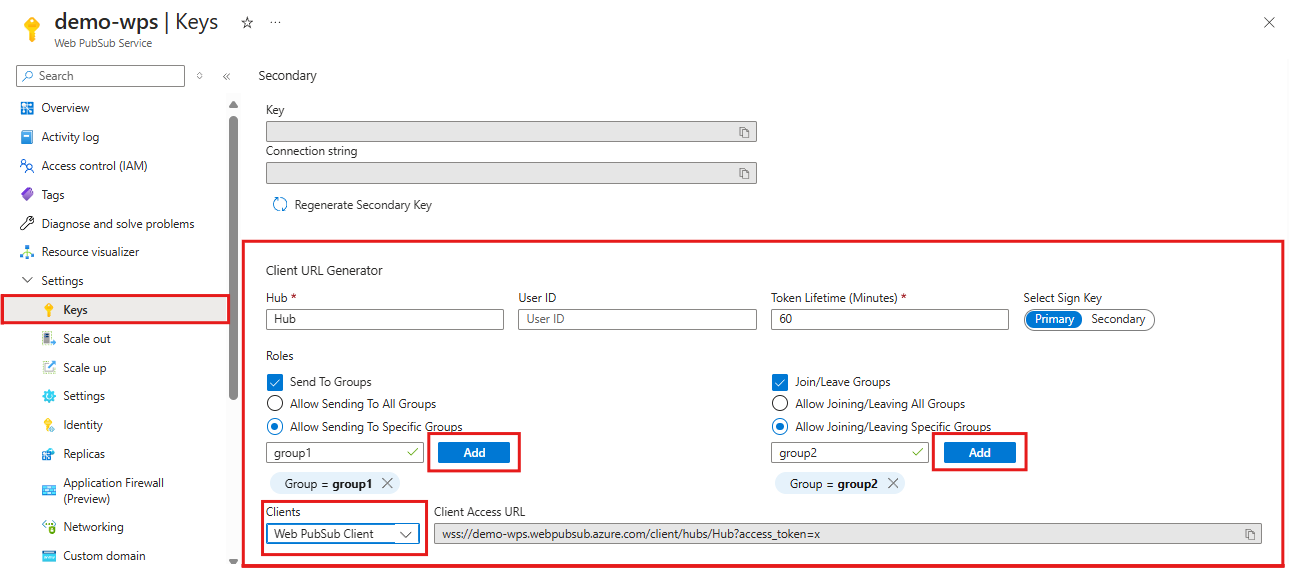
As shown in the diagram above, the client has the permissions to send messages to and join a specific group named "group1".
import { WebPubSubClient } from "@azure/web-pubsub-client";

// Instantiates the client object
const client = new WebPubSubClient("<client-access-url>");

// Starts the client connection with your Web PubSub resource
await client.start();
3. Join groups
Note that a client can only receive messages from groups that it has joined and you need to add a callback to specify the logic when receiving messages.
import { WebPubSubClient } from "@azure/web-pubsub-client";

const client = new WebPubSubClient("<client-access-url>");

// Registers a listener for the event 'group-message' early before joining a group to not miss messages
client.on("group-message", (e) => {
  console.log(`Received message: ${e.message.data}`);
});

// Starts the client connection with your Web PubSub resource
await client.start();

// A client needs to join the group it wishes to receive messages from it
const groupName = "group1";
await client.joinGroup(groupName);
4. Send messages to a group
import { WebPubSubClient } from "@azure/web-pubsub-client";

const client = new WebPubSubClient("<client-access-url>");
await client.start();

const groupName = "group1";
await client.joinGroup(groupName);

// Send a message to a joined group
await client.sendToGroup(groupName, "hello world", "text");
5. Invoke upstream events (preview)
import { WebPubSubClient } from "@azure/web-pubsub-client";

const client = new WebPubSubClient("<client-access-url>");
await client.start();

const result = await client.invokeEvent("processOrder", { orderId: 1 }, "json");
console.log(`Invocation result: ${JSON.stringify(result.data)}`);
invokeEvent sends an invoke request to the service, awaits the correlated invokeResponse, and returns the payload. You can abort the invocation by passing { abortSignal }.
Service-initiated invocations are not yet supported.
6. Stream messages to a group (preview)
You can send a large or continuous payload to a group as an ordered stream of fragments, and consume each inbound stream as a whole unit on the receiving side.
import { WebPubSubClient } from "@azure/web-pubsub-client";

const client = new WebPubSubClient("<client-access-url>");

// Receiving side: subscribe once, then consume each inbound stream with for-await.
client.onGroupStream(
  async (stream) => {
    const parts: string[] = [];
    try {
      for await (const message of stream) {
        parts.push(message.data as string);
      }
      console.log(`Stream ${stream.streamId} completed: ${parts.join("")}`);
    } catch (err) {
      console.log(
        `Stream ${stream.streamId} failed: ${
          (
            err as {
              name?: string;
            }
          ).name
        }`,
      );
    }
  },
  { handleFromStart: true },
);

await client.start();
const groupName = "group1";
await client.joinGroup(groupName);

// Sending side: write a logical stream in ordered fragments, then end it.
const stream = await client.openGroupStream(groupName);
await stream.write("hello ", "text");
await stream.write("world", "text");
await stream.end();
onGroupStream returns a subscription with close() for unregistering the listener. Each callback receives a GroupStream that is async iterable over its fragments. openGroupStream returns a GroupStreamWriter you use to write fragments, end the stream successfully, or abort it with an error.
Examples
Add callbacks for connected, disconnected and stopped events
- When a client is successfully connected to your Web PubSub resource, the
connectedevent is triggered.
client.on("connected", (e) => {
  console.log(`Connection ${e.connectionId} is connected.`);
});- When a client is disconnected and fails to recover the connection, the
disconnectedevent is triggered.
client.on("disconnected", (e) => {
  console.log(`Connection disconnected: ${e.message}`);
});- The
stoppedevent will be triggered when the client is disconnected and the client stops trying to reconnect. This usually happens after theclient.stop()is called, orautoReconnectis disabled or a specified limit to trying to reconnect has reached. If you want to restart the client, you can callclient.start()in the stopped event.
// Registers a listener for the "stopped" event
client.on("stopped", () => {
  console.log(`Client has stopped`);
});
Use a negotiation server to generate Client Access URL programatically
In production, clients usually fetch the Client Access URL from an application server. The server holds the connection string to your Web PubSub resource and generates the Client Access URL with the help from the server library @azure/web-pubsub.
1. Application server
The code snippet below is an example of an application server exposes a /negotiate path and returns the Client Access URL.
import express from "express";
import { WebPubSubServiceClient } from "@azure/web-pubsub";

const app = express();
const port = 8080;

// Imports the server library, which is different from the client library
const hubName = "sample_chat";
const serviceClient = new WebPubSubServiceClient("<web-pubsub-connectionstring>", hubName);

// Note that the token allows the client to join and send messages to any groups. It is specified with the "roles" option.
app.get(
  "/negotiate",
  async (
    _req: unknown,
    res: {
      json: (body: { url: string }) => void;
    },
  ) => {
    const token = await serviceClient.getClientAccessToken({
      roles: ["webpubsub.joinLeaveGroup", "webpubsub.sendToGroup"],
    });
    res.json({
      url: token.url,
    });
  },
);

app.listen(port, () =>
  console.log(`Application server listening at http://localhost:${port}/negotiate`),
);
2. Client side
The code snippet below is an example of the client side.
import { WebPubSubClient } from "@azure/web-pubsub-client";

const client = new WebPubSubClient({
  getClientAccessUrl: async () => {
    const negotiate = await fetch("/negotiate");
    const { url } = (await negotiate.json()) as {
      url: string;
    };
    return url;
  },
});

await client.start();
To see the full code of this sample, please refer to samples-browser.
A client consumes messages from the application server or joined groups
A client can add callbacks to consume messages from your application server or groups. Please note, for group-message event the client can only receive group messages that it has joined.
// Registers a listener for the "server-message". The callback will be invoked when your application server sends message to the connectionID, to or broadcast to all connections.
client.on("server-message", (e) => {
  console.log(`Received message ${e.message.data}`);
});

// Registers a listener for the "group-message". The callback will be invoked when the client receives a message from the groups it has joined.
client.on("group-message", (e) => {
  console.log(`Received message from ${e.message.group}: ${e.message.data}`);
});
Handle rejoin failure
When a client is disconnected and fails to recover, all group contexts will be cleaned up in your Web PubSub resource. This means when the client reconnects, it needs to rejoin groups. By default, the client has autoRejoinGroup option enabled.
However, you should be aware of autoRejoinGroup's limitations.
- The client can only rejoin groups that it's originally joined by the client code not by the server side code.
- "rejoin group" operations may fail due to various reasons, e.g. the client doesn't have permission to join the groups. In such cases, you need to add a callback to handle this failure.
import { WebPubSubClient } from "@azure/web-pubsub-client";

// By default autoRejoinGroups=true. You can disable it by setting to false.
const client = new WebPubSubClient("<client-access-url>", { autoRejoinGroups: true });

// Registers a listener to handle "rejoin-group-failed" event
client.on("rejoin-group-failed", (e) => {
  console.log(`Rejoin group ${e.group} failed: ${e.error}`);
});
Operation and retry
By default, the operation such as client.joinGroup(), client.leaveGroup(), client.sendToGroup(), client.sendEvent() has three retries. You can configure through the messageRetryOptions. If all retries have failed, an error will be thrown. You can keep retrying by passing in the same ackId as previous retries so that the Web PubSub service can deduplicate the operation.
import { WebPubSubClient, SendMessageError } from "@azure/web-pubsub-client";

const client = new WebPubSubClient("<client-access-url>");
await client.start();

const groupName = "group1";

try {
  await client.joinGroup(groupName);
} catch (err) {
  let id: number | undefined;
  if (err instanceof SendMessageError) {
    id = err.ackId;
  }
  await client.joinGroup(groupName, { ackId: id });
}
Specify subprotocol
You can change the subprotocol to be used by the client. By default, the client uses json.reliable.webpubsub.azure.v1. You can choose to use json.reliable.webpubsub.azure.v1 or json.webpubsub.azure.v1.
import { WebPubSubClient, WebPubSubJsonProtocol } from "@azure/web-pubsub-client";

// Change to use json.webpubsub.azure.v1
const client = new WebPubSubClient("<client-access-url>", {
  protocol: WebPubSubJsonProtocol(),
});
import { WebPubSubClient, WebPubSubJsonReliableProtocol } from "@azure/web-pubsub-client";
// Change to use json.reliable.webpubsub.azure.v1
const client = new WebPubSubClient("<client-access-url>", {
protocol: WebPubSubJsonReliableProtocol(),
});Key concepts
Connection
A connection, also known as a client or a client connection, represents an individual WebSocket connection connected to the Web PubSub. When successfully connected, a unique connection ID is assigned to this connection by the Web PubSub. Each WebPubSubClient creates its own exclusive connection.
Recovery
If a client using reliable protocols disconnects, a new WebSocket tries to establish using the connection ID of the lost connection. If the new WebSocket connection is successfully connected, the connection is recovered. Throughout the time a client is disconnected, the service retains the client's context as well as all messages that the client was subscribed to, and when the client recovers, the service will send these messages to the client. If the service returns WebSocket error code 1008 or the recovery attempt lasts more than 30 seconds, the recovery fails.
Reconnect
Reconnection happens when the client connection drops and fails to recover. Reconnection starts a new connection and the new connection has a new connection ID. Unlike recovery, the service treats the reconnected client as a new client connection. The client connection needs to rejoin groups. By default, the client library rejoins groups after reconnection.
Hub
A hub is a logical concept for a set of client connections. Usually, you use one hub for one purpose, for example, a chat hub, or a notification hub. When a client connection is created, it connects to a hub, and during its lifetime, it belongs to that hub. Different applications can share one Web PubSub by using different hub names.
Group
A group is a subset of connections to the hub. You can add a client connection to a group, or remove the client connection from the group, anytime you want. For example, when a client joins a chat room, or when a client leaves the chat room, this chat room can be considered to be a group. A client can join multiple groups, and a group can contain multiple clients.
User
Connections to Web PubSub can belong to one user. A user might have multiple connections, for example when a single user is connected across multiple devices or multiple browser tabs.
Client Lifetime
Each of the Web PubSub clients is safe to cache and be used as a singleton for the lifetime of the application. The registered event callbacks share the same lifetime with the client. This means you can add or remove callbacks at any time and the registration status will not change after reconnection or the client being stopped.
JavaScript Bundle
To use this client library in the browser, first, you need to use a bundler. For details on how to do this, please refer to our bundling documentation.
Troubleshooting
Enable logs
Enabling logging may help uncover useful information about failures. In order to see a log of HTTP requests and responses, set the AZURE_LOG_LEVEL environment variable to info.
export AZURE_LOG_LEVEL=verboseAlternatively, logging can be enabled at runtime by calling setLogLevel in the @azure/logger:
import { setLogLevel } from "@azure/logger";

setLogLevel("info");
For more detailed instructions on how to enable logs, you can look at the @azure/logger package docs.
Live Trace
Use Live Trace tool from Web PubSub portal to view the live traffic.
Additional resources
Learn more about client permission, see permissions
Contributing
If you'd like to contribute to this library, please read the contributing guide to learn more about how to build and test the code.