
@backtest-kit/cli
v20.1.0
Published
Zero-boilerplate CLI runner for backtest-kit strategies. Run backtests, paper trading, and live bots with candle cache warming, web dashboard, and Telegram notifications — no setup code required.

Maintainers
 tripolskypetr
Readme
📟 @backtest-kit/cli
Zero-boilerplate CLI for backtest-kit. Point it at a strategy file, pick a mode, and it handles exchange connectivity, candle caching, the web dashboard, Telegram alerts, and graceful shutdown for you — no setup code.
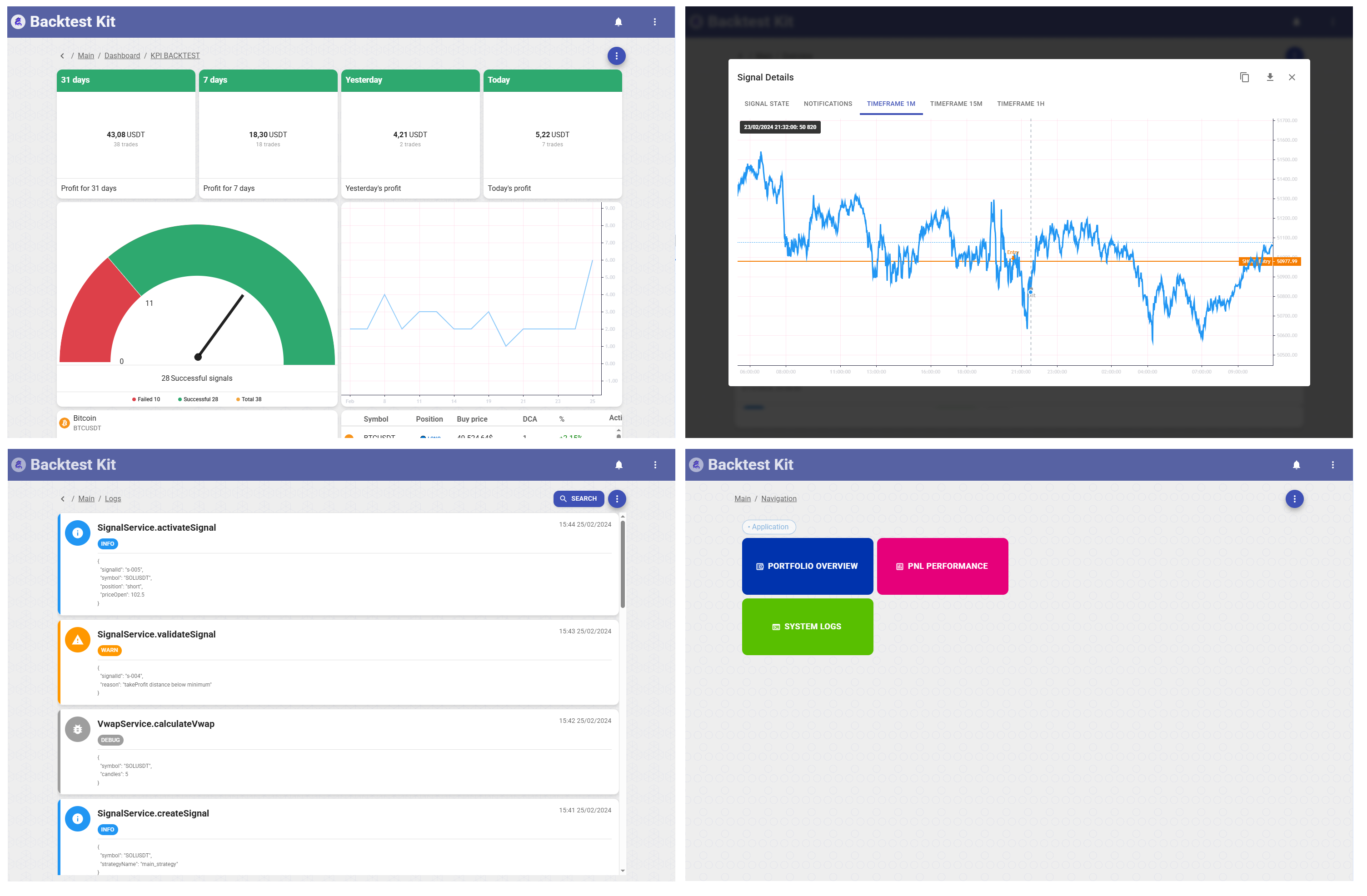



📚 Docs · 🌟 Reference implementation · 🐙 GitHub
New here? The fastest real setup is to clone the reference implementation — a working news-sentiment AI trading system with LLM forecasting, multi-timeframe data, and a documented February 2026 backtest. Start there, not from scratch.
🚀 Quick Start
# Scaffold a project (boilerplate stays inside the CLI; docs auto-fetched)
npx @backtest-kit/cli --init --output backtest-kit-project
cd backtest-kit-project && npm install && npm start -- --help
The whole onboarding is: write a strategy file that registers schemas via backtest-kit, point the CLI at it, choose a flag.
npx @backtest-kit/cli --backtest ./content/feb_2026.strategy/index.ts --symbol BTCUSDT// src/index.mjs — registers schemas via backtest-kit; @backtest-kit/cli just runs it
import { addStrategySchema, addExchangeSchema, addFrameSchema } from 'backtest-kit';
import ccxt from 'ccxt';
addExchangeSchema({
exchangeName: 'binance',
getCandles: async (symbol, interval, since, limit) => {
const exchange = new ccxt.binance();
const ohlcv = await exchange.fetchOHLCV(symbol, interval, since.getTime(), limit);
return ohlcv.map(([timestamp, open, high, low, close, volume]) =>
({ timestamp, open, high, low, close, volume }));
},
formatPrice: (symbol, price) => price.toFixed(2),
formatQuantity: (symbol, quantity) => quantity.toFixed(8),
});
addFrameSchema({ frameName: 'feb-2024', interval: '1m',
startDate: new Date('2024-02-01'), endDate: new Date('2024-02-29') });
addStrategySchema({ strategyName: 'my-strategy', interval: '15m',
getSignal: async (symbol) => null }); // return a signal or nullWire it into package.json once and the positional path never changes:
{
  "scripts": {
    "backtest": "npx @backtest-kit/cli --backtest ./src/index.mjs",
    "paper":    "npx @backtest-kit/cli --paper    ./src/index.mjs",
    "start":    "npx @backtest-kit/cli --live     ./src/index.mjs"
  },
  "dependencies": { "@backtest-kit/cli": "latest", "backtest-kit": "latest", "ccxt": "latest" }
}
npm run backtest -- --symbol BTCUSDT --ui --telegram # add integrations with flags🤔 Philosophy — React vs Next.js, but for trading
@backtest-kit/cli does two things well with one tool.
1. The lightest runner for a solo quant on day one. Write a strategy, point the CLI at it, you're trading. No DI container to learn, no scaffold to fight, no infra to copy-paste. The day you have an idea you can backtest it; the week you have an edge you can paper-trade it; the month you have a P&L you can run it live — same CLI, different flag.
2. A monorepo-grade runner for when the business takes off. The moment you start making money is the worst moment to rewrite your stack. So the CLI is monorepo-ready from day one even if you don't use it that way at first: per-strategy .env, per-strategy broker modules, folder-based import aliases, isolated dump dirs. The tool you backtested your first idea with is the tool that runs a desk of strategies in production — no rewrite, no language switch, only more files.
🗺️ Mode matrix
Every invocation is one mode (a primary flag) + a positional strategy/entry path + optional modifiers. --ui and --telegram are integrations that attach to any trading mode.
| Mode | Flag | What it does |
|------|------|--------------|
| Backtest | --backtest | Run a strategy on historical candle data (uses a FrameSchema) |
| Paper | --paper | Live prices, no real orders — identical code path to live |
| Live | --live | Real trades via exchange API |
| Walker | --walker | A/B-compare multiple strategies on the same history, ranked report |
| Main | --main | Run a custom entry point with the full environment prepared, no trading harness |
| Pine | --pine | Run a local .pine indicator against exchange data |
| Editor | --editor | Open the visual Pine Script editor in the browser |
| Candle Dump | --dump | Fetch & save raw OHLCV candles to a file |
| PnL Debug | --pnldebug | Simulate per-minute PnL for a given entry price & direction |
| Broker Debug | --brokerdebug | Fire a single broker commit against the live adapter |
| Sweep | --sweep | Grid sweep over a crowd-ideas feed: profit-before-stop corridor + raw author tracks, axes from a positional JSON config |
| Flush | --flush | Delete report/log/markdown/agent folders from a strategy dump dir |
| Init | --init | Scaffold a new project |
| Docker | --docker | Scaffold a self-contained Docker workspace |
| modifiers | --ui · --telegram · --entry | Web dashboard · Telegram alerts · fan out one strategy across many symbols |
| Flag | Type | Description |
|------|------|-------------|
| --backtest | boolean | Run historical backtest (default false) |
| --walker | boolean | Run Walker A/B comparison (default false) |
| --paper | boolean | Paper trading — live prices, no orders (default false) |
| --live | boolean | Run live trading (default false) |
| --main | boolean | Custom entry point, no trading harness (default false) |
| --ui | boolean | Start web UI dashboard (default false) |
| --telegram | boolean | Enable Telegram notifications (default false) |
| --verbose | boolean | Log each candle fetch (default false) |
| --noCache | boolean | Skip candle cache warming before backtest (default false) |
| --noFlush | boolean | Skip removing report/log/markdown/agent folders before run (default false) |
| --symbol | string | Trading pair (default "BTCUSDT") |
| --strategy | string | Strategy name (default: first registered) |
| --exchange | string | Exchange name (default: first registered) |
| --frame | string | Backtest frame name (default: first registered) |
| --cacheInterval | string | Intervals to pre-cache (default "1m, 15m, 30m, 4h") |
| --brokerdebug | boolean | Fire a single broker commit against the live adapter (default false) |
| --commit | string | Commit type for --brokerdebug (default "signal-open") |
Positional argument (required): path to your strategy entry point file — set once in package.json scripts. Tool-specific flags (--pine, --dump, --pnldebug, --docker, …) are documented in their sections below.
📈 Trading modes
The four modes that actually run strategies share one engine and one set of guarantees — only the clock and the order routing differ.
Backtest · Paper · Live
Backtest (--backtest) — runs against historical candles via a registered FrameSchema. Before running, the CLI removes the report, log, markdown, and agent folders from the strategy's dump/ dir, then warms the candle cache for every interval in --cacheInterval; subsequent runs reuse the cache with no API calls. --noCache skips warming, --noFlush keeps output folders.
{ "scripts": { "backtest": "npx @backtest-kit/cli --backtest --symbol ETHUSDT --strategy my-strategy --exchange binance --frame feb-2024 --cacheInterval \"1m, 15m, 1h, 4h\" ./src/index.mjs" } }Paper (--paper) — connects to the live exchange but places no real orders. Identical code path to live — the safe way to validate a strategy.
{ "scripts": { "paper": "npx @backtest-kit/cli --paper --symbol BTCUSDT ./src/index.mjs" } }Live (--live) — deploys a real bot. Requires exchange API keys in .env. Combine with --ui --telegram for a monitored deployment.
{ "scripts": { "start": "npx @backtest-kit/cli --live --ui --telegram --symbol BTCUSDT ./src/index.mjs" } }Walker — A/B strategy comparison
Runs the same historical period against multiple strategy files and prints a ranked report. Use it to pick the best variant before deploying.
npx @backtest-kit/cli --walker --symbol BTCUSDT --noCache --markdown --output feb_2026_comparison \
  ./content/feb_2026_v1.strategy.ts ./content/feb_2026_v2.strategy.ts ./content/feb_2026_v3.strategy.ts
# → ./dump/feb_2026_comparison.md
Each positional argument is a separate strategy entry point. Before loading them the CLI removes the report/log/markdown/agent folders from each entry point's dump/ (skip with --noFlush). All files load without changing process.cwd() — .env is read from the working directory only. After loading, addWalkerSchema is called automatically using the exchange and frame registered by the strategy files. If no frame is registered, the CLI falls back to the last 31 days from Date.now() with a warning.
| Flag | Type | Description |
|------|------|-------------|
| --walker | boolean | Enable Walker comparison |
| --symbol | string | Trading pair (default "BTCUSDT") |
| --cacheInterval | string | Intervals to pre-cache (default "1m, 15m, 30m, 4h") |
| --noCache | boolean | Skip candle cache warming |
| --noFlush | boolean | Skip removing output folders before the run |
| --verbose | boolean | Log each candle fetch and strategy progress |
| --output | string | Output file base name (default walker_{SYMBOL}_{TIMESTAMP}) |
| --json | boolean | Save Walker.getData() as JSON to ./dump/<output>.json and exit |
| --markdown | boolean | Save Walker.getReport() as ./dump/<output>.md and exit |
Output: no flag → print Markdown report to stdout; --json / --markdown → save and exit. Module hook: ./modules/walker.module loads automatically before the comparison (.ts/.mjs/.cjs tried in order).
Main — custom entry point, no trading harness
Runs a single entry point with the full CLI environment prepared (.env, config/setup.config, config/loader.config, ./modules/main.module, cwd changed to the entry-point folder, graceful shutdown wired) — but never starts a trading harness. Use it to bootstrap the environment for a quick action, e.g. calling a 3rd-party API with automatic .env import.
Unlike the trading modes it does not call Backtest/Live/Walker.background, pick a symbol, warm the cache, or resolve a strategy/exchange/frame — the entry point decides what to run. Exactly one positional entry point is required (Entry point is required otherwise). process.cwd() changes to the entry-point directory and its local .env overrides the root .env.
Although the CLI starts nothing itself, any Backtest/Live/Walker run your entry point launches is still managed: the process exits once listenDone* reports completion, the first Ctrl+C stops every active run via *.list()/*.stop(), a second force-quits. ./modules/main.module loads automatically before the entry point.
| Flag | Type | Description |
|------|------|-------------|
| --main | boolean | Enable Main mode |
| --noFlush | boolean | Skip removing output folders before the run |
{ "scripts": { "main": "npx @backtest-kit/cli --main ./tools/fetch_fear_and_greed.ts" } }Parallel multi-symbol (--entry)
Power-user modifier — skip unless needed. The standard flow runs one symbol from
--symbol. Use--entryto fan one strategy out across many symbols at once, or to drive*.background()from a UI / DB / API.
--entry is a modifier — combine it with exactly one of --backtest/--live/--paper/--walker, plus one positional entry file. The CLI does only the boilerplate (Setup, providers, the matching ./modules/<mode>.module, SIGINT that stops every active run, shutdown() once listenDone* reports all runs complete); you pick the symbol set, warm cache, and call *.background().
// src/multi-symbol.mjs
import { addExchangeSchema, addFrameSchema, addStrategySchema, Backtest, warmCandles } from "backtest-kit";
import ccxt from "ccxt";

addExchangeSchema({ exchangeName: "binance",
  getCandles: async (symbol, interval, since, limit) => {
    const exchange = new ccxt.binance();
    const ohlcv = await exchange.fetchOHLCV(symbol, interval, since.getTime(), limit);
    return ohlcv.map(([timestamp, open, high, low, close, volume]) =>
      ({ timestamp, open, high, low, close, volume }));
  },
  formatPrice: (s, p) => p.toFixed(2), formatQuantity: (s, q) => q.toFixed(8) });

addFrameSchema({ frameName: "feb-2026", interval: "1m",
  startDate: new Date("2026-02-01"), endDate: new Date("2026-02-28") });
addStrategySchema({ strategyName: "my-strategy", interval: "15m", getSignal: async () => null });

// Decide the symbol set yourself — UI, database, API, or a list.
for (const symbol of ["BTCUSDT", "ETHUSDT", "SOLUSDT", "BNBUSDT", "XRPUSDT"]) {
  // optional: await warmCandles({ exchangeName: "binance", interval: "1m", symbol, from, to });
  Backtest.background(symbol, { strategyName: "my-strategy", exchangeName: "binance", frameName: "feb-2026" });
}
npx @backtest-kit/cli --backtest --entry ./src/multi-symbol.mjsThe same shape works for --live --entry / --paper --entry (call Live.background() per symbol with your broker adapter).
🛠️ Tooling modes
Utilities that don't run a strategy. They share one convention, explained once here and referenced below.
The
<mode>.moduleconvention. By default the CLI auto-registers CCXT Binance. To use a different exchange (custom API keys, rate limits, a non-spot market), drop amodules/<mode>.module.tsthat callsaddExchangeSchemafrombacktest-kit. The CLI loads it automatically before running, trying.ts/.mjs/.cjs; it's searched next to the target file first, then in the project root..envis loaded root-first then the target-file dir (override), so API keys stay out of code.
// modules/pine.module.ts  (same shape for editor/dump/pnldebug.module; brokerdebug registers a Broker instead)
import { addExchangeSchema } from "backtest-kit";
import ccxt from "ccxt";

addExchangeSchema({
  exchangeName: "my-exchange",
  getCandles: async (symbol, interval, since, limit) => {
    const exchange = new ccxt.bybit({
      apiKey: process.env.BYBIT_API_KEY, secret: process.env.BYBIT_API_SECRET, enableRateLimit: true,
    });
    const ohlcv = await exchange.fetchOHLCV(symbol, interval, since.getTime(), limit);
    return ohlcv.map(([timestamp, open, high, low, close, volume]) =>
      ({ timestamp, open, high, low, close, volume }));
  },
  formatPrice: (s, p) => p.toFixed(2), formatQuantity: (s, q) => q.toFixed(8),
});
# .env (loaded root-first, then next to the target file)
BYBIT_API_KEY=xxx
BYBIT_API_SECRET=yyy🌲 Pine — run local PineScript (--pine)
Executes any local .pine file against a real exchange and prints results as a Markdown table — no TradingView account. Reads every plot() that uses display=display.data_window as an output column (others ignored); column names come straight from the plot names.
npx @backtest-kit/cli --pine ./math/impulse_trend_15m.pine --symbol BTCUSDT --timeframe 15m --limit 180 --when "2025-09-24T12:00:00.000Z"| Flag | Type | Description |
|------|------|-------------|
| --pine | boolean | Enable PineScript mode |
| --symbol | string | Trading pair (default "BTCUSDT") |
| --timeframe | string | Candle interval (default "15m") |
| --limit | string | Candles to fetch (default 250) |
| --when | string | End date — ISO 8601 or Unix ms (default now) |
| --exchange | string | Exchange (default: first registered, falls back to CCXT Binance) |
| --output | string | Output base name (default: .pine file name) |
| --json | boolean | Write plots as JSON array to <pine-dir>/dump/{output}.json |
| --jsonl | boolean | Write plots as JSONL to <pine-dir>/dump/{output}.jsonl |
| --markdown | boolean | Write Markdown table to <pine-dir>/dump/{output}.md |
--limit must cover indicator warmup bars — rows before warmup show N/A. Positional: path to the .pine file. Exchange via pine.module (see convention above). Required plot form:
//@version=5
indicator("MyIndicator", overlay=true)
plot(close,    "Close",    display=display.data_window)
plot(position, "Position", display=display.data_window)
Output (stdout, or --markdown/--json/--jsonl to <pine-dir>/dump/):
| Close | Position | timestamp |
| --- | --- | --- |
| 112871.28 | -1.0000 | 2025-09-22T15:00:00.000Z |
| 112736.00 |  0.0000 | 2025-09-22T18:30:00.000Z |
| 112653.90 |  1.0000 | 2025-09-22T22:15:00.000Z |
🎨 Editor — visual Pine Script editor (--editor)
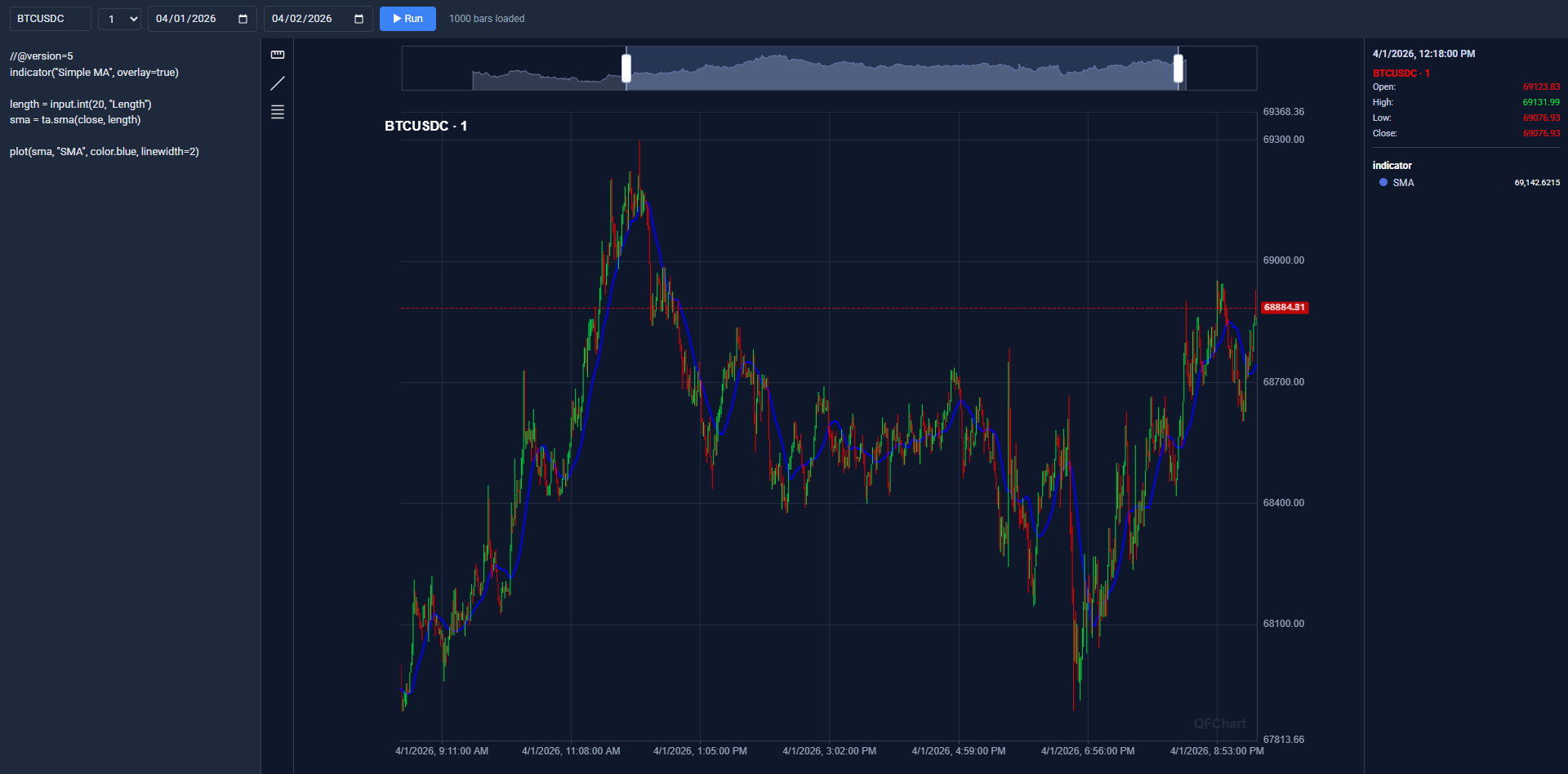
A browser-based Pine Script editor (powered by @backtest-kit/ui) with a live chart that updates on ▶ Run.
npx @backtest-kit/cli --editor # → http://localhost:60050?pine=1 opens automaticallyThe CLI loads ./modules/editor.module if present (register your exchange, same as pine.module), starts the @backtest-kit/ui server on CC_WWWROOT_PORT (default 60050), and opens the editor in your browser. Ctrl+C stops it. Env: CC_WWWROOT_HOST (default 0.0.0.0), CC_WWWROOT_PORT (default 60050).
💾 Candle Dump (--dump)
Fetch raw OHLCV candles from any registered exchange and save them — no strategy file required. dump/ is created in the current working directory.
npx @backtest-kit/cli --dump --symbol BTCUSDT --timeframe 15m --limit 500 --when "2026-02-28T00:00:00.000Z" --jsonl --output feb2026_btc
# → ./dump/feb2026_btc.jsonl
| Flag | Type | Description |
|------|------|-------------|
| --dump | boolean | Enable candle dump |
| --symbol | string | Trading pair (default "BTCUSDT") |
| --timeframe | string | Candle interval (default "15m") |
| --limit | string | Candles to fetch (default 250) |
| --when | string | End date — ISO 8601 or Unix ms (default now) |
| --exchange | string | Exchange (default: first registered, falls back to CCXT Binance) |
| --output | string | Output base name (default {SYMBOL}_{LIMIT}_{TIMEFRAME}_{TIMESTAMP}) |
| --json | boolean | Write candles as JSON array to ./dump/{output}.json |
| --jsonl | boolean | Write candles as JSONL to ./dump/{output}.jsonl |
Exchange via dump.module (see convention above), searched in the current working directory. No flag → print to stdout.
🐞 PnL Debug (--pnldebug)
Simulate a hypothetical position minute by minute — running PnL, peak profit, max drawdown per candle — without placing trades or loading a strategy.
npx @backtest-kit/cli --pnldebug --symbol BTCUSDT --priceopen 64069.50 --direction short --when "2025-02-25" --minutes 120| Flag | Type | Description |
|------|------|-------------|
| --pnldebug | boolean | Enable PnL debug |
| --priceopen | number | Entry price (required) |
| --direction | string | long or short (default long) |
| --when | string | Start timestamp — ISO 8601 or Unix ms (default now) |
| --minutes | string | Number of 1m candles to simulate (default 60) |
| --symbol | string | Trading pair (default "BTCUSDT") |
| --exchange | string | Exchange (default: first registered, falls back to CCXT Binance) |
| --output | string | Output base name (default {SYMBOL}_{DIRECTION}_{PRICEOPEN}_{TIMESTAMP}) |
| --json / --jsonl / --markdown | boolean | Save to ./dump/<output>.{json,jsonl,md} |
Columns: min (1-based offset), timestamp, close, pnl% (signed, vs entry), peak% (highest so far, ≥0), drawdown% (lowest so far, ≤0). Exchange via pnldebug.module (convention above).
Symbol: BTCUSDT | Direction: short | PriceOpen: 64069.50 | From: 2025-02-25T00:00:00.000Z | Minutes: 120
  min | timestamp                 |        close  |    pnl%  |   peak%  | drawdown%
    1 | 2025-02-25T00:01:00.000Z  |      64020.10 |   +0.08% |   +0.08% |     0.00%
    2 | 2025-02-25T00:02:00.000Z  |      64105.30 |   -0.06% |   +0.08% |    -0.06%
  120 | 2025-02-25T02:00:00.000Z  |      63200.00 |   +1.36% |   +1.36% |    -0.06%
🐛 Broker Debug (--brokerdebug)
Fire a single broker commit against your live adapter without a full strategy — verify your brokerdebug.module wires exchange calls correctly before waiting hours for a real signal.
npx @backtest-kit/cli --brokerdebug --commit signal-open --symbol BTCUSDT| Flag | Type | Description |
|------|------|-------------|
| --brokerdebug | boolean | Enable broker debug |
| --commit | string | Commit type to fire (default "signal-open") |
| --symbol | string | Trading pair (default "BTCUSDT") |
| --exchange | string | Exchange (default: first registered) |
--commit values → hook: signal-open→onSignalOpenCommit, signal-close→onSignalCloseCommit, partial-profit→onPartialProfitCommit, partial-loss→onPartialLossCommit, average-buy→onAverageBuyCommit, trailing-stop→onTrailingStopCommit, trailing-take→onTrailingTakeCommit, breakeven→onBreakevenCommit.
The CLI loads ./modules/brokerdebug.module, fetches the last candle for --symbol, derives a synthetic payload from currentPrice (TP = +2%, SL = −2%), and calls the selected hook once; exits 0 on success. The module registers a Broker adapter (Broker.useBrokerAdapter(...) + Broker.enable()), not an exchange.
🎛️ Sweep (--sweep)
A grid sweep over a feed of crowd trading ideas: the grid axes come from a positional JSON config of the consumer — from a small feasibility probe to a full parameter search. Without a config the engine defaults apply. Authors are graded by ONE binary outcome — profit-before-stop: walking each point's own hold window candle by candle, an idea is a HIT when a fixation (the profit lock if lock > 0, OR the trailing arm level) fires BEFORE the hard stop, a MISS when the hard stop fires first, the window times out, or the candles run out. Prints a Markdown report with the corridor share, the ranking winners, and the raw author tracks (ideas/hits/hitRate per grading rule) — the engine grades every author but bans none; who to trust is userspace.
npx @backtest-kit/cli --sweep --symbol BTCUSDT ./assets/tv-ideas.normalized.jsonl
# → engine-default grid; add a config to shape the sweep:
npx @backtest-kit/cli --sweep --symbol BTCUSDT ./assets/tv-ideas.normalized.jsonl ./assets/probe.config.json
| Flag | Type | Description |
|------|------|-------------|
| --sweep | boolean | Enable the grid sweep |
| --symbol | string | Trading pair to simulate (default "BTCUSDT") |
| --exchange | string | Exchange (default: first registered, falls back to CCXT Binance) |
| --output | string | Output base name (default sweep_{SYMBOL}_{TIMESTAMP}) |
| --json | boolean | Save the full ISweepResult to ./dump/<output>.json |
| --markdown | boolean | Save the summary report to ./dump/<output>.md |
| --verbose | boolean | Log every sweep lifecycle callback to the console |
Positionals: path to an ideas .jsonl file (required) — one idea per line, exact shape { "id": number, "ts": number, "symbol": string, "direction": "LONG"|"SHORT"|"NEUTRAL", "author": string } — and an optional config .json with the shape { "gridAxes"?: ISweepGridAxes, "reportOrder"?: "sharpe"|"sortino"|"pnl"|"recovery" }. Both files are validated before any work starts — a structure mismatch (including an unknown config key) aborts the run with an error naming the field. No config → an empty object → the engine defaults. Ideas of other symbols are filtered out by the engine, so one shared feed serves any --symbol.
Under the hood: one candle pass per idea to the grid's longest hold (lazy chunked fetch through the exchange, persist cache first), flood dedupe (one idea per author per direction per 8h), EVERY author traded (the engine grades every author on the raw per-author track inside each point's own hold window and bans none — userspace filters on the continuous hitRate), production slot semantics (one open position per author), time-based Sharpe/Sortino over daily equity buckets. The result is a single report bucket — result.reports.reports (grid point reports, sorted by reportOrder), result.reports.best (the four ranking winners), and result.reports.tracks (author tracks). Each track line is self-contained ({holdMinutes, profitLockPercent, hardStopPercent, trailingTakePercent, author, ideas, hits, hitRate}) for grep/jq without a join. With --verbose every lifecycle callback (onIdeas, onProfiles, onAuthorsTrained, onGridPoint, onRanking, onDone) is logged to the console as it fires, so long runs show progress. Exchange via sweep.module (see convention above).
🗑️ Flush (--flush)
Delete generated output folders from one or more strategy dump dirs without touching cached candle data.
npx @backtest-kit/cli --flush ./content/feb_2026.strategy/modules/backtest.module.ts ./content/mar_2026.strategy/modules/backtest.module.tsFor each positional entry point the CLI resolves its directory and removes from <entry-dir>/dump/: report (backtest .jsonl), log (log.jsonl), markdown (exported reports), agent (agent outlines). Candle cache (dump/data/) and AI forecast outlines (dump/outline/) are not removed.
🗂️ Project & monorepo
Scaffolding (--init)
Bootstraps a ready-to-use project with an example strategy, an example Pine indicator, an AI-agent CLAUDE.md, and documentation fetched automatically. The target dir must not exist or be empty.
npx @backtest-kit/cli --init --output my-trading-bot # → ./my-trading-bot/backtest-kit-project/
├── package.json # pre-configured with all backtest-kit deps
├── CLAUDE.md # AI-agent guide for writing strategies
├── content/feb_2026.strategy.ts # example strategy entry point
├── math/feb_2026.pine # example PineScript indicator
├── modules/{dump,pine}.module.ts # exchange schemas for --dump / --pine
├── report/feb_2026.md # example research report
├── docs/{...}.md + docs/lib/ # guides + fetched library READMEs
└── scripts/fetch_docs.mjs # downloads library READMEs into docs/lib/After scaffolding the CLI runs scripts/fetch_docs.mjs, downloading the latest READMEs for backtest-kit, @backtest-kit/graph, @backtest-kit/pinets, @backtest-kit/cli, garch, volume-anomaly, agent-swarm-kit, functools-kit into docs/lib/. Re-run anytime with node ./scripts/fetch_docs.mjs or npm run sync:lib.
Docker (--docker)
Scaffolds a self-contained Docker workspace with docker-compose.yaml and a strategy entry point, for zero-downtime live trading.
npx @backtest-kit/cli --docker && cd backtest-kit-docker
MODE=live SYMBOL=TRXUSDT STRATEGY_FILE=./content/feb_2026/feb_2026.strategy.ts docker-compose up -d
1. command: in docker-compose.yaml — pin mode and flags directly; the entrypoint forwards all args to the CLI unchanged:
command: [--live, --symbol, TRXUSDT, --strategy, feb_2026_strategy, --exchange, ccxt-exchange, ./content/feb_2026/feb_2026.strategy.ts, --ui]2. Inline env vars — MODE + STRATEGY_FILE on the command line, no file edits:
| Variable | Required | Default | Description |
|----------|----------|---------|-------------|
| MODE | yes | — | backtest | live | paper | walker |
| STRATEGY_FILE | yes | — | Path to entry point (relative to working_dir) |
| SYMBOL | no | BTCUSDT | Trading pair |
| STRATEGY / EXCHANGE / FRAME | no | first registered | Names |
| UI / TELEGRAM / VERBOSE / NO_CACHE / NO_FLUSH / ENTRY | no | — | Any non-empty value enables the matching flag |
Monorepo cwd resolution
When the CLI loads an entry point it changes the working directory to that file's location, so every relative path (dump/, modules/, template/) resolves inside that strategy's folder. Each strategy gets its own .env, broker modules, templates, and dump dir — so the same tool scales from one strategy to a desk of them.
ResolveService runs, before executing your entry point:
process.chdir(path.dirname(entryPoint))                         // cwd → strategy directory
dotenv.config({ path: rootDir + '/.env' })                      // root .env first
dotenv.config({ path: strategyDir + '/.env', override: true })  // strategy .env overrides
monorepo/
├── package.json # root scripts (one per strategy)
├── .env # shared API keys
└── strategies/
├── oct_2025/
│ ├── index.mjs # registers exchange/frame/strategy schemas
│ ├── .env # overrides root .env for this strategy
│ ├── modules/{live,paper,backtest}.module.mjs # broker adapters (optional)
│ ├── template/ # custom Mustache templates (optional)
│ └── dump/ # auto-created: candle cache + reports
└── dec_2025/ …| Resource | Path (relative to strategy dir) | Isolated |
|----------|----------------------------------|----------|
| Candle cache | ./dump/data/candle/ | ✅ per-strategy |
| Backtest reports | ./dump/ | ✅ per-strategy |
| Broker module (live/paper/backtest) | ./modules/{live,paper,backtest}.module.mjs | ✅ per-strategy |
| Config module (walker) | ./modules/walker.module.mjs | ✅ loaded once |
| Telegram templates | ./template/*.mustache | ✅ per-strategy |
| Environment variables | ./.env (overrides root) | ✅ per-strategy |
Each run produces its own dump/ — easy to compare results across periods, by inspection or by pointing an AI agent at a specific folder.
Folder-based import aliases
Every top-level folder in process.cwd() automatically becomes a bare import alias inside any strategy file — no config, just create the folder. Extract shared utilities, indicators, or AI-agent logic into named folders and reuse them across strategies without relative-path hell.
| Import | Resolves to |
|--------|-------------|
| import { fn } from "utils" | <cwd>/utils/index.ts (or .js/.mjs/.cjs) |
| import { calcRSI } from "math/rsi" | <cwd>/math/rsi.ts |
| import { research } from "logic" | <cwd>/logic/index.ts |
| import { X } from "logic/contract/ResearchResponse.contract" | <cwd>/logic/contract/ResearchResponse.contract.ts |
Both barrel and deep-subpath imports are supported. Add a matching paths entry to tsconfig.json so the editor resolves them:
{
  "compilerOptions": {
    "moduleResolution": "bundler",
    "paths": { "logic": ["./logic/index.ts"], "logic/*": ["./logic/*"], "math": ["./math/index.ts"], "math/*": ["./math/*"], "utils": ["./utils/index.ts"], "utils/*": ["./utils/*"] }
  },
  "include": ["./logic", "./math", "./utils", "./content", "./modules"]
}
Entry point formats
The CLI auto-detects the format and loads it with the right runtime — no flags. .ts via tsx tsImport() (handles ESM↔CJS cross-imports, no tsc step), .mjs via native import() (top-level await, ESM), .cjs via native require() (legacy/dual-package). Add tsx to deps for .ts strategies.
🔌 Broker adapter — transactional live orders
Mode-specific module files register a Broker adapter via side-effect import before the strategy starts. From then on, backtest-kit intercepts every trade-mutating call through the adapter before updating internal state — if the adapter throws, the position state is never changed (atomic rollback, retried next tick). No manual wiring; in backtest mode no adapter is called at all.
| Mode flag | Module file | Loaded before |
|-----------|-------------|----------------|
| --live | ./modules/live.module.mjs | Live.background() |
| --paper | ./modules/paper.module.mjs | Live.background() (paper) |
| --backtest | ./modules/backtest.module.mjs | Backtest.background() |
| --walker | ./modules/walker.module.mjs | Walker.background() |
| --main | ./modules/main.module.mjs | the custom entry point |
| --brokerdebug | ./modules/brokerdebug.module.mjs | the broker commit test |
Resolved relative to
cwd(the strategy dir);.mjs/.cjs/.tstried automatically. A missing module is a soft warning, not an error.
// live.module.mjs
import { Broker } from 'backtest-kit';
import { myExchange } from './exchange.mjs';

class MyBroker {
  async onSignalOpenCommit({ symbol, priceOpen, direction }) { await myExchange.openPosition(symbol, direction, priceOpen); }
  async onSignalCloseCommit({ symbol, priceClosed })        { await myExchange.closePosition(symbol, priceClosed); }
  async onPartialProfitCommit({ symbol, cost, currentPrice }) { await myExchange.createOrder({ symbol, side: 'sell', quantity: cost / currentPrice }); }
  async onAverageBuyCommit({ symbol, cost, currentPrice })    { await myExchange.createOrder({ symbol, side: 'buy',  quantity: cost / currentPrice }); }
}

Broker.useBrokerAdapter(MyBroker);
Broker.enable();
| Method | Payload type | Triggered on |
|--------|--------------|--------------|
| onSignalOpenCommit | BrokerSignalOpenPayload | Position activation |
| onSignalCloseCommit | BrokerSignalClosePayload | SL / TP / manual close |
| onPartialProfitCommit | BrokerPartialProfitPayload | Partial profit |
| onPartialLossCommit | BrokerPartialLossPayload | Partial loss |
| onTrailingStopCommit | BrokerTrailingStopPayload | SL adjustment |
| onTrailingTakeCommit | BrokerTrailingTakePayload | TP adjustment |
| onBreakevenCommit | BrokerBreakevenPayload | SL moved to entry |
| onAverageBuyCommit | BrokerAverageBuyPayload | DCA entry |
All methods are optional; unimplemented hooks are silently skipped. TypeScript: implement Partial<IBroker> with typed payloads (BrokerSignalOpenPayload, etc.).
⚙️ Configuration files (config/*)
Loaded from {projectRoot}/config/. The three runtime configs load in order — setup.config → loader.config → alias.config — before any strategy or module code. The UI/Telegram configs resolve strategy dir → project root → package default (first match wins) and accept .ts/.cjs/.mjs/.js.
setup.config — persistence & one-time init
Loaded once before any persistence call. When present, the CLI skips its own default adapter registration — your config takes full ownership of the persistence layer.
setup() registers all 15 persistence adapters in one call, reading connection params from env (or passed explicitly):
// config/setup.config.ts
import { setup } from '@backtest-kit/mongo';
setup(); // or setup({ CC_MONGO_CONNECTION_STRING, CC_REDIS_HOST, CC_REDIS_PORT, CC_REDIS_PASSWORD })
CC_MONGO_CONNECTION_STRING=mongodb://localhost:27017/backtest-kit
CC_REDIS_HOST=127.0.0.1
CC_REDIS_PORT=6379No strategy-code changes — adapters are wired transparently before the first persistence call.
loader.config — async startup gate
Loaded after setup.config, before strategy/module code. Unlike setup.config (side-effect import), it exports a function the CLI awaits — use it to wait for an async dependency before the run starts.
Use it to: wire microfrontends in a monorepo (pre-load sibling packages, hydrate a shared DI container); wait for a DB connection so the backtest fails fast instead of mid-run; warm caches / external APIs (instruments, calendar, fee tables); run schema migrations before signals flow.
Exactly one export style — never both (if both present, default wins):
// config/loader.config.ts — default export (preferred)
export default async () => { await mongoose.connect(process.env.CC_MONGO_CONNECTION_STRING!); await redis.ping(); };
// — or named export
export const loader = async () => { /* … */ };@backtest-kit/mongo's setup() registers adapters synchronously but doesn't block on the connection; gate the run on a real connection here. To stitch microfrontends: import "@my-org/brokers"; import "@my-org/signals"; (the @my-org alias is declared in alias.config).
alias.config — override any module import
Override any Node module import without touching strategy code. Loaded once on the first import and applied globally — e.g. replace a heavy dependency with a stub for backtesting, or swap an external API for a mock in CI.
// config/alias.config.ts — named export
export const ccxt = require("./stubs/ccxt.stub.cjs");
// config/alias.config.cjs — default export
module.exports = { ccxt: require("./stubs/ccxt.stub.cjs") };
It may also export an async factory the CLI awaits before strategy code runs — handy for ESM-only modules that require() would throw on:
// async factory (default export); or `export const loader = async () => ({...})`
export default async () => ({ nanoid: await import("nanoid"), "p-limit": await import("p-limit") });
Both styles supported, never both at once (default wins). When strategy code calls require("ccxt"), the loader checks the alias table first — no monkey-patching of node_modules. Applies to all modules in the process (not per-strategy).
symbol.config & notification.config — UI dashboard
By default the UI shows all exchange symbols. Override with a config/symbol.config (resolution: strategy dir → project root → package default):
// config/symbol.config.ts
export const symbol_list = [
  { icon: "/icon/btc.png", logo: "/icon/128/btc.png", symbol: "BTCUSDT", displayName: "Bitcoin",  color: "#F7931A", priority: 50, description: "Bitcoin — the first and most popular cryptocurrency" },
  { icon: "/icon/eth.png", logo: "/icon/128/eth.png", symbol: "ETHUSDT", displayName: "Ethereum", color: "#6F42C1", priority: 50, description: "Ethereum — a blockchain platform for smart contracts" },
];
Defaults (override per strategy):
| Key | Default | Description |
|-----|---------|-------------|
| signal | true | Signal lifecycle: opened, scheduled, closed, cancelled |
| risk | true | Risk manager rejections |
| info | true | Informational messages on an active signal |
| breakeven | true | Breakeven level reached |
| common_error | true | Non-fatal runtime errors |
| critical_error | true | Fatal errors that terminate the session |
| validation_error | true | Config / input validation errors |
| strategy_commit | true | All committed actions (partial close, DCA, trailing, …) |
| partial_loss | false | Partial loss level reached (before commit) |
| partial_profit | false | Partial profit level reached (before commit) |
| order_sync | false | Live order fill / exit confirmations from exchange sync |
| order_check | false | Live order ping / pending confirmations from exchange sync |
// config/notification.config.ts
export default { signal: true, risk: true, info: true, breakeven: true, common_error: true, critical_error: true, validation_error: true, strategy_commit: true, partial_loss: false, partial_profit: false, signal_sync: false };
telegram.config — programmatic message rendering
By default messages render from Mustache templates (template/*.mustache). Export an object with any subset of get*Markdown methods (each gets the event payload, returns Promise<string>); unimplemented ones fall back to the template.
// config/telegram.config.ts
import { IStrategyTickResultOpened, IStrategyTickResultClosed, RiskContract } from "backtest-kit";
export default {
  async getOpenedMarkdown(e: IStrategyTickResultOpened) { return `**Opened** ${e.symbol} at ${e.priceOpen}`; },
  async getClosedMarkdown(e: IStrategyTickResultClosed) { return `**Closed** ${e.symbol} at ${e.priceClosed}`; },
  async getRiskMarkdown(e: RiskContract)                { return `**Risk rejected** ${e.symbol}`; },
};
Methods → event types: getOpenedMarkdown/getClosedMarkdown/getScheduledMarkdown/getCancelledMarkdown (IStrategyTickResult*), getRiskMarkdown (RiskContract), getPartialProfitMarkdown/getPartialLossMarkdown/getBreakevenMarkdown/getTrailingTakeMarkdown/getTrailingStopMarkdown/getAverageBuyMarkdown (the matching *Commit), getSignalOpenMarkdown/getSignalCloseMarkdown (SignalOpen/CloseContract), getCancelScheduledMarkdown/getClosePendingMarkdown (*Commit), getSignalInfoMarkdown (SignalInfoContract).
🔔 Integrations
Web dashboard (--ui)
Starts the @backtest-kit/ui server at http://localhost:60050 (host/port via CC_WWWROOT_HOST / CC_WWWROOT_PORT). Restrict the symbol list with symbol.config and notification categories with notification.config (above).
Telegram (--telegram)
Sends formatted HTML messages with 1m / 15m / 1h price charts for every position event — opened, closed, scheduled, cancelled, risk rejection, partial profit/loss, trailing stop/take, breakeven. Requires CC_TELEGRAM_TOKEN and CC_TELEGRAM_CHANNEL. Customize per-event rendering with telegram.config (above).
🧪 Programmatic API — run(mode, args)
Use the CLI as a library — call run() from your own script, no child process or flag parsing.
import { run } from '@backtest-kit/cli';

await run('backtest', { entryPoint: './src/index.mjs', symbol: 'ETHUSDT', frame: 'feb-2024', cacheInterval: ['1m','15m','1h'], verbose: true });
await run('paper',    { entryPoint: './src/index.mjs', symbol: 'BTCUSDT' });
await run('live',     { entryPoint: './src/index.mjs', symbol: 'BTCUSDT', verbose: true });
run() can be called only once per process — a second call throws "Should be called only once". mode: "backtest" | "paper" | "live".
Backtest: entryPoint, symbol ("BTCUSDT"), strategy (first registered), exchange (first registered), frame (first registered), cacheInterval (["1m","15m","30m","1h","4h"]), noCache (false), noFlush (false), verbose (false).
Paper / Live: entryPoint, symbol ("BTCUSDT"), strategy (first registered), exchange (first registered), verbose (false).
🌍 Environment variables
CC_TELEGRAM_TOKEN=your_bot_token_here     # required for --telegram (from @BotFather)
CC_TELEGRAM_CHANNEL=-100123456789         # required for --telegram (channel/chat ID)
CC_WWWROOT_HOST=0.0.0.0                    # UI bind address (default 0.0.0.0)
CC_WWWROOT_PORT=60050                      # UI port (default 60050)
CC_QUICKCHART_HOST=                        # optional self-hosted QuickChart URL
| Component | Default | Note |
|-----------|---------|------|
| Exchange | CCXT Binance (default_exchange) | warns; does not support order book in backtest — register a custom exchange with snapshot storage if your strategy calls getOrderBook() in backtest |
| Frame | February 2024 (default_frame) | warns |
| Symbol | BTCUSDT | — |
| Cache intervals | 1m, 15m, 30m, 4h | used if --cacheInterval not given; skip with --noCache |
💡 Why @backtest-kit/cli
Instead of writing infrastructure for every project — manual logger/storage/notification setup, CLI arg parsing, exchange registration, cache warming, Telegram bot, SIGINT handling, run wiring — the whole thing is one script:
{ "scripts": { "backtest": "npx @backtest-kit/cli --backtest --ui --telegram ./src/index.mjs" } }Zero to running backtest in seconds · automatic candle-cache warming with retry · production web dashboard out of the box · Telegram alerts with charts (no chart code) · graceful SIGINT shutdown (no hanging processes) · pluggable logger — override the built-in one with setLogger() from your strategy module · works with any backtest-kit strategy as-is · broker hooks via side-effect modules (no CLI internals to touch).
🤝 Contribute
Fork / PR on GitHub.
📜 License
MIT © tripolskypetr