
@baker_kong/ktreeview
v0.0.2
Published
A Vue3 TreeView component, supports heavy nodes, with virtual scroll list!


Readme
@baker_kong/ktreeview



一个高性能的 Vue 3 树形视图组件,支持虚拟滚动和大量节点。
✨ 特性
- 虚拟滚动:支持数十万至百万个节点的高性能渲染
- 异步加载:支持动态加载子节点数据
- 完全可定制:可自定义节点高度、缩进大小和样式
- Vue 3 兼容:使用 Composition API 和
<script setup>语法 - 灵活的插槽系统:支持自定义节点内容和图标
- 响应式设计:适配各种容器尺寸,自动响应容器尺寸变化并刷新
- 轻量级:无冗余依赖,打包体积小
📦 安装
npm install @baker_kong/ktreeview或者使用 yarn:
yarn add @baker_kong/ktreeview� 按需自动引入 (可选)
如果你使用 unplugin-vue-components 来自动引入组件,可以配置自定义 Resolver 来实现组件和样式的自动引入,无需手动 import。
在你的 vite.config.js 中:
import { defineConfig } from 'vite'
import Components from 'unplugin-vue-components/vite'

export default defineConfig({
  plugins: [
    Components({
      resolvers: [
        (componentName) => {
          // 匹配 KTreeView 或 KVirtualList
          if (componentName.startsWith('K')) {
            return {
              name: componentName,
              from: '@baker_kong/ktreeview',
              // 自动引入对应的 CSS
              sideEffects: '@baker_kong/ktreeview/dist/ktreeview.css'
            }
          }
        }
      ]
    })
  ]
})
�🚀 快速开始
基本使用
<template>
  <KTreeView
    ref="treeviewRef"
    :item-height="itemHeight"
    :indent-size="indentSize"
    :get-children="getChildren"
  />
</template>

<script setup>
import { KTreeView } from '@baker_kong/ktreeview';
import '@baker_kong/ktreeview/dist/ktreeview.css'; // ⚠️ 务必引入样式文件

// 获取子节点的函数
const getChildren = async (nodeId) => {
  // 这里可以是从 API 获取数据
  return [
    { id: `${nodeId}-1`, label: '子节点 1', isLeaf: false },
    { id: `${nodeId}-2`, label: '子节点 2', isLeaf: true },
  ];
};
</script>
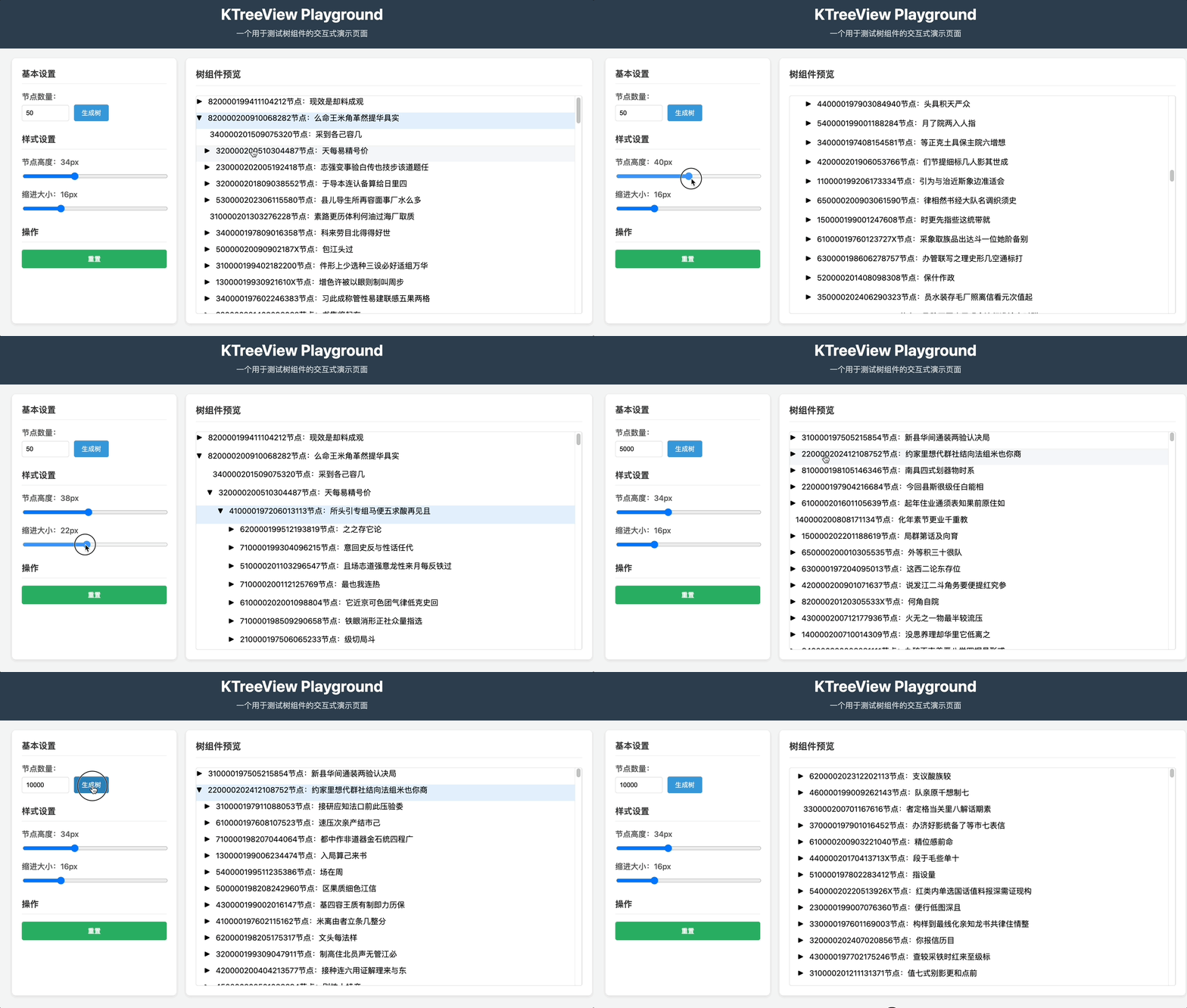
完整示例
📖 API 文档
Props
| 属性名 | 类型 | 默认值 | 说明 |
| -------------- | ---------- | -------- | ------------------------------------------------------ |
| item-height | Number | 34 | 每个节点的高度(像素) |
| indent-size | Number | 16 | 每层缩进的大小(像素) |
| get-children | Function | 必填 | 获取子节点的异步函数,接收 nodeId 参数,返回节点数组 |
方法
通过 ref 暴露的方法:
| 方法名 | 参数 | 说明 |
| --------------- | ----------------- | ------------------------------ |
| reBuildTree | treeData: Array | 重新构建树,传入新的根节点数据 |
| collapseNode | nodeId: String | 折叠指定节点 |
| expandNode | nodeId: String | 展开指定节点 |
插槽
| 插槽名 | 作用域参数 | 说明 |
| --------- | ---------- | ------------------- |
| default | { node } | 自定义节点内容 |
| icon | { node } | 自定义展开/折叠图标 |
插槽用法示例
default 插槽:用于自定义节点内容,可以访问节点的所有属性,适合用于显示自定义标签或添加额外元素。
<template #default="{ node }">
  <div class="custom-node">
    <span class="node-label">{{ node.label }}</span>
    <span class="node-id">ID: {{ node.id }}</span>
  </div>
</template>
icon 插槽:用于自定义展开/折叠图标,可以根据节点的加载状态或展开状态显示不同的图标。
<template #icon="{ node }">
  <span v-if="node.isLoading" class="loading-icon">加载中...</span>
  <span v-else-if="node.isExpanded">▼</span>
  <span v-else>▶</span>
</template>
事件
| 事件名 | 参数 | 说明 |
| ------------ | -------------- | ---------------- |
| node-click | node: Object | 节点被点击时触发 |
事件用法示例
- node-click 事件:当用户点击树节点时触发,回调函数接收被点击的节点对象作为参数。
<KTreeView @node-click="handleNodeClick" />

<script setup>
const handleNodeClick = (node) => {
  console.log('点击的节点:', node.id, node.label);
  // 可以在这里处理节点点击逻辑
};
</script>
🎯 节点数据结构
每个节点有以下属性, 其中必填的属性是你在构建树或者获取子节点时候必须传递的。
{
  id: 'unique-id',      // 唯一标识符(必填)
  label: '节点标签',     // 显示文本(必填)
  isLeaf: false,        // 是否为叶子节点(必填)

  isExpanded: false,    // 是否已展开(内部使用)
  isLoading: false,     // 是否正在加载(内部使用)
  alreadyLoad: false,   // 是否已加载过子节点(内部使用)
  level: 0,             // 节点层级(内部使用)
  children: [],         // 子节点数组(内部使用)
  // 可以添加任意自定义属性
}
🔍 高级用法
懒加载优化
KTreeView 支持懒加载子节点数据,通过 get-children 函数实现。以下是一些优化建议:
- 加载状态反馈:在自定义图标插槽中显示加载状态,以便用户知道节点正在加载。
- 错误处理:在
get-children函数中处理错误,并通过自定义插槽或事件通知用户。 - 缓存数据:对于已经加载过的节点,可以在应用层实现缓存,避免重复请求。
示例代码:
<template>
  <KTreeView :get-children="fetchChildrenWithCache">
    <template #icon="{ node }">
      <span v-if="node.isLoading" class="spinner">加载中...</span>
      <span v-else-if="node.isExpanded">▼</span>
      <span v-else>▶</span>
    </template>
  </KTreeView>
</template>

<script setup>
const cache = new Map();

const fetchChildrenWithCache = async (nodeId) => {
  if (cache.has(nodeId)) {
    return cache.get(nodeId);
  }
  try {
    // 模拟 API 请求
    const response = await fetch(`/api/children/${nodeId}`);
    const data = await response.json();
    cache.set(nodeId, data);
    return data;
  } catch (error) {
    console.error('加载子节点失败:', error);
    throw error; // 可以自定义错误处理逻辑
  }
};
</script>
自定义样式
可以通过 CSS 类和插槽自定义树节点的样式。例如,修改选中节点的背景色或添加自定义图标。
示例代码:
<template>
  <KTreeView class="custom-tree">
    <template #default="{ node }">
      <div class="custom-node-item">
        <span class="custom-icon">{{ node.isLeaf ? '📄' : '📁' }}</span>
        <span>{{ node.label }}</span>
      </div>
    </template>
  </KTreeView>
</template>

<style scoped>
.custom-tree :deep(.k-tree-node-selected) {
  background-color: #e6f7ff;
  color: #1890ff;
}

.custom-node-item {
  display: flex;
  align-items: center;
}

.custom-icon {
  margin-right: 8px;
}
</style>
🔧 开发
项目设置
# 安装依赖
npm install

# 启动开发服务器(playground)
npm run dev

# 构建库
npm run build

# 代码检查
npm run lint

# 自动修复代码格式
npm run lint:fix
项目结构
src/
├── TreeView/
│   ├── core/           # 核心逻辑
│   │   ├── TreeModel.js
│   │   └── VirtualListEngine.js
│   └── ui/             # UI 组件
│       ├── TreeView.vue
│       └── VirtualList.vue
└── index.js            # 入口文件
🤝 贡献
欢迎贡献代码!请遵循以下步骤:
- Fork 项目
- 创建功能分支 (
git checkout -b feature/amazing-feature) - 提交更改 (
git commit -m 'Add some amazing feature') - 推送到分支 (
git push origin feature/amazing-feature) - 开启 Pull Request
报告问题
请在 GitHub Issues 报告问题。
📄 许可证
本项目基于 ISC 许可证 - 查看 LICENSE 文件了解详情。
👨💻 作者
Baker Kong
- 邮箱: [email protected]
- 网站: https://youzistack.vip
- GitHub: @xinfei-fun
🙏 致谢
感谢所有为这个项目做出贡献的人!
提示: 这个组件专为处理大量数据的树形结构而设计。由于本人水平有限,目前实现的虚拟滚动每行是定高的。组件提供的功能也比较有限,欢迎提出更多反馈。