
@barbosa89/vue-table
v0.1.28
Published
Classical data table


Readme
Vue-table component
Vue-table is a data table component that allows the developer a high degree of customization, it takes care of complex tasks and gives the developer control over how the data is displayed. This component works with the Laravel framework pagination response.
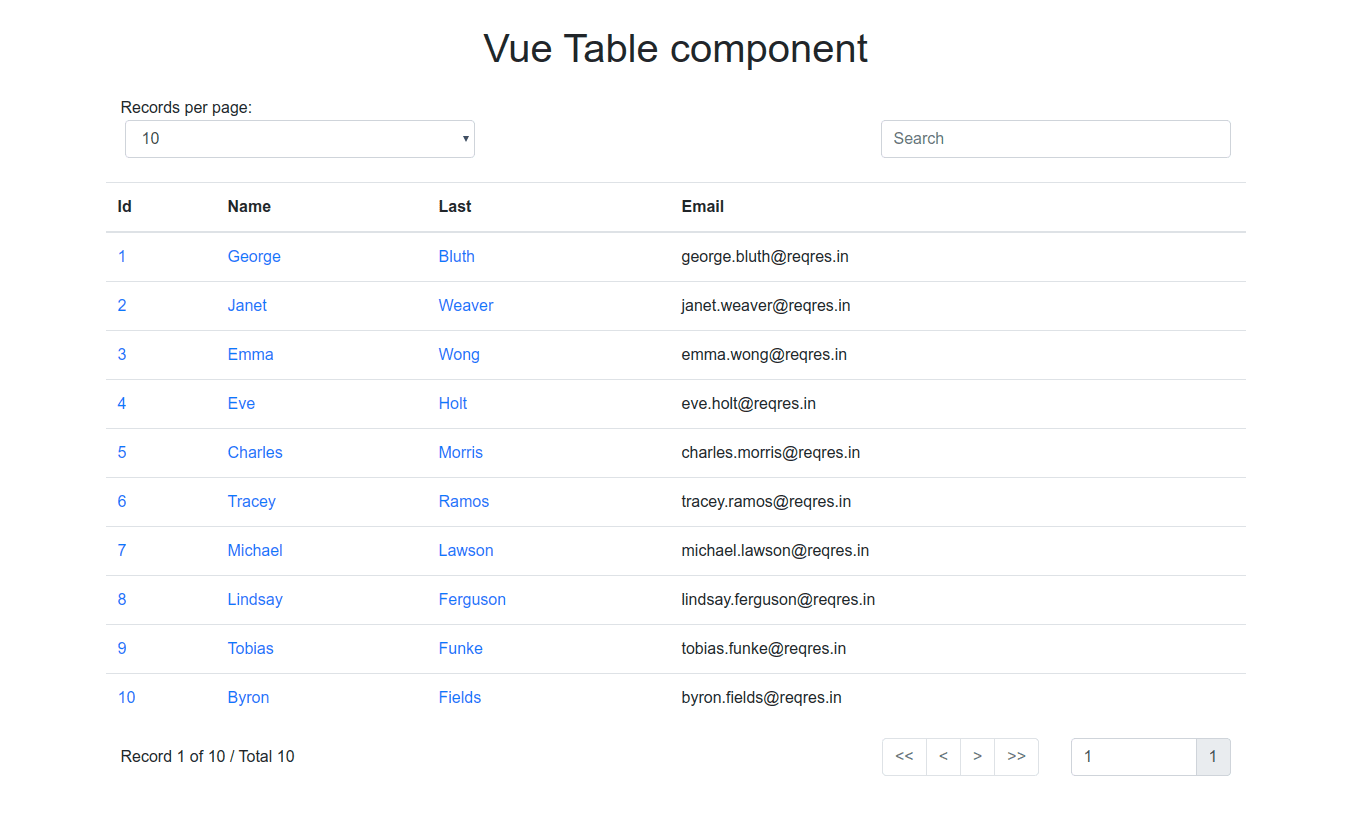
Features
- Pagination
- Go to specific page
- Option for records by page
- Search input
- Multilingual support
- Responsive
Installation
npm i @barbosa89/vue-tableUsage
The component styles are based on the CSS framework Bootstrap 4, so, Vue-table is structured in three rows (.row), so you must nest the component inside a Bootstrap container (.container/.container-fluid).
How it works
Vue-table does not display the data sent by the server directly, this passes each record to a slot, the developer uses the slot to determine the way the data is displayed.
Props
The component can be configured with four props:
- headers: It is an array that contains objects with two properties, description and sortable, the description property is required and represents a table column header; the sortable is optional, it is used as a data sort column.
headers: [
    {
        description: 'Id',  # Name to display
        sortable: 'id',        # Sortable column name in table
    },
    {
        description: 'Email' # No sortable column
    }
]- url: The endpoint from which Axios will request data.
https://myapp.com/endpointlang (en/es): The language to use, by default is English, English and Spanish are supported.
locales: It is an object of translations.
locales: {
    en:{
        display: 'Records per page',
        search: 'Search',
        record: 'Record',
        of: 'of',
        total: 'Total'
    },
    es:{
        display: 'Registros por página',
        search: 'Buscar',
        record: 'Registro',
        of: 'de',
        total: 'Total'
    }
}- params: Object with additional parameters such as filters.
params: {
    model: 'value',
    reference: 'value'
}- user-data: Array|Object data from user. If the prop is an array, a list without controls is printed. If the prop is an object, the Laravel pagination variables are assigned:
{
   "total": 50,
   "per_page": 15,
   "current_page": 1,
   "last_page": 4,
   "first_page_url": "http://laravel.app?page=1",
   "last_page_url": "http://laravel.app?page=4",
   "next_page_url": "http://laravel.app?page=2",
   "prev_page_url": null,
   "path": "http://laravel.app",
   "from": 1,
   "to": 15,
   "data":[
        {
            // Result Object
        },
        {
            // Result Object
        }
   ]
}
When a Laravel paging object is assigned, the parent component must listen for an event to update the URL.
<vue-table :url='myUrl' :user-data='paginationObject' @url-update='myUrl = $event'></vue-table>Listen event using a method:
<vue-table :url='myUrl' :user-data='paginationObject' @url-update='updateUrl'></vue-table>- data-key: You can pass a custom data key to access the data received from the API service.
return response()->json([
    'key' => $collection,
]);
when you don't pass a custom data key, it means the API service send data as follows:
return response()->json($collection);- search-icon: Now you can pass a custom search icon, example: fas fa-search.
Example
<template>
    <div class="container">
        <h1 class="text-center my-4">Vue Table component</h1>
        <vue-table :headers="headers" :url="url">
            <template v-slot:record="{ record }">
                <td>
                    <a href="#">
                        {{ record.id }}
                    </a>
                </td>
                <td>
                    <a href="#">
                        {{ record.first_name }}
                    </a>
                </td>
                <td>
                    <a href="#">
                        {{ record.last_name }}
                    </a>
                </td>
                <td>
                    {{ record.email }}
                </td>
            </template>
        </vue-table>
    </div>
</template>

<script>
    import VueTable from 'VueTable'

    export default {
        data() {
            return {
                headers: [
                    {
                        description: 'Id',
                        field: 'id', # Sortable column
                    },
                    {
                        description: 'Name',
                        field: 'name', # Sortable column
                    },
                    {
                        description: 'Last',
                        field: 'last', # Sortable column
                    },
                    {
                        description: 'Email' # No sortable column
                    },
                ],
                url: 'https://myserver.app/api/users?page=1',

                // Optional, You will need to pass the props
                lang: 'en',
                locales: {
                    en:{
                        display: 'Records per page',
                        search: 'Search',
                        record: 'Record',
                        of: 'of',
                        total: 'Total'
                    },
                    es:{
                        display: 'Registros por página',
                        search: 'Buscar',
                        record: 'Registro',
                        of: 'de',
                        total: 'Total'
                    }
                }
            };
        },
        components: {
            VueTable
        }
    }
</script>
Internacionalization
With packages like vue-i18n, you can automate multiple languages:
lang: document.documentElement.lang,
locales: {
    en:{
        display: $t('display'),
        search: $t('search'),
        record: $t('record'),
        of: $t('of'),
        total: $t('total')
    },
    es:{
        display: $t('display'),
        search: $t('search'),
        record: $t('record'),
        of: $t('of'),
        total: $t('total')
    }
}
Server side with Laravel
Vue-table sends Laravel a series of parameters namely:
- page
- per_page
- search: The search param
- ordered_desc/ordered_asc
URL example:
mylaravel.app/endpoint?page=1&per_page=15&search_=text&ordered_desc=column_nameIn an example of implementation in Laravel 7:
public function index()
{
    $posts = Post::query();

    foreach(request()->toArray() as $filter => $value) {
        $filter = Str::camel($filter);

        if($posts->hasNamedScope($filter)) {
            $posts->{$filter}($value);
        }
    }

    return $posts->paginate(request->get('per_page', 15));
}
You need to create three scopes corresponding to each parameter, excluding per_page and page, which are passed to Laravel directly:
// Eloquent model

public function scopeQueryBy($query, $value)
{
    return $query->Where('name', 'like', '%' . $value . '%');
}

public function scopeOrderedDesc($query, $value)
{
    return $query->orderBy($value, 'DESC');
}

public function scopeOrderedAsc($query, $value)
{
    return $query->orderBy($value, 'ASC');
}
Developers
npm install -g @vue/cli

# OR

yarn global add @vue/cli
You will need an add-on service for Vue CLI
npm install -g @vue/cli-service-globalRun local server
npm run devRun production mode
npm run buildNext steps
- Create a data table package for infinite loading