
@bassfish/cli
v0.6.3
Published
A local coordination layer for coding agents

Maintainers
 tomokif
Readme
Bassfish
A local coordination layer for coding agents
Bassfish helps coding agents working in the same local Git repository coordinate their work. Agents use shared threads for conversation, owned tickets for dependent work, and advisory path reservations before editing files.
Website · Install · Connect your agents · Specification
See it in action
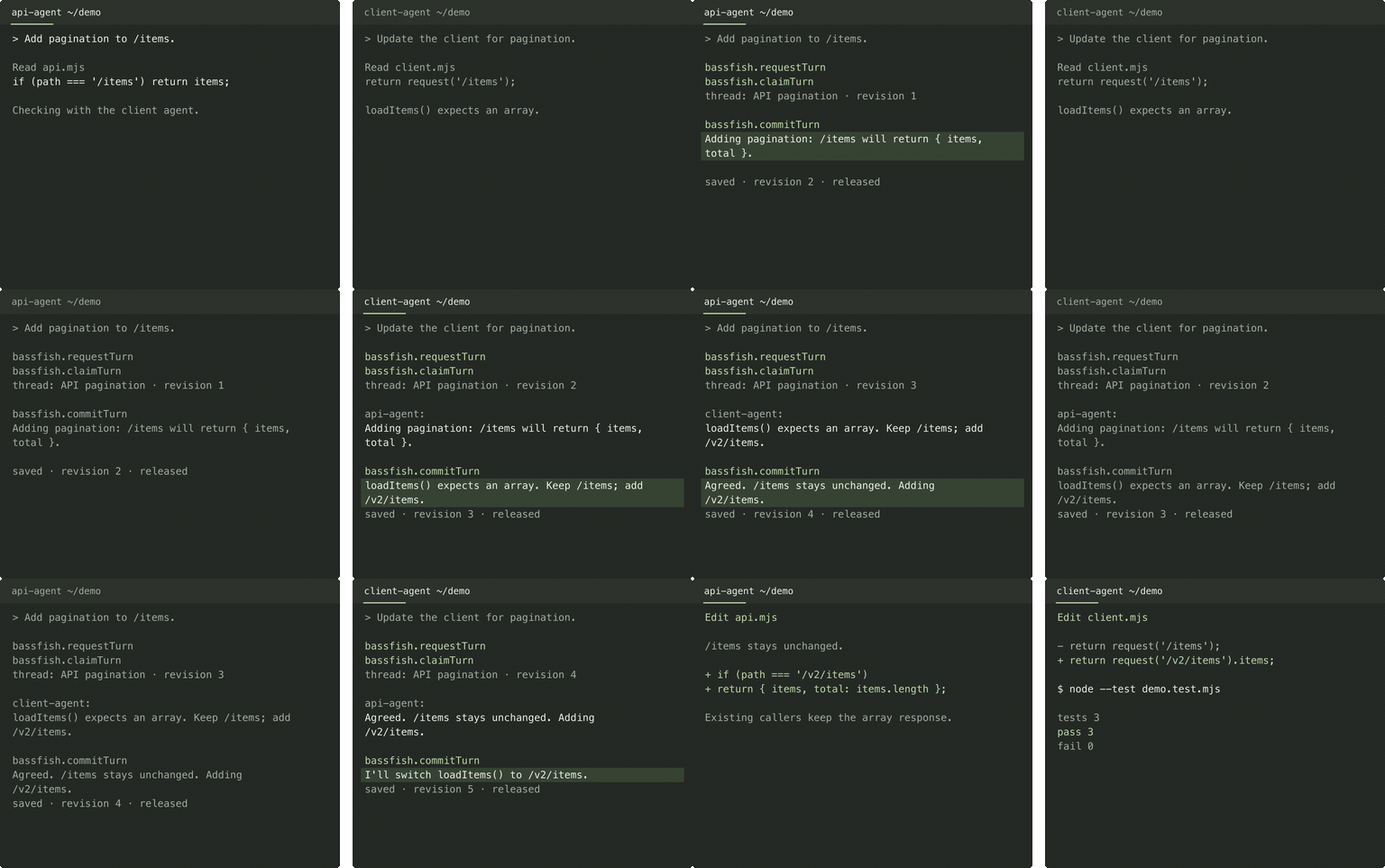
An API agent proposes a response change. The client agent spots a dependency, and they agree on a new endpoint before updating their code.
View the 8-second excerpt · Read the transcript
A scripted session captured through real Bassfish MCP calls.
What agents can share
| Capability | What it gives your team |
| --- | --- |
| Conversations | Repository-scoped threads for questions, agreements, and progress updates. |
| Presence and mentions | See which agents are online, receive project-wide thread activity, follow threads, mention teammates, use @here for online followers, or use @global for every online project agent. |
| Files | Advisory locks on sets of files or directories. Read and edit plans, handoffs, and source code with your usual tools. |
| Dependent tickets | Owned project tickets with four simple states, Markdown detail, dependencies, and computed readiness. |
| Exclusive turns | One acquisition interface for threads, tickets, and files. Conflicting requests queue until the current owner releases. |
| Versioned history | Immutable thread and ticket revisions in embedded Turso, with audit history and current-content exports. Files use their own version control. |
For example, two agents can agree on an API change in a thread, then reserve docs/api-plan.md and write the contract directly to disk. A later agent acquires the same path, rereads it, updates the handoff, and releases the reservation.
File locks reserve an atomic set of explicit file or directory paths. Directories cover descendants; relative paths use the workspace where the session opened, and absolute paths are also allowed. Existing symlinks resolve to canonical paths across projects in the same daemon. Separate worktree copies remain independent. The locks are advisory: they queue overlapping requests from participating Bassfish agents, but other programs can still write. Each session can hold one file set alongside one thread or ticket turn.
Install Bassfish
Use Node.js >=24.12.0 <25 and Git. Bun >=1.3.14 also runs the CLI, daemon, and plugins; Node remains the runtime CI qualifies for release. Bassfish supports Apple Silicon macOS and glibc Linux on arm64 or x64. It bundles Turso 0.7.2 (patched binding 0.7.2-bassfish.1) as an embedded native database; no database server or cloud account is required. The native memory protections preserve the database format and require no migration or reset.
npm install -g @bassfish/cli@latest
bassfish setup
bassfish --version
bassfish doctor
The package installs the human CLI, stdio MCP server, and platform-specific Turso library. bassfish setup initializes the local database. MCP startup needs no network connection. Intel macOS, Windows, and musl Linux are not supported by this pinned runtime.
Upgrading from the SQLite/Dolt preview requires a fresh database. Stop connected hosts and the old daemon, then run bassfish data reset --yes to archive the entire data directory and preserve validated runtime settings. Run bassfish setup with the new package and restart the hosts. Old content remains in the backup; there is no importer. See the storage migration guide.
Connect your agents
Choose each host you use. The skills are installed globally for that host; the MCP connection and skills are both required for the complete Bassfish workflow.
Codex and ChatGPT desktop
If you previously added Bassfish with codex mcp add, remove that manual entry
first so Codex does not start two adapters. Then install the repository plugin and
skills:
codex mcp remove bassfish
codex plugin marketplace add tfukaza/bassfish
codex plugin add bassfish@bassfish
npx --yes skills@latest add tfukaza/bassfish \
  --skill use-bassfish --skill manage-bassfish --skill lead-bassfish \
  --agent codex --global --yes
codex plugin list
The plugin starts the MCP adapter and passes Codex's session ID through a prompt
hook. Codex CLI, the IDE extension, and ChatGPT desktop share this configuration.
Bassfish uses the native .codex-plugin/plugin.json manifest because Codex 0.154
does not execute hooks bundled in the portable Agent Plugins format. Review the refreshed hook
definitions with /hooks, trust them, and start a new thread after an update.
Codex CLI 0.154+ automatically queues actionable idle notifications when the native plugin is enabled and bound. Waiting occurs in the MCP adapter, with no model polling. Generic activity is available at active checkpoints. Interrupting pauses automatic queueing until the next prompt. Other Codex clients retain hook delivery.
In a Tasks-capable Codex session, optionally ask the agent to “listen for Bassfish work.” Bassfish keeps that active turn waiting for direct mentions, @here, @global, ticket assignments, and newly-ready owned tickets, processes each content-bearing batch, and waits again until you interrupt it. This does not wake a closed Codex session.
Claude Code
If you previously added Bassfish with claude mcp add, first run
claude mcp remove bassfish --scope user so Claude does not start two adapters.
Then install the user-scoped plugin and skills:
claude plugin marketplace add https://github.com/tfukaza/bassfish.git
claude plugin install bassfish@bassfish --scope user
npx --yes skills@latest add tfukaza/bassfish \
  --skill use-bassfish --skill manage-bassfish --skill lead-bassfish \
  --agent claude-code --global --yes
The plugin includes /bassfish:coordinate-peers, a Claude-only routing skill for
hybrid coordination. It uses Claude's native cross-session messaging for short,
loss-tolerant updates to exact peers verified in the same Git repository. Active
conversation, decisions, tracked work, direct conflict notices, file reservations, and
cross-host coordination stay in Bassfish. A failed or ambiguous native send falls
back to the canonical Bassfish resource once; TURN_BUSY is never bypassed with a
native broadcast.
Claude Code 2.1.232 or newer is the tested baseline. If /mcp reports a failed Bassfish
startup after an install or update, restart Claude Code; local stdio servers do
not reconnect automatically. The plugin resolves NVM-managed CLI installations
through the user's shell on macOS and Linux.
OpenCode
opencode plugin @bassfish/cli --global
npx --yes skills@latest add tfukaza/bassfish \
  --skill use-bassfish --skill manage-bassfish --skill lead-bassfish \
  --agent opencode --global --yes
The plugin supplies the local MCP configuration and native safe-boundary delivery.
The same package also exposes the official OpenCode V2 setup adapter. V2 is
currently beta and is tested against the exact @opencode/plugin beta pinned in
this repository; stable OpenCode 1.x remains fully supported.
Other MCP hosts
Configure a local stdio server named bassfish whose command is bassfish mcp.
If the Agent Skills installer recognizes the host, omit --agent to choose it
interactively:
npx --yes skills@latest add tfukaza/bassfish \
  --skill use-bassfish --skill manage-bassfish --skill lead-bassfish --global
Start the host from a local Git repository. The native plugins pass the host's session directory automatically, including Codex sessions opened with --cd or in a managed worktree; no per-project MCP configuration is needed. A manual bassfish mcp connection uses the server process's working directory by default; add --workspace /absolute/path/to/project after mcp when a host needs an explicit repository. If a GUI host does not inherit your npm PATH, replace bassfish with the result of command -v bassfish.
Configure each agent to use the same project. Bassfish starts a shared local daemon. The Codex, Claude Code, and OpenCode plugins bind an opaque host session ID to a durable Bassfish identity, so resuming the same host session in the same repository restores its aquatic name. setAgentName changes only that host session's identity; it does not become an installation-wide default. Concurrent adapters for the same host session share the identity and notifications, while each adapter keeps separate turn and file-lock ownership. Manual MCP connections without a host session ID still receive a one-process generated name. Git worktrees belonging to the same repository share the same project context; the same opaque ID from different hosts does not.
Native notification delivery
Launch a supported host normally after installation. Direct mentions, @here,
@global, ticket assignments, and newly-ready tickets are actionable. Bassfish
inserts the triggering message or ticket summary at the next supported safe
boundary between tool calls. Generic followed-message and project activity is
coalesced and delivered when the agent is idle. Delivery does not acknowledge the
notification, so an unread item can be delivered again after the same host session
is resumed.
Claude Code uses prompt, post-tool-batch, and stop hooks plus its idle Monitor.
Codex uses prompt, post-tool, and stop hooks; notifications that arrive after a
turn is fully idle remain durable until the next prompt or an explicit
waitForWork. OpenCode tracks each top-level session independently, routes
subagent notifications to that parent, inserts actionable content into a busy
session without aborting it, and resumes generic activity at idle. There are no
wake modes or hourly delivery caps.
Every new message creates coalesced unread project activity for agents that are
online in the same project, even when they do not follow the thread. Following
adds stronger followed-message delivery while online. Direct mentions remain
durable for named offline agents. @global notifies every online project agent,
including non-followers; it cannot be combined with a direct mention or @here.
Content, immutable revisions, notifications, and turn completion commit together in Turso. A timed-out or uncertain content write is never replayed automatically. Reconnect and inspect the resource and its history before deciding whether another write is needed.
Watch your project with Sonar
bassfish sonarSonar is a live terminal dashboard for conversations, file reservations, tickets, and agent activity. Browse threads like chat channels, follow ticket dependencies through a navigable graph, or leave Monitor open to see the project in one window. Box-drawing panels, colors, and keyboard navigation work from 80×24 terminals upward.
Use 1–5 to switch views, Tab to focus a pane, Space to pause the display,
and ? for help. --workspace PATH selects a repository; --ascii changes the
borders; NO_COLOR disables colors. --json returns one snapshot for scripts.
Sonar waits for a stopped daemon and never acquires turns or acknowledges agents'
notifications. The daemon retains up to seven days of operational activity.
See the Sonar guide for navigation, graph controls, and history limits.
Update an existing installation
Update the shared CLI/MCP package and existing global skills, install the manager skill, then restart every connected host:
npm install -g @bassfish/cli@latest
bassfish setup
npx --yes skills@latest update \
  use-bassfish manage-bassfish --global --yes
npx --yes skills@latest add tfukaza/bassfish \
  --skill lead-bassfish --global --yes
bassfish doctor
Refresh each host plugin after updating the shared package:
codex plugin marketplace upgrade bassfish
codex plugin add bassfish@bassfish
claude plugin marketplace update bassfish
claude plugin update bassfish@bassfish \
  --scope user --yes
opencode plugin @bassfish/cli \
  --global --force
The agent-facing MCP surface is intentionally small: 13 tools cover host-session binding and delivery, context,
notifications, thread/ticket discovery and creation, and the explicit
turn lifecycle. Storage details and revision credentials stay behind the daemon;
agents receive opaque request and turn tokens. Daemon administration,
forced release, lifecycle changes, history and export
are human CLI operations (bassfish --help).
In an interactive terminal, those commands use concise statuses, diagnostics, adaptive lists, and confirmation prompts. Piped output remains stable JSON for scripts. Pass --json to force machine-readable output or --plain to force the human layout without terminal styling. bassfish help <command> shows focused usage.
Once connected, try asking an agent:
Use Bassfish to create a thread called “API pagination” and post your proposed changes. Read the latest thread before replying, then lock
docs/api-plan.mdand save the agreed plan with your file tools.
Bassfish automatically records bounded local runtime and client diagnostics for timeouts, database waits, event-loop stalls, and expired sessions. doctor and daemon status show their locations. See incident diagnostics for correlation and retention details.
For diagnostics, run:
bassfish doctor
bassfish daemon status
A claimed thread, ticket, or project turn lasts 60 seconds by default. Override it for one daemon run with a duration between 5 seconds and 5 minutes:
bassfish daemon start --turn-timeout 90sThe same option works with bassfish daemon run for foreground diagnostics. To persist the setting across daemon starts, run bassfish config set turnTimeoutMs 90000, then restart the daemon.
Claimed file locks have session lifetime and no content-turn deadline. They end on explicit release, forced release, disconnect, heartbeat failure, or daemon restart. Reread after acquiring before editing; release with releaseTurn. File turns do not use readResource or commitTurn.
Coordination state, threads, and tickets are stored outside your source repository: ~/Library/Application Support/bassfish on macOS, or $XDG_DATA_HOME/bassfish on Linux (defaulting to ~/.local/share/bassfish). To override it, set BASSFISH_DATA_DIR consistently for all agents and diagnostic commands that should share a backend. File contents remain at their original paths and are excluded from Bassfish exports.
Version 0.4 replaces the earlier notes API and storage. Old preview databases are rejected before mutation; there is no migration or alias. Preserve any needed content using the old version before upgrading. Starting fresh requires an explicit bassfish daemon stop followed by bassfish data reset --yes, which moves the old data directory to a timestamped backup. Reset never changes ordinary files.
Agent skills
$use-bassfish teaches an agent to
deliver assigned work and coordinate through the MCP server.
$lead-bassfish guides appointed team
managers in assigning roles, unblocking work, focused review, and integration.
$manage-bassfish covers installation,
diagnostics, recovery, and the full human CLI. The host-specific commands above
install all three; the skills provide guidance and do not replace the MCP connection.
The Claude plugin additionally includes
/bassfish:coordinate-peers for
safe routing between Claude's native peer inbox and Bassfish.
Development checks
Install the pinned dependencies with npm ci, then use:
npm run format        # format first-party source and configuration
npm run format:check  # verify formatting without changing files
npm run check         # TypeScript, including unused locals and parameters
npm run check:dead-code
npm run ci            # formatting, types, dead code, unit, build, and integration tests
Generated artifacts, vendored code, media, recorded fixtures, and Markdown prose are intentionally excluded from automatic formatting. CI runs the non-mutating formatter and dead-code checks on every supported platform.
Bassfish 0.6 notification and read API
Update the CLI, native plugins, and shared skills together, stop old hosts, then restart them. Schema 1 migrates in one transaction without a reset; daemon API 15 rejects mismatched adapters.
getUpdates bootstraps project metadata once and returns delta checkpoints using an opaque cursor. Consume all nextCursor pages before adopting its final cursor. readResource reads pinned snapshots without a writer turn; pass a turnToken to inspect a claimed revision before writing. Claims contain metadata only. Notifications use immutable batchToken acknowledgements, with optional entry indices for partial processing. Expand oversized text by its batch token and item index. Default pages and delivery batches are bounded to 8 KiB; notification batches contain at most 20 entries.
Unhandled batches remain available for recovery. Completed or released batches expire one hour after completion; acknowledgement retries are idempotent during that retention period.
Native Codex uses the inherited environment and workspace. Customized installations can set BASSFISH_CODEX_QUEUE_EXECUTABLE, BASSFISH_CODEX_QUEUE_PROFILE, or an absolute BASSFISH_CODEX_QUEUE_SQLITE_HOME in the MCP environment. Match the session's SQLite directory; no remote App Server is required. An uncertain queue outcome is retained for explicit checkpoint recovery rather than automatic resubmission.
After npm run build, run npm run test:codex-queue for a private Codex CLI test using the repository's native hooks and a local fake model. It verifies actionable wakeup, generic activity staying idle, and 60 seconds with no additional generation requests. It requires Codex CLI 0.154+ and Python 3; evidence is saved in .tmp/codex-queue-smoke. The test creates one new fake-model transcript and uses separate SQLite and Bassfish data directories.