
@bcgov-elmsd/cli
v0.0.4
Published
ELMSD CLI Utility


Readme
@bcgov-elmsd/cli
Installation
Install @bcgov-elmsd/cli in project which will manage migrations.
npm install @bcgov-elmsd/cliDatabase Migrations
Database migrations are run sequentially, and are tracked by the database in the _migrations table by default.
⚠️ Once shipped to production, migration files must not be modified or deleted as this will cause the database consistency check to fail. To amend a previous migration, create a new migration and make the change there.
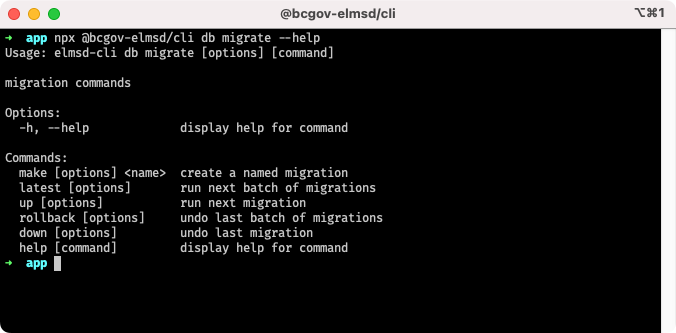
The following migration commands are available. To see more information about each command, run npx @bcgov-elmsd/cli db migrate <command> --help.
Commands
# Create a migration
npx @bcgov-elmsd/cli db migrate make -d src/_migrations -e <js|ts> <name>

# Run next batch of migrations
npx @bcgov-elmsd/cli db migrate latest -d src/_migrations -e <js|ts> --db-name <db-name> --db-host <db-host> --db-port <db-port> --db-user <db-user> --db-pass <db-pass>

# Run next migration
npx @bcgov-elmsd/cli db migrate up -d src/_migrations -e <js|ts> --db-name <db-name> --db-host <db-host> --db-port <db-port> --db-user <db-user> --db-pass <db-pass>

# Rollback last batch of migrations
npx @bcgov-elmsd/cli db migrate rollback -d src/_migrations -e <js|ts> --db-name <db-name> --db-host <db-host> --db-port <db-port> --db-user <db-user> --db-pass <db-pass>

# Rollback all migrations
npx @bcgov-elmsd/cli db migrate rollback --all -d src/_migrations -e <js|ts> --db-name <db-name> --db-host <db-host> --db-port <db-port> --db-user <db-user> --db-pass <db-pass>

# Rollback last migration
npx @bcgov-elmsd/cli db migrate down -d src/_migrations -e <js|ts> --db-name <db-name> --db-host <db-host> --db-port <db-port> --db-user <db-user> --db-pass <db-pass>
Database Seeds
Database seeds are not tracked by the database. As such, special consideration must be taken when structuring seed files.
- Each row must have a unique ID
- To prevent duplication of data, run either
TRUNCATE <table>orDELETE FROM <table> WHERE <condition>, orINSERTonly when the ID does not already exist
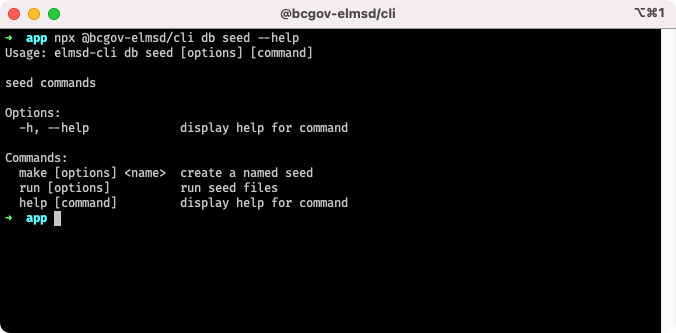
The following seed commands are available. To see more information about each command, run npx @bcgov-elmsd/cli db seed <command> --help.
Commands
# Create a seed
npx @bcgov-elmsd/cli db seed make -d src/_seeds -e <js|ts> <name>

# Run seeds
npx @bcgov-elmsd/cli db seed run -d src/_seeds -e <js|ts> --db-name <db-name> --db-host <db-host> --db-port <db-port> --db-user <db-user> --db-pass <db-pass>
Example Workflows
Development
# Create a migration
npx @bcgov-elmsd/cli db migrate make -d src/_migrations -e <js|ts> <name>

# Run next batch of migrations
npx @bcgov-elmsd/cli db migrate latest -d src/_migrations -e <js|ts> --db-name <db-name> --db-host <db-host> --db-port <db-port> --db-user <db-user> --db-pass <db-pass>

# Create a seed (optional)
npx @bcgov-elmsd/cli db seed make -d src/_seeds -e <js|ts> <name>

# Run seeds (optional)
npx @bcgov-elmsd/cli db seed run -d src/_seeds -e <js|ts> --db-name <db-name> --db-host <db-host> --db-port <db-port> --db-user <db-user> --db-pass <db-pass>
During development, migrations can be modified or deleted. To ensure the database consistency check passes, run the following command before deleting migration files.
# Rollback all migrations
npx @bcgov-elmsd/cli db migrate rollback --all -d src/_migrations -e <js|ts> --db-name <db-name> --db-host <db-host> --db-port <db-port> --db-user <db-user> --db-pass <db-pass>
CI/CD
Database migrations & seeds are intended to run every time a project is deployed. Run the following commands as part of your CI/CD pipeline.
# Run next batch of migrations
npx @bcgov-elmsd/cli db migrate latest -d src/_migrations -e <js|ts> --db-name <db-name> --db-host <db-host> --db-port <db-port> --db-user <db-user> --db-pass <db-pass>

# Run seeds
npx @bcgov-elmsd/cli db seed run -d src/_seeds -e <js|ts> --db-name <db-name> --db-host <db-host> --db-port <db-port> --db-user <db-user> --db-pass <db-pass>
License
Copyright 2022 Province of British Columbia

Licensed under the Apache License, Version 2.0 (the "License");
you may not use this file except in compliance with the License.
You may obtain a copy of the License at

    http://www.apache.org/licenses/LICENSE-2.0

Unless required by applicable law or agreed to in writing, software
distributed under the License is distributed on an "AS IS" BASIS,
WITHOUT WARRANTIES OR CONDITIONS OF ANY KIND, either express or implied.
See the License for the specific language governing permissions and
limitations under the License.